React Native Hooks: an RN 0.59 note above a 0.70 peer range, and a release that skips tests
React Native APIs turned into React Hooks for use in functional React components
At a glance
- What is it?
- The react-native-community hooks package wraps nine React Native APIs in hooks for function components, with no options object anywhere in its surface. What its own files reveal is more useful than the API list: a version note the manifest contradicts, a peer range eleven minor versions higher than the documentation, a release script that typechecks but never runs jest, and a dev dependency set where react-test-renderer is a major ahead of react.
- Who is it for?
- Reach for this package when you want a handful of one-line subscriptions in a function component and nothing else, and write your own hook the moment you need options, an interval, or a hook for an API the package does not wrap. Check your React Native version against the manifest rather than the README, because 0.70 is what npm will enforce and 0.59 is what the prose promises.
- Can I use it commercially?
- Yes. ISC is a permissive licence: you can use, modify and sell software built on it, as long as you keep its copyright and licence notices.
- Is it still maintained?
- Yes. The repository last received commits 2 days ago.
- What is it written in?
- Mainly TypeScript, according to GitHub's language statistics.
Answers come from the project's GitHub data, last synced on November 13, 2026, and from our analysis. They are not legal advice.
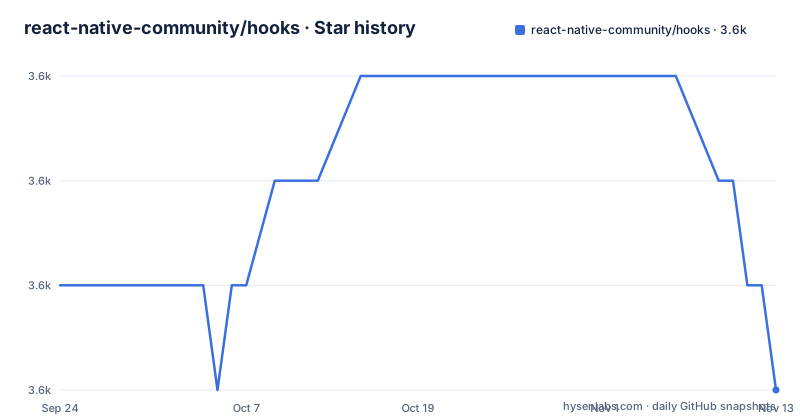
Star history
- react-native-community/hooks3,621 ★ · -1
| Repository | 2026-09-24 | 2026-11-13 |
|---|---|---|
| react-native-community/hooks | 3.6k | 3.6k |
-1 Stars in the last 50 days, measured from the daily GitHub snapshot. Compare with other projects
Editorial analysis
The README asks for RN 0.59 and the manifest demands 0.70
Installation is one of two commands:
npm install @react-native-community/hooksor `yarn add @react-native-community/hooks`. Above that, the README carries a note that you must use React Native 0.59.0 or newer. The package manifest disagrees. Its peer dependencies are `react` at `>=18.0.0` and `react-native` at `>=0.70`, which is eleven minor versions higher than the note. This matters more than a documentation nit, because peer ranges are what a package manager enforces: installing this package into a React Native 0.60 project fails at install time on a version the README says is supported. The note looks like a leftover from when the package shipped hooks for the old bridge era, and the per-hook comments that follow it, four of them marked as requiring RN60 or newer, were written against the older floor.
Nine hooks and not one options argument
The API list has nine entries: `useAccessibilityInfo`, `useAppState`, `useBackHandler`, `useImageDimensions`, `useKeyboard`, `useInteractionManager`, `useDeviceOrientation`, `useLayout` and `useRefresh`. Several need inputs: useImageDimensions takes an image source, useBackHandler a handler and dependencies, and useRefresh a callback. There is no configuration object anywhere in the package, no options for a polling interval, no way to hand a hook a different event source, and no hook for a custom subscription. That is a deliberate shape rather than an unfinished one, since the whole point stated at the top is accessing asynchronous APIs directly inside functional components, and an options object on every call would defeat that. The consequence for a reader is that the only way to find out what a hook returns is to read its example, since the list links to anchors rather than to signatures.
Four accessibility fields arrived with RN60 and one app state is iOS only
`useAccessibilityInfo` returns a flat object of booleans, and the destructuring example marks four of them individually: `reduceMotionEnabled`, `grayscaleEnabled`, `invertColorsEnabled` and `reduceTransparencyEnabled` each carry a comment saying they require RN60 or newer, while `boldTextEnabled` and `screenReaderEnabled` do not. That is the only per-version guidance in the package, and it points at RN60, which is older than the 0.70 peer range. `useAppState` returns a single string rather than an object, and the possible values are named as `active`, `background`, or `inactive` with the last one marked as iOS only. Returning a bare string means the usual comparison is a switch with a default branch, and on Android there is no third state to handle.
useImageDimensions hands back three fields and expects a guard
The image hook is the only one with an explicit input, and it accepts two shapes for it. A bundled asset comes in through `require`, and a remote one through an object with a `uri` key. What comes back is `dimensions`, `loading` and `error`, and the example handles all three before using any of them:
const {dimensions, loading, error} = useImageDimensions(source)

if (loading || error || !dimensions) {
  return null
}
const {width, height, aspectRatio} = dimensions
Once the guard passes, the useful payload is `width`, `height` and `aspectRatio`, so a caller that only needs a ratio still has to unwrap the same three-field envelope. Returning null on error means the component renders nothing rather than a placeholder, and the hook reports no error value to show, so the difference between still loading and already failed is visible only in a debugger.
useBackHandler and useRefresh are the two that take a callback
These two hooks take a function; useImageDimensions also takes a source argument. The back handler takes a callback plus a dependency array and asks for a boolean:
useBackHandler(() => {
  if (shouldBeHandledHere) {
    // handle it
    return true
  }
  // let the default thing happen
  return false
},[shouldBeHandledHere])
Return true and the event is consumed, return false and the platform does whatever it would have done, so the hook's real job is arbitration between screens rather than the back action itself. The refresh hook takes a function returning a promise and answers with two fields, `isRefreshing` and `onRefresh`, which drop straight into a `RefreshControl` inside a `ScrollView`. Its example wraps a bare `setTimeout` promise as the fetch, which is enough to show the shape: the hook owns the refreshing flag and the trigger, and you own the request.
The release script typechecks and never runs the tests
The scripts block publishes with Changesets, and the publish path is one line: `bun run typecheck && changeset publish`. Type checking runs, tests do not. The test command exists, `jest`, with a watch variant, and lint exists too, but neither is in the release chain. The canary path is longer and shows the whole flow: `bun run typecheck && changeset pre enter canary && changeset version && changeset publish --tag canary`. So a canary is a pre-release mode entered by Changesets, versioned, and published under its own npm tag. Separately, `main` points at `lib/index.js` and `types` at `lib/index.d.ts`, and there is no build script in the manifest at all, so whatever produces `lib/` is invoked outside npm scripts. The published file list is `lib` with test files excluded.
react-test-renderer 19 sits next to react 18.3.1
The development dependencies pin a set of versions that do not all agree. `react` is pinned to `18.3.1` with no range, `@types/react` to `18.3.18`, and `react-test-renderer` is `^19.0.0`, so the renderer and the React it renders are one major version apart. The testing library set is likewise mixed, `@testing-library/react-hooks` at `^8.0.1` alongside `@testing-library/react-native` at `^13.0.1`, which are two different libraries rather than two versions of one. `react-native` is pinned to `0.78.0` for development while the published peer range allows `>=0.70`. Tooling around them is modern: `eslint` at `9.20.1` with a flat config file, `typescript` at `5.7.3`, `prettier` at `3.5.1` paired with `eslint-plugin-prettier`, and `ts-jest` bridging the two test paths.
Three releases on one day, then nothing for nineteen months
The version numbers tell a story. `v3.1.0`, `v100.0.1` and `v100.1.0` were all published on 2025-02-21, an hour apart at most, and the jump from 3.x to 100.x happened in the middle of them. The current manifest version is `100.1.0`. Since that day the repository has been pushed many times, most recently on 2026-10-04, without a further release, so the published package is nineteen months behind the branch. Around that sits the release tooling: a `.changeset/` directory, `@changesets/cli`, a `CHANGELOG.md`, `renovate.json` for automated dependency updates, `mise.toml` for tool versions, `tea.yaml` for CI, and a `bun.lock` next to scripts that invoke `bun run`. A `reactnativehooks.jpg` sits at the repository root, and the contributor list is an HTML table with an emoji key.
Editorial conclusion
Reach for this package when you want a handful of one-line subscriptions in a function component and nothing else, and write your own hook the moment you need options, an interval, or a hook for an API the package does not wrap. Check your React Native version against the manifest rather than the README, because 0.70 is what npm will enforce and 0.59 is what the prose promises. If you adopt it from source rather than from npm, note that the release path typechecks and publishes without running the test suite, so the nineteen months of commits since v100.1.0 have had tests run by whoever ran them, not by the release script. Version 100.1.0 with no release since 2025-02-21 is also a reminder to pin the version rather than track main.
Frequently asked questions
How do I install the React Native community hooks?
Either npm install @react-native-community/hooks or yarn add @react-native-community/hooks. The README note says React Native 0.59.0 or newer is required, while the manifest declares peer dependencies of react >=18.0.0 and react-native >=0.70, so the enforced floor is the higher one.
Which hooks does @react-native-community/hooks provide?
The README lists useAccessibilityInfo, useAppState, useBackHandler, useImageDimensions, useKeyboard, useInteractionManager, useDeviceOrientation, useLayout and useRefresh. Some accept inputs: useImageDimensions takes a source, while useBackHandler and useRefresh take callbacks.
What does useImageDimensions return in @react-native-community/hooks?
Three fields, dimensions, loading and error, from a source given either as a required asset or as an object with a uri key. The example guards with `if (loading || error || !dimensions)` and returns null, then reads width, height and aspectRatio from dimensions.
How does useBackHandler decide who handles the back action?
You pass a callback and a dependency array, and you return a boolean. Return true and the event is consumed by your screen, return false and the default platform behaviour happens, so the hook arbitrates between screens rather than implementing the back action itself.
How is @react-native-community/hooks released?
With Changesets. The release script is `bun run typecheck && changeset publish`, and the canary flow enters pre mode, versions and publishes under a canary tag. The published files are lib with test files excluded, main points at lib/index.js and types at lib/index.d.ts. The newest release is v100.1.0, published 2025-02-21.
Official sources
Add this badge to your README
If you maintain this project, the badge below links readers to this analysis and shows its maintenance status from the daily GitHub snapshot. Paste the markdown into your README; add ?metric=license or ?metric=stars to the image URL for a different field.

[](https://hysenlabs.com/projects/react-native-community-hooks)Star history chart for your README
[](https://hysenlabs.com/projects/react-native-community-hooks)Was this useful?