React Native WebView: one WebView across iOS, Android, Windows and macOS
React Native Cross-Platform WebView
At a glance
- What is it?
- React Native WebView is the community component that took over after React Native removed its built-in WebView from core, and version 16 works only on the new architecture. It saves you from writing four native views, at the cost of a fabric-only floor and a support model where pull requests, not issues, get attention.
- Who is it for?
- Take this package if your app runs on React Native 0.76 or newer with the new architecture enabled and you want one WebView dependency covering iOS, Android, Windows and macOS. Skip it if you are still on the legacy paper architecture, because the project states the legacy architecture is no longer supported.
- Can I use it commercially?
- Yes. MIT is a permissive licence: you can use, modify and sell software built on it, as long as you keep its copyright and licence notices.
- Is it still maintained?
- Yes. The repository last received commits 4 days ago.
- What is it written in?
- Mainly TypeScript, according to GitHub's language statistics.
Answers come from the project's GitHub data, last synced on November 7, 2026, and from our analysis. They are not legal advice.
Star history
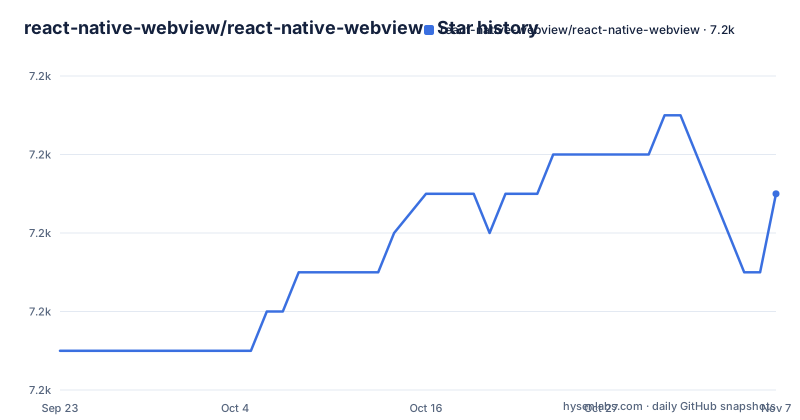
- react-native-webview/react-native-webview7,197 ★ · +4
| Repository | 2026-09-23 | 2026-11-07 |
|---|---|---|
| react-native-webview/react-native-webview | 7.2k | 7.2k |
4 Stars in the last 45 days, measured from the daily GitHub snapshot. Compare with other projects
Editorial analysis
Fabric only, and iOS 15.1 as the floor
Compatibility here is three numbers rather than one. The component runs on iOS, Android, Windows and macOS, but only on the new architecture, fabric: the legacy architecture, paper, is no longer supported. That decision sets the floor at React Native 0.76 or newer with the new architecture enabled, plus iOS 15.1 or newer, and react-native-macos 0.76 or newer on macOS. Version 16.0.2 is the newest release, published on 2026-11-03, and the legacy path is gone rather than deprecated. For an app still on paper this is not a version bump you can schedule around, because you migrate the architecture before you can take a release that carries the WebView you need. Expo apps are covered as well, the project states it is compatible with expo.
What npm ships: android/src, apple, windows and a Babel built lib
The repository is now a monorepo. The root package.json is named react-native-webview-monorepo and is private; the README says the library lives in packages/react-native-webview, and its root scripts delegate to that package with bun, for example build runs `bun run --cwd packages/react-native-webview build`. Releases go out through the ci:publish script, which runs semantic-release. The repository root also carries tsconfig.json and tsconfig.example.json, plus NuGet.config for the Windows side.
First render: the source prop takes a uri and a style
The usage example is deliberately small. Import WebView from react-native-webview, hand it a source with a uri and a style, and the native view loads that address:
import React, { Component } from 'react';
import { StyleSheet, Text, View } from 'react-native';
import { WebView } from 'react-native-webview';

// ...
const MyWebComponent = () => {
  return (
    <WebView
      source={{ uri: 'https://reactnative.dev/' }}
      style={{ flex: 1 }}
    />
  );
};
The install step is not in the README. It links a Getting Started Guide at docs/Getting-Started.md and points to the npm package react-native-webview, so the command you run is whatever that guide gives for your platform. Expo users have a separate route, and the project links its WebView SDK documentation for that case. Notice what the snippet leaves out: no onMessage handler, no injected JavaScript, no cookie setup, no headers. This renders a page and nothing more. Every question about communication between JavaScript and native belongs to docs/Reference.md and docs/Guide.md.
The example app carries its own run-ios, run-android and run-macos scripts
The example apps are full applications rather than fragments, and they now live in their own workspace packages: packages/example-mobile, packages/example-windows, packages/example-macos and packages/example-visionos, with screens shared through packages/example-shared. The root package.json exposes start, android, ios, macos, windows and visionos scripts that run bun against those packages, for example `bun run --cwd packages/example-mobile ios`, and the README points to docs/Contributing.md for each platform's install and run commands.
RNCWebView does not exist, and mergeDexRelease fails before you ever render
Two failures are named in the project documentation, and both land before a page appears. The first is the message `Invariant Violation: Native component for "RNCWebView does not exist"`, which is attributed to forgetting to run react-native link or to an error during the linking process. The second failure is the Gradle task :app:mergeDexRelease, which fails until you enable multidex support in android/app/build.gradle, with the reasoning traced to issue 1344 in the tracker. Both are build and linking problems rather than JavaScript ones.
Issues serve as a discussion forum, and pull requests are what get merged
The support model is worth reading before you file anything. The project states that maintaining WebView is very complex because it is used for many different cases, naming rendering SVGs, PDFs and login flows among them, and that many platforms are supported. It also says that nearly 500 pull requests have been merged since WebView was extracted from React Native core, that issues will mostly serve as a discussion place for the community, and that reviewing and merging pull requests is the priority. Read plainly, a question left in the tracker may go unanswered, while a pull request is the route the maintainers describe as their focus. The time comes from a small number of employers: Thibault Malbranche is listed from Brigad, and Windows and macOS are managed by Microsoft through React Native for Windows, with Alexander Sklar and Chiara Mooney named.
Why one package covers desktops that the core component never did
This project exists because React Native removed its own WebView, and the replacement differs in approach in a way you can see in the layout. Instead of a component living inside the React Native core repository, the library lives in packages/react-native-webview of this monorepo, and the project states it is compatible with iOS, Android, Windows and macOS.
Two major versions in the same week of July 2026
The project follows semantic versioning and states its policy bluntly: it does not hesitate to release breaking changes, but they arrive in a major version. The release list shows the current line: v16.0.0 was published on 2026-07-11, followed by v16.0.1 and v16.0.2 on 2026-11-03. The last push to the repository was on 2026-11-01, and releases are cut with semantic-release through the ci:publish script, with configuration in .releaserc. Two habits follow for an app that ships to users. Pin the exact version you tested, and read the changelog on every major, because the project reserves breaking changes for major versions. The licence is MIT.
Editorial conclusion
Take this package if your app runs on React Native 0.76 or newer with the new architecture enabled and you want one WebView dependency covering iOS, Android, Windows and macOS. Skip it if you are still on the legacy paper architecture, because the project states the legacy architecture is no longer supported. Verify first that the native module resolves on your build machine, since the project attributes the Invariant Violation error for a missing RNCWebView to the linking step.
Frequently asked questions
What is React Native WebView?
It is a community-maintained WebView component for React Native, written in TypeScript and released under the MIT licence. The project describes it as the replacement for the built-in WebView that was removed from React Native core.
How do I install React Native WebView?
The README carries no one line install command; it links a Getting Started Guide at docs/Getting-Started.md and points to the npm package react-native-webview. Before anything else, check that your app runs React Native 0.76 or newer with the new architecture enabled, and iOS 15.1 or newer, since the legacy architecture is not supported.
How do I use React Native WebView?
Import WebView from react-native-webview and give it a source, for example source={{ uri: 'https://reactnative.dev/' }}, plus a style such as style={{ flex: 1 }}. The prop surface is documented in docs/Reference.md and usage patterns in docs/Guide.md.
How do I debug a React Native WebView problem?
Start with the two failures the documentation names. Invariant Violation: Native component for "RNCWebView does not exist" points at the linking step, and a build error in the task :app:mergeDexRelease means multidex support has to be enabled in android/app/build.gradle.
Is React Native WebView still maintained?
The repository is not archived, the last push was on 2026-11-01, and version 16.0.2 was released on 2026-11-03, after v16.0.1 the same day and v16.0.0 on 2026-07-11. The project states that nearly 500 pull requests have been merged since the component was extracted from React Native core.
Official sources
Add this badge to your README
If you maintain this project, the badge below links readers to this analysis and shows its maintenance status from the daily GitHub snapshot. Paste the markdown into your README; add ?metric=license or ?metric=stars to the image URL for a different field.

[](https://hysenlabs.com/projects/react-native-webview-react-native-webview)Star history chart for your README
[](https://hysenlabs.com/projects/react-native-webview-react-native-webview)Was this useful?