APKEditor: a Java command-line tool that decodes APK resources to JSON or XML and builds them back without aapt
Powerful android apk editor - aapt/aapt2 independent
At a glance
- What is it?
- APKEditor is a single jar built on ARSCLib with six commands: decode, build, merge, refactor, protect and info. Its sample output was captured on version 1.4.3, and the newest release is V1.4.9 from 19 May 2026.
- Who is it for?
- Choose APKEditor if you work with APK resources from the command line, need split packages such as XAPK, APKM or APKS merged into one APK, or want resource names restored on an obfuscated build. Look elsewhere if you want a graphical editor or an Android app, because this is a jar you drive with java -jar.
- Can I use it commercially?
- Yes. Apache-2.0 is a permissive licence: you can use, modify and sell software built on it, as long as you keep its copyright and licence notices.
- Is it still maintained?
- Yes. The repository last received commits 15 days ago.
- What is it written in?
- Mainly Java, according to GitHub's language statistics.
Answers come from the project's GitHub data, last synced on November 7, 2026, and from our analysis. They are not legal advice.
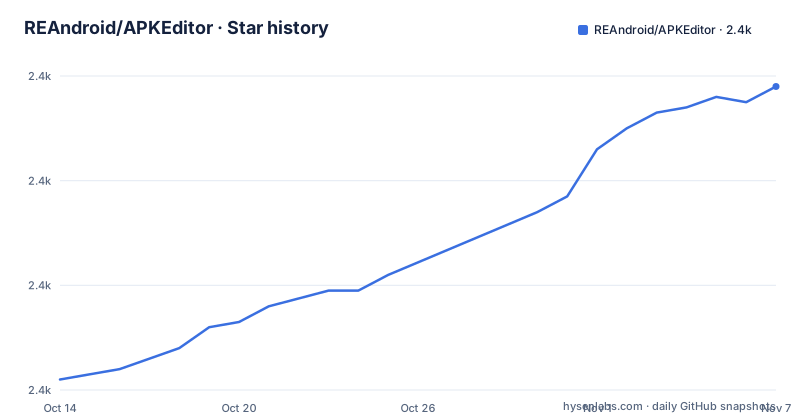
Star history
- REAndroid/APKEditor2,418 ★ · +56
| Repository | 2026-10-14 | 2026-11-07 |
|---|---|---|
| REAndroid/APKEditor | 2.4k | 2.4k |
56 Stars in the last 24 days, measured from the daily GitHub snapshot. Compare with other projects
Editorial analysis
Resources only: ARSCLib edits the binary tables, so no aapt or aapt2 is involved
The repository description says the editor is independent of aapt and aapt2. The README explains why: the tool uses ARSCLib to edit apk resources. That library parses and rewrites Android's binary resource format directly, which removes the need to call Android SDK build tools.
The README calls APKEditor an Android binary resource files editor. The scope is resources, not Java or Kotlin code. Where the README mentions dex, it is in options that control how many dex files load at a time or which dex library is used, not in any command that rewrites code. Anyone expecting smali-level edits will not find that here.
The code is Java with a Gradle build: `build.gradle`, `settings.gradle`, `gradlew` and `gradlew.bat` sit at the root, and the license is Apache-2.0.
Six commands behind one jar, with short and long names
Run the jar with `-h` to see the list:
java -jar APKEditor.jar -hThe help prints `d | decode`, `b | build`, `m | merge`, `x | refactor` and `p | protect`, plus `info`. Decode converts binary resources into readable json, xml or raw. Build goes the other way. Merge combines split apk files from a directory or from compressed packages like XAPK, APKM and APKS. Refactor renames obfuscated resources. Protect obfuscates resource files with what the README calls unique obfuscation techniques.
Each command has its own options. The README expands them in collapsible sections called more info, so the full option list is easiest to read from the jar's help output. The first line of that help shows the jar version, which the README prints as x.x.x.
Decode defaults to JSON, and XML works only on un-obfuscated apks
Decompile writes resources as a human-readable JSON string. If you pass `-t xml` it writes XML source instead, and the README restricts that to un-obfuscated apks. For an obfuscated one, JSON is the format that works.
The basic call is:
java -jar APKEditor.jar d -i test.apk -o test_jsonThe sample log shows `-t = xml`, `-load-dex = 3` and `-dex-lib = jf` as the settings in force, and a line that loads the Android framework for version 34. Decode options include `-framework` (a path to a framework file, repeatable), `-framework-version` and `-load-dex`, whose default is 3 and which applies only when `-dex-lib` is set to internal. Above that count, the decoder loads one dex at a time, which limits memory use on large apps.
Build reads the decoded directory and writes a new apk, with no signing step shown
The build command takes the decompiled directory:
java -jar APKEditor.jar b -i test_json -o test_edited.apkIts options include `-i`, `-o` (optional, and when omitted a new file is generated in the input's directory), `-framework`, `-framework-version`, `-res-dir` and `-sig`. The `-res-dir` option sets the resource root directory name, for example to move files from `res/*` to `r/*` as part of obfuscation or back. `-sig` takes a signatures directory path.
The README says nothing about signing the output with a key. An apk rebuilt with changed resources no longer matches its original signature, and Android will not install an unsigned or mismatched package. Treat signing as a step you handle outside this tool, and verify on a device or emulator before you hand the file to anyone.
Merge turns an XAPK, APKM or APKS bundle into one installable apk
Split packages carry a base module and config modules for architecture or density. The merge command combines them into a standalone apk:
java -jar APKEditor.jar m -i apk_filesIn the README's sample log the input directory holds 3 apk files with 3 modules, base among them, and the tool merges `config.arm64_v8a` after it, copying dex files such as `classes.dex` and `classes2.dex`. With no `-o`, the output is named after the input, here `apk_files_merged.apk`.
Among the merge options is `-extractNativeLibs`, which sets the `extractNativeLibs` attribute in the manifest and compresses the `*.so` library files. The README accepts a directory or a compressed bundle as input. It gives no list of formats beyond XAPK, APKM and APKS followed by an ellipsis, so test your particular bundle type first.
Refactor and protect pull in opposite directions on resource names
Refactor repairs obfuscated resource entry names:
java -jar APKEditor.jar x -i input.apkIn the sample, the tool validates the names, finds that all resource names are valid and has nothing to fix. Output defaults to `input_refactored.apk`. Options include `-public-xml`, a path to a `public.xml` ids file whose names are applied to resources, and flags such as `-clean-meta`, which cleans the META-INF directory along with the signature block, `-f` to force delete the output path, and `-fix-types`.
Protect does the reverse job. The README says it protects apk resources against almost all known decompile and modify tools, and the call shape is `p -i path/to/input.apk`. That is a strong claim with no test results shown, and the README text after the protect heading is cut off, so verify the output with the decompilers you care about.
Releases arrive every few months, and the sample logs are older than the jar
The release list shows V1.4.9 on 19 May 2026, V1.4.8 on 21 March 2026 and V1.4.7 on 28 December 2025. The last push was on 24 October 2026 and the repository is not archived.
The README's sample logs print `APKEditor version 1.4.3, ARSCLib version 1.3.6`. They were captured on an earlier build, so option names or messages in the current jar may differ from the pasted output. Trust `-h` on the version you downloaded.
The project ships `SECURITY.md`, `CONTRIBUTING.md` and `CODE_OF_CONDUCT.md`, and the README does not explain how to install anything beyond running the jar with Java. A `libs/` folder sits at the root next to `src/`. The README never states a minimum Java version.
Editorial conclusion
Choose APKEditor if you work with APK resources from the command line, need split packages such as XAPK, APKM or APKS merged into one APK, or want resource names restored on an obfuscated build. Look elsewhere if you want a graphical editor or an Android app, because this is a jar you drive with java -jar. Before relying on it, run the decode and build pair on a throwaway APK and install the rebuilt file, since the README shows no signing step.
Frequently asked questions
What is APKEditor?
APKEditor is a Java command-line tool that edits Android apk resources using ARSCLib, without aapt or aapt2. It decodes, builds, merges, refactors and protects.
How do I use APKEditor?
Run it as a jar. For example, `java -jar APKEditor.jar d -i test.apk -o test_json` decodes resources, and `java -jar APKEditor.jar b -i test_json -o test_edited.apk` builds them back.
How do I install APKEditor?
There is no installer. The README shows the tool as APKEditor.jar run with java -jar, and tagged versions such as V1.4.9 appear in the repository's releases.
Official sources
Add this badge to your README
If you maintain this project, the badge below links readers to this analysis and shows its maintenance status from the daily GitHub snapshot. Paste the markdown into your README; add ?metric=license or ?metric=stars to the image URL for a different field.

[](https://hysenlabs.com/projects/reandroid-apkeditor)Star history chart for your README
[](https://hysenlabs.com/projects/reandroid-apkeditor)Was this useful?