Every Refined GitHub feature depends on page markup GitHub controls
:octocat: Browser extension that simplifies the GitHub interface and adds useful features
At a glance
- What is it?
- Refined GitHub is a browser extension that adds and rearranges things on github.com, and its features are identified by slugs like `unreleased-commits` and `sticky-sidebar`. The project states plainly that it hopes GitHub will notice and implement these improvements itself.
- Who is it for?
- Adopt Refined GitHub if you spend most of your day inside github.com and the specific features it adds save you real friction, and if you can tell when one has broken. Do not adopt it expecting stability, because the whole mechanism is a set of selectors against markup the project does not control, and do not adopt it on a machine where an extra destructive path is unwelcome, since shift-alt-clicking a repository deletes it.
- Can I use it commercially?
- Yes. MIT is a permissive licence: you can use, modify and sell software built on it, as long as you keep its copyright and licence notices.
- Is it still maintained?
- Yes. The repository last received commits 1 day ago.
- What is it written in?
- Mainly TypeScript, according to GitHub's language statistics.
Answers come from the project's GitHub data, last synced on November 13, 2026, and from our analysis. They are not legal advice.
Star history
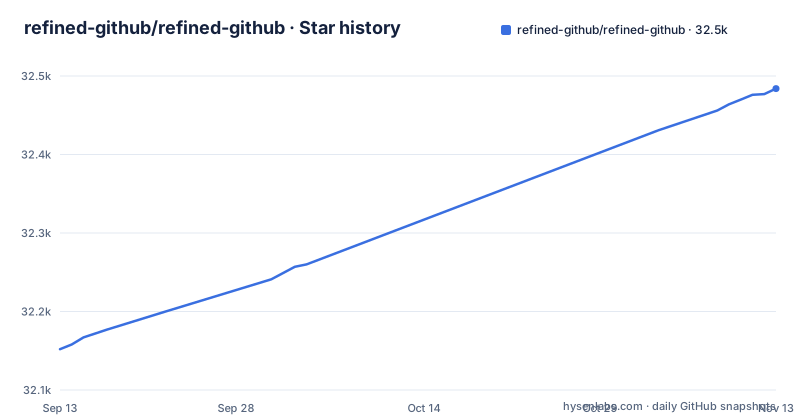
- refined-github/refined-github32,484 ★ · +332
| Repository | 2026-09-13 | 2026-11-13 |
|---|---|---|
| refined-github/refined-github | 32.2k | 32.5k |
332 Stars in the last 61 days, measured from the daily GitHub snapshot. Compare with other projects
Editorial analysis
A feature's title attribute is also its identifier
The feature list in the README is written so that each entry carries a title matching a slug: `show-whitespace`, `unreleased-commits`, `pr-base-commit`, `conversation-activity-filter`, `status-subscription`, `restore-file`, `repo-header-info`, `sticky-sidebar`, `repo-age`, `github-actions-indicators`, `archive-forks-link`. The slug is the name the extension knows the feature by.
That is a small design decision with a large payoff for a project with this many features. When something misbehaves, the report can say which slug, and the maintainer does not have to reconstruct it from a screenshot.
Read the descriptions for the ones that matter rather than the count. `unreleased-commits` tells you whether you are looking at the latest version of a repository or whether unreleased commits exist. `pr-base-commit` shows how far behind a PR head branch is and names its base commit. `restore-file` adds a button to discard all changes to a file in a PR, which is a destructive action with a shortcut.
A GitHub redesign breaks features with no error
The dependency list tells you what the extension is built on: doma, dom-chef, element-ready, dom-loaded, delegate-it, one-event, one-mutation, filter-altered-clicks. These are all about finding elements in a page you do not own and reacting when they change.
That is the whole risk profile. A feature works by locating a node using a selector or a class name, and GitHub can rename or restructure that node in any deploy. When that happens the feature does not throw, it simply stops appearing, or worse, it appears in the wrong place. There is no error to grep for, because nothing failed; the code ran and matched nothing.
The README opens with the line that the maintainers use GitHub a lot and notice annoyances they would like to fix, then says the hope is that GitHub will notice and implement some of these improvements, inviting readers to open a discussion on GitHub feedback or contact GitHub support.
So the useful question is not whether the extension works but how you would notice when one feature stops working.
Shift-alt-click deletes a repository in two clicks
Some features in this extension add destructive paths rather than removing friction. `quick-repo-deletion` simplifies repository deletion, adds a Delete fork button on repositories with zero stars, and enables shift and alt clicks to delete a repository in two clicks. `new-repo-disable-projects-and-wikis` automatically disables projects and wikis when you create a repository. `delete-branch` adds a button to delete the current branch on the branch page.
The fork case deserves a second look, because it keys on a numeric condition rather than a type. A repository at zero stars is a repository you made and did not use, or a fork you have finished with, and the extension adds a Delete fork button on repositories with zero stars.
None of this is unusual for a power-user extension. The consequence is about habit rather than code: you are adding shortcuts that shorten the deletion flow GitHub gives you, and a shortcut you have learned once will not be re-examined later.
If your organisation treats repository deletion as something that should require ceremony, think twice about using that feature before you have made it muscle memory.
The Safari build is an Xcode project, not the rollup bundle
There are three build targets, not one. `build:typescript` runs `tsc --noEmit`, which type-checks without emitting. `build:svelte` runs `svelte-check`, because part of the interface is Svelte. `build:bundle` runs `tsdown && node build/verify-bundle.ts`, which bundles the web extension and verifies the bundle.
tsc --noEmit
svelte-check
tsdown && node build/verify-bundle.ts
Safari is separate in a more interesting way. Safari is not the same bundle in a different wrapper: there is an Xcode project at safari/Refined GitHub.xcodeproj, and the `pack:safari` script invokes xcodebuild against that project with a scheme named Refined GitHub and a destination of platform=macOS. A separate `prepare:safari` script runs build/prepare-safari-release.sh.
So a maintainer shipping to the Mac App Store is running a native Apple build pipeline, and `test` composes the checks as `run-p vitest lint:* build:* --continue-on-error`, which means all of them run in parallel and a failure in one does not stop the others from reporting.
For a contributor this means the verification you can run locally and the artifact a user installs on Safari are produced by different toolchains, and a local green run does not tell you the Safari build is sound.
Building from source needs Node 24, and the repo lints with its own rules
The package manifest declares engines node >= 24 and pins the package manager at [email protected]. That is a high floor for a browser extension, and it is worth checking against your machine before you clone anything.
The toolchain is deliberately split by tool. Formatting is dprint, with `dprint fmt` and a `dprint check` variant, and there is a dprint.json at the root. Linting is eslint, and this is not stock: the repository carries an eslint-rules directory, an eslint.config.js, and an eslint-suppressions.json.
Two more files show how the project is maintained. A CLAUDE.md and an agents.md sit at the root, so instructions for automated coding agents are part of the repository rather than a wiki page. And .git-blame-ignore-revs exists, which is how a project marks mass-reformatting commits so that `git blame` keeps pointing at the change rather than at a reindent.
New features are scaffolded by a script, `new`, which runs build/new-feature.sh.
Calendar versioning, and an open invitation to GitHub
The version numbers are calendar based: 26.10.26 published on 2026-10-27, 26.10.20 on 2026-10-19, and 26.10.15 on 2026-10-15. The year leads, then the month, then a patch counter that can climb within a month. It is a scheme that makes release age readable from the version string alone, which is helpful for an extension whose features break when the other side of the page changes.
The repository is not archived and the last push was 2026-10-03. The maintainer, @fregante, is named in the sponsorship link, and the project carries commercial sponsorship from Prisma and Frappe alongside individual sponsorship.
On licensing there are two things to hold separately. The code is MIT licensed. The GITHUB and REFINED GITHUB trademarks are owned by GitHub, Inc. and used under license, which is why the README flags the product name and carries a license note rather than claiming the name.
A privacy-policy.md sits at the repository root. For a project whose whole model is reading and modifying a page you are logged into, that document is the thing to read before installing, not after.
Enterprise needs a permission toggle applied by someone else
The Chrome Web Store, Mozilla Add-ons and the Mac App Store are the three distribution routes, and they are not interchangeable in coverage. The Chrome listing covers other Chromium browsers, the Mozilla listing explicitly includes Firefox Android, and the Mac App Store covers Mac, iOS and iPadOS.
GitHub Enterprise is supported too, but not automatically. Enabling it takes applying a permission toggle to a specific host, using a separate tool by the same author, and the README links to instructions for doing exactly that. The URL it points at carries the extension name and the icon URL as parameters.
That is an extra setup step if you use GitHub Enterprise.
The extension code is in source/ in the repository, so it can be inspected.
Editorial conclusion
Adopt Refined GitHub if you spend most of your day inside github.com and the specific features it adds save you real friction, and if you can tell when one has broken. Do not adopt it expecting stability, because the whole mechanism is a set of selectors against markup the project does not control, and do not adopt it on a machine where an extra destructive path is unwelcome, since shift-alt-clicking a repository deletes it. Before installing, check two things: whether your GitHub host is github.com or an Enterprise instance, since Enterprise needs a separate permission toggle that the README links instructions for, and which features you actually want.
Frequently asked questions
What does Refined GitHub do?
It is a browser extension that simplifies the GitHub interface and adds features to it. Individual features include showing whitespace characters, telling you whether you are looking at the latest version of a repository or whether unreleased commits exist, showing how far behind a PR head branch is plus its base commit, and adding a button to discard all changes to a file in a PR.
What is Refined GitHub?
A browser extension written in TypeScript, published on the Chrome Web Store, on Mozilla Add-ons including Firefox Android, and on the Mac App Store for Mac, iOS and iPadOS. It is MIT licensed and its code lives in the source/ directory of the repository.
Is Refined GitHub safe?
The code is published in the repository under the MIT license, with the extension source in source/ and a privacy-policy.md at the root, and releases are distributed through the official browser extension stores rather than sideloaded. As with any extension that runs on the page you are logged into, reading that privacy policy and reviewing the source are the checks worth doing before you install.
Official sources
Add this badge to your README
If you maintain this project, the badge below links readers to this analysis and shows its maintenance status from the daily GitHub snapshot. Paste the markdown into your README; add ?metric=license or ?metric=stars to the image URL for a different field.

[](https://hysenlabs.com/projects/refined-github-refined-github)Star history chart for your README
[](https://hysenlabs.com/projects/refined-github-refined-github)Was this useful?