Refinery CMS: the readme tells you its website is down and its docs are stale
An extendable Ruby on Rails CMS that supports Rails 6.1 to 8.1+ and Ruby 3.x to 4.x
At a glance
- What is it?
- A Ruby on Rails content management system aimed at letting non-technical clients edit their own site, built on Devise, Dragonfly, and jQuery. The requirements section still warns about ImageTragick, and the version templates in the readme predate the Rails versions the readme claims to support.
- Who is it for?
- Take Refinery if you are building on Rails and your client needs to edit their own site without being handed a complicated interface, since that is the design target rather than an afterthought. Check three things before you start.
- Can I use it commercially?
- Yes. MIT is a permissive licence: you can use, modify and sell software built on it, as long as you keep its copyright and licence notices.
- Is it still maintained?
- Yes. The repository last received commits 5 days ago.
- What is it written in?
- Mainly Ruby, according to GitHub's language statistics.
Answers come from the project's GitHub data, last synced on November 15, 2026, and from our analysis. They are not legal advice.
Star history
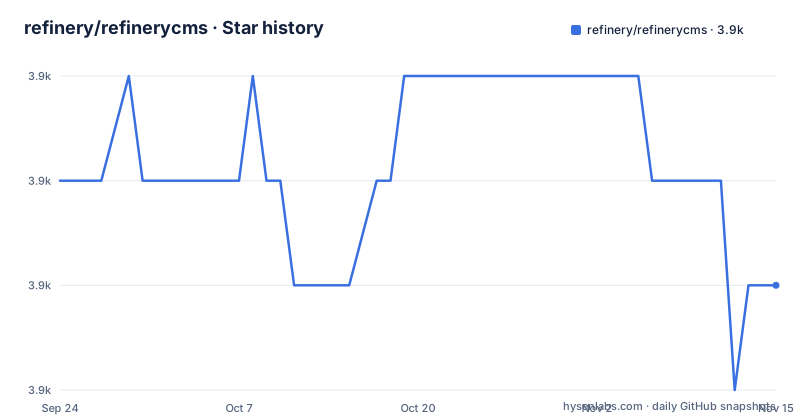
- refinery/refinerycms3,904 ★ · -1
| Repository | 2026-09-24 | 2026-11-15 |
|---|---|---|
| refinery/refinerycms | 3.9k | 3.9k |
-1 Stars in the last 52 days, measured from the daily GitHub snapshot. Compare with other projects
Editorial analysis
The readme tells you not to trust the readme
The most useful line on the page is a warning about the page. It states that some of the documentation in this README are out of date, and that the website is not currently live, and directs readers to the GitHub repository for the current status and instructions, with the guides in the repository's guides folder. That is an unusual admission and it has concrete consequences. Several links on the page point at the project's own domain: the install link, the Heroku install guide hosted there, and the full extension list. If the site is not live, those are dead ends, so the repository is the only place to read anything. The rest of the page is written in the voice of an older release, which is exactly what you would expect from a readme that has been assembled by appending sections across a decade rather than rewritten for the current version.
ImageMagick comes with a 2016 vulnerability warning
The requirements section lists two things, Bundler and ImageMagick, and then spends more words on the second than the first. ImageMagick currently has a serious security vulnerability, identified as CVE-2016-3714, and after installing it you must disable certain features in the policy configuration, with a link to a site about the issue. The feature in question is the ImageTragick one, where a crafted image file could lead to command execution. This warning is dated in a way that matters: the identifier is from 2016 and the mitigation is a policy file you have to edit yourself, so the instruction is not to upgrade. For macOS users the page suggests installing through a package manager or through a separate installer script. The larger point is that a CMS which asks you to install an image processing binary will always be asking you to carry that binary's history, and this page is honest enough to say so rather than leaving you to find out.
The version templates lag the supported Rails range
Read the headline and then read the getting-started section and you will find two different eras. The readme describes itself as an open source content management system for Rails 6.1 through 8.1, and the repository description goes further, naming Rails 6.1 to 8.1 and newer along with Ruby 3 to 4. But the getting-started templates are keyed to older versions: for Rails 5.1 and above you use the 4.0 line template, for Rails 4.2 you use the 3.0 line template, and there is an edge template for the latest code. The generator invocation is the same shape in all three cases, a new application created with a Rails template URL. So the mapping is: pick the template by your Rails version, and do not infer from the headline that a Rails 8 application should use a template named for 4.0 or 3.0. That confusion is not a typo in one place but a symptom of a readme whose install section was written for a different release line than its title.
Three well-known gems do the authentication, files, and scripting
The feature list names the library behind each area rather than describing it, which is the fastest way to understand the stack. Pages are edited through a visual editor and the site structure is managed, which is the core of the product. Images and files go through Dragonfly, a file handling library, with support for storage on Amazon S3, so uploads and links to resources such as PDF documents are handled by that library rather than by bespoke code. Authentication and users are Devise, with control over which extensions each user can access, which is the mechanism behind the per-user extension permissions. One entry is time-limited rather than architectural: the page says it uses jQuery for now, for fast and concise JavaScript. That phrasing dates the page as much as the templates do, and it tells you that the front end is not on a modern module or bundler story.
Extensions are the extension mechanism, and the generator is one command
Custom functionality is added through extensions rather than by forking the CMS, and the page says to extend Refinery by running the extension generator, with the command run without any options to get help:
rails generate refinery:engineThe stated design position is that it sticks to the Rails way as much as possible and does not force you to learn new templating languages, which is the reason a developer would pick it over a CMS with its own template syntax. The popular extensions are four separate repositories: a blog extension supporting posts, categories and comments with optional moderation, a portfolio extension for groups of images like a gallery, a news extension, and an inquiries extension which is a contact form that notifies both the site owner and the customer. A full extension list is linked, at the project's domain, which the same page says is not live. So the four linked extensions are discoverable and the complete catalogue is not.
The repository is the engine split into engines
The tree shows a Rails engine laid out the way the framework expects, and reading the directories tells you how much of Refinery is the CMS and how much is scaffolding. `core/` is the CMS itself, and `pages/` sits beside it as the pages feature, which is the part a site actually uses day to day. `dragonfly/` is the file handling integration as its own directory rather than a dependency reference, and `resources/` holds assets, with `images/` carrying the icon set. Then there is the project infrastructure: a gemspec at the root, a Gemfile, a Rakefile, an `exe/` directory and a `bin/` directory for executables, `tasks/` for rake tasks, `testing/` and `spec/` for the test suite with an `.rspec` file, `doc/` for the guides, `certs/` for certificate material, `templates/` for generator templates, `tmp/`, and a `lib/` directory. There is also a `SECURITY.md` and a `.pullreview.yml`, which is a configuration for a pull request review tool and tells you something about the review process.
The stated audience is the client, not the developer
Two paragraphs answer the question most people have about a CMS, which is who it is for. Refinery is described as great for sites where the client needs to be able to update their website themselves without being bombarded with anything too complicated, and unlike other content managers it is said to be truly aimed at the end user, making it easy for them to pick up and make changes themselves. That is a usability claim stated as a positioning decision, and it is the reason for the visual page editor and the user-facing extension permissions. For developers, the list is three items: easily customising the look to suit the business, extending with custom extensions for anything not provided out of the box, and sticking to the Rails way without new templating languages. So the evaluation criterion is whether your client will find the editing interface obvious, and that is something you can only check by looking at a running instance, which the page cannot offer you because the demo site link is on the domain that is down.
Editorial conclusion
Take Refinery if you are building on Rails and your client needs to edit their own site without being handed a complicated interface, since that is the design target rather than an afterthought. Check three things before you start. The page states outright that some of the documentation in it is out of date and that the project website is not currently live, which means the install and extension links pointing at that site will not resolve and the guides in the repository are the current source. The requirements name ImageMagick and carry a warning about a serious vulnerability in it from 2016 that you must mitigate through the policy configuration. And the getting-started templates point at Rails versions older than the range the readme claims, so pick the template by your Rails version rather than by the headline.
Frequently asked questions
What is Refinery CMS used for?
It is a Ruby on Rails content management system aimed at sites whose clients need to update their own content. It provides page editing with a visual editor, site structure management, file and image uploads, and per-user control over which extensions each user can reach.
What does Refinery CMS require to install?
Bundler and ImageMagick. The page warns that ImageMagick has a serious security vulnerability, CVE-2016-3714, and that after installing you must disable certain features in its policy configuration. macOS users are pointed at a package manager or a separate installer.
How do I add a custom feature to Refinery CMS?
With an extension rather than a fork. Run the extension generator, `rails generate refinery:engine`, and run it without any options first to get help on what it accepts.
Which gems does Refinery CMS build on?
Dragonfly for file and image handling with Amazon S3 storage support, Devise for authentication and users, and jQuery on the front end, which the page describes as current for now. The extension list is four separate repositories: blog, portfolio, news, and inquiries.
Official sources
Add this badge to your README
If you maintain this project, the badge below links readers to this analysis and shows its maintenance status from the daily GitHub snapshot. Paste the markdown into your README; add ?metric=license or ?metric=stars to the image URL for a different field.

[](https://hysenlabs.com/projects/refinery-refinerycms)Star history chart for your README
[](https://hysenlabs.com/projects/refinery-refinerycms)Was this useful?