Remark is a plugin framework with four packages, and CommonMark is the floor
markdown processor powered by plugins part of the @unifiedjs collective
At a glance
- What is it?
- Remark processes markdown as an mdast tree through the unified pipeline, split across remark-parse, remark-stringify, remark and remark-cli. The project itself points you at micromark when plugins are not the point, and its own test script rewrites files before measuring coverage.
- Who is it for?
- Remark earns its place in a build that will load plugins, needs to rewrite trees rather than just render text, or wants the CLI to inspect and format a documentation tree. It does not earn its place in a one-shot markdown to HTML converter, where the project points at micromark or the mdast utilities instead.
- Can I use it commercially?
- Yes. MIT is a permissive licence: you can use, modify and sell software built on it, as long as you keep its copyright and licence notices.
- Is it still maintained?
- Yes. The repository last received commits 48 days ago.
- What is it written in?
- Mainly JavaScript, according to GitHub's language statistics.
Answers come from the project's GitHub data, last synced on November 14, 2026, and from our analysis. They are not legal advice.
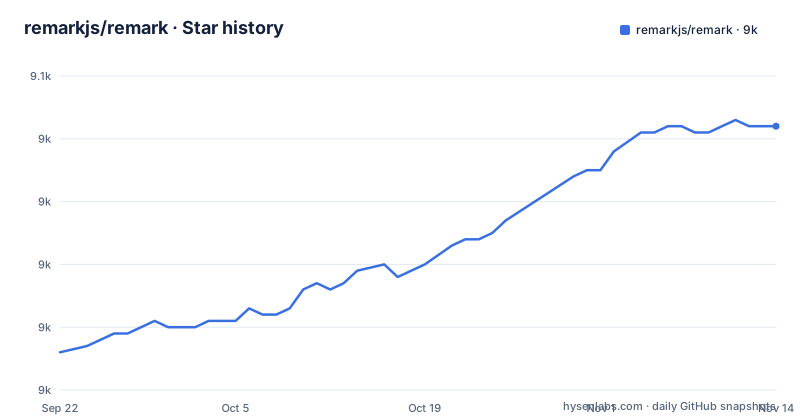
Star history
- remarkjs/remark9,042 ★ · +36
| Repository | 2026-09-22 | 2026-11-14 |
|---|---|---|
| remarkjs/remark | 9k | 9k |
36 Stars in the last 53 days, measured from the daily GitHub snapshot. Compare with other projects
Editorial analysis
Four workspaces decide the shape of your dependency graph
Installing remark is really four decisions, because the repository is a monorepo with four workspaces: packages/remark-parse, packages/remark-stringify, packages/remark and packages/remark-cli. The choice maps to what your input and output actually are. Markdown in and markdown out means remark on its own. Markdown in and HTML out means remark-parse plus remark-rehype plus a serializer from the rehype ecosystem. Only markdown out means remark-stringify with unified. Inspecting or formatting files across a project means the CLI.
The smallest pipeline that produces HTML looks like this:
import rehypeStringify from 'rehype-stringify'
import remarkParse from 'remark-parse'
import remarkRehype from 'remark-rehype'
import {unified} from 'unified'

const file = await unified()
  .use(remarkParse)
  .use(remarkRehype)
  .use(rehypeStringify)
  .process('# Hello, *Mercury*!')

console.log(String(file)) // => '<h1>Hello, <em>Mercury</em>!</h1>'
The cost of picking the wrong one is weight rather than breakage. remark-cli carries the whole parse and stringify chain whether or not you need to read markdown, because inspecting a tree means parsing it first.
The project names the cases where you should not reach for remark
Two recommendations in the intro are worth more than the feature list. If you just want to turn markdown into HTML, with maybe a few extensions, the text recommends micromark instead of remark. And if you do not use plugins and want to deal with syntax trees manually, it points at mdast-util-from-markdown and mdast-util-to-markdown.
Both recommendations point the same way. The plugin layer is the product, and a pipeline that will never load a plugin is carrying framework weight it does not use. That is a concrete architectural fork rather than a matter of taste. The cheap choice and the extensible choice are different dependencies with different APIs, so an application that starts as a converter and grows a plugin later is not adding configuration, it is changing what its build graph contains and rewriting the call sites that built the pipeline by hand.
The practical consequence is that the decision has a deadline. Choosing remark too early for a project that will never take plugins means a permanent dependency on an ecosystem it ignores; choosing micromark too early means the migration to remark happens under pressure, at the moment a plugin requirement appears.
150 or more plugins, four kinds of job, and no vetting on your behalf
Four plugins are named as exemplary: remark-gfm, remark-lint, remark-toc and remark-rehype. The reason they are exemplary is that they do four different jobs, and the taxonomy is the useful part. Extending markdown syntax is what remark-gfm does, inspecting trees is remark-lint, changing trees is remark-toc, and transforming to a different syntax tree is remark-rehype. When you have a problem, that list tells you which class of plugin to look for before you start reading package descriptions.
The count given is 150 or more plugins, discoverable through awesome-remark, a maintained list of plugins, and the remark-plugin topic on GitHub. Some are maintained inside the @remarkjs organization and some are maintained elsewhere, and anyone can make one. The text is direct about the consequence: assess the quality of remark plugins yourself, the same way you assess any dependency.
That warning has teeth here. A plugin that changes a tree changes the output for every document you process, so an unpinned plugin upgrade is a rendering change, not a maintenance detail.
Nothing in the chain sanitizes your markdown by default
Turning markdown into HTML means leaving remark's ecosystem for rehype's, with remark-rehype as the bridge. The most instructive detail is that the two examples in the docs differ in exactly one line. The short example in the intro parses, transforms and stringifies with no sanitization step at all. The fuller example inserts rehype-sanitize between the transform and the serializer:
import rehypeSanitize from 'rehype-sanitize'
import rehypeStringify from 'rehype-stringify'
import remarkParse from 'remark-parse'
import remarkRehype from 'remark-rehype'
import {unified} from 'unified'

const file = await unified()
  .use(remarkParse)
  .use(remarkRehype)
  .use(rehypeSanitize)
  .use(rehypeStringify)
  .process('# Hello, Neptune!')

console.log(String(file))
Both are presented as correct ways to do it, and the difference is yours to close. If your markdown comes from users, pull request bodies, a CMS field or an agent, then any plugin that edits the tree is also code that can influence what HTML ends up in the output, and no default step filters it. Sanitization is a line you add to the chain, not a property you inherit from the framework.
CommonMark is the floor and GFM is a plugin you have to remember
The compliance claim is deliberately split in two: 100 percent to CommonMark, and 100 percent to GFM or MDX with a plugin. remark-gfm is the named plugin for the GitHub-flavoured dialect, and the repository's own development dependencies include mdast-util-gfm and micromark-extension-gfm, which is how that dialect gets exercised in its test suite.
The effect on a documentation site is a silent one. A document that renders the way you expect on GitHub can render differently through remark until the extension is loaded, and nothing errors when it happens: the output is still valid markdown, just a smaller dialect than the one the author was looking at in their browser preview. Autolinks, tables and task lists are all in that category of things GitHub accepts and CommonMark does not.
The corollary is worth stating plainly, because it is easy to misread the compliance claim as covering everything. A remark pipeline without remark-gfm is not misconfigured, it is CommonMark, and the fix is a plugin in the chain rather than a parser option. Note also that MDX arrives the same way, as a plugin, not as a dialect flag.
`npm test` runs the formatter before coverage, so a clean tree comes back dirty
The scripts in package.json are worth reading before you run anything. The default test target is not read-only:
"scripts": {
  "build": "tsc --build --clean && tsc --build && type-coverage",
  "format": "./packages/remark-cli/cli.js --frail --output --quiet -- . && prettier --log-level warn --write -- . && xo --fix",
  "test-api": "node --conditions development test.js",
  "test-coverage": "c8 --100 --reporter lcov -- npm run test-api",
  "test": "npm run build && npm run format && npm run test-coverage"
}
The format stage writes to your working tree: remark-cli runs with --output, prettier with --write and xo with --fix, so running the suite reformats markdown and source before coverage is even measured. A green run can leave modified files behind, and a formatting change can land in a commit you did not mean to make.
The thresholds are strict in a way that affects contributors directly. Coverage runs through c8 at --100 with an lcov reporter over `node --conditions development test.js`, and typeCoverage is configured with atLeast 100 and strict true, so an uncovered branch or an untyped export fails the build rather than being noted in a report.
Tag dates lag the branch by years and the packages version apart
The release history and the commit history disagree. The most recent releases listed are [email protected] from 2024-04-30, then 15.0.1 and [email protected], both from 2023-09-18, while the last commit on the default branch is dated 2026-09-27. The branch is being worked on and the tags are not moving, which means a project judging activity by tag recency would draw the wrong conclusion here. changelog.md at the repository root is the file that reflects what actually changed.
The tag names carry a second signal. [email protected] and [email protected] are scoped to the CLI package while 15.0.1 is unscoped, so the CLI line sits at 12 while the library line sits at 15. If your build depends on both, latest does not mean the same number for each, and no single version constant describes the pair.
The consequence for anyone pinning is that a caret range on the library and a caret range on the CLI can resolve to releases produced years apart, with the pipeline between them assembled from whatever those two versions agree on.
Editorial conclusion
Remark earns its place in a build that will load plugins, needs to rewrite trees rather than just render text, or wants the CLI to inspect and format a documentation tree. It does not earn its place in a one-shot markdown to HTML converter, where the project points at micromark or the mdast utilities instead. Before adopting it, decide which of the four packages you actually need, add a sanitization step before rendering anything you did not write, and read the type-coverage and c8 thresholds in package.json, since the suite enforces both at 100 percent.
Frequently asked questions
In remarkjs, what is remark meant to be?
A tool that transforms markdown with plugins, built around the idea that plugins work with markdown as structured data, specifically ASTs. Plugins inspect and change trees, and you can use existing ones or write your own.
What is the difference between remark and rehype?
They are separate ecosystems. remark deals with markdown as mdast trees, rehype is the ecosystem for HTML, and remark-rehype turns markdown into HTML by combining both. A pipeline that outputs HTML needs pieces from each.
How do you add GFM support to a remark pipeline?
With the remark-gfm plugin. Out of the box remark is 100 percent compliant with CommonMark, and GFM or MDX support arrives only when a plugin is added to the chain.
Official sources
Add this badge to your README
If you maintain this project, the badge below links readers to this analysis and shows its maintenance status from the daily GitHub snapshot. Paste the markdown into your README; add ?metric=license or ?metric=stars to the image URL for a different field.

[](https://hysenlabs.com/projects/remarkjs-remark)Star history chart for your README
[](https://hysenlabs.com/projects/remarkjs-remark)Was this useful?