remotestorage.js: a committed bundle as the entry point, and four build tools for one library
⬡ JavaScript client library for integrating remoteStorage in apps
At a glance
- What is it?
- A browser library for storing user data locally and syncing it to a remoteStorage server, optionally through Dropbox or Google Drive. The README tells you it is production safe; the release history says the major version has not shipped stable yet.
- Who is it for?
- Judgment: this is a mature protocol implementation rather than a new one, and the repository shows it, with a type-checked test entry point, a lint pass that runs before every version bump and a typed API reference. If your application can hold user data in the browser and sync it across devices without a vendor account, that is a real capability, and the optional Dropbox and Google Drive connectors are the pragmatic part.
- Can I use it commercially?
- Yes. MIT is a permissive licence: you can use, modify and sell software built on it, as long as you keep its copyright and licence notices.
- Is it still maintained?
- Yes. The repository last received commits 7 days ago.
- What is it written in?
- Mainly JavaScript, according to GitHub's language statistics.
Answers come from the project's GitHub data, last synced on November 15, 2026, and from our analysis. They are not legal advice.
Star history
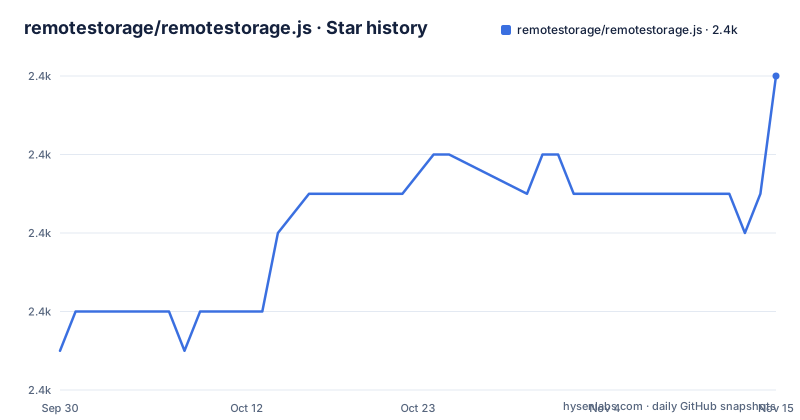
- remotestorage/remotestorage.js2,430 ★ · +7
| Repository | 2026-09-30 | 2026-11-15 |
|---|---|---|
| remotestorage/remotestorage.js | 2.4k | 2.4k |
7 Stars in the last 46 days, measured from the daily GitHub snapshot. Compare with other projects
Editorial analysis
The readme says production safe, and the release history is three betas deep
Two sentences near the top of the README are worth holding next to the release list.
The library is described as well-tested and actively maintained, and as safe to use in production. The three most recent releases are 2.0.0-beta.8 on 12 April 2026, 2.0.0-beta.9 on 27 April 2026 and 2.0.0-beta.10 on 14 August 2026, so the major version the maintainers are heading towards has not shipped stable, and the gap between the last two betas is about four months. The default branch was last pushed on 12 August 2026.
There is a second claim of the same shape further down, that new issues will usually receive a response within 24 to 48 hours. With 94 open issues that is a commitment about queue rather than a fact about the code, and it is the kind of number nobody audits.
None of this makes the library bad. It makes the README a place where reassurance and evidence sit side by side without being distinguished, so read the changelog for the version you would actually install.
The npm package is remotestoragejs and the entry point is a committed bundle
Three names for one thing. The repository is `remotestorage.js`, the project calls itself remoteStorage.js, and the published package is `remotestoragejs`, one word with no dot. So the import specifier and the repository name do not match, and a search for either will not obviously find the other.
The more unusual part is where the package points. Both the `main` and the `browser` fields resolve to a file inside `release/`, a directory that is committed to the repository rather than generated into `dist/` at pack time. The entry point is therefore a build artefact that lives in version control.
That is a deliberate trade with a real cost. It makes the published library inspectable and installable without running a build, which is genuinely useful for something meant to be dropped into a page. It also means the bundle in the repository and the sources in `src/` can disagree, and only the version bump script is responsible for keeping them in step.
For reference, the manifest declares version 2.0.0-beta.10 and is not private, under an MIT licence.
One version bump runs the test suite twice, then webpack and typedoc
The release process is visible in the scripts, and it is unusually complete.
The `preversion` hook runs the mocha unit tests, then the full `test` script, which itself starts with a type check and a shell script that runs everything, then a quiet lint pass, then the TypeScript build with declarations. So the unit tests execute twice before anything is published, once directly and once through the aggregate script.
The `version` hook then runs a production webpack build, stages the `release/` directory with `git add`, runs typedoc, and stages `docs/api/` with a second `git add`.
That means the commit which bumps the version contains the regenerated bundle and the regenerated API documentation as well as the version change. It is a coherent approach and it makes the release diff large. It also means the published artefact is produced by a chain where a typedoc failure after `git add release/` leaves a partially staged tree.
One more hook rewrites the lockfile in place: `postshrinkwrap` runs `sed` over `package-lock.json` to turn every `http://` into `https://`, with a separate branch for Darwin because of how `sed -i` takes its backup suffix there.
Four tools build one library: tsc, webpack, typedoc and vitepress
The toolchain is worth mapping, because each tool produces a different artefact and none of them is redundant.
The TypeScript compiler emits the JavaScript and the type declarations, with the declarations directed into `release/types` and declaration maps enabled, so the types ship next to the bundle. Webpack produces the browser bundle, in development or production mode, with a watch mode for the `dev` script. Typedoc generates the API reference into `docs/api/`. And VitePress builds the prose documentation, with its own dev, build and preview scripts.
The README links both kinds of output side by side: hand-written pages such as the getting started guide and the data modules guide, and an API URL whose path shape, a class directory with a capitalised class name, is typedoc's rather than VitePress's.
So the documentation site is assembled from two generators writing into one directory, and the version script stages only the typedoc half. Mocha runs the tests against the `.mjs` files under `test/unit/`.
Four tools is not excessive for a project shipping typed declarations, a bundle and a documentation site, but it does mean a contributor needs all of them configured before they can check anything.
The repository field uses the git:// protocol, and .gitmodules has no directory
The manifest's repository field is an old-style git URL on the `git://` protocol rather than an HTTPS address. GitHub disabled that protocol for cloning years ago, so the field works as a pointer for tooling that reads it and fails for anything that tries to use it directly.
The homepage field points at the protocol's main site, while the repository's own homepage field points at the library's documentation subdirectory, so there are two different canonical addresses for the project depending on which manifest you read.
There is a `.gitmodules` file at the root with no submodule directory among the top-level entries, which means either a submodule was removed without the file, or the submodules live inside one of the directories rather than at the top level. Either way the file is doing something the tree view does not explain.
Package tooling is npm's, which is consistent: a lockfile, an npm ignore file, and no yarn or pnpm configuration anywhere in the root.
Three lint configurations and two agent files share the root
There are three analysis configurations at the top level, and they are not obviously the same vintage.
`eslint.config.mjs` is a flat ESLint configuration, and the lint scripts are split four ways: the sources, the sources with warnings suppressed, the specification files, and the specifications with warnings suppressed. That split is deliberate and useful, since a contributor fixing specs and a contributor fixing sources want different exit behaviour.
Beside it sit `.jshintrc`, which is the older JSHint format and predates the ESLint flat config, and `.codeclimate.yml`, which configures a hosted analysis service. Whether the JSHint file still does anything is not determinable from the layout; the presence of all three suggests a migration that stopped partway.
Then there are two files aimed at automated assistants, `AGENTS.md` and `opencode.config.json`, sitting next to the human documentation. Alongside them, `.browserslistrc` declares the browser targets and `.nvmrc` pins a Node version, though the development dependencies carry Node type definitions a major version ahead of anything a current LTS would suggest.
The recommended inspection tool sits on a personal Gitea, and the sponsor badge is empty
Two links in this README point somewhere other than where you would expect.
The visual file browser is RS Inspektor, and it is hosted on a personal Gitea instance rather than on a project domain or a package registry. The README adds that the tool is itself implemented using this library, which is a nice piece of dogfooding, but it means the recommended way to look inside an account depends on one person's server staying up.
The sponsor line says the project was previously sponsored by NLnet, and the badge beside it is an empty anchor with no alt text, so the credit renders as nothing at all. The word previously is doing real work there: the project presents itself as a grassroots effort developed by the community.
The local development story has the same shape. To test an application you need a remoteStorage-compatible account, and the two recommended servers are both third-party, one written in Node.js and one in Rust. No server ships with the library, which is consistent with the library being a client, and it does mean the first thing you build is infrastructure.
The pinning example teaches version 1 while the package sits on a 2.0.0 beta
The versioning section is short and correct in principle. The project adheres to Semantic Versioning, breaking changes produce a new major version, and with npm you can restrict yourself to compatible upgrades with either the caret prefix or an `x` indicator. The example given is:
"devDependencies": {
  "remotestoragejs": "1.x" // same as "^1.0.0"
}
Two details sit awkwardly against the current state. The example range is 1.x while the shipped version is 2.0.0-beta.10, so the tutorial describes a major version that the recent history has moved past, and a reader copying it verbatim gets the previous generation of the library. The example also places the library under development dependencies, which is the right place in this repository's own manifest and a slightly odd thing to demonstrate to someone integrating it into an application.
The broader advice still holds, with one caveat for a beta: a caret range behaves differently for a pre-release than for a stable version, so pinning 2.0.0-beta.10 exactly and reading the changelog is the safer habit here than a range.
Editorial conclusion
Judgment: this is a mature protocol implementation rather than a new one, and the repository shows it, with a type-checked test entry point, a lint pass that runs before every version bump and a typed API reference. If your application can hold user data in the browser and sync it across devices without a vendor account, that is a real capability, and the optional Dropbox and Google Drive connectors are the pragmatic part. Three things to check first. The library has never shipped a stable 2.0.0, so read the changelog for the beta you would install and pin it exactly rather than with a caret. The npm entry point is a committed bundle that a version bump regenerates and stages, so the artefact you install and the source you read are produced by a four-tool chain you may need to reproduce if you fork. And for local development you need a server: the project recommends two third-party ones and ships none, so budget for that before you start.
Frequently asked questions
What is remoteStorage.js and what does it actually do?
It is a JavaScript library for storing user data locally in the browser and for connecting to remoteStorage servers to sync that data across devices and applications. It can also connect and sync with a person's Dropbox or Google Drive account, which is described as optional. It is MIT licensed and published to npm as `remotestoragejs`.
How do I test an app that uses remoteStorage.js locally?
You need a remoteStorage-compatible storage account. The README recommends armadietto, written in Node.js, or mysteryshack, written in Rust, for running a local test server. You can also get an account with a hoster or use another remoteStorage server implementation, and RS Inspektor is offered as a visual browser for inspecting any compatible account.
How is remoteStorage.js versioned and how should I pin it?
The project follows Semantic Versioning, so breaking changes mean a new major version, and the README suggests the `^` prefix or an `x` indicator to avoid automatic upgrades across majors. The shipped version is 2.0.0-beta.10, and the three most recent releases are 2.0.0-beta.8, beta.9 and beta.10, so a stable 2.0.0 has not been published in that sequence.
Is remoteStorage.js safe to use in production?
The README says it is well-tested, actively maintained and safe to use in production, and it is MIT licensed. The verifiable facts around that claim are the release history, where the current version is a 2.0.0 beta, the last push to the default branch on 12 August 2026, and the 94 open issues. The changelog is the place to check what changed in the version you would install.
Official sources
Add this badge to your README
If you maintain this project, the badge below links readers to this analysis and shows its maintenance status from the daily GitHub snapshot. Paste the markdown into your README; add ?metric=license or ?metric=stars to the image URL for a different field.

[](https://hysenlabs.com/projects/remotestorage-remotestorage-js)Star history chart for your README
[](https://hysenlabs.com/projects/remotestorage-remotestorage-js)Was this useful?