easy-pie-chart draws one animated ring per number, in about two kilobytes
easy pie chart is a lightweight plugin to draw simple, animated pie charts for single values
At a glance
- What is it?
- easy pie chart is a TypeScript canvas plugin for drawing a single animated ring from one value, with ESM and UMD builds, an optional jQuery entry point and no runtime dependencies. It solves one narrow job cleanly, and the data attribute rules plus the exports map in package.json are worth reading before the first script tag.
- Who is it for?
- easy-pie-chart fits a dashboard cell that needs one animated percentage and nothing else, and it is the wrong choice the moment you need two series, a legend or tooltips. Check how your build resolves the package before adopting it: the exports map sends `dist/easypiechart.min.js` to a CommonJS build, so a script tag and a bundler read different files under one name.
- Can I use it commercially?
- Yes. MIT is a permissive licence: you can use, modify and sell software built on it, as long as you keep its copyright and licence notices.
- Is it still maintained?
- Yes. The repository last received commits 43 days ago.
- What is it written in?
- Mainly TypeScript, according to GitHub's language statistics.
Answers come from the project's GitHub data, last synced on October 23, 2026, and from our analysis. They are not legal advice.
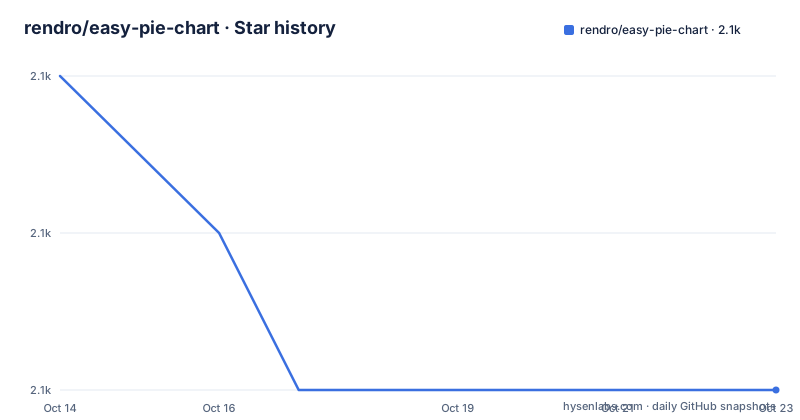
Star history
- rendro/easy-pie-chart2,058 ★ · -2
| Repository | 2026-10-14 | 2026-10-23 |
|---|---|---|
| rendro/easy-pie-chart | 2.1k | 2.1k |
-2 Stars in the last 9 days, measured from the daily GitHub snapshot. Compare with other projects
Editorial analysis
A single numeric value becomes one animated ring
easy pie chart does one job: turn one number into one circular gauge. The constructor takes a host element and an options object, and calling `update` on the instance animates the bar toward the value you pass in. There is no dataset, no series, no legend and no axis, and nothing in the option list adds one. The defaults set the geometry for a 110 px square canvas: a bar 3 px wide, 24 scale lines each 5 px long, a track in `#f9f9f9`, a bar in `#ef1e25`, and the full 360 degrees of the circle, where 100 counts as full. Because `trackWidth` defaults to the value of `lineWidth`, the track and the bar begin the same width, and changing one changes the other unless you set both. That coupling is the first thing to check when a chart renders heavier than the mockup did. A negative value is drawn counter-clockwise, which gives you a deficit indicator without touching geometry.
Two kilobytes gzipped, with a renderer you can swap
The feature list calls the package lightweight, states that it has no dependencies, and puts the bundle at roughly 2 kB gzipped for the ESM and UMD builds. The source is TypeScript and the package publishes its own type declarations. Resolution independence comes from painting to canvas instead of laying out arcs in the DOM, and the generated element is a canvas carrying the `easy-pie-chart-canvas` class, set through `canvasClass`. The renderer is pluggable too: `renderer` defaults to `CanvasRenderer` and accepts any object implementing `IRenderer`, so another drawing backend can keep the option handling and the animation loop. package.json publishes more than compiled output, because the `files` list ships `dist` and `types` along with the TypeScript source folder, which means that source travels inside the tarball. It ships under the MIT licence, and that is the only licence identifier the package declares.
Installing with npm and calling update with 65
One install and one constructor cover a working chart. Install the package:
npm install easy-pie-chartThen construct it on any element and push a value in:
import { EasyPieChart } from 'easy-pie-chart';

const chart = new EasyPieChart(document.querySelector('.chart'), {
  barColor: '#ef1e25',
  size: 110,
});

chart.update(65);
`size` is the diameter in pixels and is always square, so 110 produces a 110 by 110 chart. Updating with 65 fills 65 of the 100 that count as a full bar, and the default `animate` object runs that sweep over 1000 ms. A bundler is optional as well, since the UMD build exposes a global:
<script src="node_modules/easy-pie-chart/dist/easypiechart.min.js"></script>
<script>
  new EasyPieChart(document.querySelector('.chart'), { size: 110 }).update(65);
</script>
Expect a ring whose bar is `#ef1e25`, because `barColor` defaults to that value and nothing above overrides it.
data-* attributes outrank the options object
Every option except the callbacks can be set on the element, and the attribute wins whenever both are present. That lets one colour live in JavaScript as a shared default while a single instance overrides it in markup:
<div class="chart" data-percent="65" data-size="140" data-bar-color="#7c3aed"></div>Here `data-percent` sets the initial value, `data-size` replaces the 110 px default with 140, and `data-bar-color` overrides `#ef1e25` for that element only. Two attributes act as switches: `data-track-color="false"` hides the `#f9f9f9` ring behind the bar and `data-scale-color="false"` removes the 24 scale lines. The attributes carry text, so switching a part off means writing the string false rather than a bare keyword. What this mechanism cannot reach is any of the function options, `barColor`, `easing`, `onStart`, `onStep` and `onStop`. That is an awkward gap, because `barColor` is the option that most often wants a function: it accepts a callback returning any canvas stroke style, including a gradient built from the renderer's own context. Keep that one in the options object and leave markup to serializable values.
max, arcLength and rotate turn a ring into a gauge
The value that fills the bar is a parameter, not a percentage rule. Set the max option to the top of your own range and the callbacks still receive your raw number:
new EasyPieChart(el, {
  max: 250,
  onStep(from, to, value) {
    this.el.querySelector('.label').textContent = `${Math.round(value)} / 250`;
  },
}).update(125); // half a ring
Updating with 125 against a max of 250 draws half the circle, and `onStep` writes the intermediate value into a label on every frame of the animation, which is how a live counter works without a second timer. Two further options shape the sweep rather than the value. `arcLength` limits how much of the circle the chart spans and `rotate` turns the whole chart in degrees, so
new EasyPieChart(el, { arcLength: 180, rotate: -90, lineWidth: 10 });draws a half circle opening at the top with a 10 px bar instead of the 3 px default. Function options are bound to the chart instance, so `this.el` inside `onStep` is the host element, and an arrow function keeps its own `this` instead.
Responsive sizing breaks when the host sizes itself
`responsive` defaults to `false`. Set it to `true` and the chart follows its host element through `ResizeObserver`:
new EasyPieChart(document.querySelector('.chart'), { responsive: true });.chart { width: 100%; aspect-ratio: 1; }That stylesheet is part of the contract, not decoration. If the host element takes its size from its own content, the chart and the canvas resize each other, and this is the one failure mode called out directly in the documentation. A host sized by CSS, here with `aspect-ratio: 1` to preserve the square that `size` assumes, gives the observer a stable box to measure. There is no breakpoint, no minimum or maximum, and no hook to intervene: `size` sets the starting pixel size, and after the first resize the parent decides. Moving a fixed 110 px layout into a fluid grid therefore means giving every chart a sized parent, and that work sits outside the package.
jQuery keeps an entry point, AngularJS does not
The jQuery build ships, and the plugin file registers itself when loaded:
<script src="jquery.js"></script>
<script src="node_modules/easy-pie-chart/dist/jquery.easypiechart.min.js"></script>
<script>
  $('.chart').easyPieChart({ barColor: '#10b981' });

  // the instance lives on the element's data
  $('.chart').data('easyPieChart').update(42);

  // tear it down
  $('.chart').easyPieChart('destroy');
</script>
Calling the plugin again with the string destroy is the documented teardown path, and the instance stays reachable through the element's data. In a bundler you import the separate entry point and register it yourself with `registerJQueryPlugin($)`, passing your own jQuery instance, so nothing in the package imports jQuery on your behalf. AngularJS gets no such courtesy in 3.x. `dist/angular.easypiechart.js` was removed, and the stated reason is that AngularJS 1.x has been end-of-life since January 2022. The alternative is spelled out instead of left open: `2.1.7` stays on npm indefinitely and the same file resolves on unpkg and jsDelivr, or you copy the directive the readme supplies, which keeps the `easypiechart` module name, the `percent` and `options` bindings and `restrict: 'AE'`, and adds a `$destroy` hook because the 2.x version had no teardown and charts leaked whenever a scope went away.
The exports map and the script tag example disagree
The readme tells you to load `dist/easypiechart.min.js` from a script tag and calls that file the UMD bundle. The exports map in package.json sends the very same specifier to `./dist/easypiechart.min.cjs`, while `main` points at `./dist/easypiechart.cjs` and `module` at `./dist/easypiechart.mjs`. Two details hide behind that. Type declarations resolve from `./dist/index.d.ts` on the import condition but from `./types/cjs.d.cts` on the require condition, so a CommonJS consumer reads a file from the `types` directory rather than the generated one. And the build script runs vite in separate umd, umd-min and jquery modes, which is where several bundle names come from for one small library. Nothing here is broken, but a bundler honouring the exports map and a plain script tag read different files under one name. Check which one your pipeline actually loads before assuming the file sitting in `node_modules` is the file you ship. The last tagged version was 3.2.0 on 2026-07-22, and the last push was on 2026-09-10, with the repository not archived.
Editorial conclusion
easy-pie-chart fits a dashboard cell that needs one animated percentage and nothing else, and it is the wrong choice the moment you need two series, a legend or tooltips. Check how your build resolves the package before adopting it: the exports map sends `dist/easypiechart.min.js` to a CommonJS build, so a script tag and a bundler read different files under one name. Keep every function option in JavaScript, since data attributes cannot carry a callback, and set `trackWidth` whenever you change `lineWidth`.
Frequently asked questions
How do I install easy-pie-chart and draw my first chart?
Run `npm install easy-pie-chart`, import the `EasyPieChart` class, construct it with a host element and an options object, then call `update` with the value you want to display. The default `size` of 110 gives a 110 px square chart, and 100 counts as a full bar.
Does easy-pie-chart require jQuery?
No. The core is framework-agnostic and the feature list states there are no dependencies. The jQuery build is a separate entry point, and in a bundler you register it yourself by passing your own jQuery instance to `registerJQueryPlugin($)`.
Can I configure easy-pie-chart from HTML data attributes?
Every option except the callbacks can be set on the element, and attributes win over the options object, which keeps the ordering the 2.x jQuery plugin used. `data-track-color="false"` and `data-scale-color="false"` switch off those two parts, and `data-percent` sets the starting value.
How do I turn an easy-pie-chart into a semicircular gauge?
Set `arcLength` to 180 and `rotate` to -90, optionally with a thicker `lineWidth`. Values do not have to be percentages: set the max option to the number that should fill the bar and the bar shows that ratio, while the callbacks still receive your raw value.
What happened to the AngularJS directive in easy-pie-chart 3.x?
3.x dropped `dist/angular.easypiechart.js`, and the documented reason is that AngularJS 1.x has been end-of-life since January 2022. `2.1.7` stays on npm, and the readme supplies a short directive with the same module name and bindings if you would rather not migrate at all.
Can easy-pie-chart run without a bundler?
Yes. The UMD bundle exposes a global `EasyPieChart` from a script tag, and the jQuery build loads as a second file with `dist/jquery.easypiechart.min.js`. Under a bundler, import the ESM build or the separate `./jquery` entry point instead.
Official sources
Add this badge to your README
If you maintain this project, the badge below links readers to this analysis and shows its maintenance status from the daily GitHub snapshot. Paste the markdown into your README; add ?metric=license or ?metric=stars to the image URL for a different field.

[](https://hysenlabs.com/projects/rendro-easy-pie-chart)Star history chart for your README
[](https://hysenlabs.com/projects/rendro-easy-pie-chart)Was this useful?