rescript-react-native puts typed React Native components behind a peer dependency contract
ReScript bindings for React Native
At a glance
- What is it?
- rescript-react-native is the set of ReScript bindings that let ReScript React components run on iOS, Android and the web through react-native-web. Its package manifest is where the real design decision sits, because the peer dependency ranges on rescript, @rescript/react and react-native are what decide whether it fits your build.
- Who is it for?
- rescript-react-native suits a team that has already chosen ReScript and ReScript React and now wants the same component code to target iOS, Android and the web without a second component implementation. It does not suit a team still deciding on the language, or one on an older react-native release, because the peer dependency floor of react-native >=0.84.0 and rescript >=12.0.0 rules those combinations out at install time rather than at compile time.
- Can I use it commercially?
- Yes. MIT is a permissive licence: you can use, modify and sell software built on it, as long as you keep its copyright and licence notices.
- Is it still maintained?
- Yes. The repository last received commits 13 days ago.
- What is it written in?
- Mainly ReScript, according to GitHub's language statistics.
Answers come from the project's GitHub data, last synced on November 7, 2026, and from our analysis. They are not legal advice.
Star history
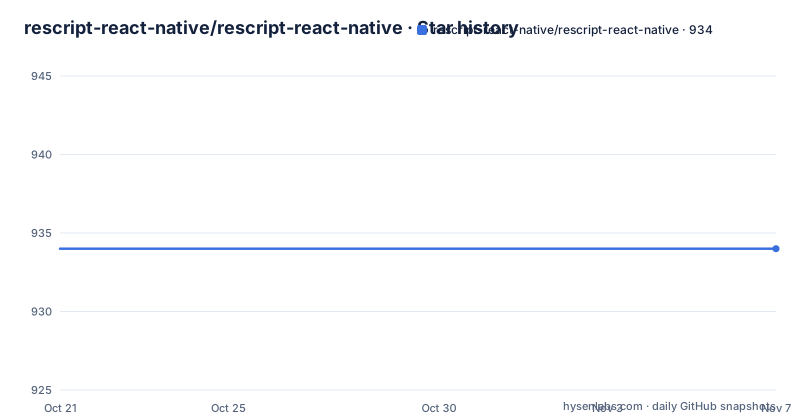
- rescript-react-native/rescript-react-native934 ★ · +0
| Repository | 2026-10-21 | 2026-11-07 |
|---|---|---|
| rescript-react-native/rescript-react-native | 934 | 934 |
0 Stars in the last 17 days, measured from the daily GitHub snapshot. Compare with other projects
Editorial analysis
Bindings, not a React Native implementation
The package is described as ReScript bindings for React Native, and that word carries most of the meaning. It does not reimplement React Native. It provides ReScript bindings so that code written in ReScript, with ReScript React, can drive React Native primitives, and the README states the point directly: it allows you to use ReScript with ReScript React to make your iOS, Android and web apps. The web target is reached through react-native-web, which is linked as a separate project, so the same component tree can run in a browser without a second rendering layer written by hand. The primary language in the repository is ReScript, and the published files list makes the shape concrete, with the ReScript source and interface files under src/ included along with the compiled JavaScript, while the Compiled JavaScript output is excluded.
The peer dependency ranges are the contract
The manifest is small and its peerDependencies block is the important part, because a bindings package lives or dies by compatibility with the versions around it. The declared peers are @rescript/react at >=0.15.0, react-native at >=0.84.0 and rescript at >=12.0.0. Nothing is bundled to paper over a version mismatch, so a project on an older react-native release cannot install this alongside it without a decision. The overrides block pins react to ^19.2.0, which tells you the React version line the bindings were developed against. Read together with the devDependencies, where @rescript/react sits at ^0.15.0 and rescript at ~12.0.2, these ranges give you the floor and the tested version. For a library that touches the React renderer and the native module layer, an explicit floor is more useful than a permissive range, and it is the first thing to check when a dependency resolution fails.
The compiler, not a bundler, produces the JavaScript
The scripts reveal how the project is built, and the answer is that ReScript compiles the sources itself. There is no webpack or rollup step in the scripts; instead there are rescript commands exposed as npm scripts, with re:start mapped to rescript watch, re:build mapped to rescript build, re:clean mapped to rescript clean and re:format mapped to rescript format. The public build script is npm run re:build, and the watch script is npm run re:start:
npm run re:startwhich runs rescript watch for a development loop, and:
npm run re:buildwhich runs rescript build for a one-off compile. The test script is npm run re:clean && npm run re:build, so the test path is a clean followed by a full rebuild rather than a separate assertion runner. The repository also carries rescript.json at the top level, which is where the compiler configuration lives.
Formatting is split between prettier and rescript format
The formatting setup is a small but telling detail, because it shows the repository treats .res and .resi files differently from everything else. There are two format paths. format:most runs prettier over md, json, js and css files, and the format script chains that with re:format, which runs rescript format over the ReScript sources. The lint-staged configuration mirrors the same split, with prettier handling *. {md,json,js,css} and rescript format handling *. {res,resi}. Husky wires a pre-commit hook to lint-staged, so a commit runs the right formatter for the files it touches. The npm scripts also include npm-run-all, which is the tool used to chain the two format steps in one command, and the prettier configuration sets trailingComma to all. The practical consequence for a contributor is that a single npm run format normalises both halves of the tree.
What the binding layer does not solve for you
There is a limit worth stating before you plan a migration. The repository is bindings, so anything that is not a React Native primitive surface is still yours to build. There is no native module bridge, no platform specific folder of native code and no build pipeline for the mobile binaries in this repository; the published files are markdown, rescript.json and the compiled JavaScript from src. Nothing in the documentation describes native module support, so a plan that depends on calling an unrepresented native module through this package is not covered by it. The documentation also lives off the repository, at rescript-react-native.github.io, with a getting started guide and a docs section, while the repository itself only links to it. That means the API reference is not something you can read in a checkout, which is a real cost when you are evaluating the package offline or inside a restricted build environment.
Release numbering that tracks the React Native line
The version scheme is worth reading carefully, because the numbers carry information about what the bindings expect. The current release is 0.84.0, published on 2026-09-15, and the react-native peer dependency is >=0.84.0. The same digit appears in both places. The earlier releases 0.83.0 on 2026-04-23 and 0.82.1 on 2026-04-10 follow the same pattern, so the package version lines up with the React Native release it targets. That is a useful signal for a team juggling a native upgrade, because the binding version tells you which React Native release it was cut against. The package is still on a 0.x version, which in npm terms means no stability guarantee on the public interface, and the changelog is kept in CHANGELOG.md at the repository root for the detail on what changed between these lines.
Licence, publishing and the community around it
The licence field on the repository says MIT, and the package manifest repeats MIT, which is the permissive short form with no copyleft obligation on a commercial app that links the bindings. The manifest also sets publishConfig access to public, and the release script runs npmpub, so publishing is handled by that tool rather than by hand. The repository lives under the rescript-react-native organisation and publishes a homepage at rescript-react-native.github.io. Participation is organised rather than informal: the README links a contribution guidelines document and a code of conduct, both under the organisation's .github directory, and the topic list on the repository includes hacktoberfest, which points to the project taking part in that seasonal programme. The last push was on 2026-09-15 and the repository is not archived, so the 0.x line is still moving.
Editorial conclusion
rescript-react-native suits a team that has already chosen ReScript and ReScript React and now wants the same component code to target iOS, Android and the web without a second component implementation. It does not suit a team still deciding on the language, or one on an older react-native release, because the peer dependency floor of react-native >=0.84.0 and rescript >=12.0.0 rules those combinations out at install time rather than at compile time. Before you adopt it, check those three peer ranges against the versions already in your lockfile, and confirm that your build can run the rescript build script, since the package ships ReScript sources and expects the ReScript compiler to compile them.
Frequently asked questions
What are the peer dependencies of rescript-react-native?
The manifest declares @rescript/react at >=0.15.0, react-native at >=0.84.0 and rescript at >=12.0.0, and it overrides react to ^19.2.0.
Can I use rescript-react-native for web apps?
Yes. The documentation states the bindings allow you to use ReScript with ReScript React to make your iOS, Android and web apps, with the web target going through react-native-web.
How do I build rescript-react-native from source?
The build script is npm run re:build, which runs rescript build. For a development loop the watch script is npm run re:start, which runs rescript watch, and the test script runs a clean followed by a rebuild.
Where are the docs for rescript-react-native?
The documentation is hosted at rescript-react-native.github.io, with a getting started guide, and the repository README links to it rather than containing the API reference itself. The changelog is kept in CHANGELOG.md at the repository root.
What licence is rescript-react-native released under?
Both the licence field on the repository and the package manifest say MIT. The licence file is at the top level of the repository.
Official sources
Add this badge to your README
If you maintain this project, the badge below links readers to this analysis and shows its maintenance status from the daily GitHub snapshot. Paste the markdown into your README; add ?metric=license or ?metric=stars to the image URL for a different field.

[](https://hysenlabs.com/projects/rescript-react-native-rescript-react-native)Star history chart for your README
[](https://hysenlabs.com/projects/rescript-react-native-rescript-react-native)Was this useful?