sys-clk, per-game clock profiles for a hacked Nintendo Switch
Nintendo Switch homebrew overclocking/underclocking system module and frontend
At a glance
- What is it?
- sys-clk is a sysmodule for the Nintendo Switch that sets CPU, GPU and memory clocks according to the running title and whether the console is docked, with a config file holding a profile per application. The interesting design is the priority order it uses when a handheld profile is requested while the console is charging, and the battery-protection caps applied on top of what you ask for.
- Who is it for?
- sys-clk suits a Switch homebrew user who wants a game to run at a fixed clock regardless of how the console is held, and who is willing to maintain a profile per title as new games appear. It is the wrong tool if you want a single global overclock, because the entire design is per-title and per-docked-state, and it is the wrong tool if you are on an unmodified console, since it requires Atmosphere.
- Can I use it commercially?
- Check first. The repository uses a licence we do not classify automatically, so read its LICENSE file before any commercial use.
- Is it still maintained?
- Activity is slowing. The repository last received commits 7 months ago.
- What is it written in?
- Mainly C++, according to GitHub's language statistics.
Answers come from the project's GitHub data, last synced on November 7, 2026, and from our analysis. They are not legal advice.
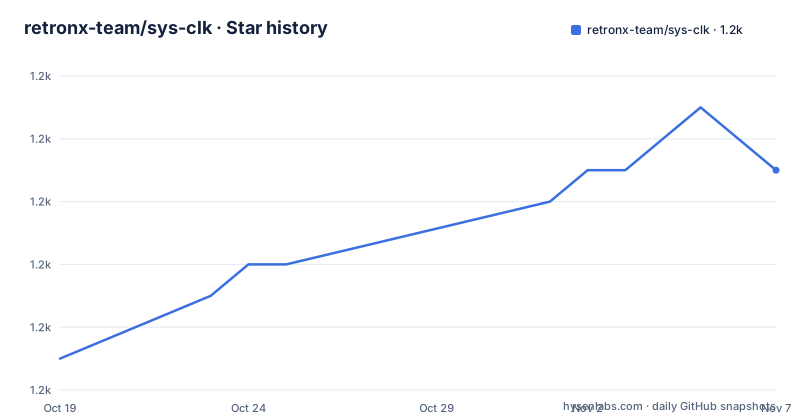
Star history
- retronx-team/sys-clk1,179 ★ · +6
| Repository | 2026-10-19 | 2026-11-07 |
|---|---|---|
| retronx-team/sys-clk | 1.2k | 1.2k |
6 Stars in the last 19 days, measured from the daily GitHub snapshot. Compare with other projects
Editorial analysis
What it changes and where the files live
sys-clk is a Switch sysmodule allowing you to set cpu, gpu and mem clocks according to the running application and docked state. That is the whole feature, and the whole design follows from it: a rule engine that maps a running title to a set of three clock values, with a different set depending on whether the console is docked, handheld, or handheld while charging.
The installation is a file copy. The instructions assume a Nintendo Switch running Atmosphère, updated to at least the latest stable version, and you copy the atmosphere and switch folders at the root of your sdcard over the existing ones, overwriting files if prompted. You also copy the config folder if you are not updating, to include the default settings. The overlay additionally requires Tesla to be installed and running.
The relevant files list is worth reading because it tells you how the pieces divide. The config file at /config/sys-clk/config.ini holds the per-title custom clocks. The log file at /config/sys-clk/log.txt is where logs are written if enabled, and the log flag file at /config/sys-clk/log.flag is what enables the writing, since the existence of the file is the signal. The CSV file at /config/sys-clk/context.csv records the title id, profile, clocks and temperatures when that is enabled.
Then the three executables. The sys-clk manager app is at /switch/sys-clk-manager.nro and is accessible from the hbmenu. The sys-clk overlay is at /switch/.overlays/sys-clk-overlay.ovl and is accessible from anywhere by invoking the Tesla menu. The core sysmodule is at /atmosphere/contents/00FF0000636C6BFF/exefs.nsp with a boot2.flag beside it in the flags directory.
That path, 00FF0000636C6BFF, is the sysmodule identifier Atmosphère uses, and the presence of a boot2.flag is what makes it load early enough to take effect at boot rather than after the homebrew environment is up.
The profile format, and what an empty value means
Presets are customised by adding them to the ini config file at /config/sys-clk/config.ini, using a template per application.
[Application Title ID]
docked_cpu=
docked_gpu=
docked_mem=
handheld_charging_cpu=
handheld_charging_gpu=
handheld_charging_mem=
handheld_charging_usb_cpu=
handheld_charging_gpu=
handheld_charging_usb_mem=
handheld_charging_official_cpu=
handheld_charging_official_gpu=
handheld_charging_official_mem=
handheld_cpu=
handheld_gpu=
handheld_mem=
The rules for filling it in are stated plainly. You replace Application Title ID with the title id of the game, and a list of game title ids is on the Switchbrew wiki. Frequencies are expressed in mhz, and will be scaled to the nearest possible values. And if any key is omitted, value is empty or set to 0, it will be ignored, and stock clocks will apply.
That last rule is the one to internalise, because it is a fallback rather than an error. A profile with a typo in a key name does not fail loudly, it quietly does nothing for that field, and the symptom is that the clock you expected never appears. It also means a profile is a complete specification of what you want, and anything you leave out reverts to the console's own behaviour, which is a sensible default for a tool that changes the stability characteristics of the hardware.
The priority order matters for the handheld case. If charging, sys-clk will look for the frequencies in that order, picking the first found. First the charger specific config, which is handheld_charging_usb_X or handheld_charging_official_X. Then the non specific charging config, handheld_charging_X. Then the handheld config, handheld_X.
The order explains why there are three separate charging keys. USB charging and official charging are treated as different states, so you can run a lower clock on USB power and a higher one on the official charger, and the generic charging key is the fallback for both.
Two worked examples, and what they reveal about the design
The two examples in the README are worth reading closely, because they show two different intents rather than two different games.
The first is Zelda BOTW, and the intent is to overclock the CPU when docked or charging, and to overclock MEM to the docked clocks when handheld. The reasoning given is that it leads to a smoother framerate overall, with the korok forest named as an example.
[01007EF00011E000]
docked_cpu=1224
handheld_charging_cpu=1224
handheld_mem=1600
The second is Picross, and the intent is the opposite: underclock on handheld to save battery.
[0100BA0003EEA000]
handheld_cpu=816
handheld_gpu=153
handheld_mem=800
Those two are a good summary of the tool's value. A single global setting has to be a compromise, and the compromise is either a speed that drains the battery or a saving that costs frames. Per-title profiles let each decision be made separately, which is why the format has so many keys. The BOTW profile also shows the intended asymmetry: the CPU is pushed up when charging, and the memory clock is set to the docked value even in handheld, because memory bandwidth is what the open world map traversal is short of.
One structural note. The title id in the section header is the key, and the values are the settings, and the template is per application. That means a config file for a library of games is a list of sections, and a game you have not written a section for simply runs at stock clocks.
The advanced section adds a values block for the timings, and the README is discouraging about using it. The values section allows you to alter timings in sys-clk, and you should not need to edit any of these unless you know what you are doing.
The clock tables and the caps that override you
The clock table is the reference a user works from, and it lists the actual frequencies the hardware can be set to.
For MEM the values are 1600, which is official docked, boost mode and max clock, then 1331 for official handheld, 1065, 800 and 665. For CPU: 1785 is max clock and boost mode, then 1683, 1581, 1428, 1326, 1224 which is sdev oc, 1122, 1020 for official docked and handheld, then 918, 816, 714 and 612. For GPU: 921 is max clock, then 844, 768 for official docked, 691, 614, 537, 460 for max handheld, 384 for official handheld, 307 for official handheld, 230, 153, and 76 for boost mode.
The values you write in the config are scaled to the nearest possible value, which is why the tables matter. A config asking for 1200 MHz gets 1224, because 1200 is not a clock the hardware exposes. This is a deliberate simplification that makes configuration forgiving, and it also means two profiles that differ slightly can land on the same real clock.
The capping table is the part that overrides your configuration, and the reason given is to protect the battery from excessive strain. Clocks requested from config may be capped before applying, depending on the current profile. Memory and CPU have no caps listed. GPU is capped at 460 MHz handheld, 768 MHz when charging on USB, and no cap when charging on the official charger or docked, with a footnote that the GPU handheld max for Mariko is increased to 614 MHz.
The notes add the two conditions in prose. GPU overclock is capped at 460 MHz in handheld and capped at 768 MHz if charging, unless you are using the official charger. And clocks higher than 768 MHz need the official charger plugged in.
So the practical rule is that the interesting overclock is a docked one, and the handheld case is mostly about saving power. The charger distinction exists because drawing more current from a USB port than it can supply is the failure mode the cap is protecting against.
The advanced timings section adds a few more knobs for the log and poll intervals. The temp_log_interval_ms, freq_log_interval_ms and power_log_interval_ms keys control how often temperatures, real frequencies and power usage are logged, with 0 disabling each and a default of 0 ms. The csv_write_interval_ms does the same for the CSV, also defaulting to 0 ms. The poll_interval_ms key defines how fast sys-clk checks and applies profiles, in milliseconds, with a default of 300 ms.
That last default is the one with a real effect on behaviour, since a profile change is not applied instantly but on the next poll, and the interval trades responsiveness against how often the module wakes up.
What the repository contains, and where the project stands
The repository layout is a description of the architecture. There is a sysmodule/ directory for the core module that hooks into the console, a manager/ directory for the hbmenu application, an overlay/ directory for the Tesla overlay, and a common/ directory for code shared between them. That is a clean separation, because the three components have genuinely different lifecycles: the sysmodule is loaded at boot and stays resident, the manager is a homebrew program you launch, and the overlay is loaded on demand by Tesla.
The config.ini.template at the root is the template for the config file, which matches the section format described above, and build.sh is the build script. The .gitlab-ci.yml indicates the CI runs on GitLab rather than GitHub Actions, which is a small detail but it tells you where the pipeline lives.
The licence is a custom one that GitHub cannot classify, the default branch is develop, and the last push was on 2026-04-04. The release tags are 2.0.1 from 2024-10-14, 2.0.0-rc from 2023-10-14 and 1.0.3 from 2023-04-20.
The gap between the last tag and the last push is worth noting if you are deciding whether to try it. The releases are on a 2.x line, the last tag is from late 2024, and the branch has moved on since. For a homebrew module that is not unusual, since the work is often reverse engineering fixes rather than features, but it does mean you should check the develop branch if you hit a problem rather than assuming the tagged build is current.
For anyone evaluating this, the honest summary is that sys-clk is a well-documented rules engine for one specific piece of hardware configuration, and its documentation is unusually complete for homebrew. The title id list, the clock tables, the capping rules and the priority order are all written down, which means the main risk of using it is not ignorance of the format but underestimating the stability implications of the values you pick, which is exactly what the capping table and the battery warning are there to bound.
Editorial conclusion
sys-clk suits a Switch homebrew user who wants a game to run at a fixed clock regardless of how the console is held, and who is willing to maintain a profile per title as new games appear. It is the wrong tool if you want a single global overclock, because the entire design is per-title and per-docked-state, and it is the wrong tool if you are on an unmodified console, since it requires Atmosphere. Before configuring it, read the capping table, because a GPU clock above 768 MHz needs the official charger plugged in and handheld GPU is capped at 460 MHz on Mariko, and remember that a profile with a missing key falls back to stock clocks rather than failing.
Frequently asked questions
What does sys-clk do on a Nintendo Switch?
It is a sysmodule that sets the cpu, gpu and mem clocks according to the running application and the docked state, so a title can be given different clock values docked, handheld, or handheld while charging. It requires Atmosphère, and the overlay additionally requires Tesla.
How do I write a per-game clock profile in sys-clk?
Add a section to /config/sys-clk/config.ini keyed by the title id, for example [01007EF00011E000], and fill in the docked_ and handheld_ keys with frequencies in mhz. Title ids for games are listed on the Switchbrew wiki.
What happens if a key is missing from a sys-clk profile?
If any key is omitted, the value is empty, or it is set to 0, it is ignored and stock clocks apply. Requested frequencies are also scaled to the nearest possible value, so 1200 MHz is realised as 1224 MHz.
What are the sys-clk GPU clock caps?
GPU is capped at 460 MHz handheld, 768 MHz when charging on USB, and is not capped when docked or on the official charger, with the handheld max raised to 614 MHz on Mariko. Clocks higher than 768 MHz require the official charger plugged in, and the caps exist to protect the battery.
How do I enable logging and CSV output in sys-clk?
Logging is enabled by creating the flag file at /config/sys-clk/log.flag, with logs written to /config/sys-clk/log.txt. The CSV at /config/sys-clk/context.csv records title id, profile, clocks and temperatures when enabled, and the values section controls how often each of those is written, with 0 disabling it.
Official sources
Add this badge to your README
If you maintain this project, the badge below links readers to this analysis and shows its maintenance status from the daily GitHub snapshot. Paste the markdown into your README; add ?metric=license or ?metric=stars to the image URL for a different field.

[](https://hysenlabs.com/projects/retronx-team-sys-clk)Star history chart for your README
[](https://hysenlabs.com/projects/retronx-team-sys-clk)Was this useful?