practical-aspnetcore: a sample library organised by framework feature
Practical samples of ASP.NET Core 11, 10, 9, 8.0, 7.0, 6.0, 5.0, 3.1, 2.2, and 2.1,projects you can use. Readme contains explanations on all projects.
At a glance
- What is it?
- Ten thousand stars for a repository that contains no framework of its own. It is a filed cabinet of runnable ASP.NET Core examples, and the interesting part is how the cabinet is organised.
- Who is it for?
- Use this repository the way its own structure suggests: pick one feature area, open one project, read the code, and move on. It answers the question a tutorial cannot, which is what the real wiring looks like once the getting-started guide stops.
- Can I use it commercially?
- Yes. MIT is a permissive licence: you can use, modify and sell software built on it, as long as you keep its copyright and licence notices.
- Is it still maintained?
- Yes. The repository last received commits 37 days ago.
- What is it written in?
- Mainly C#, according to GitHub's language statistics.
Answers come from the project's GitHub data, last synced on October 18, 2026, and from our analysis. They are not legal advice.
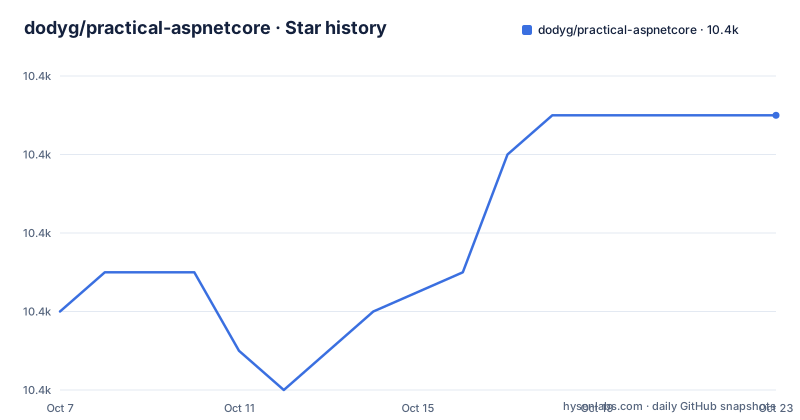
Star history
- dodyg/practical-aspnetcore10,411 ★ · +5
| Repository | 2026-10-07 | 2026-10-18 |
|---|---|---|
| dodyg/practical-aspnetcore | 10.4k | 10.4k |
5 Stars in the last 11 days, measured from the daily GitHub snapshot. Compare with other projects
Editorial analysis
A sample collection with no framework of its own
The repository description is the honest version of what this is: practical samples of ASP.NET Core across eleven versions from 2.1 up to 11, projects you can use, with explanations in the README. There is no library here, no package you would reference, and no abstraction to learn. What you get is a large, indexed set of small runnable projects.
The README opens with a greeting from Cairo, Egypt and a GitHub sponsor link, then points to a section for what is new on ASP.NET Core 11 hosted in `projects/net11`. Previous versions live on their own branches, and the README links back to net6.0, net5.0, a 3.1 LTS branch and a 2.1 LTS branch. The current default branch is `net10.0`.
That branch layout is the single most important thing to know. It is not one repository with version folders; it is one repository where each supported framework version gets a branch. Working on the wrong branch means reading samples written for an API that no longer exists in the version you are targeting, which is the most likely way to waste an afternoon here.
The project is MIT licensed, the language is C#, and there are no GitHub releases. Version history for the samples lives in the branches and in the commits, not in tags.
How the sections table is really organised
The README's main contribution is a table of feature areas, each with a sample count and a link. Reading the counts tells you what this author considers worth demonstrating, which is more informative than it sounds.
MVC leads with 47 samples, HTMX has 40, Minimal API has 36 and Endpoint Routing has 32. Blazor appears three separate ways: server-side render with 22, WebAssembly client side with 22, and Blazor Server with 16. Minimal Hosting has 23 and Generic Hosting has 9, so both the modern minimal startup and the older generic host pattern are covered rather than one replacing the other.
Then there are the areas that only matter if you need them: Elsa Workflow with 17, gRPC including gRPC-Web with 12, Razor Pages with 10, Configurations with 10, Orchard Core with 4, CoreWCF with 1, Polly with 1, and a single sample for reading the request path string. That last category is the interesting one. A one-sample section tells you the author found the default behaviour worth showing once rather than worth a tutorial.
RazorSlices appears at the end of the visible table without a count in the truncated view, which is the sort of thing you will find out by opening the link rather than by reading the README.
Getting a sample running
Nothing in the repository replaces `dotnet`. The tree has a `global.json` at the root, which is the file that pins the SDK version for the whole solution tree, plus a `.vscode/` directory and an `.editorconfig`. A pinned SDK is what makes a set of samples across many framework versions buildable on your machine.
git clone https://github.com/dodyg/practical-aspnetcore
cd practical-aspnetcore
dotnet run
Run that last command inside one of the project folders rather than at the root, since `projects/` holds the individual samples and each one is its own thing. The practical workflow is to navigate to a section directory, pick a sample, and run it.
Two things make the repository less pleasant to navigate than it could be. The samples live under a single `projects/` directory with many subdirectories rather than one solution per framework area, so there is a limit to how much an IDE can load at once. And the README's links are relative paths into that directory, which means the repository's own README is the index you navigate by rather than a solution explorer.
The `.github/` directory at the root implies automation, and the presence of `build-log.txt` and `build-log-after-prune.txt` suggests the samples are built in bulk, which is how a collection this size stays honest.
The housekeeping files that say a lot
Four files at the root are more revealing than the README: `STRUCTURE.md`, `MIGRATION-PLAN.md`, `OUT-OF-DATE.md` and `skills-checklist.md`.
`OUT-OF-DATE.md` is the one to find first. Any sample repository that tracks a dozen framework versions accumulates code that no longer builds against the current SDK, and a maintained list of known-stale samples is the only honest way to present that. Its existence tells you the project acknowledges drift rather than pretending every sample is current.
`MIGRATION-PLAN.md` is the counterpart: when a framework version retires, this is presumably where the removal of its samples is tracked. Read together, the two files are the honest bookkeeping of a collection that spans eleven framework generations.
`STRUCTURE.md` means the `projects/` layout has rules that are documented somewhere other than the README. `AGENTS.md` at the root, alongside `.github/`, suggests the project has been navigated or modified with coding agents and has instructions written down for them. `skills-checklist.md` is less self-explanatory from the name alone, and is the first thing you would need to open to find out.
There is also `CODE_OF_CONDUCT.md` and `CONTRIBUTING.md`, plus an `exercises/` directory that is separate from `projects/`. The exercises are the part of the repository aimed at people learning rather than people looking up a wiring pattern.
What the collection points at rather than contains
The README has an Other Samples section, and reading it tells you where the author thinks the boundaries are. ATProtocol samples, the protocol behind Bluesky, live in a separate repository called bluenile. Hydro Framework, described as Razor Pages compatible, lives in this repository under `projects/hydro`.
Three of the five pointers go outside entirely: the official .NET Aspire samples, the ORM Cookbook for data access, and the .NET team's own samples repository. That is a reasonable editorial stance for a sample collection. Data access and distributed application patterns both have better-maintained canonical homes, and duplicating them would create two places to update.
The trade-off is that you cannot get a complete application from this repository alone. It covers the web framework surface thoroughly and hands off everything adjacent to it, which is the right scope but means the reader has to be willing to jump repositories.
The HTMX section with 40 samples is the clearest editorial signal in the whole table. That is a lot of attention on a way of building server-rendered interactive pages without a JavaScript framework, and it tells you what the author thinks is worth understanding about modern ASP.NET Core.
How it compares to the official samples and a tutorial
The official `dotnet/samples` repository is the natural comparison. Microsoft's own samples are organised around products and templates, with each one corresponding to something in a getting-started guide. This repository is organised around framework features instead, so instead of one project demonstrating authentication you get five samples of authentication, each isolating one approach.
That difference is the whole value. A tutorial wants to get you to a working result quickly and therefore shows one path. A feature-indexed collection wants to show you the options, and it can afford to have a sample that does one small thing badly in order to make a specific mechanism legible.
The cost of that approach is that no single sample is a good starting template. There is no clone-it-and-you-have-an-app path here, and the samples are unlikely to share a consistent architecture, because consistency across unrelated feature demos would be a constraint nobody asked for. If you want a project to build on, use a template. If you want to understand a mechanism, this is where you look.
The other comparison is a video course. Samples are greppable and permanent, and you can read the exact configuration rather than watching someone type it. What they lack is narrative, and this repository does not attempt one.
Editorial conclusion
Use this repository the way its own structure suggests: pick one feature area, open one project, read the code, and move on. It answers the question a tutorial cannot, which is what the real wiring looks like once the getting-started guide stops. It will not tell you which of two approaches is right, and the absence of releases means there is no version history to lean on. Start on the net10.0 branch, since that is the default, and treat the net11 projects as preview material. The last push was on 2026-09-15, and if a sample does not build for you, check `OUT-OF-DATE.md` before filing anything.
Frequently asked questions
What is ASP.NET Core, and what does this repository show?
ASP.NET Core is Microsoft's cross-platform web framework, and practical-aspnetcore is a collection of runnable samples for it rather than a framework of its own. The README indexes them by feature area, from MVC and Minimal API to HTMX, Blazor, gRPC and Elsa workflows, with a sample count beside each section.
Which ASP.NET Core version should I look at in this repository?
The default branch is net10.0, so start there for current work. Samples for ASP.NET Core 11 live under projects/net11 in the same tree, and older framework versions are on their own branches including net6.0, net5.0, 3.1-LTS and 2.1-LTS. Reading samples from the wrong branch is the easiest way to see APIs your target version does not have.
How do I know which samples still build?
The repository tracks this rather than leaving you to find out. OUT-OF-DATE.md at the root is the list of samples known to be stale, and MIGRATION-PLAN.md covers removal of samples for retired framework versions. The presence of build-log files at the root also indicates the collection is built in bulk.
Does practical-aspnetcore include data access and distributed app samples?
It points elsewhere for those. The README directs data access to the ORM Cookbook and distributed application patterns to the official .NET Aspire samples, both maintained elsewhere. ATProtocol samples for Bluesky live in a separate repository called bluenile, and the .NET team also maintains its own samples repository.
Official sources
Add this badge to your README
If you maintain this project, the badge below links readers to this analysis and shows its maintenance status from the daily GitHub snapshot. Paste the markdown into your README; add ?metric=license or ?metric=stars to the image URL for a different field.

[](https://hysenlabs.com/projects/dodyg-practical-aspnetcore)Star history chart for your README
[](https://hysenlabs.com/projects/dodyg-practical-aspnetcore)