icm-architect: a method you install by copying a folder
Claude skill: design any process, idea, or problem into an ICM workspace (folder structure as agent architecture), or restructure an existing folder into one
At a glance
- What is it?
- icm-architect is a Claude skill with no code in it, five files deep at most, that turns a description of your work into a folder layout an agent can navigate. Its two modes include one that classifies every file in an existing repository and migrates it, and its only acceptance test is a behavioural one that no script in the repository can run for you.
- Who is it for?
- icm-architect is worth reading as a design position rather than installing as infrastructure: the claim that numbered folders and markdown files can carry sequencing, context and state instead of orchestration code is cheap to test on a scratch folder and expensive to bet a working repository on. Use Build mode first, on something disposable, and keep the six forms in mind as a vocabulary rather than a menu the model chooses for you.
- Can I use it commercially?
- Yes. MIT is a permissive licence: you can use, modify and sell software built on it, as long as you keep its copyright and licence notices.
- Is it still maintained?
- Yes. The repository last received commits 30 days ago.
- What is it written in?
- GitHub does not report a main language for this repository.
Answers come from the project's GitHub data, last synced on November 22, 2026, and from our analysis. They are not legal advice.
Star history
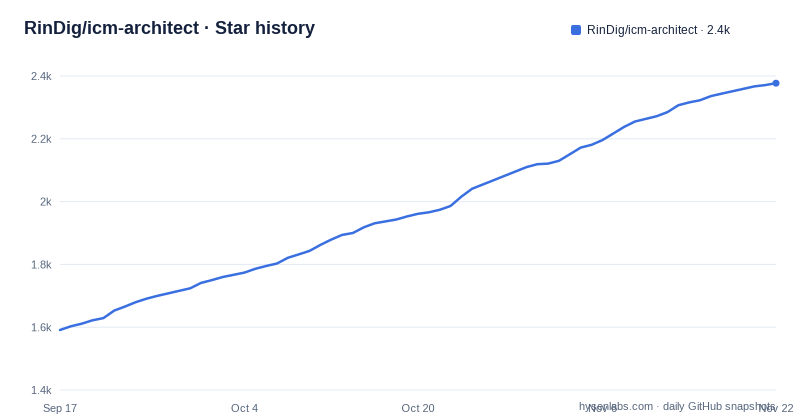
- RinDig/icm-architect2,377 ★ · +786
| Repository | 2026-09-17 | 2026-11-22 |
|---|---|---|
| RinDig/icm-architect | 1.6k | 2.4k |
786 Stars in the last 66 days, measured from the daily GitHub snapshot. Compare with other projects
Editorial analysis
Installation is a file copy with no version attached
There is no package manager here and no dependency to resolve. For Claude Code you copy the folder to `~/.claude/skills/icm-architect/`, or to `.claude/skills/icm-architect/` inside a project, and then invoke it in prose. The repository publishes no GitHub releases, and the file you copy carries no version marker, so there is nothing to record about which revision of the method a given installation came from. That has a practical consequence: the copy keeps working when the upstream repository changes, and nothing tells the agent that a newer version of the method exists. The last push to main is 25 August 2026, so the method does move, which is exactly why the absence of a version marker is worth thinking about before you install rather than after.
The Claude apps path depends on which folder is the zip root
The other installation route is a packaged file, and it comes with a rule that is easy to get wrong. You upload `icm-architect.skill`, which you can build with the skill-creator packager, or you zip the `icm-architect/` folder itself. The parenthetical is the whole instruction: the folder is the zip root, not its contents. A zip made by selecting the files inside the folder and compressing them produces an archive whose root is one level too deep, which is not the shape the loader expects. Either way the upload goes through Customize then Skills. So there are three distinct artifacts to get right depending on where you are installing: a folder for Claude Code, a skill file for the apps, and a zip whose root folder is the skill directory.
The skill fires on a phrase, not on a command
There is no flag, no subcommand and no argument parser. Installation is followed by a request in natural language, and the README offers three phrasings: ask Claude to ICM it, to structure it for agents, or to build a workspace for something. Whether the skill is selected at all is the model's decision, made from the shape of your request. That is a different activation model from a CLI, and it has a different failure mode: if the request does not resemble the method's vocabulary, nothing happens and you get an ordinary answer instead of a workspace. The three phrasings are also the only published contract for the trigger, so any automation built on top of this has to send text rather than pass an argument.
Restructure classifies your files, including the ones it calls dead
The second mode is the one to read twice. Restructure audits an existing folder, classifies every file it finds into one of five kinds, catalog, contract, factory, product or dead, proposes a migration map for approval, and only then migrates and validates. The word dead is doing real work in that list: the mode forms an opinion about which of your files carry no load, and the opinion is delivered as a proposal you are expected to approve. The only stated checkpoint is that migration map, and the safety logic for it is a markdown file, `references/reference-integrity.md`, described as the restructure move-safety gate. So the gate on a mode that rewrites a repository is a document the agent is expected to read, plus a human reading a plan. Run it on a folder you can restore.
Six forms, one skeleton, and the model chooses
Build mode does not take a template name as input. It extracts the structure already present in how you describe your work, including the stages, the human gates, and what is stable versus what changes per run, then picks one of six forms and scaffolds the smallest workspace that carries it. The six are Pipeline for a production line, Umbrella for a portfolio of pipelines, Record library for people, clients or sessions, Knowledge bundle as a navigable brain, Context map for an organization as a graph, and System map for a folder that later agents will edit, in terms of nouns, movements and change impact. They compose and recurse, so a portfolio can hold pipelines that hold records. Since the selection is made from your description rather than from you, the vocabulary in your request is doing the routing.
The walk test is the acceptance test, and nothing runs it
Every result is validated the same way: the walk test. An agent with no memory has to orient itself, act, and report status from the files alone. That is a behavioural criterion, and it is the only one the project names. The repository contains LICENSE, README.md, SKILL.md, `assets/` and `references/`, with no test directory, no workflow directory and no scripts; the primary language is not even classified, because there is no program in it. So the walk test is something a human runs by trying, and its result is a judgement. The payload is documentation. `SKILL.md` holds the method with its invariants and both modes, four reference files carry the detail, and the templates directory holds copyable starters: CLAUDE.md, CONTEXT.md, a stage contract, a node card, object and process cards, a schema and a questionnaire.
Token discipline is the cost model, and nothing measures it
The method's argument is structural rather than computational. Numbered folders carry sequencing, hierarchy carries context scoping, and plain markdown files carry state, which is how the README says orchestration code gets replaced by structure. It also draws a library analogy: the routing files are the catalog, small and stable, pointing at everything and storing almost nothing, and one librarian walks the building to whichever shelf the question selects. The reference file that carries the principles calls one of its five topics token discipline, next to naming and the five-layer hierarchy. What the repository does not contain is a single measurement: no token counts for a generated workspace, no comparison against the multi-agent framework the README says one agent replaces, and no cost table.
The method is a paper, and the skill is one implementation of it
The authority behind the folders sits outside the repository. The README points at a paper, Interpretable Context Methodology: Folder Structure as Agent Architecture, on arXiv, by Van Clief and McDermott, and at a community space called Clief Notes. The closing line of the documentation is careful about the relationship: MIT licensed, like the protocol it serves. So this is an implementation of a specification that lives somewhere else, and nothing here records which revision of that specification the skill was written against, since there is no changelog, no release and no version field. The one thing the repository does guarantee is the shape of the artifact: five entries at the root, a method file at the center, four references behind it, and a template library to copy from.
Editorial conclusion
icm-architect is worth reading as a design position rather than installing as infrastructure: the claim that numbered folders and markdown files can carry sequencing, context and state instead of orchestration code is cheap to test on a scratch folder and expensive to bet a working repository on. Use Build mode first, on something disposable, and keep the six forms in mind as a vocabulary rather than a menu the model chooses for you. Reserve Restructure for a folder you can restore from version control, and read the migration map line by line, because the mode classifies files as dead and its only stated checkpoint is your approval of that map. Before you copy the folder anywhere, decide whether you want a global or a per-project install, remember that a copy has no version attached to it, and if you are packaging it for Claude apps check which folder ends up as the root of the zip.
Frequently asked questions
What is an ICM workspace in icm-architect?
It is a folder structure used as agent architecture, where numbered folders carry sequencing, hierarchy carries context scoping, and plain markdown files carry state. The claim is that one agent reading the right files at the right moment does the work of a multi-agent framework, and that a human can open any folder and see what state the system is in.
What are the two modes of icm-architect?
Build extracts the structure already present in how you describe your work, including the stages, the human gates, and what is stable versus per-run, then picks one of six forms and scaffolds the smallest workspace that carries it. Restructure audits an existing folder, classifies every file as catalog, contract, factory, product or dead, proposes a migration map for approval, then migrates and validates.
Which six forms does icm-architect use?
Pipeline as a production line, Umbrella as a portfolio of pipelines, Record library for people, clients or sessions, Knowledge bundle as a navigable brain, Context map for an organization as a graph, and System map for a folder that later agents will edit. They compose and recurse, so a form can contain smaller instances of another.
How do I install icm-architect for Claude Code?
Copy the folder to `~/.claude/skills/icm-architect/` for a global install, or to `.claude/skills/icm-architect/` inside a project, then ask Claude to ICM it or to structure it for agents. For the Claude apps you upload `icm-architect.skill`, or a zip of the icm-architect folder itself with the folder as the zip root rather than its contents, through Customize then Skills.
What is the walk test in icm-architect?
It is the validation applied to every result: an agent with no memory has to orient, act, and report status from the files in the workspace alone. It is the project's stated acceptance criterion, and the repository contains no test suite or script that could run it for you.
Official sources
Add this badge to your README
If you maintain this project, the badge below links readers to this analysis and shows its maintenance status from the daily GitHub snapshot. Paste the markdown into your README; add ?metric=license or ?metric=stars to the image URL for a different field.

[](https://hysenlabs.com/projects/rindig-icm-architect)Star history chart for your README
[](https://hysenlabs.com/projects/rindig-icm-architect)Was this useful?