wechat-intelligence-hub separates installing from reading, and ships no key acquisition tool
Local-first WeChat intelligence system with a read-only CLI, Codex skills, searchable chat history, daily briefings, follow-ups and opportunity tracking.
At a glance
- What is it?
- wechat-intelligence-hub turns locally synced WeChat records into searchable briefings, follow-ups and opportunity tracking through a read-only reader core split across four directories. Its own documentation warns that a successful install does not mean chats can be read, that Windows first-time acquisition has not been merged, that the macOS new-machine path is untested, and that the repository deliberately ships patches and a preparation script rather than any executable acquisition tool.
- Who is it for?
- Read this before deciding anything else: the acquisition side is unfinished by the project's own account. No executable key-acquisition tool is bundled, Windows first-time acquisition is not merged, and the macOS new-machine path has not been tested on real hardware, while the candidate patches are offered only to maintainers and compatibility testers and have not passed acceptance on a fresh machine.
- Can I use it commercially?
- Yes, with strict conditions. AGPL-3.0 is a network copyleft licence: if people use a modified version over a network, for example as a hosted service, you must offer them its source code under the same licence.
- Is it still maintained?
- Yes. The repository last received commits 30 days ago.
- What is it written in?
- Mainly Python, according to GitHub's language statistics.
Answers come from the project's GitHub data, last synced on November 15, 2026, and from our analysis. They are not legal advice.
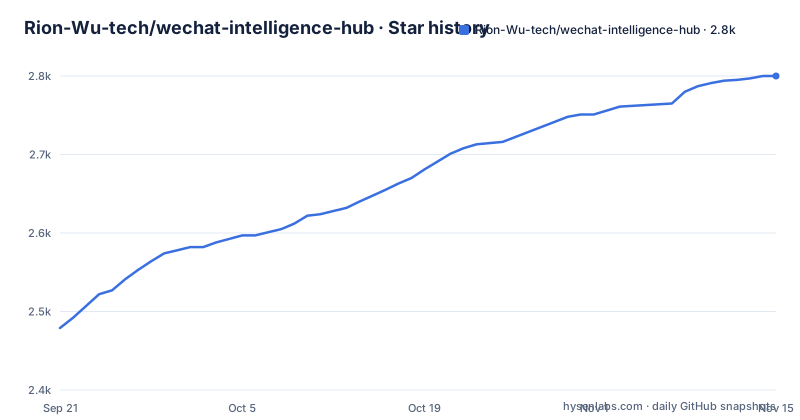
Star history
- Rion-Wu-tech/wechat-intelligence-hub2,800 ★ · +321
| Repository | 2026-09-21 | 2026-11-15 |
|---|---|---|
| Rion-Wu-tech/wechat-intelligence-hub | 2.5k | 2.8k |
321 Stars in the last 55 days, measured from the daily GitHub snapshot. Compare with other projects
Editorial analysis
A successful install is explicitly not the same as being able to read
The manual installation section leads with a bolded warning rather than a command: installing successfully does not equal being able to read chats. Full history and live database reading require access to a local database and to access material that the person is entitled to use, and coverage stops at whatever has synced to that machine.
The code is split into four directories for independent testing, while presenting as one product and one install. A clean-room read-only reader core sits under `projects/rion-wechat-reader/`. The agent entry point under `skills/wechat-cli/` calls that reader by default, and calls a compatible backend only when the user explicitly sets `RION_WECHAT_CLI_BIN`. The judgment rules live in `skills/wechat-intelligence-hub/`, and the deterministic local engine with its fictional samples and tests in `projects/wechat-intelligence-hub/`.
That environment variable is the seam. Out of the box the agent uses the project's own reader, and pointing it at a third-party binary is an explicit opt-in rather than a default.
The root also carries `LICENSE`, `COMMERCIAL-LICENSE.md` and `NOTICE.md` side by side, so the AGPL-3.0 grant and a separate commercial track are both present in the tree.
The repository ships patches and a prep script, not an acquisition tool
The macOS candidate route is documented in a providers directory, and the framing is narrow on purpose. The file is labelled as being for maintainers and compatibility test users, and it contains upstream Intel fixes, process identity verification, wait timeouts and cleanup improvements.
Two sentences constrain what it is. The repository attaches patches and a preparation script and does not attach an executable acquisition tool. And the route has not passed acceptance on a real machine with a real WeChat client, so it is not a default installation step.
Installation and the daily report never trigger acquisition. The maintenance note is explicit that installing, and generating a briefing, will not set an acquisition step off.
So the shipped surface is a diagnostic entry point rather than a credential-extraction path. What the project does hand over is the tooling to tell the two apart: the support summary prints only a version, a status, counters and error codes that are cleared for sharing, and it asks the person to check the output before sending it anywhere.
The documentation also names what not to do with it: keys, passwords and databases are not to be sent to the maintainer, to community spaces, or into issues.
A candidate route has to pass a real first-access pilot before it counts
There is a separate document defining what a candidate route has to achieve before it can become a default installation capability, and it names three conditions that must each be confirmed on their own: that the database is readable, that a target chat is spot-checked, and that official WeChat recovery is confirmed.
The document also states the rule that makes the gate meaningful: passing a simulated test does not equal succeeding at real key acquisition.
That distinction runs through the whole access design. The reader core is described as not obtaining keys, not re-signing, not injecting and not hooking WeChat. The optional experimental access helper is separated from it, with its own authorisation and side-effect boundaries.
A recovery detail shows how careful the edges are. After a database check succeeds, WeChat recovery still has to be confirmed, and a finish-recovery step removes a recovery lock only once the user has confirmed afterwards and a process check has passed. Normal queries are unaffected by that lock.
For anyone reading this as a capability claim, the pilot document is the honest measure of what works.
Windows acquisition is not merged and the macOS new-machine path is untested
The Windows status is given in detail and it is a partial result. The reader's native Windows continuous integration has verified import of fictional material, SQLCipher reading, ACL handling and path compatibility. Community reports describe individual successes for specific WeChat versions and particular tool combinations. What has not happened is a merge of Windows first-time acquisition into the main repository, and no acceptance from key acquisition through to a daily report on a new machine.
The macOS side is described in terms of what a candidate might do: it may restart WeChat and re-sign a copy. That is the side-effect boundary the project is drawing around its own helper, and the new-machine acquisition path is stated as not yet tested, with no guarantee that every version works.
The capability matrix is still being filled in version by version, and the maintainer's own verification is scoped carefully: real-data comparison between the old and new command line tools on a machine that already had authorised material, path checks for images, video and files on the current macOS, and an end-to-end indexing check. The documentation says plainly that none of this proves first-time key acquisition on a new machine or on other WeChat versions.
That scoping is the most useful sentence in the section.
A top-level ok true means the diagnosis ran, not that it worked
The standalone command line entry point is installed on its own, with a SQLCipher build flag, and then exercised:
projects/rion-wechat-reader/install.sh --with-sqlcipher
rion-wechat-cli self-test
rion-wechat-cli self-test --require-sqlcipher
rion-wechat-cli access-plan --pretty
The state model is three values, and they are the thing to read. `ready` means existing configuration is being reused. `ready_to_configure` means setup should continue with the same input. `needs_access` means access material is missing, and setup should not be run again.
Then the warning that trips people up: a top-level `ok: true` in the JSON output only means the diagnosis completed. The state to read is the one under `data`.
So the success flag answers whether the check ran, not whether there is anything to read. Partial coverage, a missing driver, multiple accounts and permission problems each produce their own next step instead of a single failure.
The same caution appears on the support summary, which exists so that a person can hand a problem to the maintainer without handing over anything sensitive.
HTML output fails closed when its sanitiser or Pandoc is missing
The full product installs with two flags:
./scripts/install.sh --with-sqlcipher --with-htmlThe HTML flag has a specific meaning. It installs a pinned version of the HTML sanitising dependency into the Hub's own virtual environment rather than modifying a global Python, and it requires Pandoc on the machine.
What happens when either is absent is the part worth having. HTML generation reports a clear error and does not fall back to an un-sanitised page, while plain Markdown and search keep working. That is a fail-closed choice, and it is stated rather than assumed.
Running without naming a skill installs both the reader entry point and the hub entry point together, and naming only the hub still pulls in the dependency automatically, so nobody has to assemble the two components by hand. The installer will not overwrite an existing directory, and an upgrade is meant to be confirmed against the real engine path first, with a backup, keeping the profile, the database and the key.
There is a fictional-data path for checking the chain without touching anything real:
bash projects/wechat-intelligence-hub/scripts/run_demo.shThe engine path only needs setting when working on the source tree directly.
The install prompt is an operator contract handed to the agent
The primary installation route is a block of Chinese text addressed to Codex, meant to be pasted in whole rather than executed line by line. It is worth reading as a contract rather than as a command.
It instructs the agent to read the repository description first, check whether it is already installed and whether the current configuration works, and reuse any existing configuration or key rather than overwriting the person's profile and data. Missing dependencies are the agent's problem. If a key is genuinely absent, the agent is told to check per operating system whether an approved acquisition route exists, to run one only if it fits this machine, only after explaining the impact and receiving separate confirmation, and to report the gap rather than run an unreviewed tool if nothing fits.
It also draws the responsibility line explicitly: the person handles logging into WeChat and completing system authorisation, and will not send a password or a key to the agent. On completion the agent reports which ranges it can read and what is still not ready, then helps initialise the hub.
The closing instruction is a constraint on behaviour rather than a task: locate and fix errors, do not hand back a pile of commands, and do not retry indefinitely.
That block is the clearest statement of the project's safety model anywhere in the documentation.
Editorial conclusion
Read this before deciding anything else: the acquisition side is unfinished by the project's own account. No executable key-acquisition tool is bundled, Windows first-time acquisition is not merged, and the macOS new-machine path has not been tested on real hardware, while the candidate patches are offered only to maintainers and compatibility testers and have not passed acceptance on a fresh machine. Anyone evaluating this should treat the readable-data boundary as the thing to establish, not the feature list, because the project itself puts the warning first. Within that boundary the design is careful: the reader is read-only and explicitly does not obtain keys, re-sign, inject or hook; the HTML report fails closed when its sanitiser and Pandoc are missing rather than degrading to unsanitised output; labels are an organisational aid that never narrows keyword search; and the installer will not overwrite an existing directory. The code is AGPL-3.0 with a separate commercial licence file, so read both before shipping anything derived from it.
Frequently asked questions
What does wechat-intelligence-hub do?
It turns locally synced WeChat records into a personal intelligence base: contact history, group chat topics, items awaiting a reply, commitments, commercial opportunities and follow-up leads, plus reports over any time range you name. Reports come as Markdown and as an interactive HTML page with composite actions, group chat, key contact and commercial signal sections.
Does installing wechat-intelligence-hub give me access to my WeChat chats?
No, and the documentation says so in bold before giving any command. Full history and live database reading need an entitled local database and access material, and coverage extends only to data already synced to that machine. A successful install is not the same as being able to read anything.
Does wechat-intelligence-hub include a tool for obtaining WeChat access keys?
No. The repository attaches patches and a preparation script for the macOS candidate route and states that it does not attach an executable acquisition tool. Installation and daily reports never trigger acquisition, and keys, passwords and databases are not to be sent to the maintainer or into issues.
What do the wechat-cli states ready, ready_to_configure and needs_access mean?
ready means existing configuration is being reused, ready_to_configure means setup should continue with the same input, and needs_access means access material is missing so setup should not be repeated. A top-level ok of true in the JSON only means the diagnosis completed, so the state to read is the one under data.
What happens if the HTML report dependencies are missing?
The installer's HTML flag installs a pinned sanitising dependency into the Hub's own virtual environment and also needs Pandoc. Without them, HTML generation reports a clear error and does not fall back to an un-sanitised page, while plain Markdown and search continue to work.
Official sources
Add this badge to your README
If you maintain this project, the badge below links readers to this analysis and shows its maintenance status from the daily GitHub snapshot. Paste the markdown into your README; add ?metric=license or ?metric=stars to the image URL for a different field.

[](https://hysenlabs.com/projects/rion-wu-tech-wechat-intelligence-hub)Star history chart for your README
[](https://hysenlabs.com/projects/rion-wu-tech-wechat-intelligence-hub)Was this useful?