JustHireMe ships its auto-apply code disabled, stores API keys in app settings with the keychain on the roadmap, and its manifest version is three releases behind the tags
Local-first AI job intelligence workbench for scraping roles, ranking fit, and generating tailored application materials.
At a glance
- What is it?
- vasu-devs/JustHireMe is a local-first desktop workbench that scrapes job listings, filters them, ranks them against a profile held in a graph and a vector store, and generates application documents, where the browser automation that would submit those documents for you is labelled an experimental lab, ships behind a flag set to false, and is explicitly excluded from the supported core, while the macOS build is ad-hoc signed and not notarised.
- Who is it for?
- This is worth trying if your problem is that job boards are noisy and you want the filtering and the ranking to be inspectable rather than opaque, because the quality gate rejects leads before they reach the ranker and the match stage is backed by a graph of your own skills rather than a keyword score. Two things to decide before you rely on it.
- Can I use it commercially?
- Yes, with strict conditions. AGPL-3.0 is a network copyleft licence: if people use a modified version over a network, for example as a hosted service, you must offer them its source code under the same licence.
- Is it still maintained?
- Yes. The repository last received commits 37 days ago.
- What is it written in?
- Mainly Python, according to GitHub's language statistics.
Answers come from the project's GitHub data, last synced on November 15, 2026, and from our analysis. They are not legal advice.
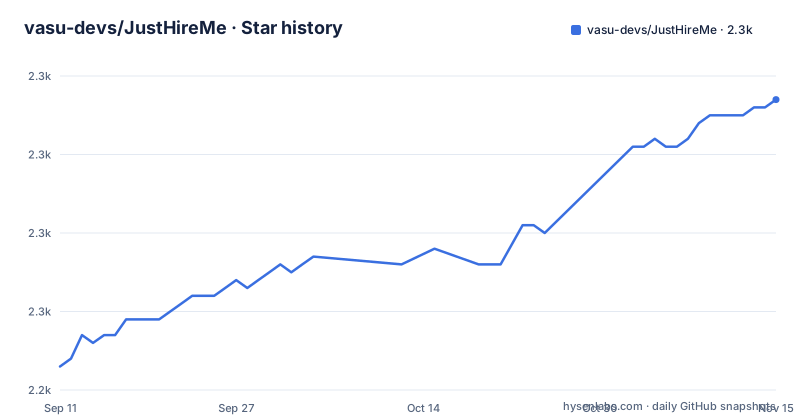
Star history
- vasu-devs/JustHireMe2,277 ★ · +34
| Repository | 2026-09-11 | 2026-11-15 |
|---|---|---|
| vasu-devs/JustHireMe | 2.2k | 2.3k |
34 Stars in the last 65 days, measured from the daily GitHub snapshot. Compare with other projects
Editorial analysis
The auto-apply code ships in the repository and is gated off
This project scrapes job listings and writes tailored application documents, which is a defensible use of automation. It also contains the code that would submit those documents to employers, and the status table is unusually explicit about that part.
The row reads that browser automation and auto-apply is an experimental lab, disabled by default. The note below the pipeline repeats it in full: the code exists in the repository, it is experimental, opt-in and unsupported as part of the stable core, and the supported open-source core is the scraper, the ranker, vector matching and the customizer. A second row in the same table marks the scraper, ranking, vector matching and customizer as the supported open-source scope.
The gate is visible in the environment example, under a heading that names the section as being for the experimental automation lab only:
JHM_AUTO_APPLY=false
PLAYWRIGHT_CHROMIUM_EXECUTABLE=
One flag, shipped set to false, and a path to a browser binary it would drive. That is a narrow surface and it is off, which is the right way to ship something of that shape.
The distinction that matters for reading the page: everything before the documents is described as supported, and the document submission is not. A reader who wants an agent filling in forms is looking at the part the project itself declines to stand behind.
The two workflow diagrams put the quality gate on opposite sides of the ranker
The page carries two flowcharts of the same pipeline and they do not agree about where leads are stored.
The first diagram runs left to right. A profile import feeds two stores, a graph of skills and projects and a vector store of the same, and those two plus a ranker stage all feed the ranking and evaluation step. A scraper produces normalised leads, those pass through a lead quality gate, and only then reach the ranker. From the ranker the output goes to a pipeline and on to the customizer, which produces a resume document, a cover letter document and outreach drafts. There is no store in that diagram and no human step.
The second diagram runs top to bottom and is the one with the human in it. A source adapter normalises a lead, the quality gate decides, and the accept branch goes to a local CRM. Only after the lead is in the local store does fit evaluation run, and only after that does a user review happen.
So one diagram ranks before anything is stored, and the other stores an accepted lead before ranking it and reviews a human afterwards. Both are labelled as the visual workflow of the same product, and the second adds a class-definitions block that styles the gate, the reject branch, the store and the score as four distinct kinds of step.
Which one matches the software is not something the page says, and that matters if you are reasoning about what happens to a rejected lead and where the record of a reviewed one lives.
Keys sit in local app settings and the OS keychain is on the roadmap
The status table has one row about credentials, and it is worth reading closely because of the word planned.
API key storage is described as local app settings, with the environment file reserved for development overrides, and the OS keychain marked as planned. So today the keys live in a configuration store belonging to the desktop application, not in the platform's credential store.
The environment example says the same thing from the other direction. Its header says to copy it only if you need shell-level overrides, and that most users should enter API keys in the desktop app settings instead. It then lists five provider keys, all empty, alongside a local model endpoint. One of those five is for a different vendor again, which the status table's keyless row does not mention, so the file is broader than the page's own summary of what you can plug in.
The local model endpoint is worth noting as a specific address rather than a general idea: it points at the versioned compatibility path of a locally running model server, which is what lets the application speak to a local model through the same client interface it uses for hosted providers.
None of this is a complaint about the design. Storing keys in application settings is a normal choice for a desktop tool, and the keychain is named as the plan. It is simply the current state, and it is the state that applies to anyone who follows the page as written.
The macOS installer is ad-hoc signed and the page says Gatekeeper will object
The distribution table has a row that most projects would not publish.
Windows and Linux ship every version: an executable installer, and packages as a Debian package plus an AppImage. The macOS row says the disk image and application bundle are released every version, and then adds in bold that they are ad-hoc signed and not yet notarised, so Gatekeeper may require the user to choose to open them anyway.
That is a real install obstacle rather than a formality. On a current macOS, a disk image from an unsigned build is blocked on first open, and the way past it is a right-click or a settings change by the person installing. The page is upfront about it, which is better than the alternative, but it means the macOS path has a step the other two do not.
Two other rows on distribution are worth pulling out. The auto-update row says updating is built in and the application updates itself from the latest release, which pairs with the release scripts in the package manifest: there is a script that verifies the updater's release artefact and a preflight target that runs the full check set and a smoke suite before a release.
And the install is two stage rather than one. The installer is about a hundred megabytes, and the heavier runtime, described as a browser, the vector libraries and an embedding model, downloads once on first run and is then cached. So first launch makes a second network fetch, which matters on metered connections and for anyone reproducing an install offline.
The package manifest is at 1.4.0 and the newest release tag is 1.7.0
Three releases are visible: version 1.6.1 on 2026-08-26, 1.6.2 two days later, and 1.7.0 on 2026-09-01. The default branch is not archived and its most recent push is dated 2026-09-30.
The package manifest in the same repository says:
  "version": "1.4.0",
  "license": "AGPL-3.0-only",
So the version the build system reads is three minor releases behind the newest tag, and a month behind the last commit. That is not necessarily a bug: a desktop application whose release pipeline stamps installers from a tag can legitimately leave the manifest behind. But the repository also carries a version-check script as a named target in the manifest, alongside a version-bump target, which suggests the drift is meant to be caught and is currently not caught, or that the check is about a different file than this one.
The release process around it is more thorough than the version field suggests. There is a build target for the frontend, one for the Python sidecar, one for the runtime pack, one for the vector runtime, and an aggregate that runs them through a custom parallel runner rather than the package manager's own. On the checking side there is a parallel check target and a separate release preflight that runs the checks and then a smoke suite.
The coverage target excludes the one behavioural test file
The test scripts come in three shapes and one of them has a hole in it.
A plain test target runs the suite. A behavioural target runs a single file by path. And the coverage target runs the suite with coverage while excluding that same file:
    "test:behavioral": "vitest run src/features/behavioralRender.test.tsx",
    "test:coverage": "vitest run --coverage --exclude src/features/behavioralRender.test.tsx",
So the file is tested, and it is deliberately kept out of the coverage number. That is a defensible choice, since a rendering test can pull in a large dependency tree and distort the figure. It is also a choice that has to be read rather than assumed, because a coverage percentage for this project does not account for the code that file exercises.
The smoke tests are a separate concern again, and there are four of them by name: one for the Python sidecar, one for the Windows update path, one against live job sources, and one for the model step, with the last cut off in what is shown here. A smoke test against live sources is worth noting for what it implies, which is that the pipeline's first stage depends on external services and somebody tests against them in CI.
None of this appears in the documentation prose. All of it is in the script table, which makes the manifest the more informative file on this project than the readme is about its own test discipline.
Matching is backed by a graph and a vector store, and the embedding model has a hashing fallback
The claim that makes this project different from a keyword filter is the explainability row, which says fit scores are backed by graph retrieval over your own skill and project graph rather than by a number alone. Two stores sit behind that.
One is an embedded graph database holding skills and projects, and the other is a vector store holding embeddings of the same material. The five-stage pipeline puts them at the match step, after ranking and before the customizer, and the first workflow diagram shows both feeding the ranker directly as well.
The vector side has a specific arrangement worth describing. Semantic matching is said to work fully offline with no API key, using a bundled model converted to a compact inference format, with a deterministic hashing fallback. That fallback is the important part: when the bundled model is not there, the system still produces vectors, by hashing instead of by embedding, and the interface above it does not change.
That is a deliberate degradation path and a silent one. A user whose model failed to load gets a working system with worse semantics, and nothing in the interface is obliged to say so.
The graph side is named with a capital and an accent in the page, which suggests a specific embedded database rather than a generic graph abstraction, and the pipeline's own text names the vector store as well. Both are local, which is what lets the matching step work with no network and no key.
Five governance files and a Python entry point at the repository root
The top level of the repository tells you more about how this project is run than the readme does.
There is a licence file, a notice file, and a separate file whose name says commercial licence. The package manifest declares the network copyleft licence with the only-forever suffix, which is the stricter of the two variants. So the terms are a copyleft licence for the open-source use, with a commercial licence file sitting beside it for the other case.
Next to those sit a code of conduct and, separately, a contributor licence agreement. A project with both a contributing guide and a separate agreement file is running a formal contribution process, which is more machinery than most single-maintainer projects need and is worth knowing before you send a patch.
Then the repository stops being only a code repository. There is a designs directory, a posts directory, a website directory, a roadmap file and a support file. So the same tree holds the application, its design documents, written posts and a marketing site.
Two smaller oddities. There is a Python file sitting at the top level rather than inside the backend directory, which is a little surprising in a project whose interface is built with a bundler and a desktop shell. And there is a tool-specific ignore file for the graph tooling, alongside the ordinary ones, which corroborates the graph database in the matching stage.
One line in the readme ties continued upkeep of the project to sponsorship, alongside funding for source adapter coverage. That is a funding model statement, and it is the only place the page says anything about how the project pays for itself.
Editorial conclusion
This is worth trying if your problem is that job boards are noisy and you want the filtering and the ranking to be inspectable rather than opaque, because the quality gate rejects leads before they reach the ranker and the match stage is backed by a graph of your own skills rather than a keyword score. Two things to decide before you rely on it. The submission path is experimental, off by default and outside the supported core, so treat the pipeline as ending at generated documents unless you are willing to own that part. And the key handling is plain local settings with an OS keychain listed as future work, so decide what you are willing to store in a desktop config on a machine that also holds your resume.
Frequently asked questions
Does JustHireMe need an API key to work?
No. Discovery, ranking and generation are described as running with zero API key, powered by a locally running model server or by an existing Claude Code or Codex subscription. Keyed providers including OpenAI, Gemini and Groq are optional, and the environment example ships them all empty.
How does JustHireMe rank a job against my profile?
In two stages. Leads are scored first by deterministic explainable rules with feedback learning and optional model reasoning, then compared against your profile using a graph of your skills and projects alongside a vector store. The page says the fit score comes with that evidence rather than a bare number.
Is the browser automation feature in JustHireMe stable?
No. It is described as an experimental lab, disabled by default, opt-in, and unsupported as part of the stable core, whose supported scope is the scraper, ranker, vector matching and customizer. Its gate is an environment flag that ships set to false.
What does the JustHireMe desktop installer need?
Windows, macOS and Linux builds ship every version. The installer is about 100 MB and the heavier runtime, described as a browser, vector libraries and an embedding model, downloads once on first run and is cached afterwards. The macOS build is ad-hoc signed and not notarised, so Gatekeeper may require opening it anyway.
What licence is JustHireMe released under?
The package manifest declares the network copyleft licence with the only-forever suffix. The repository root also carries a licence file, a notice file and a separate commercial licence file, so both terms are published.
Official sources
Add this badge to your README
If you maintain this project, the badge below links readers to this analysis and shows its maintenance status from the daily GitHub snapshot. Paste the markdown into your README; add ?metric=license or ?metric=stars to the image URL for a different field.

[](https://hysenlabs.com/projects/vasu-devs-justhireme)Star history chart for your README
[](https://hysenlabs.com/projects/vasu-devs-justhireme)Was this useful?