riscv/learn: A Structured RISC-V Learning Directory
Tracking RISC-V Actions on Education, Training, Courses, Monitorships, etc.
At a glance
- What is it?
- riscv/learn is a community-maintained directory for RISC-V courses, specifications, tools, hardware, papers, and learning paths. It is useful as a curriculum map, but it is not an installable learning environment or a substitute for the underlying resources.
- Who is it for?
- Adopt riscv/learn when you need a maintained map of RISC-V education resources or a starting sequence for hardware, software, or systems study. Do not treat it as a standalone course, substitute it for current specifications, or rely on it when you require prerequisites, exercises, support, and licensing details that a listed resource does not provide.
- Can I use it commercially?
- Yes. CC0-1.0 is a permissive licence: you can use, modify and sell software built on it, as long as you keep its copyright and licence notices.
- Is it still maintained?
- Yes. The repository received new commits within the last day.
- What is it written in?
- GitHub does not report a main language for this repository.
Answers come from the project's GitHub data, last synced on October 23, 2026, and from our analysis. They are not legal advice.
Star history
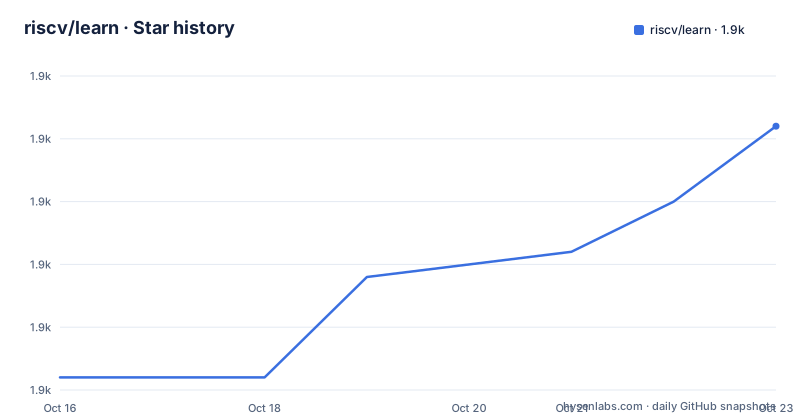
- riscv/learn1,878 ★ · +10
| Repository | 2026-10-16 | 2026-10-23 |
|---|---|---|
| riscv/learn | 1.9k | 1.9k |
10 Stars in the last 7 days, measured from the daily GitHub snapshot. Compare with other projects
Editorial analysis
Why riscv/learn Organizes RISC-V Study
riscv/learn addresses a practical problem in RISC-V education: the relevant material is spread across specifications, university courses, commercial training, tools, processor implementations, development boards, and papers. The repository does not teach RISC-V by itself. Instead, it organizes those resources into topic-based tables, recommends starting points, and proposes three learning paths for hardware, software, and systems.
The intended audience is broad. A learner with little or no digital design background can start with beginner resources, while someone with computer architecture experience can move toward operating systems, vectors, privileged architecture, or processor design. The directory also serves educators and contributors who want a public reference for curriculum choices. Its own description mentions education, training, courses, and mentorships, although the visible README concentrates most heavily on learning resources.
The repository takes a catalog-and-curriculum approach. A commercial course can sit beside open books, government or standards documentation, emulators, compilers, and hardware projects. That breadth is useful, but users must inspect each destination separately. The directory does not establish a uniform syllabus, assess every prerequisite, or replace the source material it links to.
How the RISC-V Resource Map Is Structured
The README starts with official references, including the RISC-V Specifications, ISA Explorer, ratified specifications, and training and certification. It then provides a resource-selection table based on tasks such as following a guided path, writing assembly, looking up an ABI, emulating a machine, porting software, studying a CPU, testing a core, or finding a device. This task-oriented index is more useful than a simple chronological bibliography because it maps an intended activity to a category and example.
The catalog groups resources under beginner, intermediate, specifications and reference, software and tools, ecosystem and porting, open implementations, verification and compliance, boards, and community-oriented material. Individual entries record details such as resource name, authors, description, access method, and the date it was added. The contributor instructions require resources to be placed in the appropriate table, alphabetically, with the current date.
Three explicit sequences connect those categories. The hardware path moves from digital design and the ISA to a first core, verification, system-on-chip design, and established implementations such as Ibex, Rocket Chip, or BOOM. The software path progresses from assembly through execution mechanics, toolchains, vectors, and porting. The systems path starts with privileged architecture, continues through a small operating system and boot interfaces, and ends with Linux ports on emulators or 64-bit boards. These are editorial routes through separate resources, not executable workflows supplied by riscv/learn.
Starting with the Official RISC-V References
There is no installation procedure because riscv/learn is a repository of links and written guidance rather than an application or library. The README says to begin at https://docs.riscv.org/ for the ISA manuals and at https://tech.riscv.org/isa-explorer/ for extension and profile information. The explorer is described as supporting ISA configurations, comparison of profiles, and links from extensions and instructions back to relevant specification material.
For a first real use, follow the repository's task table rather than opening every linked resource. If the goal is assembly, choose the software path and inspect the listed assembly material. If the goal is hardware, open the ISA Explorer alongside the architecture book and then review the first-core recommendations. If the goal is a systems course, start with Volume II of the ISA manual before moving to the operating-system and boot sequence.
The repository also documents how contributors add or update a resource. A pull request should place the entry in the correct table, maintain alphabetical order, and include today's date. The documented sign-off command for such a commit is:
git commit -sThis creates a DCO-signed commit when it is run in a repository configured for that workflow. The README does not give repository-cloning, branch-creation, or pull-request submission commands, so those steps are intentionally left unspecified. The contributing file is identified as the place for full contribution details.
What the Catalog Covers for Engineers
The resource map addresses several engineering tasks that are easy to confuse under the broad label of RISC-V development. Assembly learners can find introductory material and emulators such as Ripes, RARS, Spike, and QEMU. Software engineers can follow references for the GNU Toolchain and LLVM, inspect vector resources, and use the ecosystem and porting section for operating-system support. Verification is separated into a distinct category containing riscv-tests, Architectural Tests, RISCOF, and Sail.
Hardware work receives a staged treatment rather than a single list of cores. Beginner resources address digital design and RISC-V fundamentals. Later material covers building a core, FPGA-oriented study, system-on-chip design, and production-oriented examples such as Ibex, Rocket Chip, BOOM, XiangShan, and PicoRV32. Boards and development kits provide physical targets, including Raspberry Pi Pico 2, Milk-V Duo, and DC Roma.
This breadth also creates a discovery problem. “Intermediate” does not define a fixed number of prerequisite topics, and board entries do not mean that every listed tool works with every board. Likewise, a specification link can describe an architectural requirement without documenting driver support or an operating-system port. The directory is strongest for locating the next kind of resource; the reader must still check version compatibility, supported profiles, access requirements, and hardware constraints on the linked project's own documentation.
Link Verification and Catalog Boundaries
The README includes a link-check status dated 2026-09-09. At that point, the automated report recorded 163 working links, 14 redirects, and two broken links. A check workflow is configured under `.github/`, and repository files include `.lycheecache` and `.lycheeignore`, which are consistent with recurring link maintenance. A separate `contributing.md` file contains contribution rules, although its full contents are not visible here.
Link checking reduces navigation failures but does not validate educational quality. A page can resolve successfully while changing, requiring an account, using paid course material, or no longer matching the catalog description. Likewise, the link report's aggregate status does not identify the two broken links in the visible README text. Users who depend on a particular course, specification, tool, or board should open its official page and inspect it directly.
The repository also has no GitHub releases. That means users should treat `main` and its linked external services as the relevant version points rather than expecting tagged software releases or upgrade notes. This is appropriate for a directory, but it changes how maintenance should be interpreted. Recent repository activity can update the catalog without implying that every external resource has been reviewed for curriculum accuracy, technical depth, accessibility, or current software compatibility.
CC0-1.0 Licensing and Resource-by-Resource Terms
The repository declares a CC0-1.0 license. That designation applies to riscv/learn's own catalog contribution, such as its written organization and repository content. It should not be assumed to cover every course, specification, book, tool, emulator, processor, or hardware design linked from the README. Those resources can have separate licenses, access conditions, trademark rules, or distribution terms.
The distinction matters for anyone planning to copy material into a course, package resources into internal training, modify a linked implementation, or redistribute associated files. The directory records names, descriptions, links, and access categories, but the visible material does not provide a license matrix for external entries. CC0-1.0 on the repository therefore does not settle reuse rights for the destinations it lists.
Maintenance cost is primarily editorial rather than binary. Contributors must locate an appropriate resource, add it to the correct table, preserve alphabetical order, record the date, and sign commits with the DCO. The README reports link verification and also acknowledges redirects and broken links. Upgraders are not applying a package update; they are reviewing a changing `main` branch and checking the external resources selected from it.
riscv/learn Compared with a Single Course
The clearest alternative to riscv/learn is a single, structured course such as the listed MIT 6.1810 course, an edX course, or the introductory assembly materials in the catalog. A course typically provides a defined sequence, lectures, exercises, deadlines, and instructor support. riscv/learn instead offers breadth and routing across media, publishers, standards bodies, universities, hardware vendors, and open-source projects.
That difference affects adoption. Someone who already understands computer architecture and needs a coherent operating-systems course may benefit more from following that course directly. Someone deciding between assembly, toolchains, processor design, or porting can use riscv/learn to compare entry points before committing. The repository cannot guarantee that a path's components use matching terminology, tool versions, or architectural profiles because each resource is maintained independently.
A course may also become dated as hardware and profiles change. The directory can help a learner move from a foundational course toward current specifications or active implementations, but it does not rewrite a course whose examples no longer match the learner's target. The practical comparison is therefore breadth versus instructional continuity: riscv/learn offers many routes and references, while a single course supplies a bounded experience.
Editorial conclusion
Adopt riscv/learn when you need a maintained map of RISC-V education resources or a starting sequence for hardware, software, or systems study. Do not treat it as a standalone course, substitute it for current specifications, or rely on it when you require prerequisites, exercises, support, and licensing details that a listed resource does not provide. Verify first that the relevant links remain accessible, that the recommended material matches your prior knowledge, and that each external course, specification, tool, or board has terms suitable for your intended use.
Frequently asked questions
What is riscv/learn used for?
It is a community-driven directory for finding RISC-V courses, books, specifications, tools, cores, boards, and papers. It also suggests hardware, software, and systems learning paths.
How do I start learning RISC-V with riscv/learn?
The README recommends the official specifications and ISA Explorer as foundational references, then directs beginners toward digital design and introductory RISC-V materials. Learners can choose a hardware, software, or systems path.
Can I install riscv/learn as RISC-V software?
No installation instructions are provided because riscv/learn is a documented resource directory rather than an application or library. Its learning value comes from organizing links and study sequences.
How can I contribute a RISC-V resource to riscv/learn?
Open a pull request that adds the resource to the correct table in alphabetical order with today's date, or open an issue. Commits require DCO sign-off through the documented `git commit -s` command.
Official sources
Add this badge to your README
If you maintain this project, the badge below links readers to this analysis and shows its maintenance status from the daily GitHub snapshot. Paste the markdown into your README; add ?metric=license or ?metric=stars to the image URL for a different field.

[](https://hysenlabs.com/projects/riscv-learn)Star history chart for your README
[](https://hysenlabs.com/projects/riscv-learn)Was this useful?