Notepad3: a portable Scintilla editor with four CPU builds and an INI you can edit
Notepad like text editor based on the Scintilla source code. Notepad3 based on code from Notepad2 and MiniPath on code from metapath. Download Notepad3:
At a glance
- What is it?
- Notepad3 is a Windows text editor built on Scintilla and Lexilla, shipped as a portable executable with settings in an INI beside it. Two features go well past an ordinary notepad: TinyExpr++ evaluates maths in the status bar, and clipboard monitoring mode appends every clipboard change to the document on its own.
- Who is it for?
- Notepad3 fits someone on Windows who wants a single executable they can carry on a USB drive, edit with a text editor, and keep for years without an installer or an updater in the way. It does not fit a cross-platform team, since the system requirements are Windows 8.1, 10 or 11 on x86, x64, x64 with AVX2 or ARM64, and there is no other target.
- Can I use it commercially?
- Not without permission. GitHub finds no licence file in the repository, and without a licence all rights are reserved by default: you may read the code but not reuse it. Check the README, or ask the authors, before using it.
- Is it still maintained?
- Yes. The repository last received commits 2 days ago.
- What is it written in?
- Mainly C, according to GitHub's language statistics.
Answers come from the project's GitHub data, last synced on November 14, 2026, and from our analysis. They are not legal advice.
Star history
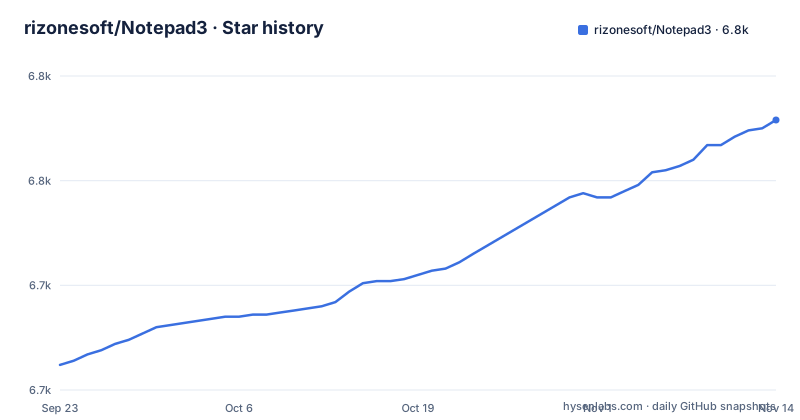
- rizonesoft/Notepad36,779 ★ · +117
| Repository | 2026-09-23 | 2026-11-14 |
|---|---|---|
| rizonesoft/Notepad3 | 6.7k | 6.8k |
117 Stars in the last 52 days, measured from the daily GitHub snapshot. Compare with other projects
Editorial analysis
One executable, four architectures, and no installer step
The distribution model is the first thing to understand. Notepad3 is fully portable: you extract the archive and run Notepad3.exe. There is no installation. The homepage, the GitHub releases page and the pre-releases page give you three channels, stable, tagged releases and nightly builds respectively.
Architectures are listed as x86 on Win32, x64, x64 with AVX2, and ARM64, and the system requirements name Windows 8.1, 10 and 11. The system requirements list only Windows.
The portable design extends to where settings live. Configuration is stored in Notepad3.ini alongside the executable, using relative path storage, so copying the folder to another machine or another drive carries your configuration with it. Documentation for replacing the built-in Windows Notepad exists for system-wide integration, which is the one feature here that reaches beyond the folder it was extracted into.
Ctrl+F7 opens the INI in the editor that reads it
The configuration file is not hidden behind a settings dialog, and that is the design decision worth noting. Pressing Ctrl+F7 opens Notepad3.ini directly in the editor, which means the settings are always readable with the tool you are already using and diffable in version control.
The file is divided into sections. UI settings live in [Settings] and are managed through the menu. Advanced settings live in [Settings2] and are meant to be edited by hand, with most of them requiring a restart to take effect. The status bar has its own section, [Statusbar Settings], where field layout, order and width are configured, and toolbar labels live in [Toolbar Labels], which controls whether function names appear next to the icons.
The full reference is a separate document, readme/config/Configuration.md, and schemas, styles and themes are covered in readme/schema/CustomSchema.md. Several features are configured by file content rather than by settings, which is a different mechanism: a file whose first line is .LOG gets a fresh date and time appended when you open it, and Emacs file variables are honoured for encoding, mode and tab width.
TinyExpr++ does maths in the status bar and in your line numbers
The status bar is configurable through 16 fields, and one of them evaluates expressions. TinyExpr++ is an inline math evaluator with more than 80 functions, and it works in two places.
Type expression=? to evaluate an expression in place, where the text is, and use ${expr} syntax in the line numbering to have the value appear in the gutter. The status bar field can also display an evaluation, alongside line, column, encoding and the Unicode code point.
This is the feature that most reliably separates Notepad3 from a plain notepad, and it has its own documentation at readme/tinyexprcpp/TinyExprPP.md. It also means line numbering can be more than decoration: a numbered scheme that computes per-line values is a small scripting surface without a scripting language.
Other editing features in the same spirit: code folding with toggle-all support, bookmarks, word auto-completion with configurable fill-up characters, mark all occurrences with a count, virtual space rectangular selection with Alt+Drag, insert GUIDs, accelerated word navigation with configurable delimiters, and undo and redo that preserve selection state.
Focused View shows only the lines matching what you selected
Focused View filters the display to lines matching the current word or selection, bound to Ctrl+Alt+V, and it has documentation of its own at readme/focusedview/FocusedView.md. It offers fold, bookmark and highlight modes, so the filtered result can be shown as a folding view, as a list of bookmarks, or as highlighted lines in place.
The useful property is that it is a view filter rather than a search-and-delete. You are not modifying the document, you are narrowing what it shows, which is a different relationship to the file. On a log file with the same error repeated at different line numbers, that is the difference between reading one occurrence and understanding the pattern.
Hyperlink hotspot highlighting is in the same category of read-only navigation: Ctrl+Click opens a link in the browser, and Alt+Click loads it in the editor instead, which keeps a link to a file from bouncing you out to a browser tab.
Find and Replace uses the PCRE2 regular expression engine, which is a stronger pattern language than the one the built-in Windows notepad offers, and grepWin provides search across files with regex support on Ctrl+Shift+F.
Clipboard monitoring mode writes every clipboard change into the file
There is a command-line switch, /b, that puts the editor into clipboard monitoring mode. In that mode every clipboard change is automatically appended as a new entry at the end of the document, so you copy something, paste it somewhere, and it lands in your notes without you switching windows.
The important detail is how you stop it. You do not close the editor; there is a menu entry, Edit then Stop Clipboard Monitoring, and the documentation calls out that you can stop at any time that way. That is the difference between a feature and a hazard. A mode that appends everything the clipboard contains to a document on every change needs a fast, obvious, non-destructive exit, and it has one.
It is the kind of feature that has no place in a shared or unattended machine, since anything copied by any application on the desktop ends up in the file. On a personal machine it is a fast scratch log.
The rest of the file handling story is conventional by comparison: AES-256 Rijndael encryption and decryption both in the app and as a command-line batch tool, encoding detection powered by uchardet, file change monitoring with configurable check intervals, and file history that preserves caret position and encoding.
grepWin and MiniPath ship inside the editor's own repository
Two companion tools are documented as part of the product rather than as external downloads. grepWin is the integrated search-in-files tool with regex support on Ctrl+Shift+F. MiniPath is a fast file browser plugin on Ctrl+M. Both appear as directories in the source tree, alongside grepWin/, minipath/, scintilla/, lexilla/ and the language/ directory.
The directory listing is a good map of the project's shape. scintilla/ and lexilla/ are the upstream editing component and lexer library it is built on, src/ holds the editor, np3encrypt/ is the encryption side, np3portableapp/ handles the packaging, Build/ holds the build scripts, Versions/ holds the templates that Version.ps1 turns into version headers, and themes/, res/ and language/ hold the assets and translations.
There is also a vcpkg.json at the root, a .nuget/ directory for package restore, and separate solution folders in other_sln/.
Building needs Visual Studio 2022, a NuGet restore, and a version header first
The build is a Visual Studio 2022 solution on toolset v143 targeting the Windows SDK. Two things have to happen in order. Run Version.ps1 before building, to generate the version headers from the templates in Versions/. Then restore the NuGet packages, which the documentation says is required once.
After that you choose a platform or build all four.
# Restore NuGet packages (required once)
nuget restore Notepad3.sln

# Build a specific platform
Build\Build_x64.cmd Release

# Build all platforms (Win32, x64, x64_AVX2, ARM64)
Build\BuildAll.cmd Release

# Or use MSBuild directly
msbuild Notepad3.sln /m /p:Configuration=Release /p:Platform=x64
The build scripts are batch files rather than a Makefile or a Gradle file, and there are companion Version.cmd and Version_DEV.cmd files next to Version.ps1. A continuous integration workflow is configured under .github/, referenced by the build badge at the top of the README.
The lineage runs through Notepad2, Notepad2-mod and metapath
The project's ancestry is documented plainly, which matters for anyone reading the licence. Notepad3 is based on code from Florian Balmer's Notepad2 and from XhmikosR's Notepad2-mod. MiniPath, the file browser, is based on Florian Balmer's metapath. Scintilla and Lexilla are the upstream components it builds on.
So Notepad3 is not a from-scratch editor. It is a maintained fork of a fork, which explains the feature density relative to the codebase size: much of the editing behaviour is inherited, and the additions are things like TinyExpr++, Focused View, clipboard monitoring and the portable INI layout.
On licensing, the badge row at the top of the README links to the BSD 3-Clause license text, while the repository metadata does not resolve a named licence for it. If you intend to redistribute the binary inside a product or an image, read the LICENSE file in the repository rather than going by the badge.
The maintenance picture is active rather than historical: the repository is not archived, the last push was on 2026-11-01, and the three most recent tags are RELEASE_7.26.602.1 from 2026-06-02, RELEASE_7.26.426.1 from 2026-04-26 and RELEASE_6.25.822.1 from 2025-08-22. The changelog is at rizonesoft.com/downloads/notepad3/update.
Editorial conclusion
Notepad3 fits someone on Windows who wants a single executable they can carry on a USB drive, edit with a text editor, and keep for years without an installer or an updater in the way. It does not fit a cross-platform team, since the system requirements are Windows 8.1, 10 or 11 on x86, x64, x64 with AVX2 or ARM64, and there is no other target. Before adopting it, check three things in the source tree: that the four build scripts produce the architecture you actually deploy to, that your licence expectations match the badge the README links to, and that grepWin inside the repository is the tool you want rather than the standalone one, since the repository ships the search tool alongside the editor.
Frequently asked questions
notepad3 vs notepad2
Notepad3 is built on top of Notepad2. The README states it is based on code from Florian Balmer's Notepad2 and from XhmikosR's Notepad2-mod, and that MiniPath is based on Florian Balmer's metapath.
How do I install Notepad3 on Windows?
There is no installation. Download the archive, extract it, and run Notepad3.exe. Settings are stored in Notepad3.ini next to the executable, and you can open that file in the editor with Ctrl+F7.
Which platforms and architectures does Notepad3 support?
Windows 8.1, 10 and 11, on x86 for Win32, x64, x64 with AVX2 and ARM64. No macOS or Linux build is mentioned in the documentation.
What does the /b command-line switch do in Notepad3?
It turns on clipboard monitoring mode, which appends every clipboard change as a new entry at the end of the document. You stop it from the menu with Edit then Stop Clipboard Monitoring, without closing the editor.
How many languages can Notepad3 highlight?
Over 55, including C/C++, C#, Go, Java, JavaScript, Python, Rust, Ruby, PHP, PowerShell, YAML, TOML, JSON and HTML/XML. There are also 26 language translations of the interface itself.
Official sources
Add this badge to your README
If you maintain this project, the badge below links readers to this analysis and shows its maintenance status from the daily GitHub snapshot. Paste the markdown into your README; add ?metric=license or ?metric=stars to the image URL for a different field.

[](https://hysenlabs.com/projects/rizonesoft-notepad3)Star history chart for your README
[](https://hysenlabs.com/projects/rizonesoft-notepad3)Was this useful?