oh-my-hermes: two pipe-to-shell installers, a pinning protocol for agents, and zero dependencies
Just install once. Anyone can use hermes-agent professionally. the powerful intelligence and memory system for your agent .
At a glance
- What is it?
- OMH is an operating layer that sits above another project's agent rather than replacing it, and most of what its page says is about installation and routing rather than code. The interesting parts are the ones with edges: the quick start pipes a shell script from a moving branch ref, a separate paste-in prompt exists purely to make agents resolve that ref to a commit SHA first, the update command upgrades itself through whichever installer owns it and then refreshes skills, the plugin bundle and the Hermes registration, and the package manifest declares no dependencies at all.
- Who is it for?
- This is a plugin pack for people who already run Hermes Agent and want evidence gates, routing and project memory on top of it, and the page is explicit that it never patches or replaces Hermes. Three things to check before you install it.
- Can I use it commercially?
- Yes. MIT is a permissive licence: you can use, modify and sell software built on it, as long as you keep its copyright and licence notices.
- Is it still maintained?
- Yes. The repository received new commits within the last day.
- What is it written in?
- Mainly Python, according to GitHub's language statistics.
Answers come from the project's GitHub data, last synced on November 15, 2026, and from our analysis. They are not legal advice.
Star history
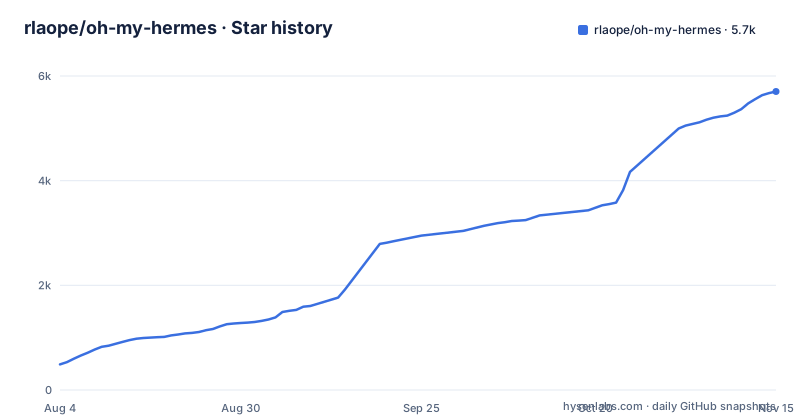
- rlaope/oh-my-hermes5,703 ★ · +5,214
| Repository | 2026-08-04 | 2026-11-15 |
|---|---|---|
| rlaope/oh-my-hermes | 489 | 5.7k |
5,214 Stars in the last 103 days, measured from the daily GitHub snapshot. Compare with other projects
Editorial analysis
The quick start pipes a script from a branch ref, and a second path pins a commit
Two one-line installers are offered. On macOS and Linux:
curl -fsSL https://raw.githubusercontent.com/rlaope/oh-my-hermes/main/install.sh | shOn Windows with PowerShell 5.1 or newer:
irm https://raw.githubusercontent.com/rlaope/oh-my-hermes/main/install.ps1 | iexBoth fetch from a branch name rather than a commit, so the bytes you run can change between two identical commands. The page knows this and offers a third path for exactly that reason, a block to paste into an AI agent. It instructs the agent to resolve refs/heads/main to one full commit SHA with git ls-remote against the repository's git URL, then fetch and follow only INSTALL_FOR_AGENTS.md at that resolved SHA, and says in as many words not to replace the resolved SHA with main. After any of the three routes, one command is marked required:
omh setupand omh doctor is there to verify or troubleshoot afterwards.
Update re-enters itself through whichever installer owns the command
The update path is the most interesting thing the page documents. omh update is described as detecting how the command was installed, upgrading the command package through its owning installer, and then refreshing the managed skills, the plugin bundle and the Hermes registration. So one command performs a package upgrade and then a state refresh. The page also draws a boundary around the fallback: use the package manager command directly only when omh update reports that its owning manager is unavailable. Removal has its own rule, that removing the command package preserves OMH state, and that a full removal means running omh uninstall --all before the manager's own remove command.
Five install routes, three of them public since v1.0.6
Beyond the two scripts there is a folded section listing the other paths, with a status note that Homebrew, Bun and npm package-manager installs are public as of v1.0.6. The commands are brew install rlaope/tap/omh, bun install -g oh-my-hermes and npm install -g oh-my-hermes, each followed by omh setup. There is also a Hermes-native route that installs a single named skill rather than the whole pack: hermes skills tap add rlaope/oh-my-hermes, then hermes skills install rlaope/oh-my-hermes/skills/omh-routing --yes. The upgrade and removal table then has one detail worth checking twice: the Homebrew row installs from the tap path rlaope/tap/omh but removes with brew uninstall omh, using the formula's short name rather than the tap path.
One model picker, reachable from the CLI and from inside the TUI
Model selection is a single component with two entry points. omh model opens a picker whose controls are described in the comment above it: arrow keys move between the category, left and right arrows move between head models, and the minus and plus keys change effort. The page adds that the same picker opens inside the OMH TUI (bare omh) as /omh-model, so a user already inside that TUI does not leave it to switch models. Onboarding a new model family is a separate skill, /omh-model-setup. The README names work categories such as ultrabrain, deep, visual-engineering and quick; each category picks a lane's model chain and reasoning effort, and every chain can be edited.
Routing scores every request and names the signal that moved it
The README says OMH picks the skill and a model for each lane and runs the work in parallel. Each lane is tagged with a work category that picks its model chain and reasoning effort, and when a provider rejects a model, the chain moves to the next one instead of silently downgrading. A hundred-plus `omh-*` specialist skills are loaded into the run by the router as tool calls.
Zero declared dependencies next to two installers and a plugin bundle
The manifest is short and the contrast with the installation instructions is stark. dependencies is an empty list. requires-python is 3.11 or newer, the license is MIT, the version is 4.0.4, and the single console script is omh, bound to omh.cli:main. The classifiers claim Development Status 5, Production/Stable and Operating System OS Independent, and the file carries a comment under them saying this is declared rather than aspirational because the full test suite is an enforcing gate on windows-latest as well as ubuntu and install.ps1 is the native installer. So a package with no runtime dependencies ships two platform installers, a plugin bundle and a test gate on both operating systems. Packaging is explicit rather than discovered, listing more than thirty omh subpackages by hand, with pytest configured to put src and tests on the path and uv configured for strict editable mode.
Eight dot-directories, one per agent tool, plus four README languages
The repository root is configured for many tools at once. It carries .claude/, .codex/, .cursor/, .opencode/, .openclaw/, .pi/, .omh/ and .codegraph/ as directories, alongside AGENTS.md and CLAUDE.md at the top level. The dot-directories are where each client keeps its own configuration, so the same tree has to stay valid for eight of them. Documentation is duplicated ten times over, with README.md plus Chinese, Japanese, Russian, Korean, Spanish, French, German, Brazilian Portuguese and Italian versions, all linked from a language bar at the top. The process files are unusually numerous as well: CHANGELOG.md, CONTRIBUTING.md, CODE_OF_CONDUCT.md, SECURITY.md, SUPPORT.md, CONTEXT.md, DESIGN.md, REVIEW.md, INSTALL_FOR_AGENTS.md and a standalone AV1_FIX_SUMMARY.md sitting at the root. There is also a .release-channel file, a MANIFEST.in and a pyrightconfig.json for type checking.
Three chat adapters and a golden directory for their output
The examples directory shows what the integrations look like, and the shape is consistent. Three adapter shims exist as single files, discord-adapter-shim.py, slack-adapter-shim.py and telegram-adapter-shim.py, plus one shared module, wrapper_shim_common.py, which is what keeps three near-identical files from drifting. Next to them sit wrapper-golden/, a directory name that implies expected-output fixtures, and wrapper-events/, which implies recorded event sequences. That pairing is how a chat adapter's behaviour gets tested without a live service. The remaining examples are use-case folders rather than code: agent-board, apple-design, hermes-ops, ops-service-quality, research-department and workflow-artifacts, plus a hermes-config.yaml at the top level of the directory, so the examples cover both the plumbing and the kind of work the pack is meant to organise.
Editorial conclusion
This is a plugin pack for people who already run Hermes Agent and want evidence gates, routing and project memory on top of it, and the page is explicit that it never patches or replaces Hermes. Three things to check before you install it. How you install it, since the quick start is a curl into a shell from a moving branch ref and the page's own answer to that is to resolve main to a full commit SHA with git ls-remote and fetch the agent instructions at that SHA. Which installer owns your copy, because update, upgrade and removal all route through it and the Homebrew row installs from a tap under one name and uninstalls under another. And what you are trusting, given a manifest with an empty dependency list and an OS Independent classifier next to a PowerShell installer, an install.sh and a plugin bundle that refreshes skills in place.
Frequently asked questions
How do I install oh-my-hermes on macOS or Linux?
Run curl -fsSL on the install.sh URL from the repository and pipe it to sh, then run omh setup, which the page marks as required, and omh doctor to verify. Windows PowerShell 5.1 and newer uses irm against install.ps1 piped to iex. Homebrew, Bun and npm routes exist too and were public as of v1.0.6.
How do I update or remove oh-my-hermes?
omh update detects how the command was installed, upgrades it through that owning installer, then refreshes the managed skills, the plugin bundle and the Hermes registration. Use the package manager directly only when omh update says the manager is unavailable. Removing the command package keeps OMH state, so a full removal means running omh uninstall --all first.
Does oh-my-hermes replace Hermes Agent?
The page says it does not. It describes OMH as an operating layer for Hermes Agent: you keep talking to Hermes, OMH picks the skill and a model for each lane and runs the work in parallel, and it never patches or replaces Hermes.
What does the oh-my-hermes package declare?
Name oh-my-hermes at version 4.0.4, MIT licensed, requiring Python 3.11 or newer, with one console script named omh bound to omh.cli:main and an empty dependencies list. It is also installable outside pip as a Homebrew tap, a Bun global package, an npm global package, or as a single named skill through the Hermes tap path.
Which model categories can oh-my-hermes route to?
Work categories such as ultrabrain, deep, visual-engineering and quick. You pick models per category with omh model, or with /omh-model from inside the OMH TUI (bare omh), where arrow keys choose the category and head model and the minus and plus keys change effort. A new model family is onboarded with the /omh-model-setup skill.
Official sources
Add this badge to your README
If you maintain this project, the badge below links readers to this analysis and shows its maintenance status from the daily GitHub snapshot. Paste the markdown into your README; add ?metric=license or ?metric=stars to the image URL for a different field.

[](https://hysenlabs.com/projects/rlaope-oh-my-hermes)Star history chart for your README
[](https://hysenlabs.com/projects/rlaope-oh-my-hermes)Was this useful?