smtp4dev catches outgoing mail on SMTP, IMAP and POP3 ports, and the Docker defaults publish all four to every interface
smtp4dev - the fake smtp email server for development and testing
At a glance
- What is it?
- A C# fake SMTP server for development and testing, with a web interface, a terminal UI, mailboxes with routing rules, relay and scripted error simulation. Its own docker-compose file warns that its port mappings are open to the network.
- Who is it for?
- Use smtp4dev when a team needs to see, inspect and route the mail an application sends during development, and wants IMAP or POP3 access to what was caught. Do not use it as a mail server for anything real, and do not run the sample compose file on a machine reachable from outside.
- Can I use it commercially?
- Yes. BSD-3-Clause is a permissive licence: you can use, modify and sell software built on it, as long as you keep its copyright and licence notices.
- Is it still maintained?
- Yes. The repository last received commits 1 day ago.
- What is it written in?
- Mainly C#, according to GitHub's language statistics.
Answers come from the project's GitHub data, last synced on November 25, 2026, and from our analysis. They are not legal advice.
Star history
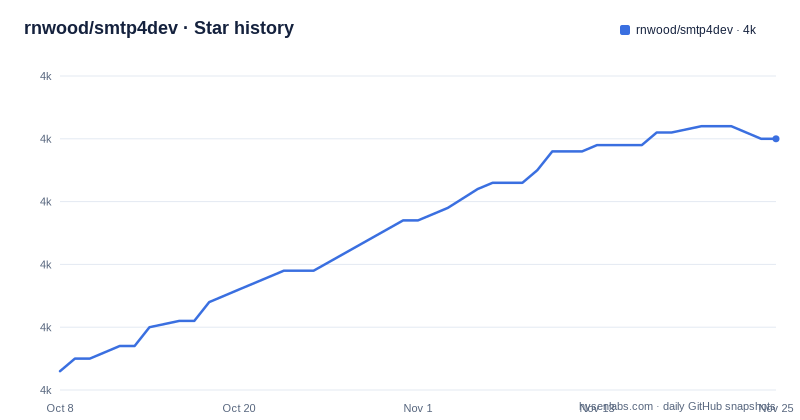
- rnwood/smtp4dev4,030 ★ · +37
| Repository | 2026-10-08 | 2026-11-25 |
|---|---|---|
| rnwood/smtp4dev | 4k | 4k |
37 Stars in the last 48 days, measured from the daily GitHub snapshot. Compare with other projects
Editorial analysis
Messages stop at smtp4dev instead of reaching real customers
smtp4dev is a dummy SMTP server. An application points its mail settings at it, sends as usual, and the messages land in smtp4dev and go no further. The README describes the purpose as testing an application without spamming real customers.
It runs on Windows, Linux and Mac OS-X, and maybe elsewhere where .NET Core is available. The repository is C#, with Rnwood.Smtp4dev as the main project and separate smtpserver/ and imapserver/ directories. A desktop project, Rnwood.Smtp4dev.Desktop, sits beside it with its own test project.
The README also points to an older v2 Windows only GUI version, available at the v2.0.10 release. Anyone who remembers smtp4dev as a small tray application should know that line is separate from the current v3 server, which the compose file pins with the image tag rnwood/smtp4dev:v3.
The BSD-3-Clause license applies. Contributors must sign a Contributor License Agreement before a pull request, which CONTRIBUTING.md and CLA.md in the repository describe.
IMAP and POP3 access mean caught mail can be read by an ordinary mail client
Most fake SMTP servers show messages only in a web page. smtp4dev also offers IMAP and POP3 access to retrieve and delete messages, according to its feature list. The compose file publishes both: 143:143 for IMAP and 110:110 for POP3, next to 25:25 for SMTP and 5000:80 for the web interface.
That opens a use that a web-only tool cannot cover. A test can pull its messages through a protocol library, and a developer can add the account to a normal mail client to see how a message renders there. The feature list adds multiple mailboxes along with rules that control which message goes where, so one smtp4dev instance can separate mail for different test accounts.
The README also lists reply, compose and relay, including rules that auto relay, plus scripting expressions with error simulation. The error simulation is the piece for testing how an application behaves when a server rejects mail. The README text available here does not show the expression syntax, and it points to docs/Configuration.md and docs/README.md for details.
The terminal UI mode is claimed to have full functionality
A Terminal User Interface mode is listed in bold with the note full functionality. That makes smtp4dev usable on a server or container where only a shell is available, without opening the web interface on port 5000.
The web interface itself includes a viewport size switcher to simulate mobile screens, a multipart MIME inspector, HTML compatibility reports and HTML validation. The screenshot captions describe a message list with sender, recipient, subject and timestamps, raw source with syntax highlighting and line numbers, detailed SMTP session logs, and dark mode.
SMTP session logging is the feature to remember when a delivery problem is not obvious. It shows the protocol conversation between your application and the server, which separates a bug in message construction from a bug in the connection or authentication step.
UTF8 support is listed too. The README gives no detail on which UTF8 SMTP extensions are covered, so confirm with a message containing non-ASCII addresses before relying on it.
TLS is covered with implicit and STARTTLS modes and a generated self-signed certificate
The feature list says TLS and SSL are supported in implicit and STARTTLS modes, with automatic self-signed certificate generation. That removes the usual setup friction for testing code that insists on an encrypted connection.
The consequence of a self-signed certificate is that clients validating the chain will refuse it. An application test that runs with certificate verification turned on has to be told to trust the generated certificate or to skip verification in the test environment. The README does not describe how to export the certificate, and docs/Configuration.md is the place to look.
Authentication is also listed without detail. The repository includes an examples/oauth2-jhipster/ directory, which shows that at least one worked example involves OAuth2 and a JHipster application. The README does not describe it beyond the directory name.
The repository also ships a sendtestemail.ps1 script at the top level, a PowerShell file for sending a test message, which suits the first check after installation.
The shipped compose file publishes four ports to every network interface
The security warning in docker-compose.yml is blunt: the port configuration publishes smtp4dev to all network interfaces, so it may be accessible from outside the machine. The README repeats this for Docker users and links docs/Docker-Security.md, to prevent accidental public exposure to the world.
The ports section as shipped reads:
- '5000:80'
- '25:25'
- '143:143'
- '110:110'
The comments say to add a 127.0.0.1: prefix for localhost-only access, which the file marks as recommended. The commented examples are '127.0.0.1:5000:80', '127.0.0.1:25:25', '127.0.0.1:143:143' and '127.0.0.1:110:110'.
This is the answer to the question of whether smtp4dev is safe. The tool catches whatever mail your applications send, which can include password reset links and real addresses from test data. An instance published on a reachable host exposes all of it, including the IMAP and POP3 ports, to anyone who can connect. The data is kept in the volume smtp4dev-data mounted at /smtp4dev, so it survives container restarts, and restart is set to on-failure.
The project's own table claims features that MailHog, MailCatcher, MailDev and FakeSMTP lack
The README includes a comparison table against MailHog, MailCatcher, MailDev and FakeSMTP, with footnotes linking each tool's repository. The table is written by the smtp4dev project, so read it as a claim and not as an independent test.
According to it, only smtp4dev has an IMAP server, a terminal UI, a MIME parts inspector, SMTP session logging, message composition and dark mode. For responsive email testing, it credits MailDev with a resizable preview pane. For TLS, it credits MailDev with basic support through the --incoming-secure, --incoming-cert and --incoming-key options. For scripting, it credits MailHog with limited support through its Chaos Monkey for failure testing.
The table also lists the implementation language of each: .NET 10 for smtp4dev, Go for MailHog, Ruby for MailCatcher, Node.js for MailDev and Java for FakeSMTP. That column matters if your team prefers a tool it can read and patch in its own language. FakeSMTP is shown as a desktop GUI with no Docker support, which fits a team that wants a window and not a service.
Releases are continuous integration builds tied to pull requests
The most recent releases in the repository are not conventional version tags. They are named like 3.16.0-ci20261026101_pr2099, 3.16.0-ci20261026100_pr2130 and 3.16.0-ci20261025100_pr2098, published on 25 and 26 October 2026. Each name contains the number of a pull request, which indicates builds produced from pull requests.
The repository is not archived and its last push was on 20 October 2026. A person who wants a stable version should use the v3 image tag shown in the compose file or follow docs/Installation.md, which the README points to for installation instructions. The README text available here does not list a specific install command, so the installation guide is where Windows, Linux and Docker steps live.
Because the pre-release names carry pull request numbers, picking the newest entry on the releases page is a poor way to choose a version. The compose file pins v3, which is a safer reference for a team that wants a repeatable setup.
Editorial conclusion
Use smtp4dev when a team needs to see, inspect and route the mail an application sends during development, and wants IMAP or POP3 access to what was caught. Do not use it as a mail server for anything real, and do not run the sample compose file on a machine reachable from outside. Before the first run, change the four port mappings to bind 127.0.0.1, then send one test message and check that it appears in the web interface.
Frequently asked questions
How to install smtp4dev?
The README sends you to docs/Installation.md for installation instructions. The repository's docker-compose.yml uses the image rnwood/smtp4dev:v3 for a container setup.
How to use smtp4dev?
Point your application's mail settings at smtp4dev and send mail as usual, then read the messages in the web interface, the terminal UI, or through IMAP or POP3. The README links docs/Configuring-Clients.md for configuring programs to send to it.
Is smtp4dev safe?
It is safe for local testing when bound to localhost. The shipped docker-compose.yml publishes its ports to all network interfaces and warns that it may be reachable from outside the machine, so add the 127.0.0.1: prefix to each port.
What is a good fake SMTP server for testing?
smtp4dev presents itself as one. Its README compares it with MailHog, MailCatcher, MailDev and FakeSMTP in a table written by the project, so verify the claims against your own needs.
Official sources
Add this badge to your README
If you maintain this project, the badge below links readers to this analysis and shows its maintenance status from the daily GitHub snapshot. Paste the markdown into your README; add ?metric=license or ?metric=stars to the image URL for a different field.

[](https://hysenlabs.com/projects/rnwood-smtp4dev)Star history chart for your README
[](https://hysenlabs.com/projects/rnwood-smtp4dev)Was this useful?