Orchard Core: two products in one repository, one stable branch and one preview feed
Orchard Core is an open-source modular and multi-tenant application framework built with ASP.NET Core, and a content management system (CMS) built on top of that framework.
At a glance
- What is it?
- An open-source modular, multi-tenant application framework for ASP.NET Core and a CMS built on top of it, shipped from the same tree. Stable packages come from the release branch on NuGet, nightly ones from a Cloudsmith preview feed, and the container image publishes the CMS project with analyzers switched off.
- Who is it for?
- It suits a .NET team that wants a modular multi-tenant application framework and a CMS from one codebase, and that can live with picking its package feed deliberately. It does not suit a team that wants a content manager and nothing else, since the framework and the CMS ship as two distinct projects, and it does not suit anyone expecting main to be a stable source.
- Can I use it commercially?
- Yes. BSD-3-Clause is a permissive licence: you can use, modify and sell software built on it, as long as you keep its copyright and licence notices.
- Is it still maintained?
- Yes. The repository received new commits within the last day.
- What is it written in?
- Mainly C#, according to GitHub's language statistics.
Answers come from the project's GitHub data, last synced on November 14, 2026, and from our analysis. They are not legal advice.
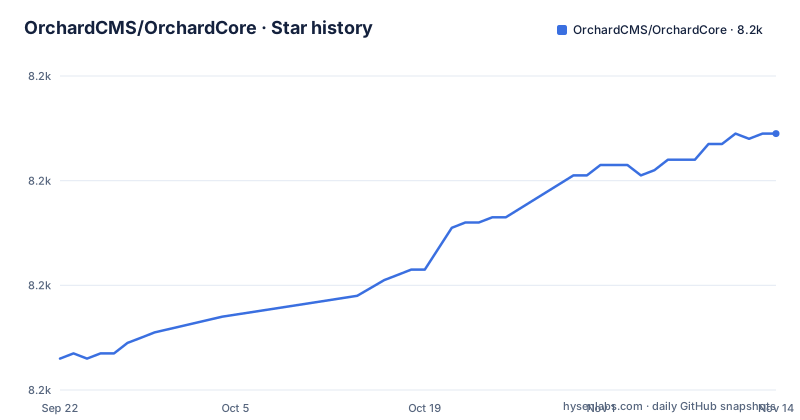
Star history
- OrchardCMS/OrchardCore8,229 ★ · +43
| Repository | 2026-09-22 | 2026-11-14 |
|---|---|---|
| OrchardCMS/OrchardCore | 8.2k | 8.2k |
43 Stars in the last 53 days, measured from the daily GitHub snapshot. Compare with other projects
Editorial analysis
Two products ship from one repository, and the image runs the CMS
The first thing to settle is that this is not one product but two. The Orchard Core Framework is an application framework for building modular, multi-tenant applications on ASP.NET Core, and the Orchard Core CMS is a web content management system built on top of that framework. The container definition makes the choice concrete, because the entry point it declares runs the CMS assembly rather than a bare host.
ENTRYPOINT ["dotnet", "OrchardCore.Cms.Web.dll"]That matters for anyone who only wants the framework, since the published image is the CMS end of the pair and the framework is what you build your own application on. The description in the repository states the same division: a modular and multi-tenant application framework, and a content management system built on that framework.
Stable and nightly come from different branches and different feeds
There are two build pipelines and they do not share a package source. Stable builds run from the release/3.0 branch through the Release CI workflow and land on NuGet under the OrchardCore.Application.Cms.Targets package. Nightly builds run from main through the Preview CI workflow and land on a preview feed hosted by Cloudsmith, which the project acknowledges as graciously provided hosting for the preview feed. The consequence is that adding main to your package sources is a deliberate act with a different origin, not a version bump of the same feed. That also means a version number alone does not tell you where a package came from, so a lock file and a record of the feed are worth keeping in a deployment.
The image publishes one project with analyzers disabled
The Dockerfile is short and its choices are instructive. The build stage uses the .NET SDK image and copies only the src directory plus the two central props files, which keeps App_Data and binaries out through the ignore file. The publish step targets a single project and one framework.
RUN dotnet publish src/OrchardCore.Cms.Web/OrchardCore.Cms.Web.csproj -c Release -o /app --framework net10.0 /p:RunAnalyzers=falseAnalyzers are turned off for that publish, so a container build will not fail you on a code analysis warning. The runtime stage is chosen by target operating system, with a nanoserver based runtime image for Windows and the standard aspnet image for Linux, and the container listens on port 80 with the URL setting expressed for all interfaces.
Front-end assets are a Yarn workspace problem
A CMS with modules and themes has front-end code scattered across the tree, and this repository handles that with Yarn workspaces rather than a single manifest. The root package is a private one named for the organisation, it pins Yarn as its package manager, and most scripts delegate to a local assets manager rather than running a tool directly.
"build": "assets-manager build",
"lint": "eslint .",
"check": "yarn workspaces foreach -A -v -v run check"
The workspace list is the interesting part: it includes the assets manager and a second local script package, the frontend project, and a glob covering the Assets folders of every module and of every theme. That last entry is the mechanism that makes a module's front-end code part of the same install. The check script runs the check task across all workspaces, and linting is a single eslint pass with TypeScript and Vue rules in the dev dependencies.
Central version props are copied before the build starts
Two files at the root carry the version policy for the whole tree: Directory.Build.props and Directory.Packages.props, and the Dockerfile copies both of them before it compiles anything. That is the convention a contributor needs to know, because a change to a package version or a shared property belongs in those files rather than in an individual project. Around them sits the rest of the toolchain plumbing: NuGet.config for package sources, global.json for pinning the SDK, a solution file in the newer slnx format, renovate.json5 for dependency updates, mkdocs.yml and a readthedocs configuration for the documentation, and Dockerfile-CI alongside the main image for continuous integration builds.
Roadmap lives in milestones, features live in the module reference
Two documents answer the two questions people actually arrive with. The first is what the product already does, and the answer is the reference of built-in modules, a documentation page that catalogues the features provided out of the box rather than describing them in prose. The second is what comes next, and the answer is the issue milestones, which the repository points at for planned releases and their priorities. That split has a practical consequence for planning: a feature request is not the same thing as a scheduled one, and the milestone list is where you can see which of them the maintainers have decided to prioritise. The documentation itself is split across the site, with an overview on the homepage, getting started docs for building applications, and a separate test drive page for people who only want to try the product as a user.
Security reports go to an email address, not the issue tracker
Support is offered through four channels and one of them is deliberately private. For questions there is a Gurubase AI model for finding answers quickly, then the issue tracker for bugs and feature requests, GitHub discussions for guidance and feedback on code, and a Discord server for real time conversation. Security issues are the exception: the instruction is to report them privately by email to a contact address at the project's own domain, which means a vulnerability report opened as a public issue has already gone too far. Outside those channels the project maintains social accounts, points at a Chinese-language community group for local resources, publishes a code of conduct, and states that it is supported by the .NET Foundation. None of that is unusual, and the private reporting instruction is the part worth remembering.
Editorial conclusion
It suits a .NET team that wants a modular multi-tenant application framework and a CMS from one codebase, and that can live with picking its package feed deliberately. It does not suit a team that wants a content manager and nothing else, since the framework and the CMS ship as two distinct projects, and it does not suit anyone expecting main to be a stable source. Check four things before you start: whether you want the framework or the CMS project, since the container image runs the CMS entry point, which feed you will restore from, because stable and preview packages come from different places, whether your build tolerates analyzers being disabled in the container publish, and that security reports go to the private email address rather than the public issue tracker.
Frequently asked questions
what is orchard core
An open-source, modular, multi-tenant application framework and CMS for ASP.NET Core, made of two distinct projects: the framework for building modular multi-tenant applications, and the CMS built on top of that framework. The current project status names v3.0.1 and describes the software as production-ready.
how to install orchard core cms
The repository points at the getting started documentation for building apps and at a separate test drive page for trying the CMS as a user. Packages come from NuGet on the stable release branch, or from the Cloudsmith hosted preview feed for nightly builds from main, and the container image publishes src/OrchardCore.Cms.Web.
orchard core vs wordpress
The repository makes no comparison with WordPress or with any other product. What it documents about itself is the two-project structure of framework and CMS, the reference of built-in modules describing the features provided out of the box, and the stable and preview package feeds.
orchard core alternative
No alternative projects are named in the repository. The information it does provide is the framework and CMS pair, the module reference for built-in features, the milestones describing planned releases and their priorities, and the getting started and test drive guides.
Official sources
Add this badge to your README
If you maintain this project, the badge below links readers to this analysis and shows its maintenance status from the daily GitHub snapshot. Paste the markdown into your README; add ?metric=license or ?metric=stars to the image URL for a different field.

[](https://hysenlabs.com/projects/orchardcms-orchardcore)Star history chart for your README
[](https://hysenlabs.com/projects/orchardcms-orchardcore)Was this useful?