Gesturefy turns mouse movement into Firefox commands
Navigate, operate, and browse faster with mouse gestures! A customizable Firefox mouse gesture add-on with a variety of different commands.
At a glance
- What is it?
- Gesturefy is a GPL-3.0 Firefox add-on that binds commands to mouse gestures, with more than eighty predefined commands and customizable traces. It works only with a real mouse, and Firefox blocks it from running on the browser's own pages.
- Who is it for?
- Gesturefy suits people who work with a mouse in Firefox all day and want page actions without reaching for the keyboard. It does not suit touchpad users, and it will never work on addons.mozilla.org, about:addons or other moz-extension pages, because Firefox blocks add-ons there.
- Can I use it commercially?
- Yes, with conditions. GPL-3.0 is a copyleft licence: if you distribute software that includes it, you must release that software's source code under the same licence. Running it internally without distributing it does not trigger that obligation.
- Is it still maintained?
- Yes. The repository last received commits 9 days ago.
- What is it written in?
- Mainly JavaScript, according to GitHub's language statistics.
Answers come from the project's GitHub data, last synced on November 7, 2026, and from our analysis. They are not legal advice.
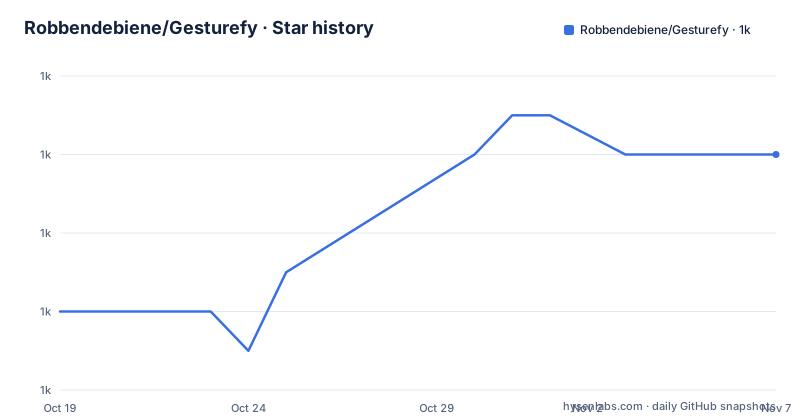
Star history
- Robbendebiene/Gesturefy1,036 ★ · +4
| Repository | 2026-10-19 | 2026-11-07 |
|---|---|---|
| Robbendebiene/Gesturefy | 1k | 1k |
4 Stars in the last 19 days, measured from the daily GitHub snapshot. Compare with other projects
Editorial analysis
Gestures need a real mouse, not a trackpad
Gesturefy is a Firefox add-on that turns mouse movements into commands. You hold a mouse button and draw a shape, and that shape is mapped to an action. The project puts it plainly: it is a pure mouse gesture extension, which means it is only suited for mice and not touchpads. That single sentence removes the add-on from consideration for a large part of the laptop population, and it is stated in the project description rather than discovered after installation.
The audience is people who spend their working day in a browser and want fewer trips to the keyboard and fewer clicks through menus. The gesture model is the same idea as a keyboard shortcut, but with the mouse as the input device, and the project argues that the result is more natural for casual users as well.
The project is written in JavaScript, lives under the master branch, and is licensed under the GNU General Public License v3.0. It is published as a Firefox add-on at addons.mozilla.org/firefox/addon/gesturefy/, with the source in the src directory of the repository alongside CONTRIBUTING.md, ISSUE_TEMPLATE.md, a crowdin.yml file and the LICENSE.
Two releases in 2026 show it tracks Firefox rather than sitting still. Version 3.2.19 was published on 2026-09-25 and version 3.2.18 on 2026-03-03, and the last push to the repository was on 2026-10-12.
More than eighty commands, four of them special
The command list is the substance of the add-on. The add-on advertises more than 80 different predefined commands, and beyond ordinary page actions it lists four special ones: popup, user script, multi purpose and cross add-on command. A popup command can surface a panel or menu of choices, and a user script command gives you a hook for running your own code against the page, which is the part that turns the add-on into a platform rather than a fixed list of shortcuts.
The gesture input itself comes in three shapes. A plain gesture is the mouse movement with a button held down, and the buttons available are the left, middle and right ones. Rocker gestures are the left-click while the right button is held, and the reverse. Wheel gestures are the scroll wheel used while a button is held, which is what makes fine page movement possible without leaving the gesture system.
Two presentation settings are yours to change. The gesture trace, the visual trail the pointer leaves while you draw, and the status information style can both be customized, so the add-on can stay quiet or stay visible depending on how much feedback you want while drawing. There is also a choice of light, dark and highcontrast themes for the add-on interface, and localisation is handled by volunteers on Crowdin, which the project credits as the reason the add-on is multilingual.
Firefox blocks the add-on from its own pages
The limitation that matters in daily use is a platform one, and it cannot be worked around. Gesturefy does not work on Mozilla related pages such as addons.mozilla.org, on internal pages such as about:addons, or on other add-on option pages with moz-extension:// addresses. The project gives the reason: Firefox restricts add-ons from accessing these pages for security reasons. The gesture code is not present in those tabs at all, so a stroke drawn on the add-on manager page produces nothing, and no setting inside Gesturefy will change that.
The second limitation is about timing. The page must be partially loaded for gestures to work, which is a reasonable constraint for a page that has not yet wired up its content, but it means the earliest moments after a page load are not gesture territory.
The third is narrower and clearly dated. Wheel gestures do not work on MacOS Sierra, and the project points at the Firefox bug report for it. Sierra is old enough that this is unlikely to affect anyone now, but it is listed as a live limitation rather than a resolved note.
The practical consequence is that gestures are a browsing accelerator, not a system-wide input layer. Any workflow that depends on the same action working inside the browser's own settings pages has to keep a keyboard fallback.
Why the add-on asks for every site
The permission list looks alarming until you read why each entry is there, and the project explains all three in detail.
The key permission is access to your data for all websites. The reason given is mechanical: the complete gesture functionality is injected in every page you visit, meaning part of the code runs in each tab. The project states there is no other way with the current API to track mouse movement or draw anything on the screen, and that the same injection is what allows page specific commands such as scroll down and scroll up. So the permission is not a data grab in intent, it is the cost of drawing a trace on a page at all. For anyone with a strict policy on add-ons with site wide access, this is the deciding fact rather than a footnote.
Read and modify browser settings exists to change context menu behaviour on MacOS and Linux, which is how the right mouse button is made usable for gestures. Display notifications is used to show a notification when Gesturefy updates and to surface certain error messages.
On privacy, the project states plainly that Gesturefy does not collect any data of any kind, has no home server, and embeds no analytic or telemetry hooks. Release 3.2.18 added Firefox's new required data collection permissions and set the declaration to none, since nothing is collected or transmitted.
Release notes show the work chasing Firefox itself
Reading the release history tells you what kind of maintenance this project does, and it is not feature work. Version 3.2.19, published on 2026-09-25, updated the maximum and minimum zoom values for the Zoom In and Zoom Out commands to the newly allowed bounds, aligned the default zoom values with Firefox's own defaults, changed the settings page background to default to the system theme so that a white screen flash is avoided in dark mode, and pulled in new translations from Crowdin.
Version 3.2.18, published on 2026-03-03, added Firefox's new required data collection permissions and set them to none.
Version 3.2.17, published on 2026-02-26, fixed popup commands that had stopped working in Firefox 148 and later.
That is three releases about compatibility, defaults and permissions rather than new gestures, and it points at the maintenance cost clearly. The add-on depends on browser APIs that Firefox changes as part of its own development, so keeping it working means shipping a release whenever the browser moves. For an individual user that cost is invisible, because the update arrives from the add-on store. For anyone thinking about maintaining a fork, it is the real bill.
The repository is not archived, and the last push was on 2026-10-12, so the work is current.
Installing it, and the browser shortcut it competes with
There is no command line installation path here. Gesturefy is a Firefox add-on, and the project points at the add-on listing at addons.mozilla.org/firefox/addon/gesturefy/, which is also where the ratings, the user count and the release download live. The repository is the source of the add-on rather than a distribution channel, and the crowdin.yml file in the repository root is what drives the translations that the project credits to volunteers.
Once installed, the work happens in the add-on options: you enable the gestures you want, assign them to the command of your choice, and adjust the trace and status style so the feedback matches how loud you want the interaction to be. The project points to the FAQ page in the project wiki for support and donation questions.
The alternative approach is the keyboard shortcut mapped inside the browser. The difference is not the number of actions available, it is the input device and its consequences. A shortcut is typed, so it works in every tab including the pages where Firefox blocks Gesturefy, and it needs no code injected into the page. A gesture is drawn, so it is faster for a handful of frequent actions and needs site wide access to work at all. If your most used actions are scroll up, scroll down and tab switching, and you are willing to map them to keys, the browser's own shortcut handling gives you most of the benefit without the permission profile.
Editorial conclusion
Gesturefy suits people who work with a mouse in Firefox all day and want page actions without reaching for the keyboard. It does not suit touchpad users, and it will never work on addons.mozilla.org, about:addons or other moz-extension pages, because Firefox blocks add-ons there. Before installing it on a work machine, read the three permissions the README explains, check whether the pages you need gestures on are the ones Firefox restricts, and confirm that your mouse has the buttons the gestures you want require.
Frequently asked questions
Does Gesturefy work with a touchpad?
No. The README describes Gesturefy as a pure mouse gesture extension, which means it is only suited for mice and not touchpads, so trackpad users should look elsewhere.
Why does Gesturefy not work on addons.mozilla.org or about:addons?
Firefox restricts add-ons from accessing those Mozilla related pages, internal pages such as about:addons and other add-on option pages with moz-extension:// addresses, for security reasons. The gesture code is therefore not present in those tabs.
What permissions does Gesturefy request and why?
Three are explained in the README: access to your data for all websites, because the gesture code is injected into every page to track mouse movement and draw on screen and to support page specific commands; read and modify browser settings, to change context menu behaviour on MacOS and Linux so the right mouse button can be used; and display notifications, for update notices and error messages.
Does Gesturefy collect any data?
The README states that it does not collect any data of any kind, has no home server and embeds no analytic or telemetry hooks. Release 3.2.18 added Firefox's new required data collection permissions and set the declaration to none.
How do I install Gesturefy in Firefox?
It is distributed as a Firefox add-on and the project points at addons.mozilla.org/firefox/addon/gesturefy/ for the listing and the download. The repository holds the source in its src directory, and the crowdin.yml file there drives the volunteer translations.
Official sources
Add this badge to your README
If you maintain this project, the badge below links readers to this analysis and shows its maintenance status from the daily GitHub snapshot. Paste the markdown into your README; add ?metric=license or ?metric=stars to the image URL for a different field.

[](https://hysenlabs.com/projects/robbendebiene-gesturefy)Star history chart for your README
[](https://hysenlabs.com/projects/robbendebiene-gesturefy)Was this useful?