ros-mcp-server drives ROS through rosbridge, and leaves permissions on the contribution list
Connect AI models like Claude & GPT with robots using MCP and ROS.
At a glance
- What is it?
- robotmcp/ros-mcp-server is a Python MCP server that reaches ROS 1 and ROS 2 machines through the rosbridge node without touching robot source code. Its dependency list contains no ROS client at all, it installs two generically named top-level packages, and it carries two MCP libraries at once. Its own contribution list still names permissions as a feature to build.
- Who is it for?
- The fit is narrow: a ROS bring-up where someone already runs rosbridge and the goal is letting an agent inspect types, topics, and state, with a simulation as the place to make mistakes. Verify the permissions question first, because the project's own contribution list treats permissions as unfinished while the feature list advertises action calls.
- Can I use it commercially?
- Yes. Apache-2.0 is a permissive licence: you can use, modify and sell software built on it, as long as you keep its copyright and licence notices.
- Is it still maintained?
- Yes. The repository received new commits within the last day.
- What is it written in?
- Mainly Python, according to GitHub's language statistics.
Answers come from the project's GitHub data, last synced on November 15, 2026, and from our analysis. They are not legal advice.
Star history
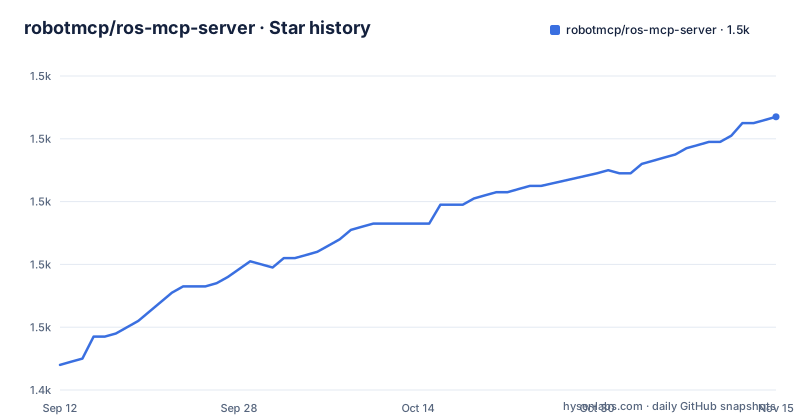
- robotmcp/ros-mcp-server1,527 ★ · +79
| Repository | 2026-09-12 | 2026-11-15 |
|---|---|---|
| robotmcp/ros-mcp-server | 1.4k | 1.5k |
79 Stars in the last 64 days, measured from the daily GitHub snapshot. Compare with other projects
Editorial analysis
Six names for one server, and an install line that is a file link
One component carries six identifiers. The repository is ros-mcp-server, the distribution in pyproject is ros-mcp, the import package is ros_mcp, the console script is ros-mcp, a server.py sits at the repository root, and server.json is installed into the install root by [tool.setuptools.data-files]. A seventh identifier, an HTML comment at the top of the README, reads mcp-name: io.github.robotmcp/ros-mcp-server, the name an MCP registry would use. Nothing in the manifest maps those six onto each other, so which one a client meets depends on whether it cloned the repository, installed the package, or resolved the registry entry.
The install path is the thinnest part. Getting Started is two sentences and the only instruction is to follow docs/install/installation.md. No command appears in the README and no alternative is offered for someone who wants the package rather than the guide. The version story is short and matches: [project] version is 3.1.2, the newest tag is v3.1.2 dated 2026-09-23, the tag before it is v3.1.1 dated 2026-09-22, and v3.1.0 is dated 2026-06-17. Two patch releases one day apart after a three-month gap is a release cadence to ask the maintainers about rather than a documented policy, since the project says nothing about how it versions.
The dependency list has no ROS in it, only a WebSocket client
The six runtime dependencies are fastmcp>=2.11.3,<3, jsonschema>=4.25.1, mcp[cli]>=1.13.0, opencv-python>=4.11.0.86, pillow>=11.3.0, and websocket-client>=1.8.0. Not one of them is a ROS package. There is no rclpy, no rospy, no ament index dependency, and no colcon package listed. The link to the robot is websocket-client talking to a rosbridge node, which lines up with the claim that you add the rosbridge node to an existing ROS setup and change no robot source.
That choice has two visible consequences. The server runs anywhere Python 3.10 or newer runs, which is why a .devcontainer/ directory and examples/5_docker_turtlesim both exist: the same server can drive a turtlesim inside a container instead of inside a ROS installation. And it means the server holds no ROS build index of its own, so the type discovery the project advertises has to come from the graph at runtime rather than from compile-time metadata.
The tension sits in the support claim. ROS 2 Jazzy, ROS 2 Humble, and ROS 1 distros are named as targets while requires-python is >=3.10. The repository does not say which Python a given ROS 1 host provides, and that pairing is the first thing to confirm before installing on anything older than a current ROS 2 install.
Two MCP frameworks in one dependency set, with open-ended pins
Two MCP libraries sit side by side: the protocol SDK with its CLI extra at mcp[cli]>=1.13.0, and fastmcp>=2.11.3,<3. Only fastmcp carries an upper bound, held below its third major release, while mcp, jsonschema, pillow, and websocket-client are all open-ended floors. The package layout hints at a split: ros_mcp.tools, ros_mcp.prompts, and ros_mcp.resources are declared as separate subpackages, the shape a server framework produces, and the script entry ros-mcp = ros_mcp.main:main yields a single console command. Which of the two libraries owns the tool layer and which is held for client compatibility is not stated anywhere in the manifest.
The vision and schema dependencies explain the two ways this project reads a machine. opencv-python and pillow are both present, and examples/8_images is the only example directory named after a media type rather than a robot or a client. jsonschema>=4.25.1 is the validation layer, and the promise that a model finds custom topic and service types and their syntax on its own points at schema-driven description rather than a hand-written tool list. Worth noting: the pinned variant is opencv-python, not opencv-python-headless, and the former is the one built against desktop GUI libraries, so on an arm64 robot or inside a slim container that is a system library question the manifest leaves open.
config and robot_specifications install as top-level importable names
[tool.setuptools] packages lists seven names: ros_mcp, ros_mcp.tools, ros_mcp.utils, ros_mcp.prompts, ros_mcp.resources, config, and robot_specifications. The last two are the repository's own top-level directories, config/ and robot_specifications/, promoted to importable distribution-wide modules. robot_specifications also carries package-data = ["*.yaml"], so a set of YAML files is installed alongside the code. A wheel that installs a top-level module called config deserves a second look on a robotics image, where a directory-level config package is a common convention and the name is likely to exist already in the environment. Whether the server imports those two by bare name or by relative path is not visible from the manifest.
The top-level tree has 18 entries, and the ones left out of the wheel are informative. launch/ is a ROS launch directory at the root of a Python distribution and is not in the packages list, so it serves a source checkout rather than an installed package. server.py at the root is likewise part of no declared package, sitting next to the ros_mcp/ directory that holds the same role. MANIFEST.in and include-package-data = true govern the source distribution, and the manifest names no license-files entry, so what carries the root LICENSE file into a built artifact is not stated.
Actions and permissions appear on both sides of the same file
The feature list advertises publishing and subscribing to topics, calling services and actions, setting parameters, reading sensor data, and monitoring robot state in real time. The Contributing section, lower down the same README, lists Action support and permissions as examples of new features to build. Both statements stand unmodified and the project does not reconcile them. The reading that fits the code is that action calls exist at least in part while a finished implementation and a permission layer do not, and that a server holding parameter-set and state-monitoring access has no access control of its own.
The first demo makes that concrete. A production industrial robot end effector, with technician manuals as the only reference, a single prompt to test the gripper, and the model running its own tests before reporting a root cause. That is write access to a production machine, presented as a routine outcome, in a repository whose contribution list still has permissions as a to-do. The third demo points at a simulated Unitree Go2 inside NVIDIA Isaac Sim, which is the setting this design suits: a wrong tool call resets a simulation rather than a shift.
So the two checks to run before a client touches hardware are both in the README, in different sections. Does the permissions layer you need exist in the version you are installing, and is your target a simulation or a live machine.
Three demo machines against nine example directories
examples/ holds nine directories, numbered 1 through 9 with nothing after: 1_turtlesim, 2_gemini, 3_limo_mobile_robot, 4_unitree_go2, 5_docker_turtlesim, 6_chatgpt, 7_cursor, 8_images, 9_turtlebot3. The Examples in Action section names three different machines. The production industrial robot has no example directory. Wilson, a home robot built on ROS 2 with Nav2 for SLAM and navigation and MoveIt for the manipulator, is linked to a page on a third-party site, and examples/3_limo_mobile_robot is a different platform that happens to hold the same number. Only the Unitree Go2 in Isaac Sim lines up with a directory, examples/4_unitree_go2.
Client coverage is thinner than the client list. Claude Code, Codex CLI, Gemini CLI, Claude Desktop, ChatGPT, and Cursor are named, along with any MCP-compatible client. The examples ship dedicated folders for Gemini, ChatGPT, and Cursor, three of the six, and nothing for Claude Code or Claude Desktop. The shortest path to seeing the server run end to end is therefore 1_turtlesim, and the shortest path to a real platform is 4_unitree_go2, while the remaining seven are variations on the same wiring.
Six empty badge blocks, and a homepage the README never links
Six empty placeholder blocks sit in the README: one under the title, one under the Examples in Action heading, one after each of the three demo subsections, and one in Getting Started. Each is a bare p align=center element with nothing inside it, so the file carries no logo, no screenshots, and no banner, and the video badge under Examples in Action is a link to youtu.be with no label text attached. The text is the whole of it.
The documentation lives outside the README. docs/install/installation.md holds the setup steps the README defers to, docs/contributing.md holds the contribution rules, and neither file's contents sit alongside the project files. The homepage value is robotmcp.ai and the README never links it; among the 18 top-level entries there is no site source directory, only docs/ and examples/. server.json is declared as a data file and installed into the install root, where an MCP registry manifest belongs, but its contents are not part of the published project information, so the version and tool list it advertises cannot be compared against the 3.1.2 in [project]. Development tooling is pinned in the manifest itself: ruff at line-length 100 over the E, F, and I rule sets with E501 ignored, and pytest with testpaths set to tests, python_files set to test_*.py, and an addopts string that begins -v --tb=sh. The last push is dated 2026-10-02, nine days after the newest tag, so the open question is not whether the project is moving but whether the README describes the version you install.
Editorial conclusion
The fit is narrow: a ROS bring-up where someone already runs rosbridge and the goal is letting an agent inspect types, topics, and state, with a simulation as the place to make mistakes. Verify the permissions question first, because the project's own contribution list treats permissions as unfinished while the feature list advertises action calls. Then check the Python version on the ROS host, since the manifest requires 3.10 or newer while ROS 1 distros are named as targets, and read docs/install/installation.md before assuming the README holds an install command. It does not.
Frequently asked questions
What does ros-mcp-server add to a robot that already runs ROS?
It runs as an MCP server and reaches the robot through the rosbridge node, so the robot's own source files are left alone. Topic publish and subscribe, service and action calls, parameter setting, and robot state monitoring are exposed to any MCP client.
Does ros-mcp-server need ROS packages installed on the machine running it?
No ROS package appears in its runtime dependencies. The six entries are fastmcp, mcp, jsonschema, opencv-python, pillow, and websocket-client, and the bridge to the robot is the websocket client talking to a rosbridge node.
How do I install ros-mcp-server?
The Getting Started section is two lines and sends you to docs/install/installation.md, and no install command appears in the README itself. What the manifest does pin is the console script ros-mcp, which calls ros_mcp.main:main.
Does ros-mcp-server have a permissions system yet?
Not one the project claims to ship. The Contributing section lists permissions alongside Action support under new features to build, while the feature list higher up advertises action calls.
Which MCP clients does ros-mcp-server name, and which have examples?
It names Claude Code, Codex CLI, Gemini CLI, Claude Desktop, ChatGPT, and Cursor. The examples directory ships dedicated folders for Gemini, ChatGPT, and Cursor only, plus turtlesim, Limo, Unitree Go2, Docker turtlesim, images, and TurtleBot3.
Official sources
Add this badge to your README
If you maintain this project, the badge below links readers to this analysis and shows its maintenance status from the daily GitHub snapshot. Paste the markdown into your README; add ?metric=license or ?metric=stars to the image URL for a different field.

[](https://hysenlabs.com/projects/robotmcp-ros-mcp-server)Star history chart for your README
[](https://hysenlabs.com/projects/robotmcp-ros-mcp-server)Was this useful?