How ip-address splits a Keenetic router by destination
ip address - Youtube, Instagtam, Twitter, Netflix
At a glance
- What is it?
- ip-address is a set of route files for Keenetic routers: one file sends YouTube, Instagram, Twitter and Netflix through a VPN tunnel while every other destination stays on your provider connection. The mechanism is simple, but a hand-worked KinoPoisk exception, a DNS detour and three different hosts turn the first run into a manual procedure.
- Who is it for?
- ip-address is worth the effort when a Keenetic router is the only box that can hold a tunnel, the services you need reach YouTube, Instagram or Netflix, and you are willing to drive a Russian-language web interface by hand. It is the wrong tool for any router that is not a Keenetic, and for anyone who needs the tunnel to stay invisible at the address level.
- Can I use it commercially?
- Yes. MIT is a permissive licence: you can use, modify and sell software built on it, as long as you keep its copyright and licence notices.
- Is it still maintained?
- Yes. The repository last received commits 56 days ago.
- What is it written in?
- Mainly Batchfile, according to GitHub's language statistics.
Answers come from the project's GitHub data, last synced on October 23, 2026, and from our analysis. They are not legal advice.
Star history
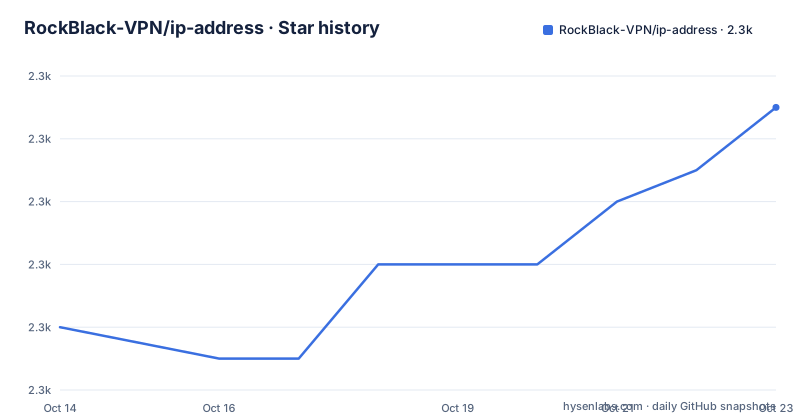
- RockBlack-VPN/ip-address2,277 ★ · +7
| Repository | 2026-10-14 | 2026-10-23 |
|---|---|---|
| RockBlack-VPN/ip-address | 2.3k | 2.3k |
7 Stars in the last 9 days, measured from the daily GitHub snapshot. Compare with other projects
Editorial analysis
Split tunnels by destination instead of tunnelling every device
ip-address is a set of route files for Keenetic home routers. You load one file into the router and every destination listed inside it goes out through your VPN connection, while every other destination reaches the internet by the ordinary route your provider gave you. Nothing is installed on the phones, the television or the console: the split happens once, at `http://192.168.1.1/staticRoutes`, the router's own page for loading routes from a file.
That is the difference from a VPN client on each device. A client intercepts everything a device sends and decides per application. A route file decides per destination address, in one place, for the whole network. The price of that choice is the list itself, because every entry can go stale when a service moves to new addresses, and nothing in the repository says who watches the ranges or how often anyone checks them.
One file covers five VPN protocols and two more topics
Before loading anything you pick your tunnel in the interface field of that page, and the README is explicit that the choice makes no difference: OpenVPN, PPTP, WireGuard, AmneziaWG and Socks5 are all named as equivalent here. The repository topics add vless and outline to the same set, which makes seven client types across the project's own metadata and its documentation.
That equivalence is a statement about the file rather than about the clients. A route file names destination networks and says nothing about the tunnel carrying them, so a protocol with different routing behaviour would surface as a symptom instead of an import error. No table of tested combinations, no minimum Keenetic firmware version and no client version numbers appear anywhere in the repository, so nothing here tells you which firmware to pair the file with.
The second press of load is part of the install
The procedure describes a single action, choose the interface and press load, and then admits in the next sentence that this may not be enough. If the routes did not all arrive the first time, press load again and the router adds the ones that are missing, so a partial import is an expected outcome rather than a fault.
You cannot cross-check the result either. The top-level tree holds no route index, no count and no format description for the files in it, so there is no expected total to compare against the table the router shows. When some routes do not stick, the services behind them fall back to your provider connection, which is the one outcome the whole project exists to prevent, and nothing on screen names which services those were.
KinoPoisk needs twelve routes handed back to your provider
KinoPoisk is the one service the README handles by hand, and it is the clearest sign that this list is a trade rather than a fix. When KinoPoisk stops working after the routes are loaded, you add static routes yourself, tick the exclusive route box so they take priority, point them at your provider interface, shown in the screenshot as the Ethernet connection, and enter each network with a mask of 24:
5.255.255.0
77.88.21.0
77.88.44.0
77.88.55.0
87.250.247.0
87.250.250.0
87.250.251.0
87.250.254.0
93.158.134.0
178.154.131.0
185.85.13.0
213.180.199.0
Twelve networks, typed in by hand, undo the routing for one service that the loaded file caught by accident. Every address added here is an address some other part of the plan deliberately sends the other way, so the two halves of the setup have to agree with each other on the same router.
Collecting a site's own domains with two console lines
The repository does not hand you a searchable address database. What it offers instead is a browser trick, a lookup form on a separate site, and a two-line snippet that collects domains from a page you already have open. Open YouTube in Chrome, press F12, move to the console tab and type `allow pasting` with your own hands, because copying that phrase and pasting it does not work. Then paste:
window.domains = [...new Set(performance.getEntriesByType('resource').map(r => (new URL(r.name)).hostname))];
console.log(domains);
The snippet takes every resource the page loaded, reduces each URL to its hostname and drops duplicates, which is what makes the output usable at all, since a single page can touch a long list of hostnames. Look at the shape of it: the first line assigns to `window.domains`, and the second prints the bare name `domains`, which resolves only because the first line put a variable into the console's global scope. Copy what it prints into the results page, which is not the same host as the form.
DoT does nothing until the router component is installed
When Instagram, Twitter and the rest still fail after the routes are in place, the next step is DNS over TLS, and it has a prerequisite that decides whether the rest of the page works at all. Keenetic ships the resolver as an optional component: open General settings, find Updates and components, choose Change component set and install the DNS-over-TLS proxy server. Until that component exists, the addresses you are about to type have nowhere to live.
Then fill in one of six resolvers, disable IPv6 and tick Ignore provider DNS:
94.140.14.14
94.140.15.15
8.8.8.8
8.8.4.4
1.1.1.1
1.0.0.1
Two of the six are AdGuard, 94.140.14.14 and 94.140.15.15 for `dns.adguard-dns.com`, two are Google, 8.8.8.8 and 8.8.4.4 for `dns.google`, and two are Cloudflare, 1.1.1.1 and 1.0.0.1 for `cloudflare-dns.com`. The README asks for the IPv6 switch and the provider DNS switch together but does not explain what either one changes, so treat them as a pair. On Windows the local cache is flushed after the router change with `ipconfig /flushdns`, and the cache and cookies of the affected application have to be cleared as well.
Three hosts, and a language label no file matches
Three different web hosts appear in this project, and nothing in the repository says which one is current. The homepage field holds `https://my.rockblack.tech`. The form where you paste domains sits on `https://rockbl.info/`, a shorter spelling than the main site. The results page is `https://rockblack.pro/ip-address`, and every screenshot in the README points at rockblack.pro. A reader who types the project name into a browser still has to guess which of the three is the one to use.
The repository tree is no tidier. `Global/`, `XKeen(data)/`, `XKeen(routing)/`, `DNS Resolver Pro` and a `RU-RU/` folder sit next to README.md and one permissions file, and the README never describes a file format, a naming rule or a way to generate any of them. The language breakdown names Batchfile as the primary language for a tree that holds no script at all, which is what a repository looks like when the real content is data. The project is not archived, the last push was on 2026-08-28, and the tagged ip-address-v1.2 build dates from 2026-01-02.
Route files are free, the tunnel configs beside them are not
The README ends with two donation buttons, YooKassa and YuMoney, a Telegram bot and group, and a paid page offering WireGuard, AmneziaWG, OpenVPN, Vless, Outline and Socks5 configs. The route files themselves are MIT licensed, so copying the addresses into your own router, editing them or republishing them carries no condition beyond keeping the notice. The tunnel configurations sold on that page are not in the repository at all.
Keep that split in mind when you decide whether to depend on the project. You can take the addresses and leave the vendor behind, and if you already run your tunnel elsewhere the file still works, because it only decides where traffic is sent. What you cannot do is outsource the upkeep: the ranges are maintained by whoever maintains them, and nothing in the repository tells you when that was.
Editorial conclusion
ip-address is worth the effort when a Keenetic router is the only box that can hold a tunnel, the services you need reach YouTube, Instagram or Netflix, and you are willing to drive a Russian-language web interface by hand. It is the wrong tool for any router that is not a Keenetic, and for anyone who needs the tunnel to stay invisible at the address level. Before loading, confirm which interface your provider uses, because the twelve KinoPoisk routes depend on that same choice. Nothing under `Global/` or `XKeen(routing)/` is documented, so check what the router actually lists after the second press of load instead of trusting the first one.
Frequently asked questions
How do I load the ip-address routes onto a Keenetic router?
Open `http://192.168.1.1/staticRoutes`, choose your VPN config in the interface field and press load. If some routes did not arrive, press load a second time and the router adds the missing ones.
Why does KinoPoisk stop working after I load the ip-address routes?
Add static routes for the twelve listed networks with a mask of 24, tick the exclusive route box and point them at your provider interface, which gives those networks priority over the tunnel.
What do I do if Instagram and Twitter still fail after loading the routes in ip-address?
Install the DNS-over-TLS proxy server component from General settings and Updates and components, then add a DoT resolver, disable IPv6 and tick Ignore provider DNS. On Windows, run `ipconfig /flushdns` afterwards and clear the cache and cookies of the affected application.
Official sources
Add this badge to your README
If you maintain this project, the badge below links readers to this analysis and shows its maintenance status from the daily GitHub snapshot. Paste the markdown into your README; add ?metric=license or ?metric=stars to the image URL for a different field.

[](https://hysenlabs.com/projects/rockblack-vpn-ip-address)Star history chart for your README
[](https://hysenlabs.com/projects/rockblack-vpn-ip-address)Was this useful?