Lively Wallpaper: fixed-cost video, variable-cost webpages, and no release since 2025
Free and open-source software that allows users to set animated desktop wallpapers and screensavers powered by WinUI 3.
At a glance
- What is it?
- Lively Wallpaper is a Windows-only app that turns video files, web pages and running games into desktop backgrounds, built on WinUI 3 and the Windows App SDK. The interesting engineering is in what the wallpaper type table and the four pause rules admit, and in the fact that the default branch has moved a year past the newest installer.
- Who is it for?
- Adopt Lively Wallpaper if you are on Windows, want a video or web page behind your desktop, and can live with a project whose newest installer is v2.2.1.0 from 2025-09-18 while the default branch keeps moving. Do not adopt it on a locked-down machine where a downloaded installer or a store app is not permitted, and do not expect a Linux or macOS build, since the shell is WinUI 3.
- Can I use it commercially?
- Yes, with conditions. GPL-3.0 is a copyleft licence: if you distribute software that includes it, you must release that software's source code under the same licence. Running it internally without distributing it does not trigger that obligation.
- Is it still maintained?
- Yes. The repository last received commits 46 days ago.
- What is it written in?
- Mainly C#, according to GitHub's language statistics.
Answers come from the project's GitHub data, last synced on November 15, 2026, and from our analysis. They are not legal advice.
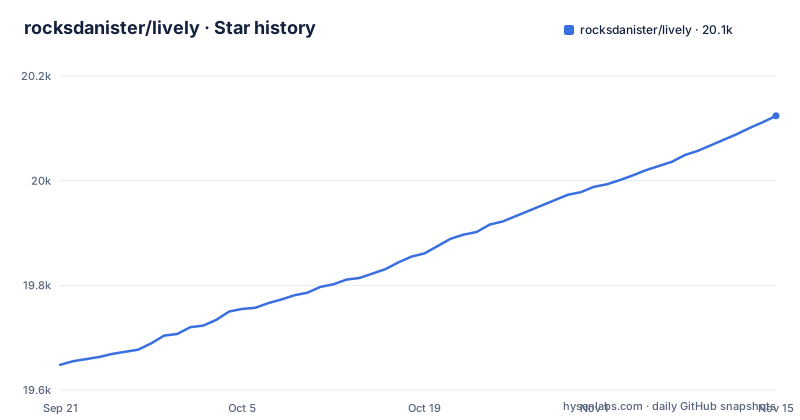
Star history
- rocksdanister/lively20,124 ★ · +476
| Repository | 2026-09-21 | 2026-11-15 |
|---|---|---|
| rocksdanister/lively | 19.6k | 20.1k |
476 Stars in the last 55 days, measured from the daily GitHub snapshot. Compare with other projects
Editorial analysis
The type table separates fixed cost from variable cost
Lively's own comparison table carries the argument. A Video or GIF wallpaper is not interactive, runs at a fixed resolution, and has fixed performance. A Webpage wallpaper is interactive, variable resolution, variable performance. An Application or Games wallpaper, which means running a Unity or Godot game as a background, is also interactive, variable resolution, variable performance.
Read the performance column as a cost statement. A video file has a size you can inspect before you set it, so its CPU and GPU use is knowable. A web page is a program you did not write, running on a minimal Chromium renderer inside your desktop, and the table declines to put a number on it. That is the honest part of the design, and it is also the part that decides whether a laptop stays quiet.
The resolution column matters for the same reason. Video is fixed, so a 4K clip on a 4K panel is a straightforward match, while a page wallpaper can follow the display. The words "variable" in both columns are doing a lot of work and the README does not quantify either one, so the only way to know what a given page or game costs is to set it and watch.
The Store build and the installer want different Windows builds
There are two download channels and they do not have the same floor. The Microsoft Store version needs Windows 10 1809 or above. The installer, taken from the releases page, needs Windows 10 1903 or above. Nothing else in the README separates them, and the deciding document is a wiki page linked as "Which version do I download?", which points to the Differences Between Distributions page.
The practical effect is that a machine on an early Windows 10 build has exactly one option, and the people who pick that option are not told here what the installer build would have given them. The README leaves any other differences between the two channels to the linked wiki page.
For an administrator the channel matters twice over. One is the operating system version, and the other is that one route is a store package and the other is an installer you run. Anything that blocks downloaded installers at the machine level removes the second option without touching the first, so the Store build is the safer default in a locked environment.
Four rules stop playback, and none of them is a locked desktop
The performance section names four situations where playback stops. It pauses when a fullscreen application or game runs, at roughly zero percent CPU and GPU usage. It pauses when the machine is on battery power, which matters on laptops. It pauses automatically during a remote desktop session. And you can set rules based on which application is in the foreground.
The first rule is keyed to fullscreen, not to maximised, and that gap is where the fourth rule earns its place. A window snapped to half the screen or maximised is still a window, so a desktop built around a maximised browser keeps decoding video behind it unless you name that application in a rule. The remote desktop pause is automatic, and it keeps the wallpaper from playing on a machine you are administering from elsewhere.
Two of the four are opt-in and two are automatic, which is worth knowing before you judge battery life. The battery pause and the foreground-application rules have to be set by you; the fullscreen and remote desktop pauses are automatic.
The default branch is a year ahead of the newest installer
The last push to the repository was on 2026-09-30, and the default branch is called core-separation. The newest tagged build is v2.2.1.0, released on 2025-09-18, and before it came v2.2.0.0 on 2025-09-03 and v2.1.0.8 on 2024-05-31. So the work is roughly a year ahead of the binary you can download, which is also the branch the README's own licence link points at.
That is the shape a pre-release default branch has, and it cuts both ways for an adopter. Building from source gives you the refactor the branch name advertises, at the cost of debugging a tree that has not been through a release. Installing gives you a build that predates whatever the core separation was for.
The release names carry the weight too. v2.2.0.0 is labelled Big Update and v2.2.1.0 Big Update - Follow Up, so the gap is not a slow trickle of patches but a single large change followed by a correction, then nothing tagged for twelve months. Anyone tracking this project should read the branch name, not the tag list, to know where the code is.
Automation is promised and then delegated to the wiki
Lively can be controlled with command line arguments from a terminal, and the README points at integration with Python or AutoHotKey scripting. The link for all of it is a wiki page called Command-Line Controls. No flag, no argument name and no example appear in the repository README, so the automation surface is asserted rather than shown.
That matters for the order of work. If you are driving Lively from a script, you are depending on an interface whose only written definition is outside the repository, maintained in the same wiki as the screensaver and API pages. The README gives nothing that would tell you whether a given argument survived the core separation work on the default branch.
The same delegation applies to the developer-facing pieces. The Lively API for interactive wallpapers is said to expose hardware readings, the audio graph and music information, and machine learning inference can be used to drive dynamic wallpapers, but both lead to wiki pages rather than to a documented contract you can read at a tag.
It runs Unity and Godot while disclaiming any affiliation
The types table offers Application or Games as a wallpaper category, and the example cell names Unity and Godot. Shadertoy.com URLs are supported as wallpapers. Immediately below the feature list, the README states that Lively is not officially affiliated with Unity technologies, godot or shadertoy.
Those two facts sit next to each other because the second one is a legal and trademark boundary, not a technical caveat. A wallpaper engine that launches other people's engines and renders other people's shaders is a distribution point for them in a way a plain video player is not, and the disclaimer is the author drawing that line in advance. Anyone running Lively on a managed laptop, or shipping it as part of a managed desktop image, has an affiliation question to answer before an engineering one.
The same reasoning explains why nothing is behind a paywall, which the README states as no blackmagic and no features behind paywall. The project is GPL-v3, and the feature list and the licence are presented as one position rather than an open core with a commercial tier attached.
A Chromium renderer, a video player, and a WinUI 3 shell in one process
The stack is three things at once. Webpage wallpapers run in a minimal webpage renderer powered by chromium. Video playback is hardware accelerated through the mpv or vlc player with customizable video filters. The shell around both is WinUI 3 with the WindowsAppSDK framework, and the README describes Lively as a native application designed for Windows.
That combination fixes the platform question. A WinUI 3 shell has no path to Linux or macOS, so the two other components are not the portability story; they are what a Windows background process needs in order to render a page and a video.
Video filters are customizable, and playback goes through mpv or vlc. The project does not say which filters ship in the installer.
Screensaver mode, multiple monitors, and translations in another repo
Two capabilities are stated in a single line each. Lively supports the Windows screensaver, and any wallpaper can be used as screensaver, so the screensaver you configure is the same one you set as background. Multiple monitors are supported, but the README does not say whether each monitor gets its own wallpaper or mirrors one, and the screensaver workflow is a separate wiki page.
The support section is split by role. Programmers and designers are both pointed at the contributing guidelines. Localization is pointed at a different repository entirely, rocksdanister/lively-translations, and the badge row at the top of the README links a Crowdin project. So translation work is not a pull request against this tree.
The root is small for a project of this size: assets, resources, schemas, src, plus CONTRIBUTING.md, PRIVACY.md and LICENSE. The schemas directory is the one worth a second look if you plan to script the app, since it is the only sign in the layout of formal schemas.
Editorial conclusion
Adopt Lively Wallpaper if you are on Windows, want a video or web page behind your desktop, and can live with a project whose newest installer is v2.2.1.0 from 2025-09-18 while the default branch keeps moving. Do not adopt it on a locked-down machine where a downloaded installer or a store app is not permitted, and do not expect a Linux or macOS build, since the shell is WinUI 3. Before installing, decide which channel you can use, because the Store build needs Windows 10 1809 and the installer needs 1903, then read the differences between distributions page before choosing.
Frequently asked questions
How do I install Lively Wallpaper?
Two channels: the Microsoft Store build needs Windows 10 1809 or above, and the installer from the releases page needs Windows 10 1903 or above. A wiki page on the differences between distributions is linked from the README to help you pick between them.
How do I use Lively Wallpaper?
Drag and drop media or a web page into the app and it becomes the desktop wallpaper. Video and GIF wallpapers are not interactive, while webpage and application wallpapers are.
How do I use Lively Wallpaper on Windows 11?
The app is built on WinUI 3 and the WindowsAppSDK framework, and the Store build runs on Windows 10 1809 or above, so Windows 11 is covered by the same requirement line. The README does not state separate requirements for Windows 11.
How do I use Lively Wallpaper on a laptop?
Lively can be set to pause wallpaper playback when the machine is running on battery power, and it also pauses during a remote desktop session. Playback stops when a fullscreen application runs, and you can add rules based on the foreground application.
How do I use Lively Wallpaper as a screensaver?
Lively supports the Windows screensaver and any wallpaper can be used as one, so the screensaver is configured from the same set of wallpapers. The workflow is covered on a separate screensaver wiki page.
How do I use Lively Wallpaper on 2 monitors?
Multiple monitors are supported. By wallpaper type, video and GIF run at a fixed resolution, while webpage and application wallpapers support a variable resolution.
Official sources
Add this badge to your README
If you maintain this project, the badge below links readers to this analysis and shows its maintenance status from the daily GitHub snapshot. Paste the markdown into your README; add ?metric=license or ?metric=stars to the image URL for a different field.

[](https://hysenlabs.com/projects/rocksdanister-lively)Star history chart for your README
[](https://hysenlabs.com/projects/rocksdanister-lively)Was this useful?