Optiscaler Client: OptiScaler Management for Game Libraries
A modern manager for OptiScaler
At a glance
- What is it?
- Optiscaler-Client is a C# and Avalonia desktop manager for installing, configuring, updating, and removing OptiScaler across Windows and Linux game libraries. It suits players who want a graphical workflow, but its unofficial components and platform-specific integrations require careful review.
- Who is it for?
- Adopt Optiscaler Client if you want a desktop interface for managing OptiScaler across several detected games and value its profile editor, backups, bulk actions, and cached components. Do not treat it as an official OptiScaler distribution or assume every integration is suitable for every system.
- Can I use it commercially?
- Yes, with conditions. GPL-3.0 is a copyleft licence: if you distribute software that includes it, you must release that software's source code under the same licence. Running it internally without distributing it does not trigger that obligation.
- Is it still maintained?
- Yes. The repository last received commits 15 days ago.
- What is it written in?
- Mainly C#, according to GitHub's language statistics.
Answers come from the project's GitHub data, last synced on October 23, 2026, and from our analysis. They are not legal advice.
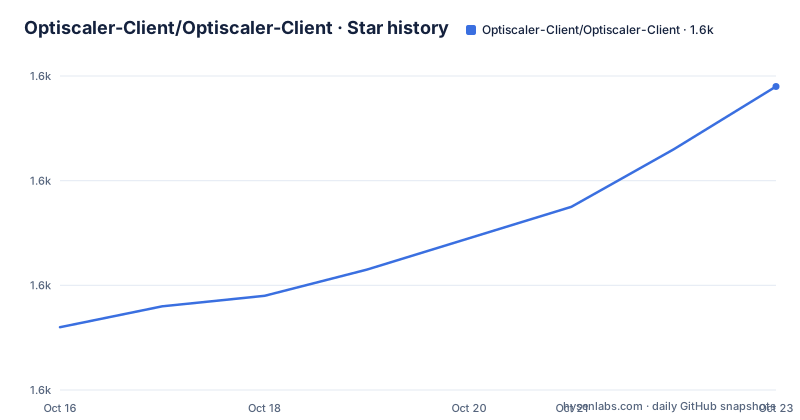
Star history
- Optiscaler-Client/Optiscaler-Client1,638 ★ · +46
| Repository | 2026-10-16 | 2026-10-23 |
|---|---|---|
| Optiscaler-Client/Optiscaler-Client | 1.6k | 1.6k |
46 Stars in the last 7 days, measured from the daily GitHub snapshot. Compare with other projects
Editorial analysis
What Optiscaler Client manages across a library
Optiscaler Client addresses the practical problem of applying OptiScaler to more than one game without manually copying files and editing each game's configuration. Its target user is a player or library maintainer who discovers games through several launchers and wants one desktop workflow for installation, removal, and configuration. The README describes scanning Steam, Epic Games, GOG, EA, Ubisoft, Battle.net, Heroic, and Xbox/Microsoft Store libraries in parallel. On Linux, automatic scanning is limited to Steam and Heroic, while Epic Games and GOG are included through the Heroic context described by the project.
The application is not a general-purpose game launcher and it is not the OptiScaler project itself. It is a personal, unofficial utility built with C# and Avalonia UI. The README explicitly states that the author is not affiliated with the OptiScaler team. That distinction matters because component sources, compatibility assumptions, and update channels can differ between the client and the upstream mod.
The client can add a custom folder, manually select an executable, and filter scans by drive root. These choices address games that are not exposed through a supported launcher or that use an unusual installation layout. It also excludes known non-game entries such as Wallpaper Engine and Steamworks Redistributables. The result is a library-oriented management tool rather than a single-game installer, although the repository does not document the discovery heuristics for every launcher.
Discovery, installation paths, and game-file changes
The documented workflow begins with library discovery and ends with a per-game installation state. The client can use automatic detection of game directory structures, including UE5 and Phoenix layouts, or offer manual executable selection for non-standard directories. Installation and uninstallation are available as quick actions from the main view. Bulk installation adds platform filtering, component selection, and profile application when a library contains several eligible titles.
An important implementation detail is that installation is not limited to the OptiScaler core. The client manages Fakenvapi, OptiPatcher, Nukem's DLSSG-to-FSR3 bridge, and FSR 4 DLL variants. It also offers several injection methods: `dxgi.dll`, `winmm.dll`, `d3d12.dll`, `dbghelp.dll`, `version.dll`, `wininet.dll`, and `winhttp.dll`. The choice affects which files are placed into the game directory, so it should not be treated as a cosmetic preference.
The README states that original game files are backed up before installation and restored during uninstallation. It also documents a lightweight configuration update path for changing a simple setting without reinstalling the whole component. However, the README excerpt does not describe backup storage locations, conflict handling when an original file already exists, or the precise rollback behavior after a partial failure. Those details need direct inspection before using the client on a valuable game installation.
Profiles and per-game OptiScaler controls
Profiles are the client's main configuration abstraction. They are INI based and can be created, edited, cloned, and managed. The built-in `OptiScaler Standard` profile supplies default settings, while a separate default profile can be applied automatically during Quick Install and Bulk Install. The editor offers an Easy Mode interface for common toggles and an Advanced Mode organized around sections, search, and sidebar navigation.
The README also describes recommended configurations sourced from the OptiScaler compatibility page and the Luma Unreal Engine list. It says the client can select an injection method from community data. That is useful for reducing repetitive research, but it does not turn the recommendation into a guarantee. GPU drivers, game updates, executable layout, and the selected component version can all change the conditions behind a compatibility entry.
The game management view exposes direct controls for output upscaling, input resolution quality, frame generation, Multi Frame Generation, and vendor spoofing. The documented quality choices range from game-controlled input and native AA through several quality levels and a custom scale factor. Frame generation includes path, nvngx, and Streamline setup, with a DLSS-G multiplier from x3-x6. These controls can reduce the need to open a profile for common changes, but advanced settings still depend on the underlying OptiScaler configuration.
Component channels, downloads, and experimental integrations
Optiscaler Client separates core OptiScaler from optional components and experimental integrations. The core component has stable, beta, and nightly version channels. OptiPatcher is described as an ASI plugin loader that automatically sets `LoadAsiPlugins=true` in `OptiScaler.ini`. Fakenvapi is installed alongside OptiScaler when the selected configuration needs it, while the FSR 4 manager can swap INT8 and FP8 builds or replace existing game files without installing OptiScaler.
The client also integrates RenoDx addons for ReShade, Nvidia Neural Rendering Mod for AMD through an unofficial bridge, and an unofficial DLSS Frame Generation modification for RTX 20 and 30 series GPUs. The latter is Windows only and is described as using a pinned, hash- and signature-verified version. The DLSS Enabler feature is explicitly downloaded from an unofficial mirror because official builds are available on Nexus Mods only.
This breadth creates the client's clearest trade-off. Centralized management is convenient, but optional components can come from different sources and may not have the same support boundaries as the core mod. The README does not provide a complete dependency or conflict matrix. Network requests can use system proxy settings, `HTTP_PROXY`, `HTTPS_PROXY`, or explicit authenticated proxy settings from app configuration, so controlled environments should account for download behavior as well.
Installing Optiscaler Client and completing a first managed install
The README identifies Windows and Linux as supported platforms and links to GitHub Releases through its release badge, but the README excerpt does not give an exact installation command, package name, download URL, or first-launch procedure. It therefore does not support inventing shell instructions or claiming that a particular binary has been verified. The documented starting point is the project's GitHub Releases page, where the release entries include `OptiscalerClient-1.0.8`, `OptiscalerClient-1.0.7.2`, and `OptiscalerClient-1.0.7.1`.
For a first real use, the README supports this sequence without undocumented commands: obtain a release for the host platform, launch the desktop client, let it discover supported libraries or add a custom folder, select a game, and use the installation controls. Before changing a game, select the intended OptiScaler channel, choose the required components, decide whether a profile should be applied, and review the injection method. The README says components are downloaded automatically when they are not cached. After installation, the Manage window provides the documented upscaler, quality, frame-generation, and spoofing controls.
Because the README excerpt omits the actual release asset instructions, it does not establish whether installation requires a package manager, a self-contained executable, or a separate runtime. It also does not state what success or failure output looks like. A first-use evaluation should therefore begin with a disposable or backed-up game directory, not with an unattended bulk deployment.
Practical limits and a different management approach
Optiscaler Client is the wrong tool when the requirement is an official, narrowly scoped OptiScaler distribution or a fully documented unattended deployment. The project itself disclaims official affiliation, and some integrations depend on unofficial mirrors or community-developed modifications. The Linux feature set is narrower than the Windows feature set, especially for automatic library discovery and the experimental RTX frame-generation feature.
A real alternative is direct manual management of OptiScaler files and `OptiScaler.ini` inside each game directory. That approach avoids a separate manager, profile store, component downloader, and automated library discovery, but it transfers discovery, backup, injection-method selection, and updates to the operator. Optiscaler Client wins when those tasks are repetitive and the operator wants a desktop interface. Manual management wins when exact file provenance, deployment timing, and change control matter more than convenience.
The GPL-3.0-or-later license is the main licensing fact documented by the repository. Any adoption decision involving redistribution or modified builds should follow the license text and applicable obligations. The README does not document telemetry, licensing of downloaded third-party components, or whether all external assets inherit the project license, so those points should not be inferred.
Optiscaler Client maintenance and release cadence
The repository is not archived, and its recorded last push was on 2026-10-08. Recent release entries are dated 2026-10-08, 2026-09-23, and 2026-09-21, which indicates recent project activity. The README does not describe a long-term support policy, migration policy, compatibility guarantee, or compatibility window for older game versions.
The upgrade cost is therefore operational rather than just a binary replacement. A user must review release notes, component channels, injection methods, profile compatibility, and any changed experimental integration before applying a new version. Because installation can modify game directories and the project offers backup and restore, an upgrade should be treated as a controlled operation until the operator has verified the restoration behavior. The GPL-3.0-or-later license also remains relevant when redistributing the client or distributing modified versions.
Editorial conclusion
Adopt Optiscaler Client if you want a desktop interface for managing OptiScaler across several detected games and value its profile editor, backups, bulk actions, and cached components. Do not treat it as an official OptiScaler distribution or assume every integration is suitable for every system. Verify first that your platform, game executable, GPU, injection method, selected OptiScaler channel, and any unofficial mirrored component match your deployment requirements, then review the backup behavior before changing existing game files.
Frequently asked questions
What is Optiscaler Client used for?
Optiscaler Client is an unofficial desktop utility for discovering games, installing or removing OptiScaler, applying configuration profiles, and managing related components across supported game libraries. The README describes support for Windows and Linux, with reduced automatic library scanning on Linux.
Does Optiscaler Client provide an official OptiScaler installation?
No. The README states that Optiscaler Client is a personal project and not an official OptiScaler project, with no affiliation to the OptiScaler team. It manages OptiScaler-related components and downloads through its own workflow.
Can Optiscaler Client install OptiScaler for multiple games?
Yes. The documented Bulk Install feature supports installing across multiple games with platform filtering, component selection, and profile application. Automatic game discovery supports several launchers, while custom folders and manual executable selection cover other layouts.
What happens to existing game files when Optiscaler Client uninstalls OptiScaler?
The README states that original game files are backed up before installation and restored during uninstallation. The README does not specify backup locations, conflict handling, or the exact steps for manually recovering a failed restoration.
Does Optiscaler Client support Linux game libraries?
The README lists Linux as a supported platform. It says automatic scanning on Linux covers Steam and Heroic, while other launchers may require custom folders or manual executable selection. One experimental RTX frame-generation feature is documented as Windows only.
Official sources
Add this badge to your README
If you maintain this project, the badge below links readers to this analysis and shows its maintenance status from the daily GitHub snapshot. Paste the markdown into your README; add ?metric=license or ?metric=stars to the image URL for a different field.

[](https://hysenlabs.com/projects/optiscaler-client-optiscaler-client)Star history chart for your README
[](https://hysenlabs.com/projects/optiscaler-client-optiscaler-client)Was this useful?