Material Maker builds textures as node graphs and paints the model
A procedural textures authoring and 3D model painting tool based on the Godot game engine
At a glance
- What is it?
- Material Maker is a Godot based desktop application that authors textures as interconnected nodes and paints 3D models in the same window. The install surface covers Windows and macOS well and Linux barely, and the argument parsing at startup has no documented flags behind it.
- Who is it for?
- Pick Material Maker if you already live in Godot or want a node graph texture workflow on the desktop, and you are content to install from itch.io, Steam or an automated build from master. Pass if you need a documented batch renderer, a bridge to Blender or Unity, or a vendor support contract.
- Can I use it commercially?
- Yes. MIT is a permissive licence: you can use, modify and sell software built on it, as long as you keep its copyright and licence notices.
- Is it still maintained?
- Yes. The repository last received commits 4 days ago.
- What is it written in?
- Mainly GDScript, according to GitHub's language statistics.
Answers come from the project's GitHub data, last synced on November 15, 2026, and from our analysis. They are not legal advice.
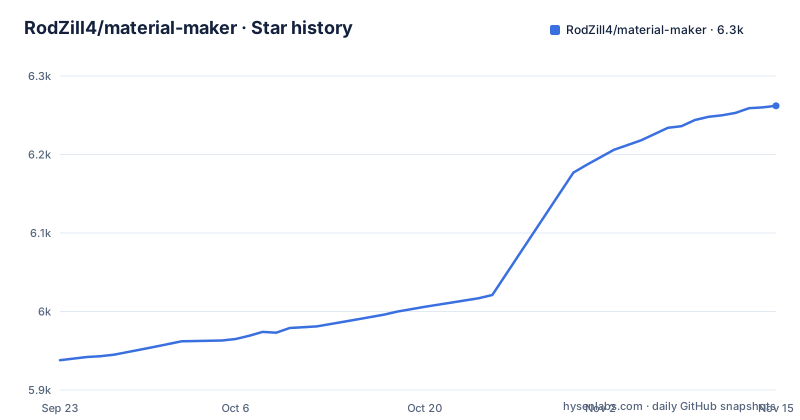
Star history
- RodZill4/material-maker6,262 ★ · +324
| Repository | 2026-09-23 | 2026-11-15 |
|---|---|---|
| RodZill4/material-maker | 5.9k | 6.3k |
324 Stars in the last 53 days, measured from the daily GitHub snapshot. Compare with other projects
Editorial analysis
Textures are graphs, because the editor is Godot's GraphEdit
Material Maker is a tool based on the Godot Engine that creates textures procedurally and paints 3D models, and its interface comes straight out of Godot's GraphEdit node. A texture or a brush is not a document you fill in field by field. It is a set of interconnected nodes that you wire together, and the graph is the saved artefact. That choice is most of the product. The repository is a Godot project rather than a library: project.godot at the root, start.gd and start.tscn as entry points, material_maker/ for the application code, addons/ next to it, default_env.tres for the default environment, export_presets.cfg for the packaged builds. The primary language is GDScript. Two example scenes ship with it, demo/demo.tscn and demo/object.tscn. What the README describes is a tool you launch, not a plugin you drop into a Godot project of your own.
Four ways to get it, and two of them are package managers
The primary downloads are an itch.io page and a Steam listing. On Windows, Scoop works, and it wants its bucket set up before the package resolves:
scoop bucket add extras
scoop install material-maker
On macOS, Homebrew covers it in one line:
brew install material-makerWindows also goes through Chocolatey, either as a normal install or as a portable one that leaves the location to you:
choco install material-makerchoco install material-maker.portableThat is the whole documented install surface, and two things are missing from it. No package manager is named for Linux, so a Linux install means itch.io, Steam, or a build you make yourself. And the final route is the one the README hedges: automated desktop builds are published from the master branch by the dev-desktop-builds.yml workflow for anyone who cannot wait for the next release, with the warning to use them at your own risk.
Releases are plain integers, but the master branch ships nightly desktop builds
Version naming is plain numbers. 1.6 shipped on 2026-04-18, 1.7 on 2026-07-14 and 1.8 on 2026-10-25. The default branch is master, and the last push was on 2026-10-25, the day 1.8 was released. That branch doubles as a distribution channel, which is where the trade-off sits. A build from master is the fastest way to get a fix that has not reached a tag yet, and also the easiest way to get a build nobody has pinned, since the README states no version for what it produces. CHANGELOG.md sits at the root, so the record of what changed between tags is in the repository rather than only on a release page, and reading it before you pin a build is cheaper than discovering a renamed node later.
parse_args.gd runs at startup, and not one flag is documented
Startup goes through start.gd and start.tscn, and the repository also ships parse_args.gd together with parse_args.tscn and a .uid file beside it. What those arguments are is not written down. The README documents no flag for a headless render, no batch mode, no output path, no resolution and no config override, and the two demo scenes are files you open in the editor rather than targets a script points at. The consequence is specific: Material Maker is documented as a tool you sit in front of. If your pipeline needs a texture regenerated overnight from a source file, this repository does not describe how to ask for that, and you would be driving the interface by hand instead. A test/ directory does exist at the root, but that says nothing about a scripting surface.
Translations install from Preferences, and the Chinese pack is pinned to one commit
Localisation runs through the running application rather than through a folder you create. Translation files are installed with the Install button in the Preferences dialog, so a language pack is a file the application fetches and then applies at runtime. The README points at one example, a Chinese translation credited to free_king, and the link for it is a raw file URL pinned to a single commit rather than to the master branch. A link pinned that way does not pick up later edits on its own, which means a pack can go quiet while the application underneath it keeps changing, and the Preferences dialog is the only place you would notice. Anyone adding a language works in the plain file model: produce a translation file, hand it over for the dialog to install, and accept that its freshness is a manual problem.
Desktop builds only: no Blender bridge, no Unity package, no browser version
The downloads are desktop builds, and that boundary is sharper than a feature list suggests. Windows and macOS have package managers. Linux has itch.io, Steam, or nothing documented in the README. Past platform, no export target for another tool is named either: no Blender bridge, no Unity package, no browser or iPad build. The README also says nothing about baking, about UDIM style texture sets, or about how a painted 3D model result travels back into a game engine pipeline, so the round trip from this tool to a shipped project is not something it walks you through. Where the documentation does get concrete, it is on the authoring side: wire up nodes, paint the model, then read the user manual at rodzill4.github.io/material-maker/doc/, and the repository also carries a .readthedocs.yaml file.
MIT covers the code, and unless otherwise specified is the line to read
The licence is MIT, held by Rodolphe Suescun and contributors with copyright dated 2018-present, and the README attaches a qualifier that matters more for an art tool than for a library: files in the repository are MIT licensed unless otherwise specified, with LICENSE.md holding the detail. That qualifier is the line to read before you ship anything produced with the tool. The repository mixes code with assets, including demo/ scenes, icon.ico, icon.png and a MaterialMakerLG.icon directory, and no per asset declaration is visible from the top level. CONTRIBUTING.md and .mailmap are both present, so the project has a stated contribution path and a recorded author list behind its commits. The code is permissive and short enough to read. The graph workflow is the part you actually adopt.
Editorial conclusion
Pick Material Maker if you already live in Godot or want a node graph texture workflow on the desktop, and you are content to install from itch.io, Steam or an automated build from master. Pass if you need a documented batch renderer, a bridge to Blender or Unity, or a vendor support contract. Check one thing first: whether the graph you need has a node for it in the user manual.
Frequently asked questions
What is Material Maker?
A tool based on the Godot Engine that creates textures procedurally and paints 3D models. Textures and brushes are described as interconnected nodes, in an interface built on Godot's GraphEdit node.
How do I install Material Maker?
Download it from itch.io or Steam. On Windows there is also Scoop, which needs the extras bucket added first, and Chocolatey with a portable package. On macOS there is Homebrew. No package manager is named for Linux.
How do I use Material Maker?
Build a texture by wiring interconnected nodes together in the GraphEdit based interface, then paint 3D models in the same application. The user manual sits at rodzill4.github.io/material-maker/doc/, and translation files install from the Preferences dialog.
Is Material Maker open source?
The repository is MIT licensed, copyright 2018-present Rodolphe Suescun and contributors, with files licensed under MIT unless otherwise specified. The primary language is GDScript and the code sits in a Godot project with project.godot at the root.
How does Material Maker compare with Substance Painter?
The README names no competing product. Material Maker's own approach is a node graph for authoring textures procedurally, plus direct painting of 3D models, both inside one Godot based desktop application.
Official sources
Add this badge to your README
If you maintain this project, the badge below links readers to this analysis and shows its maintenance status from the daily GitHub snapshot. Paste the markdown into your README; add ?metric=license or ?metric=stars to the image URL for a different field.

[](https://hysenlabs.com/projects/rodzill4-material-maker)Star history chart for your README
[](https://hysenlabs.com/projects/rodzill4-material-maker)Was this useful?