The install instructions at the top are for a different product
A version of openClaw/Clawdbot that automates android phones entirely without root, including all apps from a side-loaded APK. Acts as your 24/7 personal assistant on your phone.
At a glance
- What is it?
- PhoneClaw is an Android automation app in Kotlin that generates its automation logic at runtime in an embedded scripting language and drives the Accessibility service with vision. The README around it advertises an npm package, a browser extension and a token, none of which are this app, and the demo list is mostly videos of other things.
- Who is it for?
- Build it from source and read the token section before you run it, because the vision-based clicking sends screenshots to a hosted model and the token is configured through Gradle properties. Two things to ignore while you read the README: the npm, extension and marketplace links at the top belong to a separate product, and the demo list is a gallery of assorted automation videos rather than a description of what this app does.
- Can I use it commercially?
- Yes. MIT is a permissive licence: you can use, modify and sell software built on it, as long as you keep its copyright and licence notices.
- Is it still maintained?
- Yes. The repository last received commits 100 days ago.
- What is it written in?
- Mainly Kotlin, according to GitHub's language statistics.
Answers come from the project's GitHub data, last synced on November 21, 2026, and from our analysis. They are not legal advice.
Star history
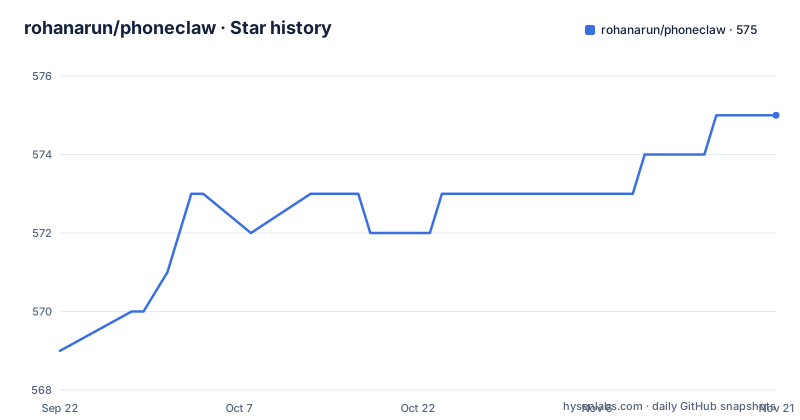
- rohanarun/phoneclaw575 ★ · +6
| Repository | 2026-09-22 | 2026-11-21 |
|---|---|---|
| rohanarun/phoneclaw | 569 | 575 |
6 Stars in the last 60 days, measured from the daily GitHub snapshot. Compare with other projects
Editorial analysis
The install instructions at the top are for a different product
The first block of the README is headed as an install section, and it does not install PhoneClaw.
npm install -g superpowers-aiThe package it installs is a command line tool with a different name, and the README goes on to list a browser extension for the same tool and a marketplace namespace for it, then says to open a URL to control a stream. The heading itself ends in a stray asterisk, as if a footnote had once been attached to it.
None of that is the Android app. PhoneClaw is installed by opening the repository in Android Studio and using a build menu action to produce an APK, then side-loading it.
So the first thing a new reader is shown is how to install something else, and the actual install is four steps further down under a setup heading with numbered items instead of a command.
A token named after the app appears in someone else's demo
The demos section is a list of links with captions, and one line among them describes a cryptocurrency token named after this project being integrated into somebody else's application.
That is a naming collision, not a feature. Nothing in the repository connects the app to a token, and the line sits between demo videos about automated locking, an automated community moderation agent and a video about flying drones with AI.
What the surrounding list contains is a broader point. There is a video about software-only iPhone automation, an iOS app in an app store, an augmented reality headset demo, uploading videos to a social platform with music attached, and two videos whose captions describe creating social media accounts with two-factor codes pulled from email and handling captchas.
I am not reproducing how any of those work. It is enough to say that the demo list covers account creation and captcha handling alongside the rest, which tells you what the underlying automation layer is capable of and is the reason to read the access-control story before pointing it at anything.
Vision clicking means the screen leaves the phone
The two headline helpers are the interesting part of the scripting surface, and both work by taking a screenshot and asking a vision model about it.
One takes a natural-language description, finds the matching element in the image and taps it through the Accessibility service, which is the mechanism that lets it survive a layout that differs from the one the flow was written against. The other takes a question about what is visible and returns a short string you can branch on, and the README suggests it for one-time codes, status labels and field values.
Neither runs on the device. The setup section asks for an authentication token for a hosted vision service, supplied through Gradle properties so that it stays out of version control.
# local.properties (project root) OR ~/.gradle/gradle.properties
MOONDREAM_AUTH=YOUR_TOKEN_HERE
So every screenshot taken to find a button is a screenshot sent to someone else's inference service. That is the single most important thing to know about this app, and it appears at the bottom of the README under a heading that just says setup.
The token file path and the committed Gradle properties file
The token guidance offers two locations, one inside the project and one in your user-level Gradle directory, and the comment marks the first as acceptable.
The repository's top-level listing contains a Gradle properties file. If a contributor follows the first option and writes a token into the project's own copy before committing it, the claim that the token is kept out of git stops being true, because nothing in the documentation says to add that file to the ignore list.
This is a small thing in a project whose readme is mostly demo links, but it is the kind of thing that ends with a credential in a public history, and the fix is one line in the ignore file.
It is also the only configuration this project has. There is no settings screen, no configuration file format and no documentation of what happens when the token is missing, so the first run either works or produces a failure the README does not describe.
One update entry, six months behind the last push
There is an updates section, and it contains a single line: a date in February 2026, noting that selecting a model on a third-party router became possible.
The repository was last pushed in August 2026. So the changelog is half a year behind the code it describes, and it documents exactly one change, which is a feature rather than a fix.
There are no GitHub releases either, so the only version history is the commit log and one dated sentence. For an app that has been building APKs from source for a while, that is thin, and it means the README's feature list and the actual behaviour of whatever you build may have drifted apart.
The root of the repository is also where a screenshot with a space in its filename sits next to the readme and a licence, which suggests the tree has been assembled rather than curated.
Installation is a debug build you make yourself
The setup sequence is honest about what it involves. The cheapest phone named as a test device is a specific low-end model available at a US retailer, and the instructions say that is the phone used in the demos. Developer mode has to be enabled, and the documentation states plainly that the device does not need to be rooted.
Then the build: install Android Studio, open the repository, and use the menu action that generates APKs. The resulting file is transferred to the phone and installed, and you allow the permissions it asks for.
The last two steps are where the agent appears. On first launch you use voice commands to describe an automation, the app runs it, schedules it, and writes out a file that you can then edit.
No root is needed, but the Accessibility service is what does the clicking, and that is the same system-level interface that Android's own safety features watch. The readme does not discuss what the app does with that access beyond automating what you describe.
A community link whose label and target disagree
The community section lists a chat server, a video channel and a social community. The social entry is a link whose visible text and destination point at two different community identifiers.
That is the kind of detail that matters more than it looks. Community links in a readme are how a project finds the people who can answer a question about a sideloaded build, and a mismatch means either the label was edited without updating the destination or the destination was swapped without updating the label. Either way one of the two identifiers is dead.
It is also a useful signal about the rest of the documentation. Several demo captions have no link at all beneath them, the updates section has one stale entry, and the install block at the top belongs to another project. The parts that matter for using the app, the scripting helpers and the build steps, are the parts that are specific and checkable.
Editorial conclusion
Build it from source and read the token section before you run it, because the vision-based clicking sends screenshots to a hosted model and the token is configured through Gradle properties. Two things to ignore while you read the README: the npm, extension and marketplace links at the top belong to a separate product, and the demo list is a gallery of assorted automation videos rather than a description of what this app does.
Frequently asked questions
What is PhoneClaw?
An Android automation app written in Kotlin that runs on-device workflows and generates automation logic at runtime using ClawScript, a JavaScript-based scripting language with an embedded engine built into the app, driving the device through the Accessibility service.
Does PhoneClaw need a rooted phone?
No. The setup instructions say to enable developer mode and side-load an APK, and state explicitly that you do not need to root the device. The build is produced locally with Android Studio.
How does PhoneClaw tap controls without fixed coordinates?
With a helper that takes a screenshot, uses vision to locate a UI element described in plain language, and taps the best match through the Accessibility service. A second helper answers a question about what is visible and returns a short string, which suits reading one-time codes and field values.
What can PhoneClaw's scripting helpers do?
They can read text aloud with on-device speech, pause for a delay, register and clear cron-scheduled tasks, click an element by description, answer a question about the screen, send email from the device, and parse a value as an integer with a fallback.
What does PhoneClaw need a hosted vision token for?
The vision-assisted clicking and screen reading run on a hosted model rather than on the phone, and the setup asks for an authentication token for it, supplied through Gradle properties so it stays out of version control.
Official sources
Add this badge to your README
If you maintain this project, the badge below links readers to this analysis and shows its maintenance status from the daily GitHub snapshot. Paste the markdown into your README; add ?metric=license or ?metric=stars to the image URL for a different field.

[](https://hysenlabs.com/projects/rohanarun-phoneclaw)Star history chart for your README
[](https://hysenlabs.com/projects/rohanarun-phoneclaw)Was this useful?