UltrawideIndex catalogs ultrawide fixes as one release per game
A growing collection of widescreen and wider solutions from Rose of the WSGF.
At a glance
- What is it?
- A documentation repository, not a tool: it indexes widescreen and wider solutions from Rose of the WSGF, with a GitHub release tag per game, a download badge and a screenshot. Useful as a catalogue, silent about compatibility and licensing.
- Who is it for?
- UltrawideIndex is the right starting point for a player who owns a 21:9 or 32:9 monitor and wants to know which ultrawide fix exists for a specific game, because each entry resolves to its own release page with its own instructions. It is the wrong place to look for a general patching tool, since the repository contains no code and no framework, only a catalogue.
- Can I use it commercially?
- Not without permission. GitHub finds no licence file in the repository, and without a licence all rights are reserved by default: you may read the code but not reuse it. Check the README, or ask the authors, before using it.
- Is it still maintained?
- Yes. The repository last received commits 9 days ago.
- What is it written in?
- GitHub does not report a main language for this repository.
Answers come from the project's GitHub data, last synced on November 7, 2026, and from our analysis. They are not legal advice.
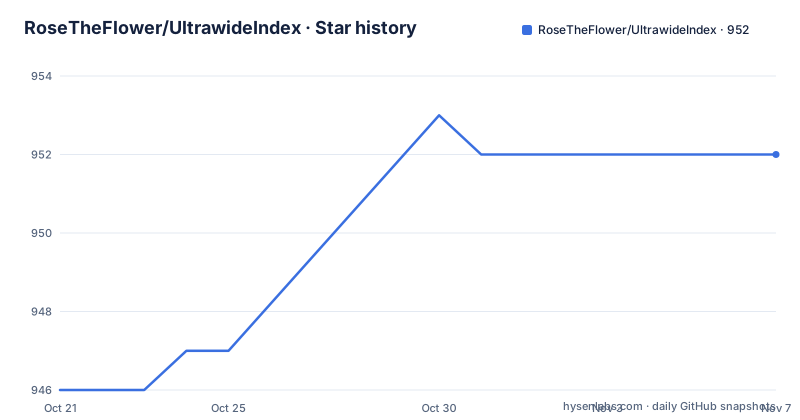
Star history
- RoseTheFlower/UltrawideIndex952 ★ · +6
| Repository | 2026-10-21 | 2026-11-07 |
|---|---|---|
| RoseTheFlower/UltrawideIndex | 946 | 952 |
6 Stars in the last 17 days, measured from the daily GitHub snapshot. Compare with other projects
Editorial analysis
A catalogue with a download page per game
UltrawideIndex is described as a growing collection of widescreen and wider solutions from Rose of the WSGF, which is the widescreen games finder community that catalogues ultrawide fixes. The repository is not a tool and it is not a patch framework. It is an index.
The top level entries make that clear: .gitattributes, .github/, README.md, a donations/ directory, an instructions/ directory and a screenshots/ directory. There is no source directory, the primary language of the repository is not even recorded, and the README carries no build instructions, because there is nothing to build.
What the project does is give every fix its own GitHub release tag, so the distribution mechanism doubles as the index. Each entry in the README names a game, shows a 32:9 screenshot from the screenshots/ directory, carries a download badge pointing at that game's release tag, states in one line what the fix does, and links to a download page and instructions for that specific release. The tag names are short and lower case, which is the pattern GitHub releases use for this kind of per-project distribution:
apeout
endofabyss
thesinkingcity2
Recent tags follow the same pattern, with apeout published on 2026-10-19, endofabyss on 2026-10-01 and tss2fov, described as a FOV changer for The Sinking City 2, on 2026-08-18. The last push to the repository was on 2026-10-19 and the repository is not archived, so the catalogue is still growing.
Horizontal bars, vertical bars, field of view and resolution caps
The one-line descriptions across the entries fall into a small number of distinct fixes, and reading them together explains what ultrawide support actually requires from a game.
The first group is the horizontal bar, which appears when a game renders 16:9 and letterboxes the rest of a wider screen. End of Abyss removes the black bars affecting resolutions other than 16:9, and Little Nightmares Enhanced Edition removes the bars in anything other than 16:9 without reducing the field of view. Farlands goes further, removing the black bars affecting all aspect ratios but 16:9 and correcting the scaling of videos in ultrawide.
The second group is the vertical bar, which appears when a game is built for a taller screen than the display. Teenage Mutant Ninja Turtles: Splintered Fate removes the vertical black bars and expands the view in ultrawide, Terminator 2D: NO FATE enables ultrawide and wider support with no vertical black bars, and Horses removes the vertical black bars limiting the game view to 4:3.
The third group is the resolution lock. My Little Pony: A Zephyr Heights Mystery disables the game's resolution restrictions, which is what allows ultrawide support at all, and Kane & Lynch 2: Dog Days enables ultrawide and wider without stretching, which is a separate problem from removing bars because the render target itself has to widen.
A fourth group exists for cutscene-only problems, where the gameplay view is fine and the bars appear in cinematics. Watch Dogs 2 removes the black bars from the game's real-time cutscenes, The Sinking City 2 removes them from cutscenes, menus and interaction scenes, and Agatha Christie: Death on the Nile removes them from the cutscenes.
Where the fixes come from, and what the repository does not contain
The provenance is stated in one phrase: these are solutions from Rose of the WSGF. The WSGF is where the community catalogues ultrawide fixes, and UltrawideIndex collects them under one roof with a consistent presentation and a download link per game. The README does not claim to author the individual fixes, and nothing in the repository suggests the fixes are built by a single tool or engine.
That has a direct consequence for anyone expecting a patching workflow. There is no configuration file, no injector, no loader, no documented set of dependencies, and no script to run. What you get per game is a release artefact, an instruction page, and a screenshot showing what the result looks like at 32:9. The screenshots are the real documentation: a 32:9 capture is the fastest way to tell whether a fix widens the gameplay view or only removes bars from a cutscene.
The instructions/ directory at the top level suggests the project keeps some shared guidance outside the README, and the per-release pages carry their own instructions, which matters because the steps for removing a resolution restriction are not the same as the steps for a geometry patch.
The donations/ directory is also worth noting for a project that curates other people's work. It signals that the maintainer is collecting support for the catalogue itself, which is the part of the chain that the WSGF does not do.
Reading the catalogue: what an entry does and does not tell you
An entry is a sentence, a screenshot and a link. That is genuinely enough to answer the question most people arrive with, which is whether a fix exists for the game on their desk, and roughly what it does.
It is not enough to answer the questions that decide whether you should install it. The README says nothing about the game version each fix targets, and a black bar fix built for one patch level of a game can behave differently on another, particularly for the entries that change the render target or remove a resolution cap. Nothing in the catalogue records a minimum game version, a supported aspect ratio ceiling, or whether a fix works in multiplayer.
The entries are also uneven in a way that is informative. Some describe a mod, for instance Ape Out, where the mod enables ultrawide and wider support with no black bars, and Terminator 2D, which also uses the word mod. Others are described as a solution, for instance End of Abyss and The Thaumaturge, where the solution removes the black bars from cutscenes, dialogue and fight scenes. The wording reflects that some entries are patches to shipped files and some are configuration changes, and the distinction matters when you are deciding how to uninstall one.
The sixteen or so entries visible in the README are only the recent slice of a catalogue that the description calls growing, so the shape of the collection is worth keeping in mind before drawing conclusions about coverage.
Licence, packaging and the limits of a bare index
The licence field on the repository is not set, and there is no licence file among the top level entries. The README does not state terms either. That is a genuine gap, not a formatting quirk, and it applies to the fixes themselves as much as to the index: a catalogue that redistributes game modifications and points at download pages is a place where a user will want to know what they are allowed to do with what they downloaded, and the repository as described does not answer that.
There is also no homepage, no documentation site and no issue tracker mentioned in the README, only a GitHub repository, the README itself, and the release pages it links to. For a catalogue whose value is the link between a game name and a fix, that is coherent, but it means the only maintenance channel is the repository itself.
The final limit is the one implied by the whole design. UltrawideIndex answers a lookup question, not a build question. If what you want is a single tool that scans a library and patches everything that is patchable, this catalogue will not do that, and if what you want is to understand how a fix works, the download and instructions pages for that specific game are where you have to go. The screenshots directory can at least tell you the coverage of a game at a glance, since each capture is taken at 32:9.
Editorial conclusion
UltrawideIndex is the right starting point for a player who owns a 21:9 or 32:9 monitor and wants to know which ultrawide fix exists for a specific game, because each entry resolves to its own release page with its own instructions. It is the wrong place to look for a general patching tool, since the repository contains no code and no framework, only a catalogue. It also does not tell you which game version each fix was built against, or what licence the fixes carry, since the top level of the repository has no licence file and the licence field is unset. Verify the specific release tag you intend to use, read its own instructions, and confirm the fix matches the build of the game you have before you overwrite anything.
Frequently asked questions
What is UltrawideIndex?
It is a growing collection of widescreen and wider solutions from Rose of the WSGF, presented as an index where each game has its own GitHub release tag, a download badge, a 32:9 screenshot and a link to a download page with instructions.
How do I get an ultrawide fix for a specific game?
Each README entry links to that game's own release page, for example the apeout or endofabyss tag, where the download and the instructions for that fix live. The repository also keeps an instructions/ directory alongside the screenshots/ directory.
Does UltrawideIndex cover games with vertical black bars?
Yes, several entries target vertical bars, including Teenage Mutant Ninja Turtles: Splintered Fate, Terminator 2D: NO FATE and Horses, which removes the bars limiting the view to 4:3. Other entries target the horizontal bars that appear at non-16:9 resolutions.
What licence applies to the fixes in UltrawideIndex?
The repository does not state one: the licence field is not set, there is no licence file among the top level entries, and the README does not mention terms. The release page for each individual fix is the place to check before using it.
Official sources
Add this badge to your README
If you maintain this project, the badge below links readers to this analysis and shows its maintenance status from the daily GitHub snapshot. Paste the markdown into your README; add ?metric=license or ?metric=stars to the image URL for a different field.

[](https://hysenlabs.com/projects/rosetheflower-ultrawideindex)Star history chart for your README
[](https://hysenlabs.com/projects/rosetheflower-ultrawideindex)Was this useful?