PhoneAgent's iOS bridge runs inside the UI test target, so the agent loop is iOS only
An AI agent that can get things done across iPhone apps.
At a glance
- What is it?
- PhoneAgent is two projects sharing one protocol: a SwiftUI iPhone app with its own agent loop, and a localhost JSON-RPC bridge that lets an external coding agent drive iOS and Android devices. Eleven actions are shared, one is not, and the known limitations section is unusually honest about what that costs.
- Who is it for?
- Use it if you want an external agent driving a real phone or simulator and you already live on a Mac with Xcode, because the iOS side is a test-hosted bridge and there is no way around that requirement. The action surface is small enough to read in full, the element-tap and text-entry shapes are documented as plain JSON, the API key goes into the iOS keychain rather than a file, and the Android bridge scopes itself to one selected serial.
- Can I use it commercially?
- Yes. MIT is a permissive licence: you can use, modify and sell software built on it, as long as you keep its copyright and licence notices.
- Is it still maintained?
- Yes. The repository last received commits 92 days ago.
- What is it written in?
- Mainly Swift, according to GitHub's language statistics.
Answers come from the project's GitHub data, last synced on November 14, 2026, and from our analysis. They are not legal advice.
Star history
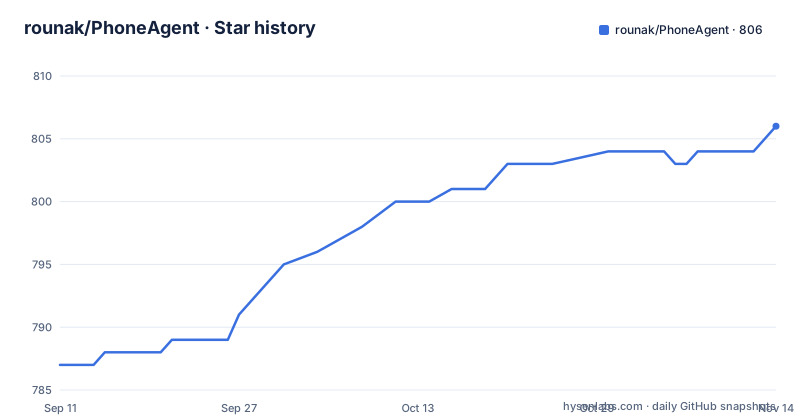
- rounak/PhoneAgent806 ★ · +19
| Repository | 2026-09-11 | 2026-11-14 |
|---|---|---|
| rounak/PhoneAgent | 787 | 806 |
19 Stars in the last 64 days, measured from the daily GitHub snapshot. Compare with other projects
Editorial analysis
The iOS bridge is hosted by a UI test target, not by the app
The most consequential line in the repository pointers is the third one. The iOS bridge server lives at `PhoneAgentUITests/SimulatorRPCServer.swift`, inside the UI test target, alongside the test runner file beside it. So the thing that exposes the action surface to an external agent is a test host, not the application.
That explains requirements that would otherwise look arbitrary. The port is a fixed 45678 rather than something negotiated, the bridge runs against an iOS simulator or a physical iPhone because those are the two targets a UI test can be launched against, and the host must be macOS with Xcode with localhost forwarding set up for a physical device.
It also explains why there is a separate in-app mode. The SwiftUI app runs its own agent loop inside the app, with API key entry, prompt input from the keyboard or the microphone, and an optional always-on mode with a custom wake word. The bridge is the other mode, where an outside agent calls the same device through a socket.
Eleven shared actions, and the one that thinks exists on only one platform
The shared action surface is a flat list of eleven method names, identical on iOS and Android: get the view tree, get a screen image, get context, set an API key, open an app, tap, tap an element, enter text, scroll, swipe and stop. That is a deliberately small vocabulary. It is what you need to look at a screen and act on it, and nothing in it can install anything, change a setting you did not name, or reach outside the device.
Then there is one method that is not shared: `submit_prompt`, listed as iOS only, with a note that it powers the in-app iPhone agent loop. It is the difference between driving a phone and asking a phone to drive itself, and the limitations section confirms the Android bridge does not yet implement it.
So the two platforms are not two ports of the same product. iOS gets an agent that can be handed a goal in natural language. Android gets a remote control with eleven verbs and no reasoning attached. Read the action list as an interface for a model, and the iOS-only method is the difference between a tool and an agent.
One parameter name carries a bundle identifier on iOS and a package name on Android
The RPC notes describe the port as newline-delimited JSON-RPC objects on 127.0.0.1:45678 by default, with an override for host and port on the command line. The portability shim is in the open-app call, whose request parameter is named `bundle_identifier` on both platforms even though the value means different things: an iOS bundle identifier, or an Android package name.
The documentation then supplies identifiers for one platform only: Settings, Camera, Photos, Messages and the Home Screen for iOS. No Android equivalents are listed, so an agent porting a script has the shape right and has to know the package names itself, or find them with the tree call.
Every call goes through one command-line client, which is the piece that makes this usable from an agent rather than from a test:
# iOS bundle identifier example
./.agents/skills/phoneagent/scripts/rpc.py open-app com.apple.Preferences

# Android package example
./.agents/skills/phoneagent/scripts/rpc.py open-app com.android.settings

# Fetch tree
./.agents/skills/phoneagent/scripts/rpc.py get-tree

# Capture screenshot (writes PNG under /tmp/phoneagent-artifacts)
./.agents/skills/phoneagent/scripts/rpc.py get-screen-image --print-metadata
The same client drives both platforms, which is why one script can open a system settings screen on either. Note the artifact path in the comment: a screen capture is written to a temporary directory on the host rather than returned inline, so an agent that wants to look at a screen reads a file.
Element taps take rectangles, and the documentation admits trees go stale
The two element-level actions, tap an element and enter text, take coordinate rectangles in a two-point form: an origin and a size. Not an element handle, not an accessibility identifier, a rectangle. That choice has consequences, and the limitations section names them. UI tree snapshots can be noisy or stale during animations, so a rectangle computed from a snapshot can be applied to a screen that has already moved.
The second limitation is adjacent: keyboard and text reliability can vary by app and platform, so a secure field, a custom keyboard or a web form inside an app view all fail differently and the surface has no per-app configuration for any of them. The third is that long-running tasks need explicit polling and retries from the caller.
Those three together describe an agent loop that has to be written defensively: read the tree, act, capture an image, check the screen is what you expected, and repeat, rather than trusting that a tree read and a tap belong to the same instant. None of that is a helper you can import. It is left to the caller, and the client script does not provide it.
A credential setter shares one localhost port with a text-entry action
Set an API key sits on the shared action surface, in the same list as enter text and tap. Whatever process reaches that port can change the credential the in-app agent uses, and the whole stated security model is four points: the bridge is localhost-oriented, the iOS physical-device workflow uses localhost forwarding, the Android bridge executes only through the selected adb serial, and the in-app API key is stored in the iOS keychain.
That is a coherent posture rather than an oversight. The keychain is the right place for the credential, and scoping the Android bridge to one serial is a real boundary, since the bridge will not act through a second attached device. Localhost orientation carries the most weight, and it is a boundary against other processes on the same machine rather than against a remote caller.
The disclaimer is correspondingly direct: experimental software, a personal project, app contents may be sent to the model API when the agent flow is running, and model or tool actions can be incorrect so important operations need verifying. The last of those is the instruction to keep a human in the loop.
The quick start hardcodes one developer's home directory
The in-app quick start is four numbered steps, and the first of them is an absolute path on somebody else's machine: open that project file in Xcode, run the named scheme on a simulator or device, enter an API key when prompted, submit tasks. Every step after the first is reproducible. The first is not.
The other route avoids the problem. External agents are pointed at a skills directory rather than an Xcode project, and the helper scripts there are what a script actually calls: a CLI for both platforms, an iOS bridge launcher that handles physical-device localhost forwarding, and an Android bridge launcher that discovers devices automatically.
Wireless Android needs two steps before that serial exists, because pairing and connecting are different ports:
# Pair (from Wireless debugging screen)
adb pair <PHONE_IP:PAIRING_PORT>

# Connect (from Wireless debugging screen)
adb connect <PHONE_IP:ADB_PORT>

# Verify
adb devices -l
and then the bridge is started against the network serial:
./.agents/skills/phoneagent/scripts/start_android_rpc_bridge_local.sh --serial <PHONE_IP:ADB_PORT>That is the full setup: a macOS host with Xcode, Python 3, and the Android SDK tools for the Android side. The project is MIT licensed with no published release, the last commit on record is dated 2026-08-15, and the counters are 795 stars, 94 forks and six open issues.
Editorial conclusion
Use it if you want an external agent driving a real phone or simulator and you already live on a Mac with Xcode, because the iOS side is a test-hosted bridge and there is no way around that requirement. The action surface is small enough to read in full, the element-tap and text-entry shapes are documented as plain JSON, the API key goes into the iOS keychain rather than a file, and the Android bridge scopes itself to one selected serial. Do not treat it as a product or as automation you can hand to someone else: it is described as experimental software and a personal project, it has no published release, and its limitations are documented rather than fixed. Before you build on it, check four things. Decide which platform you actually need the agent loop on, because Android gets the eleven actions and nothing that thinks. Read the known limitations before you design a retry strategy, because stale UI trees during animations and app-dependent keyboard reliability are both called out and neither is fixed by polling harder. Treat the localhost assumption as the whole security model, since a bridge that can set an API key, tap and type has no authentication of its own. And check what your prompts imply, because the disclaimer says app contents may be sent to the model API when the agent flow is running.
Frequently asked questions
what is phone agent
PhoneAgent is an experimental mobile automation project with two operating modes: an in-app iPhone agent, which is a SwiftUI app plus an XCTest runner plus the OpenAI Responses API, and an external bridge that lets a coding agent such as Codex or OpenClaw control iOS and Android devices. Eleven RPC actions are shared across both platforms.
Which platforms does phoneagent support?
Both, through the same JSON-RPC bridge. iOS runs XCTest-hosted actions against a simulator or a physical iPhone, and Android runs adb plus UiAutomator input and screencap actions against an emulator or a device. Only iOS has the submit_prompt method and therefore the in-app agent loop.
How does phoneagent talk to the device?
Over newline-delimited JSON-RPC objects on 127.0.0.1:45678 by default, with host and port overrides on the command line client. The open_app request parameter is named bundle_identifier on both platforms, carrying an iOS bundle identifier or an Android package name, and the element-level tap and text entry actions take coordinate rectangles in a two-point form.
What are the known limitations of phoneagent?
The Android bridge does not yet implement the submit_prompt agent loop. UI tree snapshots can be noisy or stale during animations, keyboard and text reliability can vary by app and platform, and long-running tasks need explicit polling and retries. The disclaimer adds that app contents may be sent to the model API and that model or tool actions can be incorrect.
Where does phoneagent store the OpenAI API key?
In the iOS keychain, entered through the app when prompted. The security model is described as four points: the RPC bridge is localhost-oriented, the iOS physical-device workflow uses localhost forwarding, the Android bridge executes only through the selected adb serial, and the in-app API key is stored in the keychain. Setting an API key is itself one of the eleven shared RPC actions.
Official sources
Add this badge to your README
If you maintain this project, the badge below links readers to this analysis and shows its maintenance status from the daily GitHub snapshot. Paste the markdown into your README; add ?metric=license or ?metric=stars to the image URL for a different field.

[](https://hysenlabs.com/projects/rounak-phoneagent)Star history chart for your README
[](https://hysenlabs.com/projects/rounak-phoneagent)Was this useful?