swama: MLX inference in Swift, a server that binds every interface, and two models that will not load
High-performance MLX-based LLM inference engine for macOS with native Swift implementation
At a glance
- What is it?
- Trans-N-ai's local AI runtime for Apple Silicon, written in Swift on MLX with an OpenAI-compatible API, a CLI and a menu bar app. What the default bind address, the Responses compatibility matrix and the known 2.4.0 failures commit you to.
- Who is it for?
- Swama is the local-inference option for someone who wants an OpenAI-shaped endpoint on a Mac and is willing to stay inside the MLX model ecosystem, since the alias families cover the common cases and the API surface is wide enough to drop into an existing client. Three things to check before you point a tool at it.
- Can I use it commercially?
- Yes. MIT is a permissive licence: you can use, modify and sell software built on it, as long as you keep its copyright and licence notices.
- Is it still maintained?
- Yes. The repository last received commits 39 days ago.
- What is it written in?
- Mainly Swift, according to GitHub's language statistics.
Answers come from the project's GitHub data, last synced on November 14, 2026, and from our analysis. They are not legal advice.
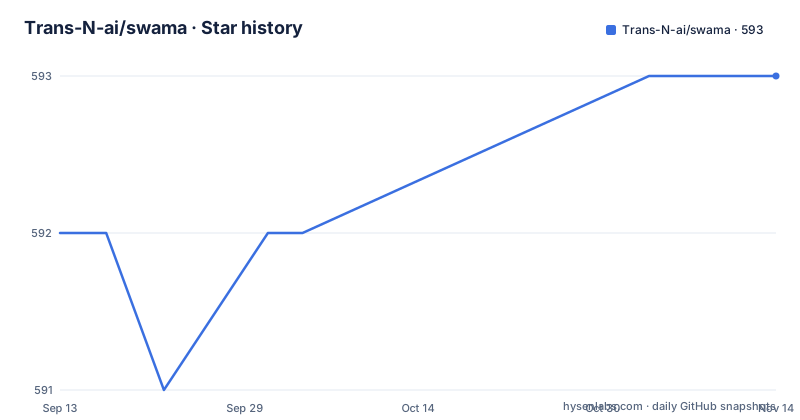
Star history
- Trans-N-ai/swama593 ★ · +1
| Repository | 2026-09-13 | 2026-11-14 |
|---|---|---|
| Trans-N-ai/swama | 592 | 593 |
1 Stars in the last 62 days, measured from the daily GitHub snapshot. Compare with other projects
Editorial analysis
serve binds to every interface by default and the example opts out
The default is the first thing to know about the server. `swama serve` binds to 0.0.0.0, which the page states plainly makes the API reachable from other machines on your network. The quick start shows the safe form, passing --host 127.0.0.1 alongside --port 28100, so the documented path is not the default path. The port itself is 28100 and can be changed with --port or the SWAMA_PORT environment variable. What is not described anywhere on the page is an authentication mechanism, and the endpoint list includes chat completions, embeddings, audio transcription and text to speech, which is enough surface to make an exposed listener interesting. The decision endpoint adds one more. If you need the server reachable from another machine, treat that as a deliberate decision with a firewall or tunnel in front of it rather than something the default setting gives you safely.
The Responses endpoint says out loud where compatibility stops
Most compatibility shims describe what they support and stay quiet about the rest. This one publishes a support matrix with a category for fields that are accepted with an explicit local meaning, and the promise is that they are validated, documented and never silently honoured. The examples are specific. client_metadata is validated and ignored, existing for client-side tracing only. prompt_cache_key is accepted as a hint and currently unused, because the local cache reuses a KV prefix by comparing actual prompt tokens and holds one entry per model, which means two sessions interleaved against the same model evict each other; the page says in bold terms that this is not an equivalent of the hosted prompt cache. reasoning is accepted as an empty object or summary auto, and auto leaves the choice to the server, so a local model that emits no reasoning items satisfies it. include reasoning.encrypted_content is accepted with nothing to return, and parallel_tool_calls is noted as something this server never executes.
Two vision aliases fail to load on the current release
The model table and the known-issue note contradict each other, and the note is the one to read. The alias table lists gemma3 with sizes up to 27b and qwen3-vl with sizes up to 235b, including thinking variants. The known issue says that in testing on 2.4.0, gemma3 at 4B and qwen3-vl at 4B fail to load, with the Gemma failure possibly related to issue 23 in the tracker, and advises using qwen3.5 for image input. So the two families are advertised and partly broken at the size most people would try first, and the workaround is named rather than worked around. The release in question, v2.4.0, is the newest of three published between June and September 2026, at v2.2.0, v2.3.0 and v2.4.0, with the last commit on the default branch dated 2026-10-01. If a specific model is the reason you are here, test that alias before anything else.
Aliases span four modalities and the mapping lives in one Swift file
The alias system is the part of the project most worth borrowing. Language aliases cover the Qwen3.5 family from 0.8b to a 397B-A17B variant, Qwen3 and Qwen2.5, Llama 3.2 and 3.3, gpt-oss at two sizes, DeepSeek R1, DeepSeek Coder and SmolLM. Vision covers Qwen3.5, Gemma3, Qwen3-VL and thinking variants. Speech recognition covers Qwen3-ASR, Whisper from tiny to large-v3-turbo, Parakeet, SenseVoice, GLM-ASR, Voxtral, Canary, Moonshine, Nemotron, Cohere transcribe, Moss with diarization, wav2vec2 and MMS. Text to speech, marked experimental in the table, covers Kokoro, Orpheus, Qwen3-TTS, Marvis, Chatterbox, Vyvo, Fish Speech, Soprano, PocketTTS, EchoTTS, KittenTTS, Irodori and Omnivoice. The complete mapping lives in ModelAliases.swift under the SwamaKit module, aliases download from Hugging Face on first use, and FireRedASR2 is supported only by its full repository id.
The source build renames the binary because the app bundles the CLI
Building from source is four steps and one of them is a rename with a comment explaining why.
git clone https://github.com/Trans-N-ai/swama.git
cd swama/swama
swift build -c release
mv .build/release/swama .build/release/swama-bin   # the app bundles the CLI under this name

cd ../swama-macos/Swama
xcodebuild -project Swama.xcodeproj -scheme Swama -configuration Release
The Swift build produces the command-line tool and the xcodebuild step produces the menu bar app from a separate top-level directory, so the repository holds two buildable products and the app expects the CLI under a different filename. The other two routes avoid all of it: a Homebrew cask with `brew install swama`, or a Swama.dmg from the releases that you drag into Applications. The app route has two steps the page spells out because they are easy to miss, allowing the first launch under System Settings if macOS blocks it, and then choosing Install Command Line Tool in the menu bar to put swama on your PATH.
The menu bar app sets the context limit and the command line does not
The division of labour between the two front ends is not symmetrical, and the differences are functional rather than cosmetic. The menu bar app is described as running the server in the background, installing the swama command and setting the context limit. The command line quick start shows three invocations, running a model with a prompt, running a model against an image file with -i, and serving on a host and port, with no context-length option among them. So a user who wants to raise the context window does it in the app, and the CLI exposes model execution and serving. There is also a curl example for the chat completions endpoint with a JSON body naming a model and a user message. For a project that describes itself as a local runtime, having the context ceiling configured from a menu rather than a flag is the kind of decision that will annoy anyone scripting it.
A decision endpoint scores answers without generating any text
Two endpoints sit outside the OpenAI schema and are worth knowing about. The decision scoring endpoint is described as SGLang-style and takes choices, ratings and yes/no answers, returning scores instead of generated text, which is a different cost and latency profile from asking a model to reply. The SystemOne endpoint is a request and response adapter over the same decision scorer. Neither appears in the OpenAI API, so a client that only knows the standard endpoints will not find them, and an application that wants scoring rather than generation has to call them directly. The rest of the surface is conventional: models listing for downloaded models, chat completions with streaming, tool calling and image_url input, embeddings for models such as a 300M embedding model on four bits, multipart audio transcription for local speech recognition, and audio speech for the experimental text-to-speech path, with named voices listed per engine.
Apple Silicon, macOS 15.4 and a Swift 6.2 toolchain
The requirement list is short because the platform list is short. An Apple Silicon Mac running macOS 15.4 or later, and for building from source, Xcode with the Swift 6.2 toolchain. There is no Linux or NVIDIA path in the requirement, which follows from the choice of MLX, Apple's machine learning library for its own silicon. The project is written in Swift rather than wrapping a Python runtime, which is the difference from most local inference tools and explains the Xcode step. The repository reflects a normal working setup: a VERSION file next to CHANGELOG.md, CONTRIBUTING.md and SECURITY.md, a Tests/ directory and a Tools/ directory at the root, a .swiftformat configuration for the formatter, and a readme in English, Chinese and Japanese. Community links include a Slack invite and a discussion board.
Editorial conclusion
Swama is the local-inference option for someone who wants an OpenAI-shaped endpoint on a Mac and is willing to stay inside the MLX model ecosystem, since the alias families cover the common cases and the API surface is wide enough to drop into an existing client. Three things to check before you point a tool at it. The server binds to every interface by default and the documentation does not describe an authentication mechanism, so pass the loopback host unless you have decided what is on the network. The Responses endpoint is a documented subset, so an agent client that depends on prompt caching or reasoning items will get validated-and-ignored fields rather than an error. And on the current release two vision aliases fail to load, so verify your model before building anything on it. If you need Linux or NVIDIA hardware, none of this applies.
Frequently asked questions
What is Swama?
A local AI runtime for Apple Silicon Macs, written in Swift on Apple's MLX. It runs language, vision, embedding, speech recognition and text-to-speech models and serves them through an OpenAI-compatible API, a command-line tool and a menu bar app. The requirements are an Apple Silicon Mac on macOS 15.4 or later, plus Xcode with the Swift 6.2 toolchain to build from source.
How do I install Swama?
Three routes are documented: `brew install swama`, downloading Swama.dmg from the releases and dragging Swama.app into Applications, or building from source with `swift build -c release` followed by an xcodebuild step for the app. The source build renames the built tool to swama-bin because the app bundles the CLI under that name.
What port does the Swama server use and is it exposed to the network?
Port 28100 by default, changeable with --port or SWAMA_PORT. `swama serve` binds to 0.0.0.0 by default, which makes the API reachable from other machines on your network, so pass --host 127.0.0.1 to keep it local, which is what the quick start example does.
Which models does Swama support?
Any MLX model on Hugging Face by its full id, with short aliases covering language, vision, speech recognition and text-to-speech families including Qwen3.5, Qwen3, Llama, DeepSeek, Gemma3, Whisper, Parakeet and Kokoro. The complete mapping lives in ModelAliases.swift, aliases download on first use, and text-to-speech is marked experimental.
Is the OpenAI Responses API fully supported in Swama?
It is implemented as a stateless subset: string or message-item input, instructions, input_text and input_image parts, custom function tools with multi-turn call items, tool_choice auto or none, basic sampling, non-streaming responses and typed SSE streaming. Other fields are accepted with an explicit local meaning, including prompt_cache_key, which is taken as a hint and not used because the local cache holds one entry per model.
Official sources
Add this badge to your README
If you maintain this project, the badge below links readers to this analysis and shows its maintenance status from the daily GitHub snapshot. Paste the markdown into your README; add ?metric=license or ?metric=stars to the image URL for a different field.

[](https://hysenlabs.com/projects/trans-n-ai-swama)Star history chart for your README
[](https://hysenlabs.com/projects/trans-n-ai-swama)Was this useful?