obs-backgroundremoval: portrait masking in OBS Studio and its sharp edges
An OBS plugin for removing background in portrait images (video), making it easy to replace the background when recording or streaming.
At a glance
- What is it?
- A C++ OBS Studio plugin that predicts a portrait mask with a neural network and drops the background pixels, leaving you to composite the cut-out yourself. The build paths, the GPU backends and the architecture rules are where the real decisions sit.
- Who is it for?
- Streamers who shoot a talking head and own a GPU get a genuine virtual green screen from this plugin. Everyone else is running a neural network on two CPU threads, which is a different bargain than a colour keyer ever asked you to make.
- Can I use it commercially?
- Yes, with conditions. GPL-3.0 is a copyleft licence: if you distribute software that includes it, you must release that software's source code under the same licence. Running it internally without distributing it does not trigger that obligation.
- Is it still maintained?
- Yes. The repository last received commits 8 days ago.
- What is it written in?
- Mainly C++, according to GitHub's language statistics.
Answers come from the project's GitHub data, last synced on November 13, 2026, and from our analysis. They are not legal advice.
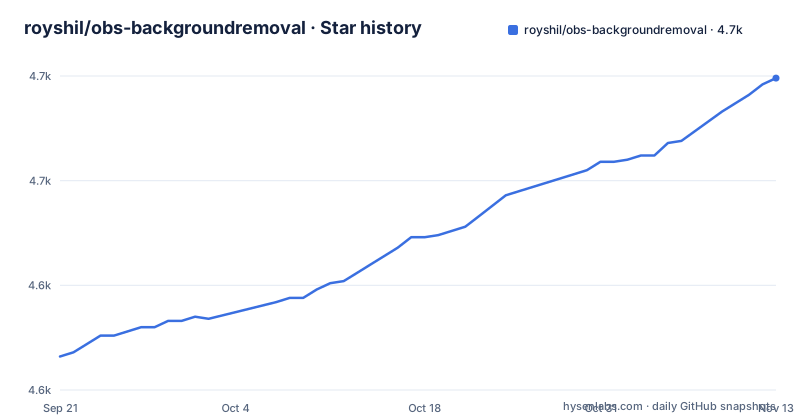
Star history
- royshil/obs-backgroundremoval4,699 ★ · +133
| Repository | 2026-09-21 | 2026-11-13 |
|---|---|---|
| royshil/obs-backgroundremoval | 4.6k | 4.7k |
133 Stars in the last 53 days, measured from the daily GitHub snapshot. Compare with other projects
Editorial analysis
A mask network feeds OBS layers instead of asking you to light a green screen
The plugin never asks you to light your background green or to pick a colour to knock out. A neural network predicts the mask of the portrait, and the background pixels are removed from that prediction. What comes out the other side is a cut-out, and the plugin is written to be composable with other OBS plugins so the hole can be filled with an image or a transparent colour. That makes it one link in a chain rather than a finished composite. Something downstream has to supply the replacement pixels, and something else has to decide what happens at the ragged edge of the mask.
The published tutorials confirm the shape of it. There is a separate walkthrough video for the Depth of Field effect, another for low-light enhancement, and a third for removing the background from any object rather than only a human. None of those are the core job. They are examples of what you can bolt onto a source that has already been segmented, which is the point: the plugin hands you a layer, and the rest of your scene decides what the layer is worth.
The weights come from five upstream model repositories, and three more handle low light
The portrait segmentation weights are not trained here. Five places supply them: SINet from the Portrait-Segmentation repository, PP-HumanSeg from PaddleSeg release 2.7, MediaPipe Meet Segmentation from the PINTO model zoo, the video matting project published by PeterL1n, and TCMonoDepth, which appears twice, once in the PINTO model zoo and once in the yu-li repository. Low-light enhancement draws three more from that same model zoo: TBEFN, URetinex-Net, and a semantic-guided low-light enhancement network.
The repository root reflects how carefully the dependencies are pinned: a Models/ directory next to vendor/, vcpkg.json, vcpkg-configuration.json, vcpkg-triplets/, plus REUSE.toml, LICENSES/ and NOTICE alongside the GPL-3.0 LICENSE file. Release 1.4.0, published on 2026-04-07, is named after supply chain work rather than a new model. For a reader the practical consequence is that an upgrade can change how your mask behaves without a single change to your scene, because the weights live in other repositories and their version history lives there too. Pin what you deploy.
Debian Forky is the only platform with a documented source build
The build instructions come in two tiers. For Windows there is a single clone line and nothing after it. Then comes the sequence reserved for the platforms supported for building from source officially, and that list has exactly one entry: Debian Forky, on x86_64 and arm64.
git clone https://github.com/royshil/obs-backgroundremoval.git
cd obs-backgroundremoval
sudo ./bin/bootstrap
./bin/setup
./bin/build
sudo dpkg -i release/obs-backgroundremoval-*-linux-gnu.deb
Read the sequence closely. Bootstrap runs under sudo; setup and build do not. The artefact is a .deb installed with dpkg, not a binary you copy into an OBS plugins folder. The stated plan is to add build scripts for Windows, Mac and various distributions of Linux, which means today they are absent. So if your machine is not Debian Forky, you depend on a prebuilt package somebody else compiled.
On Windows, GPU acceleration is still written in the future tense
The three platforms sit at three different levels of maturity for the same feature, and the wording gives it away. On macOS the plugin uses CoreML, which the project calls efficient on Apple Silicon. On Windows, WinML acceleration is something the team plans to support. On Linux, CUDA, ROCM and MIGraphX are all listed as supported when the plugin is built from source.
That gap has a direct cost. A Windows creator who wants the segmentation network to run on the GPU through this plugin has no documented path, and since the Windows instructions stop at the clone line, there is no documented way to wire up a backend yourself either. You take the CPU route and manage the thread count. The project states its goal plainly: availability for everyone on every system, even on machines with no GPU. That goal is met by the CPU path, which is why the thread setting carries more weight than a UI slider normally would, and why the absence of a Windows backend is a performance story rather than a functional one.
The macOS package crashes on the wrong architecture instead of falling back
The Mac section carries the sharpest warning in the whole documentation. This plugin does not support cross-architecture translation, spelled out as Rosetta2, and an Intel binary on Apple Silicon, or an Apple Silicon binary on Intel, will crash.
The failure mode matters more than the restriction. A crash is not a slow path and not a line in a log: it takes the host process down, and for OBS that means losing an in-progress recording or a live stream rather than losing one effect. Match the package to your CPU and you will never meet this. Reach for an x64 build out of habit and you find out the hard way, at the worst possible moment. This is also the sort of detail a download page cannot express, because the filename is where the answer lives, so check the package architecture before you install rather than after.
ROCM left ONNX Runtime at 1.23.0, so AMD builders have to move to MIGraphX
The Linux acceleration list is not static, and the documentation pins it to a version number in a different project. ROCM is marked as deprecated in ONNX Runtime 1.23.0 and, further along, as removed from ONNX Runtime starting with that same version. For AMD GPUs the recommended backend is therefore MIGraphX. If you build the plugin from source on Linux, the requirement lands on you: your own ONNX Runtime installation has to have CUDA, ROCM or MIGraphX support, so acceleration is only as available as the runtime you happened to install.
The order of operations for an AMD user matters. Take MIGraphX, then confirm the runtime actually ships it. A source build that quietly fell back to a CPU provider would look like a working plugin with bad frame times. Note the scope: this whole branch only exists for source builds, so the question never arises for someone running a prebuilt binary.
Two CPU threads is the setting you are meant to pick, and it is not the default you land in
With no GPU available the mask still has to be computed, and the plugin exposes a setting for the number of CPU threads, which is controllable through the UI settings. The guidance is blunt. A 2-thread setting works best.
Two threads on a modern machine sounds wrong to anyone who has tuned a renderer. Two things follow from the recommendation. First, whatever default you land in is not automatically the recommended value, so the setting is worth checking per machine rather than assumed from a previous install. Second, on a laptop whose main thread is already busy with capture and encoding, raising the count can make the whole scene worse, because the mask competes with the rest of the pipeline for the same cores.
A Lite sibling is the documented answer when the full build misbehaves
This is not the only thing its maintainers ship. When something is not working, the documentation points you at Live Background Removal Lite, https://github.com/kaito-tokyo/live-backgroundremoval-lite, developed by Kaito Udagawa, who is one of the two copyright holders named on the main plugin. It is offered as the thing to try first, which tells you the maintainers expect the full plugin to fail for some setups, though the documentation does not spell out which cases separate the two projects or how their approaches differ. You will have to judge that yourself.
Support runs through GitHub Discussions and the OBS Plugins forum, with issues reserved for bugs and feature requests, and hands-on consultation is sold as a paid sponsorship tier. Worth knowing before you budget someone else's debugging time. The repository itself also carries AGENTS.md, CONTRIBUTING.md, CODE_OF_CONDUCT.md and a standalone FAQ.md, so the long-form answers are more likely to sit in the tree than in the issue tracker. The last push landed on 2026-10-29, and release 1.5.0 came out on 2026-08-30 with the OBS 32 requirement and deb packaging fixes.
Editorial conclusion
Streamers who shoot a talking head and own a GPU get a genuine virtual green screen from this plugin. Everyone else is running a neural network on two CPU threads, which is a different bargain than a colour keyer ever asked you to make. Before committing, check three things: whether your OBS is on version 32 or newer, since release 1.5.0 requires it; whether the macOS package matches your CPU, because there is no translation fallback and a mismatch crashes; and whether your AMD path is MIGraphX, because ROCM left ONNX Runtime at 1.23.0. If any of those three is unresolved, the Lite version at kaito-tokyo/live-backgroundremoval-lite is the first thing to try.
Frequently asked questions
What is OBS Background Removal?
It is an OBS Studio plugin written in C++ that uses a neural network to predict the mask of a portrait and remove the background pixels, so the cut-out can be composited with an image or a transparent colour. The same plugin also enhances low-light scenes.
How do you install obs-backgroundremoval?
The project points downloads at https://royshil.github.io/obs-backgroundremoval/ and lists every version on its releases page. On Debian Forky, the one platform it supports building from source officially, you can compile it and install the resulting .deb with dpkg.
How do you use OBS Background Removal in a scene?
Add the plugin to a scene, let the network predict the portrait mask, and pair it with another plugin that supplies the replacement background, since an image or a transparent colour is what fills the hole. The CPU thread count is set in the plugin's own UI settings, where a 2-thread setting works best.
How do you set up OBS Background Removal?
A walkthrough and recommendations sit at https://royshil.github.io/obs-backgroundremoval/usage/, with separate tutorial videos for the Depth of Field effect, for low-light enhancement, and for removing the background from any object rather than only a person. On macOS, take the package that matches your CPU.
How do you add OBS Background Removal to your stream layout?
Add it to the scene, then put a second plugin behind the cut-out to provide the replacement background, because this plugin removes the background pixels rather than replacing them. If the plugin is not working for you, the author points at the Lite version at https://github.com/kaito-tokyo/live-backgroundremoval-lite.
What is an alternative to the OBS Background Removal plugin?
The project names one itself: Live Background Removal Lite, https://github.com/kaito-tokyo/live-backgroundremoval-lite, developed by Kaito Udagawa, who co-maintains this plugin. It is offered as the fallback when the full plugin is not working, and the documentation does not explain how the two differ in approach.
Official sources
Add this badge to your README
If you maintain this project, the badge below links readers to this analysis and shows its maintenance status from the daily GitHub snapshot. Paste the markdown into your README; add ?metric=license or ?metric=stars to the image URL for a different field.

[](https://hysenlabs.com/projects/royshil-obs-backgroundremoval)Star history chart for your README
[](https://hysenlabs.com/projects/royshil-obs-backgroundremoval)Was this useful?