lite.ai.toolkit keeps the runtime in C++ and refuses to hide MNN
A lite C++ AI toolkit: 100+ models with MNN, ORT and TRT, including Det, Seg, Stable-Diffusion, Face-Fusion.
At a glance
- What is it?
- lite.ai.toolkit is a C++ inference library with 300+ model implementations that sit directly on ONNXRuntime, MNN, NCNN and TensorRT, aimed at teams shipping detection, matting and face models without a Python layer. Its Linux-only build and a quick start still pinned to the v0.2.0 download are the parts to check before adopting.
- Who is it for?
- Adopt lite.ai.toolkit if your product ships a Linux C++ binary and you want detection or matting models wired without Python. Do not adopt it if you need Windows or macOS builds, or if the GPL-3.0 terms conflict with how you distribute.
- Can I use it commercially?
- Yes, with conditions. GPL-3.0 is a copyleft licence: if you distribute software that includes it, you must release that software's source code under the same licence. Running it internally without distributing it does not trigger that obligation.
- Is it still maintained?
- Yes. The repository last received commits 71 days ago.
- What is it written in?
- Mainly C++, according to GitHub's language statistics.
Answers come from the project's GitHub data, last synced on November 14, 2026, and from our analysis. They are not legal advice.
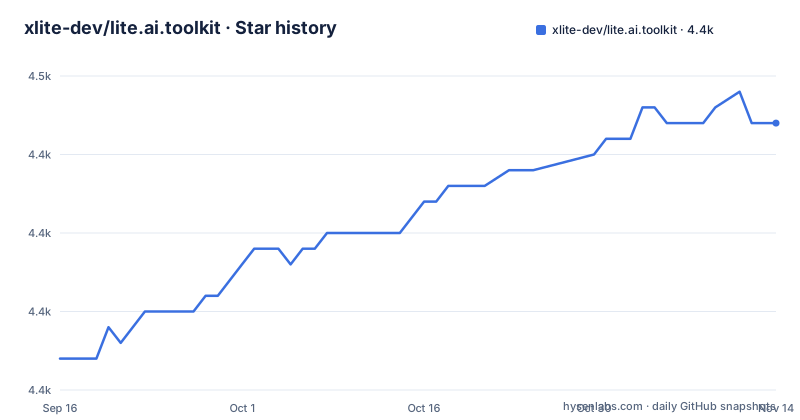
Star history
- xlite-dev/lite.ai.toolkit4,447 ★ · +15
| Repository | 2026-09-16 | 2026-11-14 |
|---|---|---|
| xlite-dev/lite.ai.toolkit | 4.4k | 4.4k |
15 Stars in the last 59 days, measured from the daily GitHub snapshot. Compare with other projects
Editorial analysis
A C++ model zoo for people who cannot ship a Python runtime
The gap lite.ai.toolkit fills is deployment, not modelling. Detection, face recognition, segmentation and matting models already exist as ONNX files; what a C++ product team lacks is a set of preprocessors, postprocessors and threshold defaults written in the language their binary is built in. The library answers that with 300+ C++ implementations and weights catalogued separately, and it claims a minimum of two dependencies, OpenCV and ONNXRuntime.
The audience is an engineer with an existing ONNX model file and a C++ binary that must run on hardware without a Python runtime installed. Secondarily it serves people moving off a Python inference service and into a single executable.
Read the numbers carefully, because the README states them twice and differently. The opening description says 100+ models. The Features section says 300+ C++ implementations and 500+ weights. Both can hold, since weights and implementations are counted separately, but the headline figure is the smaller one and a reader sizing an effort from it will undercount. The repository is C++, its default branch is main, and it is not archived.
One class per model, deliberately not an abstraction over MNN
Each model is a class in a namespace that mirrors the task, not the backend. Detection lives under lite::cv::detection, and the YOLOv5 example constructs one directly from an ONNX path:
#include "lite/lite.h"

int main(int argc, char *argv[]) {
  std::string onnx_path = "yolov5s.onnx";
  std::string test_img_path = "test_yolov5.jpg";
  auto *yolov5 = new lite::cv::detection::YoloV5(onnx_path);
  std::vector<lite::types::Boxf> boxes;
  cv::Mat image = cv::imread(test_img_path);
  yolov5->detect(image, boxes);
  lite::utils::draw_boxes_inplace(image, boxes);
  cv::imwrite("test_results.jpg", image);
  delete yolov5;
  return 0;
}
After construction the object takes an OpenCV BGR image and a vector of boxes, and a utility header draws them back onto the same Mat in place, so the whole first program is three calls.
The deliberate design choice is that the library does not abstract MNN and ONNXRuntime into one interface. Both build flags exist, -DENABLE_ONNXRUNTIME=ON by default and -DENABLE_MNN=ON off by default, and the README shows an application using lite.ai.toolkit for detection and MNN::Interpreter or Ort::Session for its own classifier in the same function. Headers for each backend live in lite/mnn/core/mnn_config.h and lite/ort/core/ort_config.h. You get a thin layer per model, and you keep direct backend access when you need it.
Building from source is two commands and Linux only
The quick start is a clone and a shell script, nothing else:
git clone --depth=1 https://github.com/xlite-dev/lite.ai.toolkit.git  # latest
cd lite.ai.toolkit && sh ./build.sh # >= 0.2.0, support Linux only, tested on Ubuntu 20.04.6 LTS
The comment on the second line is the important part. build.sh supports Linux only and was tested on Ubuntu 20.04.6 LTS. A Windows or macOS developer has no documented build path here.
For a first run the repository also publishes a prebuilt archive plus the YOLOv5 test resources. The quick start points at tag/v0.2.0:
export LITE_AI_TAG_URL=https://github.com/xlite-dev/lite.ai.toolkit/releases/download/v0.2.0
wget ${LITE_AI_TAG_URL}/lite-ort1.17.1+ocv4.9.0+ffmpeg4.2.2-linux-x86_64.tgz
wget ${LITE_AI_TAG_URL}/yolov5s.onnx && wget ${LITE_AI_TAG_URL}/test_yolov5.jpg
Note what is baked into that archive name: ONNXRuntime 1.17.1, OpenCV 4.9.0 and FFmpeg 4.2.2, for linux-x86_64. Consuming it means accepting those versions. Linking against an existing build takes four lines of CMake, with find_package and target_link_libraries against ${lite.ai.toolkit_LIBS}.
The TensorRT path is a separate namespace and a separate toolchain
Turning on GPU inference is not a runtime flag. You rebuild with bash ./build.sh tensorrt, and the model class changes namespace, from lite::cv::detection::YoloV5 to lite::trt::cv::detection::YOLOV5, and takes an engine path rather than an ONNX path:
// trtexec --onnx=yolov5s.onnx --saveEngine=yolov5s.engine
auto *yolov5 = new lite::trt::cv::detection::YOLOV5(engine_path);
The commented trtexec line is the catch. In the ORT path you hand the library an .onnx file and it does the graph setup. In the TensorRT path you must first convert that ONNX file into a serialised engine yourself and keep the engine file, so the deployment unit changes shape and the CI pipeline needs trtexec in it.
Version floors are stated plainly: TensorRT 10.x or later and CUDA 12.x or later. That rules out the CUDA 11 era many installed machines still run. The README sends you to build.sh, the tensorrt-linux-x86-64 install notes under docs/tensorrt and examples/lite/cv/test_lite_yolov5.cpp for the mechanics.
The prebuilt download points at v0.2.0 while the newest release is v0.3.4
The quick start section sends first-time users to the prebuilt library at tag/v0.2.0 and repeats the instruction a second time further down the page. The repository's newest release tag is v0.3.4, so the documented quick start does not hand you the current library. What you get instead is ONNXRuntime 1.17.1, OpenCV 4.9.0 and FFmpeg 4.2.2 from that tarball, whatever the source tree now expects.
The repository was last pushed on 2026-09-05 and is not archived, so commits are landing on main. The practical consequence is a split: source builders and tarball users run different code from the same repository on day one.
There is also a scope signal in the News section. The maintainer states that most of their time now goes to LLM and VLM inference work in separate repositories, Awesome-LLM-Inference and LeetCUDA, and that lite.ai.toolkit is now maintained by @wangzijian1010. Vision model classes in this repository will see less attention than they would from a full-time owner.
GPL-3.0 and bundled OpenCV and FFmpeg shape the packaging decision
Two facts decide whether this is usable for you before any API does. Licence is GPL-3.0, a copyleft licence that attaches obligations to how you ship a linked binary. This is not legal advice, but the practical question is concrete: if your product is closed source and distributed, linking lite.ai.toolkit statically or dynamically is a decision for your counsel, not for a README.
The second fact is that the installation package carries complete copies of MNN and ONNXRuntime, and the prebuilt tarball name shows OpenCV and FFmpeg alongside them. Teams with a hardened base image and pinned OpenCV version may find this a conflict rather than a convenience.
Note also that the GPL obligation, whatever your counsel concludes, does not disappear because the code arrived through a release tarball rather than a package manager.
Where OpenCV's dnn module reaches the same result with less code
OpenCV is already a required dependency here, and its dnn module loads ONNX networks and draws detections through the same Mat and BGR convention this library uses. The difference in approach is what sits above the graph. OpenCV dnn gives you the network, the blob and the postprocessing primitives, so the NMS threshold, the anchor decoding and the letterbox resize stay in your code. lite.ai.toolkit ships those per-model decisions as ready-made classes, one per architecture, which is exactly the work you would otherwise write and then re-test when a model's output layout changes.
Pick lite.ai.toolkit when you want detection, matting and face models working now and do not want to own the tensor reshaping. Pick OpenCV dnn directly when you need a single unusual custom layer behaviour or when the model is not in the 300+ implementation matrix, since an unmapped architecture has no class to instantiate. The README's Supported-Models Matrix lists the 300+ C++ implementations, and that list is the deciding document.
What the documentation leaves open
The README is strong on the happy path and thin on the rest. The supported-models matrix exists as a linked page, and there are separate hub documents for ONNX, MNN, TNN and NCNN under docs/hub.
Backend coverage is also uneven on the page. Detection, face detection, face recognition, segmentation and matting are linked from the introduction; stable diffusion and face fusion appear in the repository description rather than in that introduction.
For an evaluator the practical consequence is that you cannot size adoption from the documentation alone. Clone the repository, run sh ./build.sh on your target image, and try the one or two models your product actually depends on before committing to the rest.
Editorial conclusion
Adopt lite.ai.toolkit if your product ships a Linux C++ binary and you want detection or matting models wired without Python. Do not adopt it if you need Windows or macOS builds, or if the GPL-3.0 terms conflict with how you distribute. Before anything else, rebuild from source on your own Ubuntu image and confirm that the model you actually need is in the 300+ implementation matrix rather than only listed in the model hub docs.
Frequently asked questions
What dependencies does lite.ai.toolkit need to build?
OpenCV and ONNXRuntime are required by default, and MNN support is toggled with the -DENABLE_MNN=ON option, which is off by default while -DENABLE_ONNXRUNTIME=ON is on by default. The installation package bundles complete copies of MNN and ONNXRuntime.
Can lite.ai.toolkit run inference on an NVIDIA GPU?
Yes, through TensorRT, built by running bash ./build.sh tensorrt. The README states that this path needs TensorRT 10.x or later and CUDA 12.x or later, and the engine file must be produced first, for example with trtexec, before it is passed to the lite::trt namespace class.
Is lite.ai.toolkit available on Windows or macOS?
The build command in the README is annotated as support Linux only, tested on Ubuntu 20.04.6 LTS, and the prebuilt archive is named for linux-x86_64.
Which models does lite.ai.toolkit include and how is it licensed?
The README describes a lite C++ toolkit with 300+ model implementations and separate weight listings, covering object detection, face detection, face recognition, segmentation and matting among others, with hub documents for ONNX, MNN, TNN and NCNN. The repository is licensed GPL-3.0, and the most recent release tag is v0.3.4.
Official sources
Add this badge to your README
If you maintain this project, the badge below links readers to this analysis and shows its maintenance status from the daily GitHub snapshot. Paste the markdown into your README; add ?metric=license or ?metric=stars to the image URL for a different field.

[](https://hysenlabs.com/projects/xlite-dev-lite-ai-toolkit)Star history chart for your README
[](https://hysenlabs.com/projects/xlite-dev-lite-ai-toolkit)Was this useful?