react-uploady, file upload components and hooks for React
Modern file uploading - components & hooks for React
At a glance
- What is it?
- react-uploady is a React library for building browser side file upload features, and its central design decision is that it is a set of small packages rather than one bundle, so a project installs only the engine, the context provider and the components it actually uses. The core is 29.6KB minified and 10.61KB gzipped, and the whole thing with every optional package is 73.4KB and 23.65KB.
- Who is it for?
- react-uploady fits a React application that needs a real upload experience, with progress, retry, drag and drop, and resumable uploads, and who does not want to adopt a single large upload widget. It does not fit a project that wants one component with a fixed look and no configuration, because the library deliberately gives you the pieces and expects you to compose them, and it does not fit a codebase that cannot accept a peer dependency on the Tus protocol server side.
- Can I use it commercially?
- Yes. MIT is a permissive licence: you can use, modify and sell software built on it, as long as you keep its copyright and licence notices.
- Is it still maintained?
- Yes. The repository last received commits 4 days ago.
- What is it written in?
- Mainly JavaScript, according to GitHub's language statistics.
Answers come from the project's GitHub data, last synced on November 7, 2026, and from our analysis. They are not legal advice.
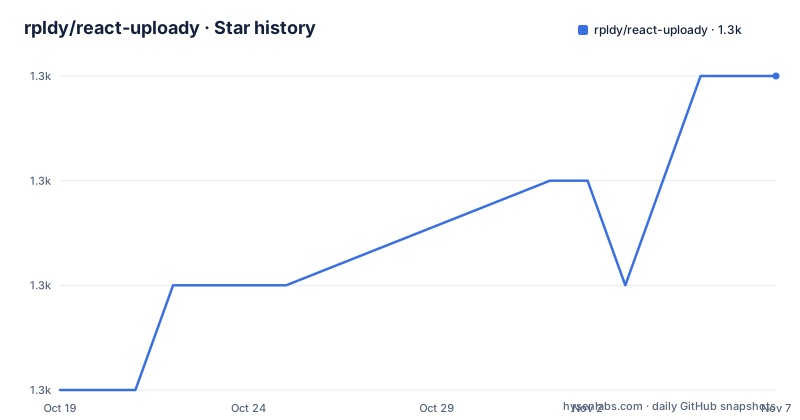
Star history
- rpldy/react-uploady1,253 ★ · +3
| Repository | 2026-10-19 | 2026-11-07 |
|---|---|---|
| rpldy/react-uploady | 1.3k | 1.3k |
3 Stars in the last 19 days, measured from the daily GitHub snapshot. Compare with other projects
Editorial analysis
A library, not a widget
The README describes the project as modern file uploading with components and hooks for React, and the philosophy sentence is the one to keep. It should be as simple as possible to use, yet customizable at every point. The way that is achieved is by shipping parts. There are components, there are hooks, and there are features, and you choose the ones you need and install only the dependencies required for them. The intro makes the scope clear, calling it a lightweight library for building client side file upload features with a few lines of code, and saying that Uploady provides the foundations needed to upload files from the browser while the rest is up to you. That is a meaningful difference from a drop in widget, and it is the reason the package map is longer than the feature list of a typical uploader. The audience is a React developer who wants a small upload foundation with a controlled footprint rather than a component with its own opinions about markup and styling.
The size table is the design brief
The README states that React-Uploady has a small footprint by design with very few and tiny dependencies, and then shows the numbers, which is the most useful part of the documentation. The core bundle is 29.6KB minified and 10.61KB gzipped. Adding the UI packages takes it to 37.8KB and 13.54KB. Adding chunked upload support as well brings 45.2KB and 15.94KB. And everything together is 73.4KB minified and 23.65KB gzipped. Those figures are worth reading twice, because they explain the package structure. The library is not one artifact that happens to be small, it is a set of artifacts that you assemble, and the table tells you the price of each decision. For a team that already ships a large bundle, the difference between installing the core alone and installing everything is a third of the payload, which is a design conversation rather than a technical one.
The package map, from engine to drop zone
The README groups the packages by role, and the grouping is the architecture. The main packages are @rpldy/uploader, the processing and queuing engine, and @rpldy/uploady, the context provider and the hooks. The UI packages are the parts a user touches, the upload button with an asUploadButton higher order component, upload preview for images and video of files being uploaded, an input for sending a URL as upload information such as fetching a remote image, a drag and drop zone for files and folder content, a paste to upload helper, and hooks for the retry mechanism. The providers are wrappers that change the transport, chunked-uploady for chunked uploads, tus-uploady for tus resumable uploads, and native-uploady for React Native with no react-dom dependency. Underneath sit the senders, the XHR sender, the chunked sender, the tus sender and a mock sender for tests, plus a retry package, and the internal shared and shared-ui utility packages every other package depends on.
Installing only the part you need
The installation section is explicit that a React application needs at least the Uploady provider, and the commands are given for both package managers.
# Yarn:
   $ yarn add @rpldy/uploady

# NPM:
   $ npm i @rpldy/uploady
If the application has its own user interface and only needs the uploading mechanism, the minimum is the Uploader instead.
# Yarn:
  $ yarn add @rpldy/uploader

# NPM:
  $ npm i @rpldy/uploader
The project is a monorepo, and the README says so directly, which is the reason the package names are scoped per feature. That is the whole installation story, and it is short because the philosophy is that you start with the engine and add the pieces you need.
Chunked, resumable and mockable transports
The transport layer is where a file upload library either earns its place or does not, and this one separates the engine from the sender deliberately. The default sender uses XHR. The chunked sender adds chunked uploads on top of the XHR sender, and the tus sender adds support for the tus resumable upload protocol, which is the part that matters for large files on a flaky connection, because the client can resume rather than restart. The mock sender exists for testing, so a component test can run the whole upload flow without a server, which is a small feature with a large effect on test suite speed. The retry package sits alongside as an extra, with its own hook package in the UI group, so retrying a failed upload is something you opt into rather than something every application inherits.
A monorepo with a size budget wired into it
The root package.json shows the tooling of a large monorepo. The package manager is pnpm at 11.15.0, and the scripts call lerna for the build and the clean, with nx.json and pnpm-workspace.yaml present, so builds run through the lerna and nx combination. The bundle is produced by a script at scripts/bundle.mjs with the configuration in bundle.config.mjs, and the production bundle sets UPLOADY_BUNDLE and NODE_ENV. There are also overweight.json and overweight-report.json, which is a bundle size budget tool, and given the size table in the README it is a fair guess that the budgets are enforced. The rest is a modern test stack, vitest with coverage, flow for the type checks, eslint, cypress for end to end and component tests, and storybook for the visual catalogue, served locally on port 9111 with the bundle on 8009. The presence of a .browserslistrc, a babel.config.js, a vite.config.mjs and a netlify.toml shows a library that has to build for browsers, for tests and for a demo site at the same time.
A maintained library with a MIT licence
The release history shows a project that publishes regularly, with v1.12.0-rc.0 on 2025-10-28, v1.12.0 on 2025-10-30 and v1.13.0 on 2025-11-26, so the release candidate comes first and the stable follows, which is the pattern you want from a library with a wide install base. The repository is not archived and the last push was on 2026-10-14. The licence is MIT, in LICENSE.md, and the package is published to npm as @rpldy/uploady with a monthly download badge. The project has a CONTRIBUTING.md, a SECURITY.md and a Contributor Covenant 2.0 code of conduct, and it is supported through Open Collective, which is how a library maintained in someone's spare time usually pays for itself. The README also directs questions to the GitHub discussions area, and asks production users to comment on a specific discussion thread, which is a good sign about who is actually relying on it.
Editorial conclusion
react-uploady fits a React application that needs a real upload experience, with progress, retry, drag and drop, and resumable uploads, and who does not want to adopt a single large upload widget. It does not fit a project that wants one component with a fixed look and no configuration, because the library deliberately gives you the pieces and expects you to compose them, and it does not fit a codebase that cannot accept a peer dependency on the Tus protocol server side. Verify three things first: which packages your use case actually needs, since the size table scales with the choices, that your backend speaks the protocol the sender you pick expects, Tus or chunked, and that the retry behaviour matches your application, since the retry package and the retry hooks are separate from the engine.
Frequently asked questions
What is react-uploady?
It is a React library for building client side file upload features, described as a lightweight library for creating upload functionality with a few lines of code. The philosophy is to be as simple as possible to use while staying customizable at every point, using components, hooks and features that you choose between.
How do I install react-uploady?
For a React application you need at least the Uploady provider, installed with yarn add @rpldy/uploady or npm i @rpldy/uploady. If you have your own user interface and only need the upload mechanism, the minimum is the Uploader package, @rpldy/uploader, and further packages are added as needed.
Does react-uploady support resumable uploads?
Yes. The @rpldy/tus-uploady provider and the @rpldy/tus-sender add support for tus resumable uploads, while @rpldy/chunked-uploady and @rpldy/chunked-sender add chunked uploads on top of the XHR sender. A @rpldy/mock-sender is available for testing without a server.
How big is react-uploady?
The README publishes the numbers for each combination: the core bundle is 29.6KB minified and 10.61KB gzipped, core plus UI is 37.8KB and 13.54KB, adding chunked support gives 45.2KB and 15.94KB, and everything together is 73.4KB minified and 23.65KB gzipped.
Official sources
Add this badge to your README
If you maintain this project, the badge below links readers to this analysis and shows its maintenance status from the daily GitHub snapshot. Paste the markdown into your README; add ?metric=license or ?metric=stars to the image URL for a different field.

[](https://hysenlabs.com/projects/rpldy-react-uploady)Star history chart for your README
[](https://hysenlabs.com/projects/rpldy-react-uploady)Was this useful?