TTS-WebUI puts Gradio, React and an OpenAI compatible port on one install
A single Gradio + React WebUI with extensions for ACE-Step, OmniVoice, Kimi Audio, Piper TTS, GPT-SoVITS, CosyVoice, XTTSv2, DIA, Kokoro, OpenVoice, ParlerTTS, Stable Audio, MMS, StyleTTS2, MAGNet, AudioGen, MusicGen, Tortoise, RVC, Vocos, Demucs, SeamlessM4T, and Bark!
At a glance
- What is it?
- rsxdalv/TTS-WebUI serves a Gradio interface, a separate React UI and an API from a single Python process, with models supplied by extension packages. The dependency pinning is where the friction lives: the manifest, the requirements file and the Dockerfile disagree about torch, about Windows only packages and about which extensions get installed.
- Who is it for?
- Use TTS-WebUI when you want one install covering many speech, music and audio conversion models and you are prepared to manage extension packages yourself. Do not assume the Docker path and the pip path install the same thing, because the Dockerfile adds two extensions the requirements file leaves out.
- Can I use it commercially?
- Yes. MIT is a permissive licence: you can use, modify and sell software built on it, as long as you keep its copyright and licence notices.
- Is it still maintained?
- Yes. The repository received new commits within the last day.
- What is it written in?
- Mainly TypeScript, according to GitHub's language statistics.
Answers come from the project's GitHub data, last synced on November 25, 2026, and from our analysis. They are not legal advice.
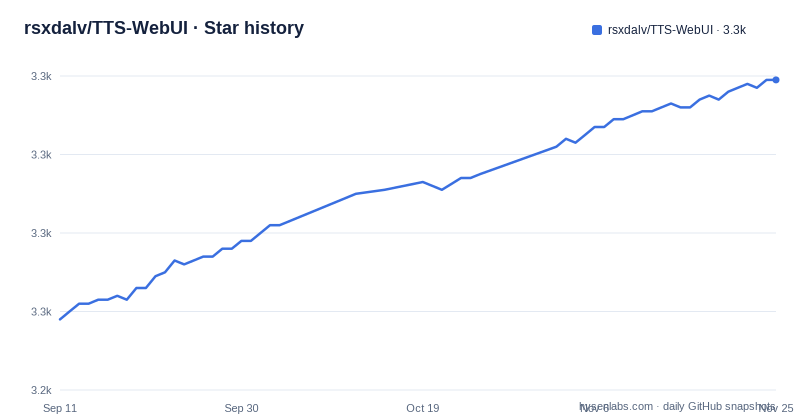
Star history
- rsxdalv/TTS-WebUI3,319 ★ · +61
| Repository | 2026-09-11 | 2026-11-25 |
|---|---|---|
| rsxdalv/TTS-WebUI | 3.3k | 3.3k |
61 Stars in the last 75 days, measured from the daily GitHub snapshot. Compare with other projects
Editorial analysis
Three ports for one process
The deployment file is the clearest statement of the architecture. One service named tts-webui runs the image ghcr.io/rsxdalv/tts-webui:main and publishes three ports: ${TTS_PORT:-7770} mapped to 7770, ${UI_PORT:-3000} mapped to 3000 with the comment include React UI, and ${OPENAI_API_PORT:-7778} mapped to 7778. The requirements file names the same shape in prose, with a comment over the FastAPI and Uvicorn pins reading Database API and same as OpenAI TTS API. That means a caller can talk to the install over an OpenAI shaped interface while a human works in either UI, and the three defaults leave little room to collide with anything else already bound on a workstation. The repository records TypeScript as its primary language, which reflects the react-ui/ directory rather than the Python that actually runs the server.
Torch 2.11 is pinned, flash-attn wheels are for 2.6 and 2.8
The manifest pins torch==2.11.0 for the cpu, mac, rocm and intel extras, and torch==2.11.0+cu128 plus xformers==0.0.35 for cuda. The container build sets the same number as TORCH_VERSION=2.11.0 and installs from the cu128 wheel index. Inside requirements.txt, three accelerator blocks sit commented out. Deepspeed carries a note that it needs to be compiled with DS_BUILD_OPS or a plain pip install of PyTorch without NVCC will fail. Triton and triton-windows are parked because triton-windows has issues with certain libraries. The flash-attn lines point at prebuilt wheel URLs whose filenames encode torch2.6 and torch 2.8.2 with cu128, on cp310 linux x86_64 and win_amd64 respectively. Those wheel names predate the pinned torch by three minor releases, so uncommenting the block unchanged will not match the installed torch.
The container installs two extensions the pip path skips
requirements.txt pins a Core Extensions block covering demucs, mms, seamless_m4t, vocos, openai_tts_api, log_viewer and vall_e_x, with the audiocraft line commented out. The Dockerfile then adds two more after the requirements install, each pointed at a separate index rather than PyPI: tts-webui-extension.rvc at 0.0.6 or newer and tts-webui-extension.styletts2 at 0.1.0 or newer, both using --extra-index-url https://tts-webui.github.io/extensions-index/. Neither appears in requirements.txt. So a pip install of the project and a container build of the same tag end up with different model sets, and the ones only present in Docker are the voice conversion and the StyleTTS2 entry. Note also that the uv install step is commented out in the Dockerfile while uv>=0.11.0 is a live requirement, which leaves the installer for that dependency to the image's Python.
goodtab and goodtabs are both required
Three Gradio plugin packages appear near the end of the requirements file and two of them are near duplicates in name: gradio-goodtabs at 0.0.5 or newer and gradio-goodtab at 0.0.5 or newer, followed by gradio-iconbutton at 0.0.1 or newer. Installing both singular and plural forms means two releases from the same line end up in one environment. Gradio itself is hard pinned at 5.49.1 with a license comment, and the reason given for pinning pydantic is a comment reading for gradio 5.5.0 fix, which names a version well below the pin that actually ships. pillow is pinned to 10.3.0 for gradio, conda fix. These are the kinds of constraints that make the project reproducible on the machine of whoever wrote the line, and a version bump in any one of them is where the next breakage will come from.
soundfile resolves only on Windows
One dependency carries an environment marker rather than a version: soundfile==0.12.1 with the marker sys_platform == 'win32' and a comment naming torchaudio as the reason. On Linux and macOS the package is simply not requested, whatever torchaudio needs. This is the only marker left active in the file; the commented triton and triton-windows lines each carried their own sys_platform conditions. Reading the two lists together shows a deliberate preference for letting the platform's own wheels supply the audio layer, with Windows pinned because it cannot. The remainder of the file mixes the same style with plain lower bounds: fastapi>=0.109.0, uvicorn>=0.27.0, mutagen>=1.47.0 for audio metadata extraction, cached_path>=1.7.3 with a note that it prevents old huggingface-hub fallbacks, and deprecated>=1.2.13.
SQLite lives under data and needs no container
State is kept in a file rather than a service. The compose file closes with a comment block stating that SQLite is used as the database, that no separate container is needed, and that database files are stored in ./data/sqlite/. Three host directories are mounted into the container: ./data to /app/tts-webui/data, ./outputs to /app/tts-webui/outputs and ./favorites to /app/tts-webui/favorites. A fourth line mounting ./voices is present but commented out, so voice files are expected to be present in the image rather than supplied by the operator. That mount list does not line up with the repository root, which carries a committed outputs-rvc/ directory and no outputs/ directory, so a fresh checkout and a fresh volume will not put generated files in the same place. Restart behaviour is set to unless-stopped, and the GPU reservation names device 0 explicitly with the nvidia driver.
Asterisks mark model rows without a legend
The supported model table has three columns: text-to-speech, audio and music generation, and audio conversion and tools. The first column runs from Bark, Tortoise, Maha TTS, MMS, Vall-E X, StyleTTS2 and SeamlessM4T unstarred, then XTTSv2, MARS5, F5-TTS, Parler TTS, OpenVoice, OpenVoice V2, Kokoro TTS, DIA, CosyVoice and GPT-SoVITS each with an asterisk. The generation and tools columns are starred the same way, and no legend anywhere in the table says what the star denotes. Three starred rows point at this author's own extension repositories rather than upstream projects: Song Bloom, PyRNNoise and MiMo Audio. The screenshots section is the one place the rendering fails outright, with every cell in both rows reading the same truncated fragment.
Three launcher scripts and an installer that points at v0.0.0
Windows, macOS and Linux each get a launcher at the repository root: start_tts_webui.bat, start_tts_webui.command and start_tts_webui.sh, alongside installation.html and an installer_scripts/ directory. The header link labelled Download Installer resolves into a release asset under the tag v0.0.0, which is a placeholder tag rather than one of the numbered releases, so the binary route and the numbered releases are two different paths. The README also links a Google Colab notebook, a Discord invite, a YouTube channel and a feedback form, and points at a Silly Tavern integration. The container base is nvidia/cuda:12.8.0-devel-ubuntu22.04 with Node 22.9.0 installed through nvm, even though the manifest declares requires-python >=3.8 and the repository carries its own .python-version file.
Editorial conclusion
Use TTS-WebUI when you want one install covering many speech, music and audio conversion models and you are prepared to manage extension packages yourself. Do not assume the Docker path and the pip path install the same thing, because the Dockerfile adds two extensions the requirements file leaves out. Before starting, check whether the project’s pinned PyTorch version suits your hardware, check whether the extensions index is reachable, and confirm the port assignments do not collide with anything already on your machine.
Frequently asked questions
What is WebUI used for?
TTS-WebUI is a single Gradio and React WebUI for working with a wide set of audio models. Its supported table is split into text-to-speech, audio and music generation, and audio conversion and tools, covering Bark, Tortoise, XTTSv2, MusicGen, RVC, Demucs, Vocos and many more, with most models arriving as extension packages.
Is TTS AI generated?
The models the project hosts synthesise audio rather than replay recordings. The table separates text-to-speech entries such as Bark, Tortoise, StyleTTS2 and XTTSv2 from audio and music generation entries such as MusicGen, MAGNeT and Stable Audio, and from audio conversion and tools such as RVC, Demucs, Vocos and Whisper.
How do I use TTS?
The repository ships start_tts_webui.bat, start_tts_webui.command and start_tts_webui.sh, plus installation.html and installer_scripts/. The container path runs ghcr.io/rsxdalv/tts-webui:main with ports 7770, 3000 for the React UI and 7778 for the API, and a Google Colab notebook is linked from the README for running it remotely.
Official sources
Add this badge to your README
If you maintain this project, the badge below links readers to this analysis and shows its maintenance status from the daily GitHub snapshot. Paste the markdown into your README; add ?metric=license or ?metric=stars to the image URL for a different field.

[](https://hysenlabs.com/projects/rsxdalv-tts-webui)Star history chart for your README
[](https://hysenlabs.com/projects/rsxdalv-tts-webui)Was this useful?