www.ruby-lang.org: the Jekyll source behind the official Ruby site
Source of the https://www.ruby-lang.org website.
At a glance
- What is it?
- The Ruby language website is a Jekyll site with per language Markdown folders, Tailwind for styling and a Pagefind search index generated at build time. It suits contributors who want to fix a page in any of the supported languages, and the interesting engineering is in the search pipeline and the translation structure rather than in the templates.
- Who is it for?
- Adopt this repository if you want to correct, translate or extend the official Ruby website, and you can run Ruby, Node.js and Docker free environments locally to build it before you open a pull request. Do not adopt it as a starting point for a new documentation site, since the structure is tuned to one organisation's translation workflow and its Heroku buildpack.
- Can I use it commercially?
- Not without permission. GitHub finds no licence file in the repository, and without a licence all rights are reserved by default: you may read the code but not reuse it. Check the README, or ask the authors, before using it.
- Is it still maintained?
- Yes. The repository last received commits 5 days ago.
- What is it written in?
- Mainly HTML, according to GitHub's language statistics.
Answers come from the project's GitHub data, last synced on November 7, 2026, and from our analysis. They are not legal advice.
Star history
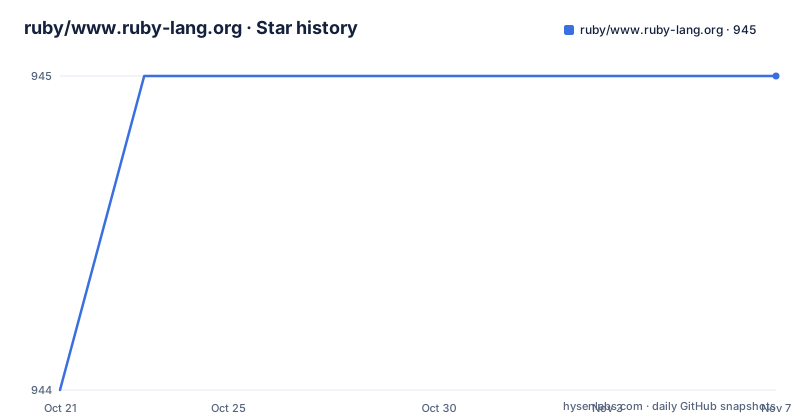
- ruby/www.ruby-lang.org945 ★ · +1
| Repository | 2026-10-21 | 2026-11-07 |
|---|---|---|
| ruby/www.ruby-lang.org | 944 | 945 |
1 Stars in the last 17 days, measured from the daily GitHub snapshot. Compare with other projects
Editorial analysis
The site is a Jekyll project with a Tailwind layer on top
This repository holds the source of the official Ruby programming language website, and the README is direct about the stack. It is the Jekyll source code for the site, and the styling is handled with Tailwind CSS, which is why Node.js is a prerequisite alongside Ruby and Git even though the site is generated by a Ruby tool.
The build is driven by Rake rather than by hand. The Rakefile at the root provides the serve, build, lint, check:markup and check:links tasks, and the Gemfile and Gemfile.lock pin the Ruby side while package-lock.json pins the Node side. The Jekyll configuration lives in _config.yml, with the usual set of directories whose names start with an underscore for the parts of a site that are not pages: _data for data files, _includes for partials, _layouts for page templates and _plugins for the Ruby code that hooks into the build.
Content is plain Markdown and HTML, which is the single most important fact for a first-time contributor. The repository root holds 404.md and index.html, and everything else under a language folder is Markdown. The top level also carries a favicon.ico, a robots.txt, a _headers file, and a security.asc file with a security contact key, which is the file a researcher needs before reporting a vulnerability in the site.
The maintenance signal is healthy but the release picture is empty. The last push was on 2026-10-19, the repository is not archived, and no GitHub releases are published, which is expected for a website whose artifacts are deployed rather than downloaded.
Bundler, npm, then rake serve, and the first build is slow
The quick start in the README is a short, explicit sequence, and it is worth following exactly, because two of the steps are easy to overlook.
The first is Bundler, and the second is the bundler configuration.
gem install bundlergit clone https://github.com/ruby/www.ruby-lang.org.git
cd www.ruby-lang.org/
bundle config set --local without production
bundle install
npm installThe bundle config command excludes the production group, which keeps the local environment to what is needed for development, and the npm install is what pulls in Tailwind, Pagefind and the typography plugin. The package.json at the root defines just two scripts, build-css and watch-css, so npm is a supporting tool for styling rather than a second build system.
Then you start the server.
bundle exec rake serveAnd you open http://localhost:4000/ in a browser. The README warns that the initial build takes several minutes, and it is right to set expectations before you assume something is broken. The reason is the translation set: every language folder is processed, and the search index is generated at the end of the build.
For a faster loop while editing, the README gives a direct Jekyll invocation with watch, future and incremental flags enabled, which skips the surrounding Rake work and rebuilds only what changed.
bundle exec jekyll serve --watch --future --incrementalLanguage folders are the content model, not a plugin
The translation structure is the defining design decision of this repository, and it is visible in the directory listing. Each language has its own folder at the top level: en for English as the base language, and then ja, es, fr, bg, de, id, it, ko, pl, pt, ru, tr, uk, vi, zh_cn and zh_tw alongside it. A page lives inside its language folder as Markdown, and the site's `_config.yml` and the `_layouts` and `_includes` directories turn those files into pages.
There is no translation plugin doing the work at runtime. The consequence is that a translator edits a file in a folder, and the same structural change has to be applied by hand in every other language folder. That is a real cost and a real benefit: the benefit is that the site is plain files that any editor can handle and that no plugin can break, and the cost is that a structural change to a shared component is a multi language diff.
The README treats translation as a first class contribution path, with a translation guide in the project wiki, and it points at dedicated channels for questions: a Gitter chat for the site, an issue tracker for bugs and the wiki for background. The content guidelines in the README are brief and worth reading before editing, because they set the tone for the whole site: write for a global audience of developers with varying English proficiency, keep the language straightforward, keep version numbers and examples current, and preview locally before submitting.
There is a separate security.asc file at the root, which is the key a security researcher uses to encrypt a report about a vulnerability in the site rather than posting it in a public issue.
Three rake tasks gate every pull request
The README is emphatic about the test suite, and the emphasis is repeated in two places. Before submitting a pull request, all tests should pass, and the tasks to run are these.
bundle exec rake lint          # run linter on markdown files
bundle exec rake check:markup  # check markup for all generated pages
bundle exec rake check:links   # check for 404's (needs a running local server)
Each task covers a different failure mode. The linter works on the Markdown sources, so it catches formatting problems before a page is ever rendered. The markup check runs over the generated pages, so it catches invalid HTML in the output, which can come from a layout or an include rather than from the page you edited. The link check looks for 404s and needs a running local server, which is why it comes after the other two and why the README tells you to keep a server up while you work on it.
For a full build, the task is rake build, which is the one to use before opening a pull request rather than the quick serve. The test directory at the root and the Rakefile's task wiring are what make these checks runnable by anyone without reading the source of the site itself.
The two ecosystems each guard their own layer. The Ruby side checks Markdown and HTML through Rake, while the CSS side is handled by the npm scripts, which rebuild the compiled stylesheet from the Tailwind input.
npm run build-css   # build CSS
npm run watch-css   # watch and rebuild CSS automatically
Note the ordering the README describes. The rake tasks build the CSS with Tailwind first, which is why a missing npm install leaves the rake path failing earlier than the plain Jekyll path would.
Search indexes the built HTML through Pagefind
The search implementation is the part of this project with real engineering in it, and the README explains it in unusual detail.
Search is Pagefind, which indexes the HTML that Jekyll produced rather than the Markdown behind it. That choice means no search server is needed, because the index is a set of static files that the site serves. A plugin, _plugins/search_index.rb, runs Pagefind whenever Jekyll finishes writing the site, so both rake build and rake serve leave you with a search index that matches the site they just produced. Nothing extra to run afterwards.
The costs and the failure modes are documented too. Indexing adds a few seconds to a build and needs Node, so npm install has to come first. Without it, bundle exec jekyll build still finishes and only reports that the index was skipped, which is enough for editing content. The rake tasks stop earlier than that, since they build the CSS with Tailwind first.
The per language behaviour is the subtle part. Pagefind builds one index per language and picks the right one using the lang attribute of the page the visitor is on, so each translation searches its own pages and reads its own interface labels. That is what makes search usable in a site with sixteen language folders rather than a single blended index.
And there is one documented exception. Bulgarian is excluded, because Pagefind has neither word stemming nor interface translations for it, so the search.unsupported key in _config.yml keeps those pages out of the index and Bulgarian searches run against English instead. Adding a language to that key is all it takes to apply the same treatment to another one.
Heroku preview for changes you cannot build locally
There is a documented escape hatch for contributors who cannot get a local build working, and it uses a project specific Heroku buildpack rather than the generic Ruby one.
The steps are: sign up at heroku.com and install the Heroku CLI, then create a preview app.
heroku login
heroku create --buildpack https://github.com/ruby/heroku-buildpack-www-ruby-lang.git
Then push your branch and open the app.
git push heroku your-branch-name:master
heroku open
The branch is pushed to the master ref on the remote, which is how the buildpack expects to receive it, and heroku open takes you to the deployed preview. The buildpack lives in a separate repository under the ruby organisation, so it is maintained alongside the site rather than being a one off script.
This path is marked as advanced in the README, and there is a good reason to prefer the local route when you can. A local build with bundle exec rake serve gives you the same page on http://localhost:4000/ with the search index regenerated, and the three rake checks run against that output. A Heroku preview answers a narrower question, whether the site deploys, and it creates a remote application that has to be cleaned up afterwards.
It is also worth knowing what the deployment environment means for a site like this. The repository topics list heroku alongside jekyll, ruby and html, and tailwind.config.js sits at the root, so the CSS build has to be part of the deploy path for the preview to look like production.
What this repository is not, and where it will frustrate you
A few honest limits.
First, the licence is not stated. The repository listing shows the licence as unknown, and there is no licence file among the top level entries, so the terms for reusing the site content, the templates and the design are not spelled out in the repository. Anyone planning to fork the site for another project should resolve that before copying markup and assets, and the Ruby project is not a good model here because this repository is separate from the interpreter source.
Second, there is no release history in the GitHub sense, and no changelog for the site itself. Deployments happen from the master branch, so the audit trail for what changed on the live site is the commit history, not a set of published versions.
Third, the build is slow on a cold start, and the README says so plainly. On a machine with limited resources, the combination of sixteen language folders, a full Tailwind build and a Pagefind index will make a first build feel like a hang. The watch and incremental flags exist for that reason.
Fourth, the structure is tuned to one organisation. A folder per language with no translation tooling is a good fit for a project with a translation wiki and a community around it. For a team that wants machine translation or a single source of truth across locales, this layout is a poor starting point, and the right move would be to build a different site rather than refactor this one.
Finally, the link checker needs a running server, which means the full local stack, which means Ruby, Node.js and a working bundle. Contributors who only wanted to fix a typo on a page still have to install all of that, and the README does not describe a lighter path.
Editorial conclusion
Adopt this repository if you want to correct, translate or extend the official Ruby website, and you can run Ruby, Node.js and Docker free environments locally to build it before you open a pull request. Do not adopt it as a starting point for a new documentation site, since the structure is tuned to one organisation's translation workflow and its Heroku buildpack. Verify first that bundle exec rake serve comes up on http://localhost:4000/ and that bundle exec rake lint, check:markup and check:links all pass, since the project treats those three tasks as the condition for submitting a change.
Frequently asked questions
How do I run the Ruby website locally?
Install Ruby, Node.js and Git, install Bundler with gem install bundler, then clone the repository, run bundle config set --local without production, bundle install and npm install. Start it with bundle exec rake serve and open http://localhost:4000/, allowing several minutes for the first build.
How does the Ruby website handle translations?
Each language has its own top level folder, with en as the base language and ja, es, fr, bg, de, id, it, ko, pl, pt, ru, tr, uk, vi, zh_cn and zh_tw alongside it, and pages are Markdown files inside those folders. Translation work is guided by a translation guide in the project wiki.
What does the search on the Ruby website use?
Search is Pagefind, which indexes the HTML Jekyll produced rather than the Markdown behind it, so it needs no server of its own. The plugin _plugins/search_index.rb runs it whenever Jekyll finishes writing the site, so rake build and rake serve both leave a matching index.
Why is Bulgarian search on the Ruby website different?
Pagefind has neither word stemming nor interface translations for Bulgarian, so the search.unsupported key in _config.yml keeps those pages out of the index and Bulgarian searches run against English instead. Adding a language to that key does the same for another one.
Which checks should I run before opening a pull request?
The README asks for the full test suite: bundle exec rake lint to check Markdown formatting, bundle exec rake check:markup to validate the generated HTML, and bundle exec rake check:links to look for 404s, which needs a running local server.
How do I preview a change on the Ruby site without a local build?
The README describes a Heroku preview using the project buildpack, creating an app with heroku create --buildpack pointing at the ruby/heroku-buildpack-www-ruby-lang repository, then pushing your branch with git push heroku your-branch-name:master and running heroku open.
Official sources
Add this badge to your README
If you maintain this project, the badge below links readers to this analysis and shows its maintenance status from the daily GitHub snapshot. Paste the markdown into your README; add ?metric=license or ?metric=stars to the image URL for a different field.

[](https://hysenlabs.com/projects/ruby-www-ruby-lang-org)Star history chart for your README
[](https://hysenlabs.com/projects/ruby-www-ruby-lang-org)Was this useful?