RubyGems.org's dev stack runs with authentication switched off
The Ruby community's gem hosting service.
At a glance
- What is it?
- The repository behind the Ruby gem host holds two things, a Rails app and a gem processor, and it documents them in five lines. The substance sits in the compose file and the Dockerfile, where the databases run without credentials and RubyGems itself is the one dependency left unpinned.
- Who is it for?
- Adopt this repository if you intend to work on the gem host itself, and read two files before you start: the compose file, which starts Postgres, memcached and two OpenSearch images with every authentication layer turned off and bound to loopback, and the Dockerfile, which pins Ruby and Alpine but leaves RUBYGEMS_VERSION with no default.
- Can I use it commercially?
- Yes. MIT is a permissive licence: you can use, modify and sell software built on it, as long as you keep its copyright and licence notices.
- Is it still maintained?
- Yes. The repository last received commits 1 day ago.
- What is it written in?
- Mainly Ruby, according to GitHub's language statistics.
Answers come from the project's GitHub data, last synced on November 15, 2026, and from our analysis. They are not legal advice.
Star history
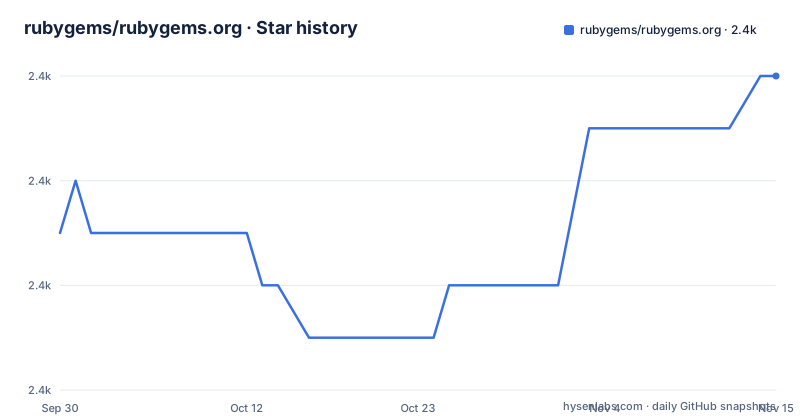
- rubygems/rubygems.org2,444 ★ · +3
| Repository | 2026-09-30 | 2026-11-15 |
|---|---|---|
| rubygems/rubygems.org | 2.4k | 2.4k |
3 Stars in the last 46 days, measured from the daily GitHub snapshot. Compare with other projects
Editorial analysis
Two parts, and storage that changes with the environment
The entire architecture statement in this repository is five lines long, under a heading called Organization. It names a Rails app that manages users and lets others view gems, and a gem processor that handles incoming gems and stores them in Amazon S3 in production or on the filesystem in a directory called `server/` during development.
That single sentence carries the deployment model. In production the gems are objects in a bucket; in development they are files on disk next to the checkout, under a directory that also appears in the tree layout. Anything that expects a database row to point at a stored file has to behave differently in the two environments, and the README does not say how the switch is made or whether the two storage backends share one interface.
What sits alongside those two parts is worth noting too. The root carries `config.ru` and a Rakefile for the Rails side, `Dockerfile` and `docker-compose.yml` for the environment, `shipit.yml` for deployment, `db/` for schema work, and separate `doc/` and `reports/` directories. The default branch is master, the license is MIT with `MIT-LICENSE` at the root, and the repository publishes no GitHub releases at all, so there is no release trail to read here.
Postgres runs with trust authentication on the loopback interface
The development environment is a compose file, and its first two services hand out their ports on 127.0.0.1 with no credentials at all:
  db:
    image: index.docker.io/library/postgres@sha256:f104f501cd403abdc56cd17fab81fad0b15754e8dce818e20300a17a3628700f # 14.15
    ports:
      - "127.0.0.1:5432:5432"
    environment:
      - POSTGRES_HOST_AUTH_METHOD=trust
  cache:
    image: index.docker.io/library/memcached@sha256:f4504742a8fb03c3ac0cd172e1c1d2277117629f8d21d52f78307121ddc3de5f # 1.4.39
    ports:
      - "127.0.0.1:11211:11211"
`POSTGRES_HOST_AUTH_METHOD=trust` tells the Postgres image to accept any connection from any local socket or address without a password, and the loopback-only port mapping is what keeps that from being a network exposure on a default install. Both images are pinned by digest with the version left as a trailing comment, Postgres 14.15 and memcached 1.4.39, which is the one habit in this file worth copying into your own compose setups: an exact digest plus a human-readable version.
The search stack goes further. The OpenSearch service sets `DISABLE_SECURITY_PLUGIN=true` and the dashboards service sets `DISABLE_SECURITY_DASHBOARDS_PLUGIN=true`, so neither has a login. All four services follow the same loopback pattern, which makes this a deliberately open local environment rather than a mistake.
The console will not start until the search cluster reports green
The two OpenSearch services are wired together with a healthcheck rather than a sleep. The search node runs as a single node with discovery.type set to single-node, a 512 megabyte heap floor and ceiling, and a healthcheck that curls the cluster health endpoint waiting for green status with a five second timeout, retried six times at five second intervals. The dashboards service depends on that condition being satisfied:
  search-console:
    image: index.docker.io/opensearchproject/opensearch-dashboards@sha256:d8f4442da4d0cb44865a5eab01c9eb9f00769e2d5f053d21e3ff3c64a50fc6ec # 2.13.0
    ports:
      - "127.0.0.1:5601:5601"
    environment:
      - 'OPENSEARCH_HOSTS=["http://search:9200"]'
      - "DISABLE_SECURITY_DASHBOARDS_PLUGIN=true"
Green is the strictest of the three cluster states, since it requires every replica to be assigned, so this gate is the part most likely to decide whether a fresh development environment comes up on the first attempt. The dashboards healthcheck takes a different shape, using a shell command that curls `/api/status` and exits non-zero on failure, with a three second timeout rather than five.
Both OpenSearch images are version 2.13.0. The heap setting of `-Xms512m -Xmx512m` is identical for the node and for the dashboards process, which means each container is capped at half a gigabyte regardless of how much memory the machine has, a deliberate ceiling that keeps the local stack small.
Toxiproxy is in the compose file and nowhere in the overview
The last service in the file is `toxiproxy`, image 2.5.0 from the Shopify registry on ghcr.io, publishing 127.0.0.1:8474. Toxiproxy is a proxy that sits between a client and a service and can be told to cut connections, add latency, or return errors on command, which is what makes it a test dependency rather than a runtime one. Its presence in a development compose file implies the test suite exercises failure paths that a healthy stack cannot produce on its own.
None of that appears in the README. The overview covers purpose, support, links, contributions, organization and the license, in that order, and says nothing about how to run the stack, what Toxiproxy is for, or which service the application expects to reach it through. Setup instructions live in CONTRIBUTING.md under a development setup heading, and the deploy process lives on the wiki of a separate infrastructure repository, with a multi-step checklist at `rubygems-infrastructure/wiki/Deploys`.
So the repository splits its documentation three ways: an overview that fits on one screen, a contribution guide with the local setup, and an external wiki with the production deploy. `shipit.yml` at the root is the fourth piece, and it is the only file in the tree that names the deployment tool without explaining it.
Ruby and Alpine get defaults, RubyGems does not
The container image pins its platform with two arguments that have defaults and a third that does not:
ARG RUBY_VERSION=4.0.6
ARG ALPINE_VERSION=3.23
FROM ruby:$RUBY_VERSION-alpine${ALPINE_VERSION} AS base

# Update rubygems
ARG RUBYGEMS_VERSION
RUN gem update --system ${RUBYGEMS_VERSION} --no-document
The comment at the top of the file says to make sure RUBY_VERSION matches the Ruby version in `.ruby-version` and in the Gemfile, which is a manual synchronization step across three files. The same warning is not repeated for Alpine. And RUBYGEMS_VERSION is declared with no value at all, so the gem update is unpinned unless the build passes something, and the variable that determines which RubyGems release ships inside the image is the one nobody is told to keep in step.
The rest of the build is careful in ways worth copying. A throw-away build stage exists purely to keep the final image small. Gems are installed with the development and test groups excluded, an optional BUNDLE_WITH argument for adding groups back, twenty parallel jobs and five retries, then cleaned. Cached mounts carry the apk package cache, the gem path and a secret named after the bundler packager setting, and the cache directories are deleted before the image is finished.
Three agent instruction files sit next to the code of conduct
The root of the repository contains `.claude/`, `CLAUDE.md` and `AGENTS.md` alongside `CODE_OF_CONDUCT.md`, `CONTRIBUTING.md` and `SECURITY.md`. Three instruction files for automated coding agents, versioned with the application, in a project that also carries a Ruby version file, a RuboCop configuration with a separate todo file, a Prettier config and an ignore file for Prettier.
That mix says something about how the project is worked on. Formatting is enforced by two separate tools for two file types, with `.rubocop_todo.yml` recording the offences that have not been fixed yet, and `.git-blame-ignore-revs` set up to keep mass reformatting commits out of blame output. There is also `.devcontainer/`, a `.pumaenv` for the application server, an `.erdconfig` for entity relationship diagrams, `.herb.yml` at the root, and a `vendor/` directory that the Dockerfile fills during the build.
Maintenance runs through Ruby Central, the non-profit that manages the site and also supports RubyConf, RailsConf and Bundler. Hosting is donated by Amazon Web Services and CDN service by Fastly. Requests and RFCs go through the rubygems organization on GitHub, support mail goes to a support address, and the code of conduct applies to anyone taking part.
Editorial conclusion
Adopt this repository if you intend to work on the gem host itself, and read two files before you start: the compose file, which starts Postgres, memcached and two OpenSearch images with every authentication layer turned off and bound to loopback, and the Dockerfile, which pins Ruby and Alpine but leaves RUBYGEMS_VERSION with no default. It is not a mirror, a client, or a package index you can stand up for your own gems; the processor writes to S3 in production and to a filesystem directory in development, and the deploy checklist lives in another repository's wiki.
Frequently asked questions
what is ruby gems org
RubyGems.org is the Ruby community's gem hosting service. This repository holds two parts: a Rails app that manages users and lets people view gems, and a gem processor that stores incoming gems in Amazon S3 in production or on the filesystem in server/ during development.
Who operates RubyGems.org and who pays for the hosting?
Ruby Central, a non-profit, manages the site and also supports RubyConf, RailsConf and Bundler. Hosting is donated by Amazon Web Services and CDN service by Fastly.
What services do I need to run the RubyGems.org development environment?
The compose file starts Postgres with trust authentication, memcached, OpenSearch 2.13.0 with its security plugin disabled, OpenSearch Dashboards 2.13.0 on port 5601, and a Toxiproxy service on port 8474. Every service binds to 127.0.0.1 only.
Where is the deploy checklist for RubyGems.org?
Not in this repository. It is a multi-step checklist on the wiki of the rubygems-infrastructure repository. This repo carries a shipit.yml at the root and points to a Development Setup section in CONTRIBUTING.md.
Which Ruby and RubyGems versions does the RubyGems.org image use?
Ruby 4.0.6 on Alpine 3.23 by default, and the image comment says to keep RUBY_VERSION in step with .ruby-version and the Gemfile. RUBYGEMS_VERSION is declared as an argument with no default value.
Official sources
Add this badge to your README
If you maintain this project, the badge below links readers to this analysis and shows its maintenance status from the daily GitHub snapshot. Paste the markdown into your README; add ?metric=license or ?metric=stars to the image URL for a different field.

[](https://hysenlabs.com/projects/rubygems-rubygems-org)Star history chart for your README
[](https://hysenlabs.com/projects/rubygems-rubygems-org)Was this useful?