LiteParse has no model in the loop, and its own tables say where that ends
A fast, helpful, and open-source document parser. The representation follows LlamaParse PDFium path extraction; LiteParse calls the shape rectangle bbox rather than PDFium's coords, and uses width / height rather than w / h.
At a glance
- What is it?
- LiteParse is a Rust PDF parser built on PDFium, Tesseract and grid projection, with Markdown, JSON and text output and no cloud dependency. Its benchmark tables are unusually candid, and they mark the boundary: charts score near zero for every tool tested.
- Who is it for?
- Adopt LiteParse when your documents are native-text PDFs or office files and you need bounding boxes, Markdown and JSON out of the box with nothing leaving the machine. Do not adopt it as the answer for handwriting, dense tables or charts, since the README hands those to LlamaParse and its own numbers put charts near zero for every tool tested.
- Can I use it commercially?
- Yes. Apache-2.0 is a permissive licence: you can use, modify and sell software built on it, as long as you keep its copyright and licence notices.
- Is it still maintained?
- Yes. The repository last received commits 1 day ago.
- What is it written in?
- Mainly Rust, according to GitHub's language statistics.
Answers come from the project's GitHub data, last synced on November 13, 2026, and from our analysis. They are not legal advice.
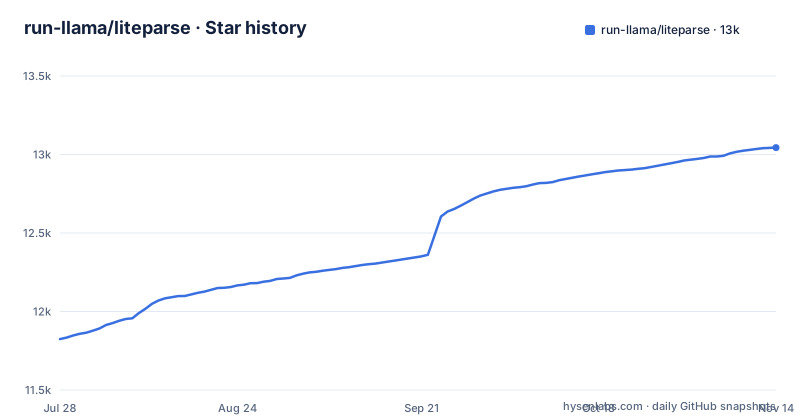
Star history
- run-llama/liteparse13,042 ★ · +1,218
| Repository | 2026-07-28 | 2026-11-13 |
|---|---|---|
| run-llama/liteparse | 11.8k | 13k |
1,218 Stars in the last 108 days, measured from the daily GitHub snapshot. Compare with other projects
Editorial analysis
PDFium reads the text and grid projection rebuilds the page around it
The pipeline is five stages and no model anywhere in it. Input arrives as PDF, DOCX, XLSX, PPTX or images. Format conversion handles the non-PDF side through LibreOffice and Rust image crates, resvg and usvg. Text extraction is the PDFium C library. OCR is selective rather than blanket, an OCR merge stage combines native text with OCR results, and grid projection reconstructs the spatial layout from what came before. Roughly 2 to 5 milliseconds per page is the figure given for the text parsing stage.
The wire format carries one deliberate difference from the C library underneath, and it matters if you compare coordinates across the two systems. The representation follows LlamaParse's PDFium path extraction, and LiteParse calls the shape rectangle bbox rather than PDFium's coords, and uses width and height rather than w and h.
OCR arrives through three doors and the engine you pick moves the score
Tesseract is built in, bundled with the library and described as zero setup. A second door is HTTP, so EasyOCR, PaddleOCR or a server you wrote can sit behind an endpoint. The third is a plain API, with OCR_API_SPEC.md in the repository as the written specification for it.
So swapping the OCR engine is a deployment decision rather than a code change, and the benchmark tables in the README price that swap. On ParseBench, which scores 2,049 documents as a mean of five categories, LiteParse with no OCR reaches 0.364 overall, adding Tesseract takes it to 0.380, and adding PaddleOCR takes it to 0.389. The same ordering holds on opendataloader-bench at 0.886, 0.896 and 0.901, on a 200 document corpus.
Complexity detection exists to reject a document before you pay to parse it
Before a full parse, LiteParse can tell you whether the document deserves one. Complexity detection is a cheap check for whether a document needs OCR or heavier parsing, so a caller can route the file, reject it, or estimate cost up front. For an ingestion pipeline that is the feature that matters most, because it separates finding a scanned document at intake from finding it after the queue behind it is full of the same thing.
The same overview block covers the rest of the output surface: screenshot generation for high-quality page images aimed at LLM agents, and three output formats, Markdown, JSON and Text. Markdown output is structured with headings, tables, lists, images and links for RAG pipelines, and bounding box information travels alongside the text so a caller can position it. Nothing in that list asks for a network round trip, which is the point of the project as the README frames it: a standalone tool focused exclusively on fast and light parsing, with the proprietary LLM features and the cloud dependency left out on purpose.
Worker pool mode exists because PDFium serializes concurrent parses
Parallel parsing needs a workaround, and LiteParse names the reason. PDFium otherwise serializes concurrent parses, so the Python and Node.js bindings ship a worker pool mode that runs work in persistent worker processes to get true parallelism. That mode also imposes hard per-parse timeouts: a rogue document is killed, identified by name, and never stalls the pipeline. On a batch job over untrusted files, that is the difference between a bounded run and one hung job holding the queue open.
Four language surfaces come out of one Cargo workspace whose members are crates/pdfium-sys, crates/pdfium, crates/liteparse, crates/liteparse-napi, crates/liteparse-python and crates/liteparse-wasm, on edition 2024. Platforms named are Linux, macOS on Intel and ARM, and Windows, and the release tags move in step, with wasm, python and node all published at 2.17.0 on 2026-10-22.
The scoreboard shows OCR helping, and charts staying empty for everyone
The tables are the most useful part of the documentation and they cut both ways. Everything was measured with each tool at its latest release as of 2026-09-09, using no ML model at all: no LLM, no layout model, no GPU. On ParseBench, LiteParse with PaddleOCR reaches 0.389 overall against 0.283 for pdf-inspector and 0.277 for opendataloader, and on olmOCR-bench it passes 42.2 percent of tests against 39.6 with no OCR.
Now the columns where it loses ground. Semantic Formatting goes to pdf-inspector at 0.426 against 0.385, and headers_footers is 62.1 for pdf-inspector against 55.8 for LiteParse without OCR. Charts is near zero across the table, with markitdown highest at 0.020 and LiteParse at 0.013, because none of these tools reconstruct chart data. The two math categories need LaTeX output, score 0.0 for every tool, and still count in the average. Visual grounding is LiteParse's own ground at 0.297 against 0.099 for pdf-inspector, and scoring it needs bounding boxes, which the README says come from:
lit parse --extract-blocksPackaging has to carry a pdfium shared library beside the binary
The Dockerfile builds in two stages. A rust:1-bookworm builder installs libclang-dev, libtesseract-dev, libleptonica-dev, cmake and g++, copies Cargo.toml, Cargo.lock and crates/, and runs cargo build --release. The runtime stage is debian:bookworm-slim with libtesseract5, liblept5, tesseract-ocr-eng and ca-certificates, and the built binary is installed as lit with a symlink giving it the liteparse name.
The part worth copying is how pdfium travels. The shared library is taken from the builder's cargo cache into a directory of its own, which then has to be named on the loader path:
COPY --from=builder /root/.cache/pdfium-rs/ /usr/local/lib/pdfium-rs/
ENV LD_LIBRARY_PATH="/usr/local/lib/pdfium-rs"
Those two lines are why a LiteParse image needs both stages. The repository also carries full.Dockerfile and musl_build_cargozig.md, separate build recipes from this one.
Three registries, one docs site, and a V1 branch you should not start from
LiteParse ships as a Rust crate on crates.io, as the npm packages @llamaindex/liteparse and @llamaindex/liteparse-wasm, and as a Python package on PyPI, with API documentation and guides at developers.llamaindex.ai/liteparse. Those are the destinations the README links, and the docs site carries the guides. A Simplified Chinese README sits next to the English one.
Version history has a fork in the road worth knowing. A note at the top of the README sends anyone looking for LiteParse V1 to a separate branch of old code, which means V2 is what ships on main and V1 users are being pointed away from it. The licence is Apache-2.0, the repository is not archived, and the last push was on 2026-10-31.
The rest of the tree tells you what kind of project this is. crates/ holds the six Rust members, with packages/, ocr/, demo/, wasm-demo-site/ and docs/ beside it, and run_benchmarks.sh sits beside dataset_eval_utils/ and integration_tests_data/. Building it is Cargo work with no wrapper: the Makefile's targets are cargo build, cargo test --all, cargo clippy --all-targets --all-features and cargo fmt --all, with a lint-strict target that passes -D warnings.
Dense tables and handwriting are the cases the README hands to LlamaParse
LiteParse draws its own boundary and it is worth reading before committing. For complex documents, named as dense tables, multi-column layouts, charts, handwritten text and scanned PDFs, the README says you get significantly better results with LlamaParse, the cloud-based document parser from the same organisation, built for production document pipelines.
The difference in approach is not a tuning difference. LiteParse runs entirely on your machine with no proprietary LLM features and no cloud dependencies, and the benchmark runs behind its numbers use no ML model at all. LlamaParse moves document understanding to a hosted service. So the choice follows the document: native-text PDFs with embedded figures are LiteParse's territory, and OCR gains there are modest, while handwriting, dense tables and charts are the work the README sends elsewhere.
Editorial conclusion
Adopt LiteParse when your documents are native-text PDFs or office files and you need bounding boxes, Markdown and JSON out of the box with nothing leaving the machine. Do not adopt it as the answer for handwriting, dense tables or charts, since the README hands those to LlamaParse and its own numbers put charts near zero for every tool tested. Verify first on your own corpus: run the OCR configuration you plan to ship against a hundred of your real files and read the headers_footers and Semantic Formatting columns, because those are where pdf-inspector scores above LiteParse.
Frequently asked questions
What are the key differences between LiteParse and LlamaParse?
LiteParse is a standalone local parser with no proprietary LLM features and no cloud dependencies, and the benchmark runs behind its numbers use no LLM, no layout model and no GPU. The README states that for dense tables, multi-column layouts, charts, handwritten text and scanned PDFs you get significantly better results with LlamaParse, the cloud-based parser built for production document pipelines.
Is LiteParse open source?
Yes. The repository carries the Apache-2.0 licence and the README calls LiteParse a standalone open source PDF parsing tool focused on fast and light parsing. It is published as a Rust crate on crates.io, as @llamaindex/liteparse and @llamaindex/liteparse-wasm on npm, and on PyPI.
How do I install LiteParse?
The README links the Rust crate on crates.io, the npm packages @llamaindex/liteparse and @llamaindex/liteparse-wasm, and the Python package on PyPI, then points to developers.llamaindex.ai/liteparse for API documentation and guides. The Dockerfile shows the source build with cargo build --release inside a rust:1-bookworm image.
What is LiteParse?
A standalone PDF parsing tool focused on fast and light parsing, providing spatial text parsing with bounding boxes and running locally. Output comes as Markdown, JSON and Text, screenshots can be generated for page images, and it is published for Linux, macOS on Intel and ARM, and Windows.
LiteParse vs markitdown: how do they compare?
On ParseBench, LiteParse with PaddleOCR scores 0.389 overall against markitdown 0.185, and table structure on opendataloader-bench is 0.832 against 0.273. Markitdown is the highest of the tested tools on Charts at 0.020 while LiteParse sits at 0.013, and its heading hierarchy score on opendataloader-bench is 0.000.
Official sources
Add this badge to your README
If you maintain this project, the badge below links readers to this analysis and shows its maintenance status from the daily GitHub snapshot. Paste the markdown into your README; add ?metric=license or ?metric=stars to the image URL for a different field.

[](https://hysenlabs.com/projects/run-llama-liteparse)Star history chart for your README
[](https://hysenlabs.com/projects/run-llama-liteparse)Was this useful?