RushDB: one Rust binary that turns nested JSON into a linked graph with SQL, Cypher and vector search
RushDB is a graph + vector database and memory layer for AI agents. Push any JSON, get typed, searchable, relationship-aware records back — no schema, no migrations. Built on Neo4j.
At a glance
- What is it?
- RushDB is a graph and vector database for AI agents that infers types from the JSON you write and links nested objects into records. It ships as a single binary with several query languages, and its Cypher and GQL support is still at release candidate level.
- Who is it for?
- RushDB fits teams that want to push JSON into one database and query it as records, a graph and a vector index without designing a schema, and that can run a single Linux or macOS binary, Docker or Helm. It is a weaker fit if you need native Windows, a settled openCypher or ISO GQL, or built-in embedding generation, since vectors must be supplied.
- Can I use it commercially?
- Yes. Apache-2.0 is a permissive licence: you can use, modify and sell software built on it, as long as you keep its copyright and licence notices.
- Is it still maintained?
- Yes. The repository received new commits within the last day.
- What is it written in?
- Mainly TypeScript, according to GitHub's language statistics.
Answers come from the project's GitHub data, last synced on November 15, 2026, and from our analysis. They are not legal advice.
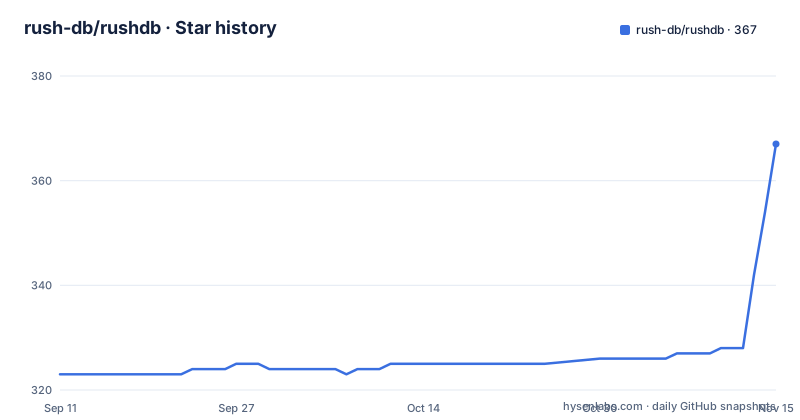
Star history
- rush-db/rushdb367 ★ · +44
| Repository | 2026-09-11 | 2026-11-15 |
|---|---|---|
| rush-db/rushdb | 323 | 367 |
44 Stars in the last 65 days, measured from the daily GitHub snapshot. Compare with other projects
Editorial analysis
One script installs the binary, and rushdb up opens a node with a fixed local token
The quick start is two lines:
curl -fsSL https://raw.githubusercontent.com/rush-db/rushdb/main/install.sh | sh
rushdb up
The script installs the rushdb binary into ~/.rushdb/bin after checking the release checksum, and it also checks the Sigstore signature when cosign is installed. Then rushdb up starts a durable node on http://127.0.0.1:3000 with its data in ./.rushdb and the local token local-token.
That token is the first thing to understand. It is a development convenience bound to loopback. The Dockerfile comments are explicit that the server refuses the default token off loopback, so the moment you expose the node to a network you must set your own.
There is also a platform limit. The install script supports Linux with glibc 2.28 or newer and macOS, on x86-64 and arm64. Windows is not supported natively, and the project tells you to use WSL 2 or Docker. A team on Windows laptops therefore runs the database inside a Linux layer, which matters if you planned to bundle it into a desktop installer.
Nested objects become linked records, and queries cross the links by label name
RushDB's central trick is that you write a JSON document and each nested object turns into its own record, linked to its parent. The example ingests a COMPANY called Acme with DEPARTMENT children, each holding EMPLOYEE objects:
export RUSHDB_TOKEN=local-token
curl -s http://127.0.0.1:3000/protocol/v1/execute \
  -H "Authorization: Bearer $RUSHDB_TOKEN" -H 'Content-Type: application/json' \
  -d '{"protocolVersion":1,"operation":{"kind":"ingest","ingest":{"kind":"documents","label":"COMPANY",
       "documents":{"name":"Acme","DEPARTMENT":[
         {"name":"Engineering","headcount":12,"EMPLOYEE":[{"name":"Ada","role":"Staff Engineer"},{"name":"Linus","role":"Engineer"}]},
         {"name":"Sales","headcount":4,"EMPLOYEE":[{"name":"Grace","role":"Account Executive"}]}]}}}}'
The key names in uppercase, DEPARTMENT and EMPLOYEE, are what become labels. The query then reaches across relationships by naming the related labels. To find engineers at Acme, the predicate filters EMPLOYEE on role containing Engineer and walks up through DEPARTMENT to COMPANY with name Acme.
The requests go to one endpoint, /protocol/v1/execute, with a protocolVersion of 1 and an operation whose kind is either ingest or query. Because the shape of the JSON decides the graph, the casing and nesting of your keys is a modelling decision you make by writing, not by declaring a schema.
SQL, Cypher and the SDK all read the same records, but two languages are release candidates
The same records answer every interface. SQL arrives over the PostgreSQL wire protocol, with psql or any PostgreSQL driver, and labels are tables:
PGPASSWORD=$RUSHDB_TOKEN psql "host=127.0.0.1 port=5432 user=rushdb dbname=rushdb sslmode=disable" \
  -c "SELECT name, headcount FROM department ORDER BY headcount DESC"
Note that the database name and the user are both rushdb, and the token doubles as the password. Cypher works over HTTP, or over Bolt with the Neo4j drivers when the node is started with rushdb up --languages sql,cypher --bolt-port 7687, so Bolt is something you switch on explicitly.
The JavaScript SDK installs with npm install @rushdb/javascript-sdk, and the example builds new RushDB with the token and the options direct: true and engineUrl: 'http://127.0.0.1:3000'. Its find call takes labels, a where object, and orderBy, and the example expects the engineers Ada and Linus.
Gremlin, SQL/PGQ GRAPH_TABLE, Mongo-style documents and ISO GQL use the same HTTP endpoint. The feature table is careful about maturity: openCypher and ISO GQL are listed as release candidates. If your application leans on either one, test the exact queries you need before committing.
Schema inference is per value, and vector search only indexes vectors you bring
There is no schema to design. You write any JSON shape, and types are inferred per value. The engine keeps an exact catalog of labels, properties and relationships that you can query, so discovery is a query, not a document you maintain.
Under that is what the project calls the Labeled Meta-Property Graph, or LMPG. Each property is stored as a typed definition shared by the records that use it, which means schema discovery, value ranges and facets come from the storage layout itself. A practical result is that a screen listing every property on a label is cheap to build.
Search has three parts. Vector indexes come in exact and HNSW forms, and they work over the vectors you supply. RushDB does not say it generates embeddings, so the work of producing them sits in your own pipeline and the database stores and searches what you hand it. BM25 full-text indexes cover text. Hybrid search fuses the vector and full-text results into one ranking.
The flip side of inferring types per value is that the types follow what you actually wrote. If two writers send the same property in different shapes, the database will not stop either of them with a declared schema.
A write-ahead log and MVCC sit under the AI-memory pitch
The project is described as a graph and vector database and a memory layer for AI agents, but the durability list reads like a conventional database. It has a write-ahead log, MVCC snapshots, multi-statement transactions, backups with point-in-time restore, and streaming replication to read-only followers.
That last part sets the shape of high availability. Followers are read-only, so writes still go through one leader. The workspace has a rushdb-raft crate alongside rushdb-backup, rushdb-tx, rushdb-storage and rushdb-engine, but the available text gives no failover procedure, so do not assume an automatic one.
Multitenancy is optional and fail-closed, with each tenant getting its own keyspace. Fail-closed means a request that cannot be matched to a tenant is refused rather than falling through to shared data. The transports are HTTP, the PostgreSQL wire protocol, gRPC and Bolt, all from one process, so there is no proxy tier or other service to operate. The cost of that single process is that every language, index and transport shares one failure domain.
Docker needs an explicit token, and the cleartext transports need an opt-in
The Docker route is one line:
docker run -p 127.0.0.1:3000:3000 -v rushdb:/data -e RUSHDB_TOKEN=change-me rushdb/rushdbThe Dockerfile explains the settings behind it. A token is required because the server refuses the default token off loopback. Inside the container the image sets RUSHDB_LISTEN=0.0.0.0, RUSHDB_DATA_DIR=/data and RUSHDB_ALLOW_INSECURE_LISTEN=true, and which host interfaces can reach it is decided by docker run -p. That is why the example binds 127.0.0.1 on the host side.
If you leave loopback, the cleartext transports need the explicit opt-in. Either terminate TLS in front of the container, or mount a certificate and set RUSHDB_TLS_CERT and RUSHDB_TLS_KEY. The image exposes 3000 for HTTP and 5432 for the PostgreSQL wire, uses a distroless nonroot base, and owns /data as uid 65532.
For Kubernetes there is a Helm chart installed with helm install rushdb oci://ghcr.io/rush-db/charts/rushdb --set auth.token=..., so the auth token is a required value there too. Templates also exist for Docker Compose with an HTTPS variant behind Caddy, cloud-init, systemd, Fly.io, Render, Coolify and Dokploy.
Four more install routes differ in what they compile and what they verify
Homebrew is brew install rush-db/tap/rushdb for macOS and Linux, and brew services start rushdb runs it in the background. The Docker images are rushdb/rushdb and ghcr.io/rush-db/rushdb, for linux/amd64 and linux/arm64.
Cargo has two forms with different costs. The binstall form fetches the release binary:
cargo binstall rushdb-serverThe install form compiles the server, so it needs a C++ compiler, and the project recommends the locked flag:
cargo install rushdb-server --lockedRelease archives on GitHub come with SHA-256 checksums, an SBOM and Sigstore signatures, which is the route for anyone who must verify what they deploy. The source build is:
cargo build --release -p rushdb-server --bin rushdbThe install script can pin a version, and the example pins v3.0.0 with sh -s -- --version v3.0.0. A source build also depends on the toolchain: the workspace declares rust-version 1.91, while the Dockerfile builds in rust:1.98.1-bookworm. If you build locally, you need a Rust at least as new as the declared minimum.
Three releases in four days and a description that still says Neo4j
v3.0.0 was tagged on 2026-10-28, v3.0.1 on 2026-11-01 at 16:21 UTC and v3.0.2 about five hours later. The last push was 2026-11-01 and the repository is not archived, so it is actively maintained. The workspace version matches the newest tag at 3.0.2. A brand-new major version with two patch releases in a day means upgrade notes in CHANGELOG.md are worth reading before you move data.
One inconsistency deserves a check. The repository description says RushDB is built on Neo4j. The README describes a single Rust binary with its own data directory, and the workspace contains crates for storage, transactions, query, SQL, text search, vector, Bolt and gRPC. Bolt is offered so that Neo4j drivers can connect. Which wording is accurate for the version you run decides your operational story, so read the manual before you assume a Neo4j server is required or absent.
The code quality gate is public. make gate runs rustfmt in check mode, clippy with warnings denied, and the whole test suite, and the workspace denies missing_docs and clippy pedantic lints. The license is Apache-2.0.
Editorial conclusion
RushDB fits teams that want to push JSON into one database and query it as records, a graph and a vector index without designing a schema, and that can run a single Linux or macOS binary, Docker or Helm. It is a weaker fit if you need native Windows, a settled openCypher or ISO GQL, or built-in embedding generation, since vectors must be supplied. Confirm the Neo4j wording in the repository description against the Rust workspace before you plan around either.
Frequently asked questions
Is Neo4j better than SQL for RushDB data?
RushDB does not make you pick one. The same records answer SQL over the PostgreSQL wire protocol and Cypher over HTTP or Bolt, along with Gremlin, Mongo-style documents and its JSON query language.
Is Neo4j SQL or NoSQL, and where does RushDB stand?
RushDB is a graph and vector database whose description says it is built on Neo4j. It answers SQL, Cypher and Mongo-style document queries over the same records, so it spans both styles.
How do I start RushDB locally?
Run the install script from the README and then rushdb up. It starts a durable node on http://127.0.0.1:3000 with data in ./.rushdb and the local token local-token.
Official sources
Add this badge to your README
If you maintain this project, the badge below links readers to this analysis and shows its maintenance status from the daily GitHub snapshot. Paste the markdown into your README; add ?metric=license or ?metric=stars to the image URL for a different field.

[](https://hysenlabs.com/projects/rush-db-rushdb)Star history chart for your README
[](https://hysenlabs.com/projects/rush-db-rushdb)Was this useful?