keyd remaps keys below the display server, one config section per keyboard
A key remapping daemon for linux.
At a glance
- What is it?
- keyd is a C daemon that remaps keys through kernel input primitives instead of X11, so its config reaches virtual terminals as well as graphical sessions. Overloads, layers, a wildcard keyboard id and a three key panic sequence are the parts worth understanding before you install it.
- Who is it for?
- keyd fits a Linux user who wants layers, tap and hold overloads and a keyboard config that survives a switch to a virtual terminal, and who is willing to read the man page. It does not fit someone who wants to script individual key up and down events, since that is the one thing the project says it is not, and application specific remapping is still labelled experimental.
- Can I use it commercially?
- Yes. MIT is a permissive licence: you can use, modify and sell software built on it, as long as you keep its copyright and licence notices.
- Is it still maintained?
- Yes. The repository last received commits 167 days ago.
- What is it written in?
- Mainly C, according to GitHub's language statistics.
Answers come from the project's GitHub data, last synced on November 15, 2026, and from our analysis. They are not legal advice.
Star history
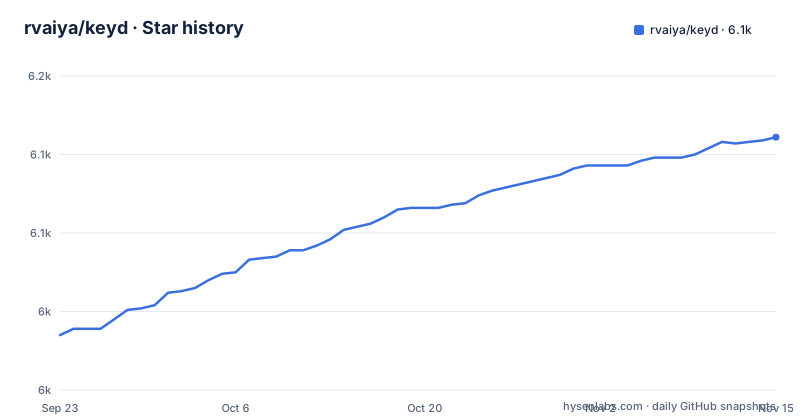
- rvaiya/keyd6,111 ★ · +126
| Repository | 2026-09-23 | 2026-11-15 |
|---|---|---|
| rvaiya/keyd | 6k | 6.1k |
126 Stars in the last 53 days, measured from the daily GitHub snapshot. Compare with other projects
Editorial analysis
The ids section decides which keyboards a config reaches
Every keyd config opens with an `[ids]` section, and the sample quickstart puts a single `*` in it. That wildcard is not a stylistic choice, it is the mechanism: keyd matches input devices against the ids list before applying the mappings, and a bare `*` accepts every keyboard the daemon sees. The second section, `[main]`, holds the remappings themselves. The quickstart uses it to map capslock to `overload(control, esc)` and to swap escape for capslock, so capslock becomes control when held and escape when tapped. Both directives are read from `/etc/keyd/default.conf`, and the daemon is told to pick up changes with `sudo keyd reload`. Because keyd remaps keys using kernel level input primitives (evdev, uinput), the same config also works in a VT.
[ids]

*

[main]

# Maps capslock to escape when pressed and control when held.
capslock = overload(control, esc)

# Remaps the escape key to capslock
esc = capslock
overload and oneshot split one physical key into tap and hold
The configuration vocabulary is small, and each function does one specific job. `overload` takes two arguments and gives a different result depending on how long the key is held, which is how capslock can send control on hold and escape on tap in a single line. `oneshot` modifies the next key instead, and the README's Example 1 uses `leftshift = oneshot(shift)` so a single left shift press applies to the following keystroke. Layers add a third axis, and a `[symbols]` section supplies the keys a layer contains, so `capslock = overload(symbols, esc)` reaches into that block. The docs also mention hybrid modifiers, keyboard specific configuration and Unicode support, plus a client-server model built on an IPC mechanism for scripting and display server agnostic remapping. What the config format does not offer is per-event programming: that is explicitly listed as something keyd is not.
backspace+escape+enter is the way out of a config that bricks your input
A key remapper that runs below the display server has an obvious failure mode, and the documentation names it directly: it is possible to render your machine unusable with a bad config file. The escape hatch is a fixed chord, `backspace+escape+enter`, which should cause keyd to terminate and hand your input back to the original stack. That only helps if you can still type those three keys, which is the reason to keep a VT reachable and the reason the wildcards in the ids section deserve thought before you save a change. Errors surface in the service log and can be read the ordinary way, through the system service manager, for example `sudo journalctl -eu keyd`. The recovery path, the log location and the reload command together are the three things to know before the first edit, not after it.
keyd monitor shows keyd's output, not the original events
Finding the right key name for a config is done with `keyd monitor`, and the output changes depending on whether the daemon is running. While keyd is active, the command corresponds to what keyd itself emits, which is the list you want when writing a mapping, because it tells you what the remapping stage has turned your presses into. The original input events are the other half of the puzzle and are only visible if you stop keyd first and then run the same command. Reading the man page, `man keyd`, gives the fuller description. The examples directory in the repository leans on the same vocabulary, with files such as home-row-mods.conf, capslock-escape-with-vim-mode.conf, extend-layer.conf, nav-layer.conf, simlayer.conf, half-qwerty.conf and an apple-magic-keyboard-touch-id.conf, so reading those is a faster way to learn the format than starting from an empty file.
Mice that emit keys are caught by the wildcard id
One hardware note in the quickstart deserves more attention than it gets. Some mice, and the Logitech MX Master is named as an example, are capable of emitting keys, and those emissions are consequently matched by the wildcard id. The result is a config intended for one keyboard applying to a pointing device as well, which produces mappings you did not ask for and cannot explain from the config file alone. The documented fix is to explicitly blacklist such devices. This is the practical cost of a system-wide daemon: the blast radius of a mapping is decided by device matching, not by which window has focus, and the same property is what makes a config apply inside a VT where no window manager exists to arbitrate.
The Makefile picks one virtual keyboard backend and compiles it in
Build choices sit in the Makefile rather than in a configure script. `VERSION=2.6.0` supplies the version string, and `COMMIT` comes from `git describe`, so a build records the commit it came from and marks a dirty tree. `VKBD=uinput` selects which virtual keyboard implementation is compiled, and the all target builds `src/*.c` together with `src/vkbd/$(VKBD).c` into `bin/keyd`, linking pthread. Setting that variable to `usb-gadget` switches to the single board computer path, the experimental gadget support contributed for boards that expose a USB device port, and the install target then installs a second systemd unit alongside the main one. Paths are overridable too: `CONFIG_DIR?=/etc/keyd` and `PREFIX?=/usr/local`, with the socket fixed at `/var/run/keyd.socket`. A debug target exists as well, rebuilding with address sanitizer flags.
app.conf remaps individual applications through a separate group-owned mapper
System-wide remapping is only half the story, and the half aimed at one window is the experimental part. It runs through a separate helper rather than the daemon, so it needs group membership first: `usermod -aG keyd <user>`. Configuration lives per user in `~/.config/keyd/app.conf`, keyed by application name, and the sample binds keys per application with `macro` and key notation, for example sending a macro in alacritty and switching tabs in chromium. You then run `keyd-application-mapper`, and the documentation suggests putting `keyd-application-mapper -d` into display server initialization logic such as ~/.xinitrc unless you are running Gnome. Support is stated for X, sway and gnome under wayland, with python for application specific remapping, python-xlib for X and dbus-python for KDE.
Distribution packages come from community packagers, not the project
There is no official package channel, and the documentation is explicit that third-party packages are maintained by community members with no personal responsibility taken for them. What that looks like in practice: Debian 13 trixie and Ubuntu 25.04 plucky carry keyd in their own archives and install with `sudo apt install keyd`, and older Ubuntu releases can pick up the latest Debian build through the `ppa:keyd-team/ppa` archive. Arch, Alpine, Fedora through a COPR, Gentoo through GURU, openSUSE with `sudo zypper in keyd` and Void with `sudo xbps-install -Su keyd` are all covered by named packagers. Building from source is the fallback and the only route to unreleased work: master is the development branch and things may occasionally break between releases, while the tagged releases are the ones to consider stable.
git clone https://github.com/rvaiya/keyd
cd keyd
make && sudo make install
sudo systemctl enable --now keyd
The install step compiles and links the daemon, copies the application mapper into `bin/`, writes a systemd unit from `keyd.service.in` with the prefix substituted in, and installs a sysusers entry. Where systemd is absent the target prints a note instead, telling you to add keyd to your init process yourself.
Editorial conclusion
keyd fits a Linux user who wants layers, tap and hold overloads and a keyboard config that survives a switch to a virtual terminal, and who is willing to read the man page. It does not fit someone who wants to script individual key up and down events, since that is the one thing the project says it is not, and application specific remapping is still labelled experimental. Before installing, check that your distribution has a package or plan to build from source, decide whether the wildcard ids entry should be narrowed so keyboard-emitting mice stop matching it, and confirm you can reach a VT, because a bad config is the fastest way to lose the session.
Frequently asked questions
How to use keyd on Linux?
Install the daemon or build it with make and sudo make install, then enable the service with sudo systemctl enable --now keyd. Put your mappings in /etc/keyd/default.conf under [ids] and [main] and apply them with sudo keyd reload, using keyd monitor to discover key names.
What is keyd?
keyd is a system-wide key remapping daemon for Linux written in C. It remaps keys with kernel level input primitives, evdev and uinput, so the mappings are not tethered to X11 and continue to apply inside a VT.
Is there a good keymapper for Linux?
keyd presents itself as that answer, replacing a medley of tools such as xcape and xmodmap whose results were tethered to X11. It supports layers, tap and hold overloading, keyboard specific configuration and Unicode, and it is explicitly not a tool for programming individual key up and down events.
Can I reassign keyboard keys with keyd?
Yes, through the [main] section of the config, where each line names a key and its replacement. The quickstart maps capslock to overload(control, esc) and esc to capslock, and layers add named key blocks under a section such as [symbols].
Official sources
Add this badge to your README
If you maintain this project, the badge below links readers to this analysis and shows its maintenance status from the daily GitHub snapshot. Paste the markdown into your README; add ?metric=license or ?metric=stars to the image URL for a different field.

[](https://hysenlabs.com/projects/rvaiya-keyd)Star history chart for your README
[](https://hysenlabs.com/projects/rvaiya-keyd)Was this useful?