react-frame-component: render a React tree inside an iframe
Render your React app to an iFrame
At a glance
- What is it?
- react-frame-component is a small React component that encapsulates a whole application, or a single component, inside an iframe, mounting the React DOM into the frame's own document so styles and third party libraries cannot leak in or out. The interesting parts are the initialContent model and the two escape hatches the author documents honestly.
- Who is it for?
- Adopt react-frame-component if you need to isolate a third party React tree, an embedded widget or an untrusted view from your application's styles and window. Do not adopt it for iframe content that depends on the parent origin, because the default srcdoc approach changes the frame's origin and the documented fallback is explicitly unperformant.
- Can I use it commercially?
- Yes. MIT is a permissive licence: you can use, modify and sell software built on it, as long as you keep its copyright and licence notices.
- Is it still maintained?
- Yes. The repository last received commits 131 days ago.
- What is it written in?
- Mainly JavaScript, according to GitHub's language statistics.
Answers come from the project's GitHub data, last synced on November 7, 2026, and from our analysis. They are not legal advice.
Star history
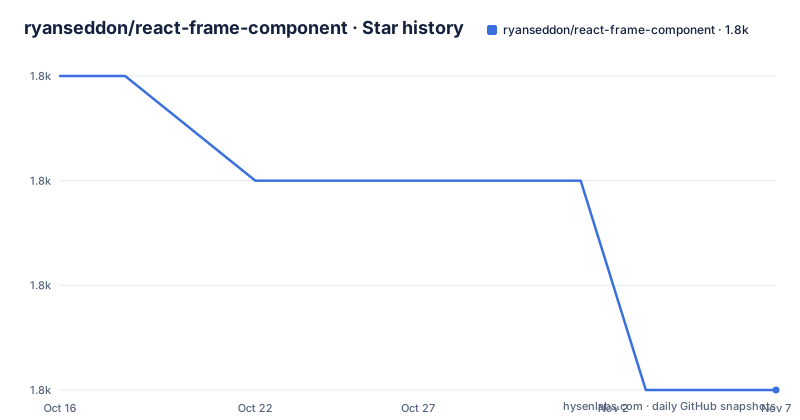
- ryanseddon/react-frame-component1,815 ★ · -3
| Repository | 2026-10-16 | 2026-11-07 |
|---|---|---|
| ryanseddon/react-frame-component | 1.8k | 1.8k |
-3 Stars in the last 22 days, measured from the daily GitHub snapshot. Compare with other projects
Editorial analysis
The component renders into the frame's document, not yours
The component allows you to encapsulate your entire React application or a per component in an iFrame, and the install is a single package:
npm install --save react-frame-componentThe usage is a wrapper component:
import Frame from 'react-frame-component';

const Header = ({ children }) => (
  <Frame>
    <h1>{children}</h1>
  </Frame>
);
What the component does underneath is what gives it its behaviour. The README explains, in the section on the lifecycle callbacks, that internally the component calls ReactDOM.render, which starts a new set of lifecycle calls, and that the frame's contents are mounted into a document that belongs to the iframe rather than to your page. That is the whole mechanism. Because the React tree lives in the frame's document, the CSS cascade of your application does not reach it and its styles do not leak into yours, and window and document inside the tree are the frame's own. For a widget that vendors bring with their own stylesheet, or for a piece of UI you do not want to be able to reach your window, that isolation is the point of the library rather than a side effect. The project also publishes a demo and a blog post about building the component, which is the honest place to start if you want the reasoning behind the design.
initialContent and mountTarget decide where React lands
Two props carry most of the configuration. initialContent is the initial html injected into the frame, and it defaults to a minimal document, a doctype, an empty head, a body and a single div. The documentation is precise about two constraints. The content is only injected once, and it does not update if you change the prop afterwards. And at least one div is required in the body of the html, because that div is what the React DOM is rendered into. mountTarget then says where in that content the children are mounted, and it is a CSS selector such as #target or .target, which means you choose the element by selector rather than by prop. The example shows the pattern with the target element baked into the initial markup:
<Frame
  initialContent='<!DOCTYPE html><html><head></head><body><h1>i wont be changed</h1><div id="mountHere"></div></body></html>'
  mountTarget='#mountHere'
  >
</Frame>
The one-time injection is a real constraint. A component whose initial content changes over time, for example because it needs a different stylesheet depending on a prop, has to re-render into the frame rather than rely on initialContent changing.
The head prop lands in the body, and that is deliberate
The head prop is a DOM node that gets inserted before the children of the frame, and the documentation makes a point that is easy to misread: this is injected into the body of the frame, with a link to the blog post for why. The reason it is not a real head element is that the component writes the frame's content rather than parsing a document into it, so a node that React creates has to be inserted somewhere React controls. The stated benefit of doing it this way is that it can be updated and it works for stylesheets, which is the common case, since what people usually want to add to a frame is a link tag. A related detail is that the initialContent prop is where you can put a head tag or script tags if you need them, with the documentation noting that it allows you to insert any html into the frame. So there are two mechanisms, one that is declarative and updatable for the common case, and one that is a one-shot string for the awkward cases.
The srcdoc problem, and the escape hatch the author discourages
The most interesting prop in the library is the one it tells you to avoid. By default the frame's initial content, as defined by initialContent, is populated through the frame's srcdoc attribute. The documentation explains that this can cause issues with some libraries such as Recaptcha and Google Maps, because they depend on the frame's location or origin. In those cases the dangerouslyUseDocWrite flag makes the component use document.write() to populate the initial content instead. The description of the consequences is unusually blunt, calling this unperformant and unrecommended, while noting that it allows these libraries to be used inside a Frame instance. That combination is the right way to treat it, because the flag's name says what it does and the documentation says what it costs. The default is the good path, since srcdoc is fast and does not require re-parsing the document, and the fallback exists for the specific case of a vendor library that will not run in a srcdoc frame because it needs the parent's origin.
Lifecycle callbacks and the two ways into the frame
Because the component calls ReactDOM.render internally, the parent's componentDidMount and componentDidUpdate do not reliably describe the state of the frame's contents, since that new set of lifecycle calls is sometimes triggered after the parent's own lifecycle. The component therefore exposes contentDidMount and contentDidUpdate as conceptually equivalent callbacks, and the README explains that they are needed for exactly that reason. There are also two documented ways to reach the iframe's window and document, which matters when you need to focus an element, trigger an imperative animation or integrate with a third party DOM library. The first is the FrameContextConsumer, whose callback is invoked with the iframe's window and document instances, and the second is the useFrame hook, which returns the same two objects from the Frame context:
import Frame, { useFrame } from 'react-frame-component';

const InnerComponent = () => {
  const { document, window } = useFrame();
  return null;
};
A third route is the ref prop, which gives access to the inner iframe DOM node and can be created with React.createRef() or React.useRef(), and the documented example uses it to focus the frame from a useEffect, alongside triggering imperative animations and integrating with third party DOM libraries. Between the three, the hook is the convenient one for reading the frame's document, and the ref is the one for focus management.
The build: Vite, Vitest, Playwright and changesets
The repository is a modern JavaScript package and its configuration says how the project is run. The manifest is version 5.3.2 with the type set to module, a UMD build as main, an ES module build as module, hand-written types in index.d.ts, and an exports map routing types, import and require to the right files. The scripts show the workflow: a clean step that removes dist with rimraf, a build with vite build, a separate build for the example project using its own vite.example.config.js, a serve step that runs vite against the example directory, and a lint over src and test with eslint. The tests run under vitest, with a watch mode, and the development dependencies include @playwright/test alongside @testing-library/dom, which is the combination you would expect for a component whose whole job is to put a DOM in a different document. Releases go through changesets, with a release script that runs changeset version and then the build, and a publish:changesets script. The tree also carries an .nvmrc, a .prettierrc, babel.config.json, an example/ directory with app.jsx and index.html, and a test/ directory. The tagged releases are v5.3.2 from 2026-03-29, v5.3.0 from 2026-03-22 and v5.2.7 from 2024-05-30, and the last push to the repository was on 2026-06-30.
Where react-frame-component is the wrong tool
Four limits are clear from the documentation itself. The first is the origin problem, which the author states plainly in the dangerouslyUseDocWrite section: a library that depends on the frame's location or origin will not work under the default srcdoc approach, and the fallback is explicitly unperformant. If your embedded content is a recaptcha, a Google Map or anything else that reads the parent window, this component makes your life harder rather than easier. The second is that the content is injected once. initialContent does not update, so a frame whose markup must change with the application state needs a different approach. The third is the React generation. The documented examples call ReactDOM.render, which is the pre-18 API, and while the project is at version 5.3.2 with recent releases, the documentation has not been rewritten around the modern createRoot entry point, so a team on a current React should expect to check that boundary first. The fourth is that this is isolation, not a security boundary. A frame's contents are still same-origin in the cases the component supports, and an iframe is a layout tool, not a sandbox you should trust with hostile code.
Editorial conclusion
Adopt react-frame-component if you need to isolate a third party React tree, an embedded widget or an untrusted view from your application's styles and window. Do not adopt it for iframe content that depends on the parent origin, because the default srcdoc approach changes the frame's origin and the documented fallback is explicitly unperformant. Before you ship, read the dangerouslyUseDocWrite section and decide deliberately whether your embedded library needs the parent origin, and check the version you install, since the current release is v5.3.2 from 2026-03-29 and the last push was on 2026-06-30.
Frequently asked questions
What does react-frame-component do?
It is a React component that encapsulates your entire React application, or a single component, inside an iframe, rendering the React DOM into the frame's own document so styles and window references stay separate. The package is MIT licensed and published on npm as react-frame-component.
How do I install and use react-frame-component?
Run `npm install --save react-frame-component`, import the default export with `import Frame from 'react-frame-component';` and wrap the component you want isolated in `<Frame>`. The current release is v5.3.2 from 2026-03-29.
What do initialContent and mountTarget do?
initialContent is the html injected into the frame, defaulting to a minimal document with one div in the body, and it is only injected once and does not update when the prop changes. mountTarget is a CSS selector such as #mountHere that says where inside that content the React children are mounted, and at least one div must exist in the body for the React DOM to render into.
When should I set dangerouslyUseDocWrite?
Only when the embedded content depends on the frame's location or origin, because the default approach populates the frame through its srcdoc attribute, which breaks libraries such as Recaptcha and Google Maps. The documentation describes the document.write fallback as unperformant and unrecommended while noting it makes those libraries usable.
How do I get the iframe's window and document?
Use the FrameContextConsumer, whose callback is invoked with the iframe's window and document instances, or the useFrame hook, which returns the same two objects from the Frame context. A ref gives access to the inner iframe DOM node for focus management and imperative animations.
Official sources
Add this badge to your README
If you maintain this project, the badge below links readers to this analysis and shows its maintenance status from the daily GitHub snapshot. Paste the markdown into your README; add ?metric=license or ?metric=stars to the image URL for a different field.

[](https://hysenlabs.com/projects/ryanseddon-react-frame-component)Star history chart for your README
[](https://hysenlabs.com/projects/ryanseddon-react-frame-component)Was this useful?