react-number-format: two components, and a README that still names karma
React component to format numbers in an input or as a text.
At a glance
- What is it?
- A React input formatter built around a caret engine, with a numeric component and a pattern component behind one package. The manifest runs its tests on a different runner than the README names, and the build script publishes the documentation as its last step.
- Who is it for?
- Take react-number-format if you need a numeric input that users cannot type nonsense into, and you want the formatted value and the raw value both available. Check three things before you build on it.
- Can I use it commercially?
- Yes. MIT is a permissive licence: you can use, modify and sell software built on it, as long as you keep its copyright and licence notices.
- Is it still maintained?
- Activity is slowing. The repository last received commits 8 months ago.
- What is it written in?
- Mainly JavaScript, according to GitHub's language statistics.
Answers come from the project's GitHub data, last synced on November 22, 2026, and from our analysis. They are not legal advice.
Star history
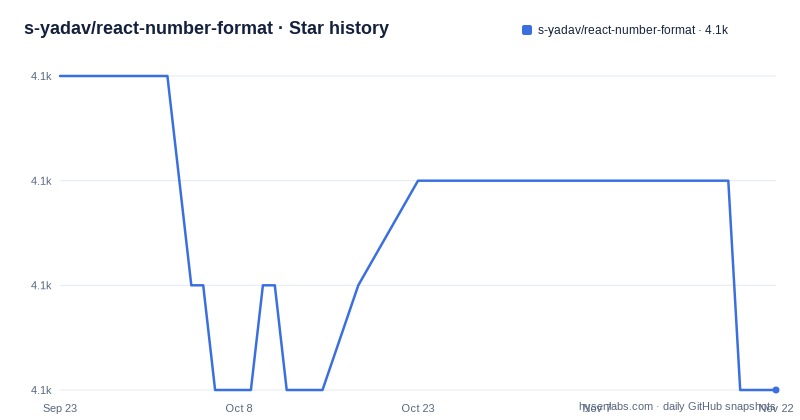
- s-yadav/react-number-format4,097 ★ · -3
| Repository | 2026-09-23 | 2026-11-22 |
|---|---|---|
| s-yadav/react-number-format | 4.1k | 4.1k |
-3 Stars in the last 60 days, measured from the daily GitHub snapshot. Compare with other projects
Editorial analysis
Two components share one caret engine
The package exports two components and the choice between them is the main design decision. The numeric one handles numbers with the things you would expect: a prefix, a suffix, a thousands separator, and input masking so a user can only type text matching the configured numeric pattern. The pattern one handles the case where the value is not a number at all, such as a formatted identifier, and takes its shape from a pattern you supply. Both sit on the same caret engine, which is the part the project describes as sophisticated and light weight, and that engine is what makes masking usable rather than merely restrictive: the caret has to land in the right place when a separator is inserted as you type, and a component that simply rejected bad characters would leave the user fighting the field. Installation is one line from either of the two package managers:
npm install react-number-formatThe third documented capability is formatting outside an input, rendering a number as plain formatted text, which is what makes the library useful for a display table as well as for a field. Beyond that the page promises custom pattern formatting, a custom formatting handler, and full customisation.
The README names karma and jasmine; the manifest runs vitest
The development section of the page has drifted from the manifest, and the discrepancy is easy to miss unless you compare them. The readme says test cases are written in jasmine and run by karma, and points at a specific test file pattern. The manifest's test script runs a different runner entirely, followed by a type check with the compiler in no-emit mode, and there is a separate coverage script running that same runner with coverage enabled. The karma configuration file is still in the repository root, so the old runner was not removed, it was simply stopped being what runs the suite. The same drift shows in the bundler: the readme says the start command runs an example server on a particular local port, while the manifest's start script is a development server with hot reload, and the tree contains both a Vite configuration and a webpack configuration. The practical advice is simple: read the manifest for how the project is actually built and tested, and read the readme for what the components do.
The build command publishes the documentation before it finishes
The build script is a chain of eight steps and the last three are the ones worth noticing. It builds the distribution bundle in production mode, then generates the type declarations with the compiler in build mode, then runs the built-output tests and the type check, then formats the source, and then builds the documentation site and publishes it. So `build` is not a local artefact command; it ends by pushing documentation somewhere. There is a separate documentation development server on its own port, and the documentation source is versioned in its own directory, with a sibling directory holding the previous major version's documentation. A small publish script is what performs the upload step. Two consequences follow. First, a contributor who only wants to check the bundle cannot run the whole build without publishing consequences. Second, the fact that the old major's docs are kept in the repository rather than replaced means you can read what changed between versions, which is a much better migration story than a changelog alone.
Two module formats, one package, and a tree-shakeable flag
The packaging is conventional and worth stating precisely because a component library is consumed differently from an application. The package marks itself side-effect free, which is the flag that tells a bundler it may drop unused imports, and that is only safe because the components do not run anything at module scope. Two entry points are declared, a CommonJS file and an ES module file, plus a types entry, and the published file list contains exactly those two directories, the distribution build and the type declarations. So the source, the example application, and the tests do not ship, which is why the example in the repository cannot be required from a consuming project. Keywords mention masking and currency, which tells you the two common use cases, and the bugs field carries a direct mail address alongside the issue tracker, which is an older convention that some projects have moved away from and this one has not.
Flow types, Babel stripping, and TypeScript declarations all coexist
The repository carries evidence of at least three typing and build eras at once, which is normal for a library that has existed across several major versions and tells you something about how the types have been produced. There is a Flow configuration file and a directory of Flow type stubs, and the Babel configuration includes the plugin that strips Flow type annotations, which means the source can carry Flow syntax and still be consumed by a JavaScript build. At the same time there are two TypeScript configuration files, one for the build and one for the editor, and a build step that emits declarations. So the source is typed one way and the shipped declarations are generated another way, and the build script runs a no-emit type check as part of the normal test command, which is what keeps the two from drifting. There is also a style configuration and an editor configuration, and the dependency list still carries Babel packages at versions old enough that they exist mainly for the legacy path.
A published version that is a bug fix, and a branch that has since moved
The release history is one bug-fix line followed by a support addition and a feature addition, which is the shape of a mature component library that fixes rather than reinvents. The newest tag is a patch described only as bug fixes, published on the same day the branch last moved. The one before it came in the previous year, and the one before that announced support for a new major version of the host framework. That last one is the pattern to watch: a component library's release cadence is governed by when its peer framework moves, so gaps in the tag history usually mean the host framework moved and the library was waiting for it. The repository is not archived and the branch was last pushed on 2026-03-22, which is the concrete date to weigh if you are deciding whether to depend on it, since a bug-fix release with no feature work in it is what maintenance looks like when it is healthy rather than abandoned.
Editorial conclusion
Take react-number-format if you need a numeric input that users cannot type nonsense into, and you want the formatted value and the raw value both available. Check three things before you build on it. The branch last moved on 2026-03-22, and the release at that point was a bug fix, so read the current release notes rather than assuming recent activity. The documentation section of the readme describes an older toolchain than the manifest actually uses, so trust the manifest for how the project is built and tested. And there is a migration guide from the previous major version on the documentation site, which is the first thing to read if you are upgrading rather than starting fresh.
Frequently asked questions
install react number format
Install it from npm with `npm install react-number-format`, or with `yarn add react-number-format`. The package ships a CommonJS entry, an ES module entry, and type declarations, and it is marked side-effect free so a bundler can drop unused imports.
What is react-number-format used for?
It formats numbers in a React input or as plain text, using a caret engine so a user can only type text matching the configured numeric or string pattern. It supports prefixes, suffixes, thousands separators, input masking, custom patterns, and a custom formatting handler.
What is the difference between NumericFormat and PatternFormat?
The numeric component handles numbers with prefixes, suffixes, separators and masking, while the pattern component handles values that are not numbers at all and takes its shape from a pattern you supply. Both share the same caret engine, and each has its own props page on the documentation site.
How do I migrate from react-number-format v4 to v5?
There is a migration page on the documentation site, and the previous major version's documentation is kept in the repository rather than replaced, so you can compare the two directly instead of reading a changelog alone.
Official sources
Add this badge to your README
If you maintain this project, the badge below links readers to this analysis and shows its maintenance status from the daily GitHub snapshot. Paste the markdown into your README; add ?metric=license or ?metric=stars to the image URL for a different field.

[](https://hysenlabs.com/projects/s-yadav-react-number-format)Star history chart for your README
[](https://hysenlabs.com/projects/s-yadav-react-number-format)Was this useful?