refactoring-ui-skill, the folder-name-sensitive Claude skill built from one book's decisions
A Claude Code skill that applies the concrete design rules from the book Refactoring UI (Wathan & Schoger) — constrained spacing/type/color/shadow scales, hierarchy through weight and color, and depth through emulated light — to building and fixing interfaces.
At a glance
- What is it?
- This Claude Code skill turns the design rules from Refactoring UI into a SKILL.md, three reference files, and a token stylesheet. Here is what each file is for and what the install actually requires.
- Who is it for?
- This skill earns a place on a team that has read the book, agreed with it, and kept arguing about spacing in review. It is a poor substitute for reading it: the repository ships the decisions and not the reasoning that produced them, and the MIT grant covers original notes and derived CSS rather than the source material.
- Can I use it commercially?
- Check first. The repository uses a licence we do not classify automatically, so read its LICENSE file before any commercial use.
- Is it still maintained?
- Yes. The repository last received commits 81 days ago.
- What is it written in?
- Mainly CSS, according to GitHub's language statistics.
Answers come from the project's GitHub data, last synced on November 15, 2026, and from our analysis. They are not legal advice.
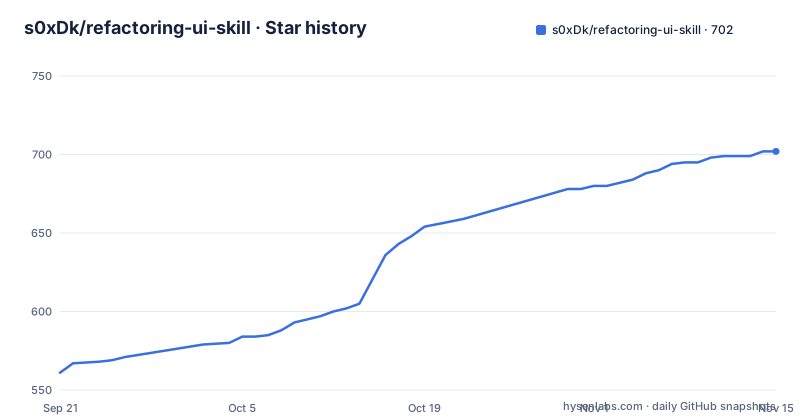
Star history
- s0xDk/refactoring-ui-skill702 ★ · +141
| Repository | 2026-09-21 | 2026-11-15 |
|---|---|---|
| s0xDk/refactoring-ui-skill | 561 | 702 |
141 Stars in the last 55 days, measured from the daily GitHub snapshot. Compare with other projects
Editorial analysis
The folder name has to be `refactoring-ui` or nothing loads
Claude Code discovers a skill by finding a folder that contains a `SKILL.md`, and this repository is laid out so that the clone target is the skill. That is why both install commands end in a directory named `refactoring-ui` rather than the repository name:
git clone https://github.com/<you>/refactoring-ui-skill.git ~/.claude/skills/refactoring-uigit clone https://github.com/<you>/refactoring-ui-skill.git .claude/skills/refactoring-uiThe first is the personal scope, available in every project you open. The second is checked into one repository and shared with your team. The folder name has to match the name the skill declares, which is called out as the reason the instruction is worded that way rather than left to inference. A new session or a restart is needed afterwards, because the skill list is read at startup.
A submodule is the only route that tracks upstream updates
A plain clone into `~/.claude/skills/` is the simplest thing that works and the easiest thing to leave behind. The repository offers one alternative and names the reason: add it as a git submodule at that path if you want to track updates. That distinction decides who does the work later. With a submodule the upstream history is a reference your own repository records, so a fetch and a fast-forward is the whole update procedure. With a copy, updating means remembering that a skill you installed months ago has newer rules in it, and there is no mechanism in the repository that tells you so. There are no GitHub releases to watch either, and the branch was last pushed on 2026-08-26.
`tokens.css` is a starting point, not a generator
The asset directory holds one file, `tokens.css`, described as a complete, contrast-verified starter token set. That word starter is the part to hold onto. The file is a set of decisions you can adopt wholesale, and the verification claim means the pairs were checked rather than eyeballed, which removes the most tedious failure mode when you start a palette from nothing. It does not mean the file will produce a coherent interface on its own, because a token set encodes available values rather than the relationships between them. The skill's own file is where those relationships live: `SKILL.md` is described as holding the systems, the procedure, the hierarchy rules, and the hard rules, in that order.
Three reference files split the work by task
The division is by what you are trying to do, which is a better arrangement than a single long document. `references/systems.md` covers building a color palette from scratch, working in HSL with saturation and hue rotation, so it is the file for a new palette rather than a tweak. `references/diagnose.md` is a symptom-to-fix table, and it is aimed at improving UI that already exists. `references/techniques.md` covers depth and light simulation, typefaces, grids, and images, which are the cross-cutting techniques that do not belong to either a palette or a complaint. If you are mid-review on an existing screen, `diagnose.md` is the one to load first.
Hierarchy is a weight and color decision, not a size decision
The headline rule the skill enforces is that spacing, type sizes, weights, colors, shadows, and radii get picked from fixed scales instead of ad hoc values. The second is more interesting: hierarchy is built through weight and color rather than by piling on font size. That single rule removes the most common source of the kind of UI people describe as cheap, where every level of importance is signalled by making the text bigger, so the largest thing on the screen is whatever somebody once needed to emphasise. A fixed scale makes the size ladder a closed set, and weight and color become the variables that actually express importance.
Activation keys off your vocabulary, not a menu
The skill is designed to switch itself on. It activates when Claude is building or styling UI, when it is picking font sizes, spacing, colors, or shadows, when it is designing a palette or design tokens, and when you describe a UI as looking off, looking amateur, or feeling cluttered, plain, or unfinished. Those last triggers are the interesting design choice, because they are words a person says rather than words a tool parses. Explicit invocation is available when you want it anyway:
/refactoring-ui make this dashboard look less amateurThe intended behaviour is a translation step: a vague complaint becomes a list of specific mechanical fixes drawn from the scales and the techniques files.
MIT covers the notes, not the thinking behind them
The licensing is split in a way worth reading carefully. The repository's own contents are MIT, with a `LICENSE` file at the root, and the credit section is explicit that the text and images of the book are not included. What ships is original notes and CSS derived from the book's concepts, and the licence does not extend to the book itself. There is also a claim about provenance rather than permission: every rule and CSS value is said to have been cross-checked page by page against the book, with the framing that this is the book's decisions made once rather than a summary. That is a high standard to verify from outside, and nothing in the repository lets a reader audit it.
Editorial conclusion
This skill earns a place on a team that has read the book, agreed with it, and kept arguing about spacing in review. It is a poor substitute for reading it: the repository ships the decisions and not the reasoning that produced them, and the MIT grant covers original notes and derived CSS rather than the source material. Before installing, rename the cloned folder to `refactoring-ui`, decide whether you want a personal copy or a committed one, and if you want updates, add it as a submodule rather than a plain clone.
Frequently asked questions
How do I install the Refactoring UI Claude Code skill?
Clone the repository into a skills directory so the folder is named refactoring-ui, either ~/.claude/skills/refactoring-ui for a personal copy or .claude/skills/refactoring-ui inside one project to share it with your team. Add it as a git submodule at that path if you want to track updates, then restart Claude Code or open a new session.
Does the refactoring-ui skill include the Refactoring UI book?
No. The repository ships original notes and CSS derived from the book's concepts, and it says so in the credits section. The licence is MIT for the repository contents only and does not extend to the book itself, which is sold separately.
When does the Refactoring UI skill activate on its own?
When Claude is building or styling UI, choosing font sizes, spacing, colors, or shadows, designing a palette or design tokens, or when you describe the UI as looking off or amateur or feeling cluttered, plain, or unfinished. You can also invoke it explicitly with a slash command.
What files make up the refactoring-ui skill?
A SKILL.md holding the systems, procedure, hierarchy, and hard rules, three reference files for building a palette from scratch, a symptom-to-fix table for existing UI, and techniques covering depth, typefaces, grids, and images, plus an assets folder containing a contrast-verified starter tokens.css.
Official sources
Add this badge to your README
If you maintain this project, the badge below links readers to this analysis and shows its maintenance status from the daily GitHub snapshot. Paste the markdown into your README; add ?metric=license or ?metric=stars to the image URL for a different field.

[](https://hysenlabs.com/projects/s0xdk-refactoring-ui-skill)Star history chart for your README
[](https://hysenlabs.com/projects/s0xdk-refactoring-ui-skill)Was this useful?