Sabaki is an Electron Go board editor whose release list has a four year hole in it
An elegant Go board and SGF editor for a more civilized age.
At a glance
- What is it?
- Sabaki reads and writes SGF, opens wBaduk and Tygem files, and runs GTP analysis engines, all built on libraries the same author extracted into separate repositories. The packaging tells the more interesting story: the Electron fuses are locked down in the safe direction, the Flatpak artifact is labelled beta while the AppImage is not, and the release list jumps from 2022 straight to July 2026.
- Who is it for?
- Sabaki is a good pick if your games live in SGF and you want an editor that also opens what other Go software writes, since NGF and GIB import is the feature that saves collections stranded in a proprietary tool. Three things to weigh.
- Can I use it commercially?
- Yes. MIT is a permissive licence: you can use, modify and sell software built on it, as long as you keep its copyright and licence notices.
- Is it still maintained?
- Yes. The repository last received commits 15 days ago.
- What is it written in?
- Mainly JavaScript, according to GitHub's language statistics.
Answers come from the project's GitHub data, last synced on November 15, 2026, and from our analysis. They are not legal advice.
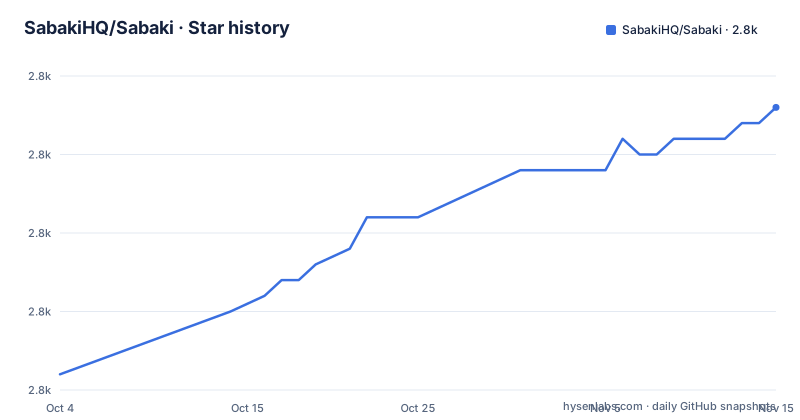
Star history
- SabakiHQ/Sabaki2,798 ★ · +17
| Repository | 2026-10-04 | 2026-11-15 |
|---|---|---|
| SabakiHQ/Sabaki | 2.8k | 2.8k |
17 Stars in the last 42 days, measured from the daily GitHub snapshot. Compare with other projects
Editorial analysis
The release list jumps from 2022 to July 2026, and master is ahead of both
The three most recent releases tell an odd story. The newest is v0.60.2 from 9 July 2026, one week after v0.60.0 on 3 July 2026, and before those the list goes straight back to v0.52.2 on 4 September 2022. So either the project spent most of four years without cutting a tag, or the intermediate line was distributed some other way; the release list does not say which. The manifest version is 0.60.2, which matches the newest tag rather than anything newer, and the last commit on the default branch is dated 13 September 2026, two months after that tag. The default branch is also called master, not main. What that combination means for a user is simple: a download from the release page is two months behind the branch, and neither of those dates is recent enough to assume the file you install is the code you read.
Every Electron fuse that would let a packaged app be repurposed is switched off
The build configuration in the manifest is where this project states its security position, and it is unusually explicit. Five fuses are set: runAsNode is false, so the packaged binary refuses to act as a plain Node runtime; the Node options environment variable is disabled, so NODE_OPTIONS cannot be injected through the environment; CLI inspect arguments are disabled, so the packaged app cannot be turned into a debugging target from its own command line; onlyLoadAppFromAsar is true, which stops the app from loading code from loose files next to the bundle; and embedded asar integrity validation is on. On macOS the dmg target is notarized as well. None of this is visible in the README, and all of it changes what someone who has the installed application can do with it. For an application that opens files you downloaded from other people's Go servers, that is a reasonable set of defaults to insist on.
The Flatpak artifact is the one labelled beta, and it asks for the home directory
Packaging is per platform and the artifact names are templated on the version, which is where the odd one out shows up. Linux produces an AppImage named with the version, architecture and extension, categorised as Game. macOS produces a single dmg target, notarized, categorised under public.app-category.board-games. Windows produces an .exe through NSIS with oneClick and perMachine both false, so the installer is neither a one step install nor a machine wide one. The Flatpak build is the exception: its artifact name inserts a beta marker that none of the others carry, and its runtime and base versions are pinned to 23.08. Its finish arguments are also worth reading closely, because they request both the X11 and Wayland sockets, the dri device, PulseAudio, network sharing, access to the home directory, and a named pipe on org.freedesktop.Flatpak. Home directory access for a board game is broad, and the socket permission is how a sandboxed app reaches other desktop applications.
SGF parsing, game trees and GTP handling were extracted into their own repositories
The Related section is really an architecture description. Sabaki is a consumer of eight sibling projects by the same organisation, and each one owns a piece of the domain. There is an sgf library for parsing and creating SGF files, an immutable-gametree data type, a go-board data type, a Node module named gtp for handling GTP engines, a set of simple heuristics called influence for estimating influence maps on positions, deadstones for Monte Carlo dead stone determination, boardmatcher for finding patterns and shapes in board arrangements and naming moves, and Shudan, a highly customisable low level Preact Goban component. So when a parsing bug shows up in the editor, the fix may belong in one of those packages rather than here, and each of them can be used without the application at all.
It reads other people's formats, and writes SGF with Markdown comments
The format story is asymmetric in a useful way. Reading and saving covers SGF games and collections, and on top of that the editor opens wBaduk NGF files and Tygem GIB files, which is what rescues a collection trapped in one of those clients. Everything written goes out as SGF. Comments are not raw text: they are rendered with a subset of Markdown, and the editor can annotate board positions and moves as well. The editing surface is built around markup rather than freehand drawing, with lines and arrows as first class objects, copy and paste of variations, undo and redo, and a search that can find a move by position or by comment text. There is a fast game tree, a score estimator alongside a scoring tool, fuzzy stone placement, guess mode for playing both sides, and autoplay for reviewing a game. The cost of all this is a document format designed in the last century, which is why the Markdown subset is a subset.
Engine analysis is scoped to supported engines, not to the protocol
GTP engines are supported, and the documentation separates that into two things: talking to an engine, and analysing a board with it. Board analysis is only available for supported engines, which is a narrower promise than the protocol itself, and the two live in separate guides, one for engines and one for the analysis integration. That distinction matters in practice, because GTP is a text protocol with widely varying capabilities: an engine that answers a play request does not necessarily answer an analysis request in a form a GUI can draw. A separate feature, guess mode, has nothing to do with engines and plays both colours of a position, which is the usual way to check what an engine thinks of an unfinished game. Autoplay is the third piece here, and it is a review tool rather than an analysis one.
No install command on the page, three images at the root, two test directories
The README contains no installation command at all. It links to a documentation index and to a Building and Tests guide, both inside the repository, so the build instructions are deliberately not duplicated on the front page. What the top level does contain is telling: banner.png, logo.png and screenshot.png sit at the repository root next to the source, there are both an e2e directory and a test directory alongside a Playwright configuration, a webpack configuration sits next to an index.html, and a .nvmrc pins the Node version the build expects. The application entry point in the manifest is src/main.js, which is the Electron main process rather than a renderer. Two smaller details: the manifest homepage uses an http URL while the project site is served over https, and a .git-blame-ignore-revs file is present, which is how the project keeps formatting and reformatting commits out of blame output.
Editorial conclusion
Sabaki is a good pick if your games live in SGF and you want an editor that also opens what other Go software writes, since NGF and GIB import is the feature that saves collections stranded in a proprietary tool. Three things to weigh. Check the version you are getting rather than assuming the newest tag is current, because the release list skips from 2022 to mid 2026 and the default branch has moved on since the last tag. Expect engine analysis to work only for engines the project has integrated, since board analysis is scoped to a supported list rather than to the GTP protocol at large. And if you are on Linux, note that the Flatpak build is the artifact carrying a beta marker while the AppImage is not, so pick deliberately rather than by habit.
Frequently asked questions
Which file formats does the Sabaki editor open and save?
SGF games and collections are read and saved, and it also opens wBaduk NGF and Tygem GIB files. Comments are displayed as a subset of Markdown, and the editor can annotate board positions and moves. Output is SGF.
What is the current version of Sabaki?
The manifest says 0.60.2 and the newest release tag is v0.60.2 from 9 July 2026, one week after v0.60.0. Before those the list jumps back to v0.52.2 from September 2022, and the last commit on the master branch is dated 13 September 2026.
Can Sabaki run Go analysis engines?
GTP engines are supported, but board analysis is only available for supported engines, which is narrower than the protocol itself. Engines and the analysis integration are documented in separate guides, and guess mode for playing both colours is a separate feature again.
How is the Sabaki desktop application packaged?
Through Electron with per platform targets: an AppImage for Linux, a Flatpak whose artifact name carries a beta marker and whose finish arguments include the home directory and the freedesktop named pipe, a notarized dmg for macOS, and a Windows executable through NSIS with one click and per machine installation both disabled.
How do I install Sabaki?
The README carries no install command. It points to the documentation index and to the Building and Tests guide inside the repository, so the installation and build steps live in the documentation rather than on the front page.
What license is Sabaki released under?
MIT. The manifest declares MIT and the repository root carries a license file named LICENSE.md, which is an unusual extension for that license but is what the tree contains.
Official sources
Add this badge to your README
If you maintain this project, the badge below links readers to this analysis and shows its maintenance status from the daily GitHub snapshot. Paste the markdown into your README; add ?metric=license or ?metric=stars to the image URL for a different field.

[](https://hysenlabs.com/projects/sabakihq-sabaki)Star history chart for your README
[](https://hysenlabs.com/projects/sabakihq-sabaki)Was this useful?