HeadlessX runs a browser fleet you have to operate
The undetected self-hosted browser automation platform. Powered by Camoufox (Firefox) for 0% detection rates. Built for speed, privacy, and scalability.
At a glance
- What is it?
- HeadlessX is a self-hosted scraping platform made of a dashboard, a protected API, a Redis-backed queue, a Python YouTube engine, a Go markdown service and a remote MCP endpoint. The README is direct about the cost of that: six services, six ports, and a v2.5 plan that drops Camoufox for a different browser engine.
- Who is it for?
- HeadlessX suits operators who already run Postgres, Redis and a Python toolchain and want their own browser fleet, Google session and MCP endpoint on hardware they control. It does not suit anyone after a hosted extraction API or a single command install, because the v2.5 plan rules out a developer mode and nothing documents rollback.
- Can I use it commercially?
- Check first. The repository uses a licence we do not classify automatically, so read its LICENSE file before any commercial use.
- Is it still maintained?
- Yes. The repository last received commits 11 days ago.
- What is it written in?
- Mainly TypeScript, according to GitHub's language statistics.
Answers come from the project's GitHub data, last synced on October 22, 2026, and from our analysis. They are not legal advice.
Star history
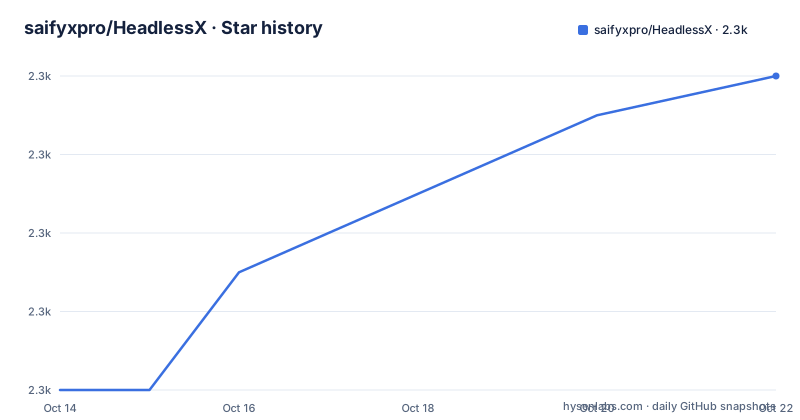
- saifyxpro/HeadlessX2,340 ★ · +8
| Repository | 2026-10-14 | 2026-10-22 |
|---|---|---|
| saifyxpro/HeadlessX | 2.3k | 2.3k |
8 Stars in the last 8 days, measured from the daily GitHub snapshot. Compare with other projects
Editorial analysis
HeadlessX runs a whole stack, not one binary
HeadlessX is not a library you import. It is a set of services you keep running yourself: a web dashboard, a protected API, queue-backed workflows and a remote MCP endpoint served over `/mcp`. On top of that sit the operator surfaces, and the list is concrete. A website operator handles scrape, crawl, map, content extraction and screenshots. Then come Google AI Search, Tavily, Exa and YouTube. The dashboard itself carries queue jobs, logs, API keys, proxy management and config management.
The `.env.example` shows how wide that footprint is. Postgres, Redis, the API server, the Next.js dashboard, a Go html-to-markdown service and a Python YouTube engine each get a port, and the defaults were deliberately pushed off the crowded ones to avoid collisions. Postgres ships in Docker only, with no Supabase option, and the repository root carries `pnpm-workspace.yaml`, `nx.json` and `mise.toml` next to `apps/` and `packages/`.
DATABASE_URL="postgresql://headlessx:headlessx@localhost:35432/headlessx"
REDIS_URL=redis://localhost:36379
PORT=38473
WEB_PORT=34872
Those four lines are the first thing an operator has to get right, because the queue, the dashboard and both local engines wait on them.
Google AI Search needs a Build Cookies run first
The Google operator cannot answer a query on a fresh install. It requires a one-time `Build Cookies` run in the dashboard before the first search, and the saved Google session is then kept in the shared persistent browser profile and reused later. Miss that step and the operator looks dead while everything around it still works, which is how a first-run failure arrives.
That design carries a second edge. Because the Google session sits in the same persistent profile that the browser operators use, that one directory holds a signed-in Google account next to crawl state. Credentials are treated as sensitive elsewhere in the stack: `CREDENTIAL_ENCRYPTION_KEY` encrypts stored credentials at rest, and `DASHBOARD_INTERNAL_API_KEY` is how the Next.js dashboard server authenticates against the API. Both are filed under required security and both ship as placeholder strings, so replacing them is a first-run task rather than optional hardening. Anyone with filesystem access to the profile directory can reuse that Google session, and no per-operator profile option is documented anywhere.
Node 22 in the badge, Node 18 in engines
Two runtime claims in the same repository do not agree. The badge in the README header advertises Node.js 22+, and the next badge advertises Next.js 16. The `package.json` at the repository root asks for less: `engines` allows node `>=18.0.0` and pnpm `>=9.0.0`. Which one governs is left open, so a Node 18 operator who trusted the badge learns the answer at install time rather than from the docs.
The install path is opinionated in a different way. A `preinstall` hook runs `npx only-allow pnpm`, so npm and yarn installs are refused before dependencies resolve. The workspace is Nx driven: `dev` calls `pnpm exec nx run headlessx-pro:dev`, `build` calls `nx run-many -t build`, and the database targets `db:push`, `db:migrate`, `db:studio` and `db:deploy` all point at a `headlessx-api` project. Quality tooling is committed rather than left to the operator: `biome.json` behind the `lint` and `format` scripts, `knip.json` for unused code, and `.semgrepignore` plus an `audit-results.json` sitting in the top-level tree.
"engines": {
    "node": ">=18.0.0",
    "pnpm": ">=9.0.0"
},
The YouTube workspace needs Python, uv and Go
YouTube is the operator that does not run in Node. The workspace is active only when `YT_ENGINE_URL` points at a healthy `yt-engine` service, and that service is a Python ASGI app started through uv. HTML to markdown conversion is a second foreign process, a Go binary started with `go run .`.
"yt-engine:dev": "cd apps/yt-engine && uv run python -m uvicorn app.main:app --reload --host 0.0.0.0 --port ${YT_ENGINE_PORT:-38090}",
"markdown:start": "cd apps/go-html-to-md-service && PORT=${HTML_TO_MARKDOWN_PORT:-38081} go run .",
Timeouts are configured rather than negotiated. `YT_ENGINE_TIMEOUT_MS` is 45000, `YT_ENGINE_JOB_TTL_HOURS` is 12, work lands in `./tmp/yt-engine`, and `HTML_TO_MARKDOWN_TIMEOUT_MS` is 60000. A model download step is wired as `models:download`, which runs `python3 scripts/download_models.py`. Count the toolchains and a complete install needs Node with pnpm, Python driven by uv, Go, Postgres and Redis. The runtime badge covers only the first of those five, which is the gap that turns a two minute setup into an evening.
A first run: keys first, then the CLI verbs
v2.1.2 added a published bootstrap flow, and it is short. The verbs are `headlessx init`, then `start`, `logs`, `stop`, `restart`, `status` and `doctor`. Init walks through guided setup and login prompts; the rest are lifecycle and diagnostic commands. None of them writes your environment file, so the keys come first.
DASHBOARD_INTERNAL_API_KEY=replace-with-a-long-random-string
CREDENTIAL_ENCRYPTION_KEY=replace-with-a-different-long-random-string
Past that, only the operators you actually want need credentials. `TAVILY_API_KEY` and `EXA_API_KEY` are blank in the shipped file and matter only for those two providers, while `YT_ENGINE_URL` has to reach a live `yt-engine` before the YouTube workspace does anything at all. For a public deployment, v2.1.2 also added Docker plus Caddy production domain scaffolding under `infra/domain-setup`, and moved local and Docker host defaults off the `3000` and `8000` stacks that other tools squat on.
Google is the exception that catches people out, because `Build Cookies` has to run in the dashboard before the first query. Do that early, while the stack is still small.
v2.5 drops Camoufox for Hexium and moves the repo
The headline claim, an undetected browser automation platform at 0% detection rates, belongs to the version you can install today. v2.1.2 runs Camoufox, a Firefox build, and v2.5 will not. The plan is to launch Hexium, published as `hexium-browser` and driven through the Playwright `launch()` call up to Chrome 151. The README names the rejected options without hedging: not Camoufox, not CloakBrowser. No measurement method, test set or detection dataset appears anywhere in the README, so that 0% figure cannot be checked from the repository. It is a claim, not a documented result.
The rest of the plan narrows the product. The playground-style dashboard is to be replaced by a proper agent chat that calls operators, and Interact or YAML workflows will not ship in HeadlessX at all; those stay in Helium CLI. Headed operator work, Google cookie setup and later logins, still embeds KasmVNC in the dashboard so keyboard and mouse reach the real browser window.
There is a repository move attached. v2.5 lives under HeadlessXLabs. This repository stays on v2.1 under the current owner until that ships. Platform install becomes one `headlessx-setup` command that picks self-host or VPS, auto-detects the OS, checks Docker, npm and Bun, and on VPS validates DNS before it starts. That install path has no developer mode, which sits awkwardly beside the current `package.json`, where an Nx workspace still exposes development and lint targets.
Where the badge and the classifier disagree
Two signals here contradict each other: the README badge reads AGPL-3.0, while GitHub could not classify the project's terms and records them as Other, pointing at the LICENSE file. The last push was on 2026-09-17, the version in `package.json` is 2.1.2, and the `.env.example` header still reads HeadlessX v2.1.0.
Beyond that, several operational answers are simply missing. There is no documented rollback, so an operator moving from a 2.1.x install toward a later version has no written procedure and no stated data migration path. Hardware sizing for the browser fleet is absent, as is any figure for how many concurrent operators one Postgres instance holds. The `doctor` verb exists, but no failure output is documented for it. Proxy management is a dashboard surface and the sponsor block sells residential pools from BirdProxies, Swiftproxy, NodeMaven, Mango Proxy and Thordata, yet no page ties a particular proxy setting to a particular operator.
One more detail worth knowing: Headfox JS appears exactly once, in the header line about what powers the platform, and never returns in the overview, the operator list or the v2.5 plan. If you are evaluating this for the stealth stack specifically, that name alone tells you very little.
Tavily and Exa keys instead of a local engine
HeadlessX offers two ways to get a result and they cost different things. Tavily and Exa need two API keys and nothing else. The browser operators need Postgres, Redis, a Python environment, a Go toolchain and a persistent profile on the machine, all kept alive between runs.
The comparison this README does not make is with the projects it credits as inspiration. Firecrawl, Steel Browser, obscura, agent-browser, pdf-inspector and zquestz/s appear only as badge links inside an Inspired by block, with no sentence about how any of them differ in approach. Picking between them means reading each project's own documentation; nothing here narrows that choice.
Inside HeadlessX the split is engine ownership, and it is easy to miss because both paths sit behind the same operator list. Running the YouTube operator means shipping a Python service and waiting on it: `YT_ENGINE_TIMEOUT_MS` is 45000 and `YT_ENGINE_JOB_TTL_HOURS` is 12, so a slow job can hold a queue slot for the better part of a day. Handing a query to Tavily means an external request and nothing local to maintain. Pick per operator rather than per platform, since the two costs do not overlap.
Editorial conclusion
HeadlessX suits operators who already run Postgres, Redis and a Python toolchain and want their own browser fleet, Google session and MCP endpoint on hardware they control. It does not suit anyone after a hosted extraction API or a single command install, because the v2.5 plan rules out a developer mode and nothing documents rollback. Verify three things first: whether your Node version satisfies the `engines` field rather than the badge, whether a shared persistent Google profile fits your security model, and whether you can maintain Go and Python services beside it. Start from `headlessx init` on v2.1.2.
Frequently asked questions
What does HeadlessX need running before it will work?
Postgres, Redis, the Node API server, the Next.js dashboard, a Python yt-engine service and a Go html-to-markdown service, each on its own port. Postgres runs in Docker only, and the shipped `.env.example` assigns the ports and the two required security keys.
Why does Google AI Search return nothing on the first run?
It needs a one-time `Build Cookies` run in the dashboard before the first search. The saved Google session then stays in the shared persistent browser profile and is reused later.
Which Node.js version and package manager does HeadlessX require?
The badge says Node.js 22+ and Next.js 16, but the `package.json` engines field allows node `>=18.0.0` and pnpm `>=9.0.0`, with `packageManager` pinned to `[email protected]`. A preinstall hook runs `npx only-allow pnpm`, so npm and yarn installs are refused.
Why is the YouTube workspace missing from the dashboard?
The workspace is active only when `YT_ENGINE_URL` points at a healthy `yt-engine` service. Without that local Python service up and reachable, the operator stays inactive no matter what the dashboard shows.
Is there a developer mode in HeadlessX?
The v2.5 install plan rules out a developer mode and moves platform setup to a single `headlessx-setup` command that auto-detects the OS and checks Docker, npm and Bun. The current repository still ships an Nx workspace with development, lint and database targets in `package.json`.
Official sources
Add this badge to your README
If you maintain this project, the badge below links readers to this analysis and shows its maintenance status from the daily GitHub snapshot. Paste the markdown into your README; add ?metric=license or ?metric=stars to the image URL for a different field.

[](https://hysenlabs.com/projects/saifyxpro-headlessx)Star history chart for your README
[](https://hysenlabs.com/projects/saifyxpro-headlessx)Was this useful?