Tamery inside the conar repo: four database engines, one cloud account, four dev servers
AI-powered tool for working with Postgres, MySQL, MSSQL and Clickhouse.
At a glance
- What is it?
- Tamery, the Electron client published from the conar repository, wraps PostgreSQL, MySQL, MSSQL and Clickhouse behind a cloud account and an AI SQL assistant, and its development stack needs local Postgres, Redis and a portless proxy before anything renders.
- Who is it for?
- Adopt Tamery when your team is willing to hold a cloud account for a desktop database client, and skip it for air-gapped work, because no offline mode is documented anywhere in the project. SQLite and MongoDB are listed as coming soon rather than shipped.
- Can I use it commercially?
- Yes, with strict conditions. AGPL-3.0 is a network copyleft licence: if people use a modified version over a network, for example as a hosted service, you must offer them its source code under the same licence.
- Is it still maintained?
- Yes. The repository received new commits within the last day.
- What is it written in?
- Mainly TypeScript, according to GitHub's language statistics.
Answers come from the project's GitHub data, last synced on October 23, 2026, and from our analysis. They are not legal advice.
Star history
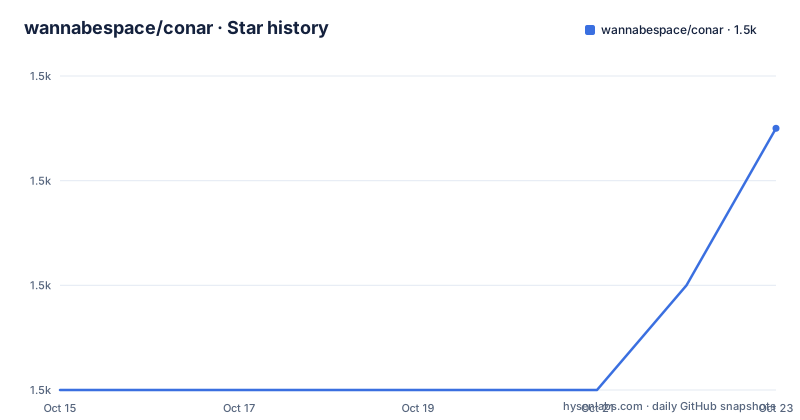
- wannabespace/conar1,457 ★ · +5
| Repository | 2026-10-15 | 2026-10-23 |
|---|---|---|
| wannabespace/conar | 1.5k | 1.5k |
5 Stars in the last 8 days, measured from the daily GitHub snapshot. Compare with other projects
Editorial analysis
Four database engines behind one Electron client with a cloud account
Tamery is a desktop client for engineers who want help writing SQL against databases they already run. It is not a server, and it is not a migration tool. The stated scope is PostgreSQL, MySQL, MSSQL and Clickhouse, with connections stored in the project's own cloud so an assistant can help write and optimise queries. Its stated security story is an open-source codebase, encrypted connection strings and password protection.
The stack list says where the work happens. Electron and React with TypeScript form the shell, Hono and oRPC serve the API, Drizzle ORM owns the schema, Better Auth covers accounts, and the Vercel AI SDK with Anthropic carries the assistant. Railway, PostHog, Resend and Stripe sit in that same list, which means the code you can read on GitHub is not the only code in play. Read it as a client wired to a hosted service rather than as something you run and forget. Someone who wants a database editor with no account and no vendor behind it is looking at a different product from the one described here.
Four dev servers on portless subdomains, started by a postinstall hook
The repository is a pnpm workspace with turbo.json and pnpm-workspace.yaml at the root, an apps/ directory for services, packages/ for shared code, and patches/, scripts/, docs/ and pnpm-lock.yaml alongside them. Four services are exposed over HTTPS through portless: the API at https://api.local.tamery.app, the app at https://app.local.tamery.app, the Electron main process at https://main.local.tamery.app and a proxy at https://proxy.local.tamery.app. Root scripts such as start:api and start:app drop into one app's directory when you want less than the whole set.
Two details reward a closer look. Installing dependencies fires a postinstall hook that runs the portless proxy before you have typed anything, and it starts that proxy with only the `--tld app` flag, even though the four subdomains above all have to resolve for a development session to work. Schema work lives outside the apps too: the root drizzle:migrate script is a filtered call into the shared @tamery/db package rather than a script sitting in apps/api.
Postgres and Redis have to exist before migrations mean anything
Installation is the package manager step, and it does more than fetch code:
pnpm installTwo root hooks fire around it. prepare runs husky, then `bun scripts/sync-pnpm-versions.ts` and `bun scripts/setup-dev.ts`, and postinstall starts the portless proxy described above.
For driving the running interface, the project recommends agent-browser, installed globally once per machine and deliberately kept out of the dependency tree:
npm install -g agent-browser && agent-browser installAgents call its CLI directly, opening a page with `agent-browser open <url>` and then reading a snapshot, clicking and reading console output; any other browser automation can take its place. Backing services come next, and they are not optional extras for local work. Postgres and Redis have to be reachable from `apps/api/.env`, which you copy from `.env.example`, either hosted or through docker-compose.dev.yml:
pnpm run docker:startThe compose file is the only documented way to get a local pair, and nothing in the project describes a way to skip it.
pnpm run dev opens a package picker, not a single server
Prepare the schema first. The migration command is routed through the shared db package, so it looks different from the other root scripts:
pnpm run drizzle:migrateThen start the workspace:
pnpm run devThat opens a package picker with every package pre-selected, so pressing Enter starts all of them. Pass -a to skip the prompt entirely, deselect what you do not need, or enter a single app's directory and run the dev script there, as with `cd apps/api`. Each service ends up on its own https subdomain rather than on a port you choose.
Nothing in this path produces a packaged desktop binary. On a headless machine you end up driving a browser view of the same code, which is why the project pairs the dev command with agent-browser and its snapshot, click and console verbs. The packaging step exists separately, as build:todesktop, and it is not part of what the development command gives you.
The repository is conar while every product string says Tamery
This is the first thing a careful reader trips over. The GitHub project is wannabespace/conar and its default branch is tamery, while the README opens with Tamery.app and links a Download-Tamery badge pointing at https://tamery.app/download. package.json sets homepage to https://tamery.app and names the author Wannabe Space, LLC. Workspace packages are scoped @tamery, the desktop target is @tamery/desktop, and the published command line package is tamery.
The word conar appears nowhere inside the tree, so searching the source for it turns up nothing, and the repository description still reads AI-powered tool for working with Postgres, MySQL, MSSQL and Clickhouse. That mismatch is more than cosmetic for anyone auditing the project: the binary name, the domains under which your database connections are sent, and the npm scope are all different from the repository slug you would search for. Anyone tracing a published artefact back to its source has to cross that gap by hand.
Three scripts cover tests, checks and dependency refresh
Unit tests run through turbo across the workspace:
pnpm run testEnd to end tests need a test server started first:
pnpm run test:startpnpm run test:e2eNo CI workflow is documented for any of them, even though .github/ sits at the repository root, so what runs these in practice is left to the reader. Static checks live next door: check runs ultracite check, and check-types runs `tsc --noEmit` before its turbo pass.
Dependency refresh is deliberately conservative. The update script calls `taze -r -I major`, which walks every package and skips every major bump, so version drift is handled in increments and the big upgrades are a deliberate act. The oxlint.config.ts and oxfmt.config.ts files at the root are what the check and fix scripts act on.
Build targets for a CLI and an Arch feed with no documentation
Three build targets have no explanation in the README. build:cli compiles the tamery package, and publish:cli runs `pnpm publish --access public --no-git-checks` from apps/cli, which means a command line product is meant to reach the npm registry while skipping git checks entirely. build:todesktop wraps the ToDesktop target @tamery/desktop, and aur:sync with aur:sync:checksum points at an Arch package feed, matching the aur/ directory at the repository root.
The code ships under AGPL-3.0 while the same repository wires Stripe, PostHog and Resend into a hosted offering that the client talks to, and PRICING.md sits at the root with no pricing detail in the README, so reading the client as free software misses where the billing and the connection data live.
The practical alternative is to run less of it. Point apps/api/.env at your own hosted Postgres and Redis instead of the Docker pair, drop into apps/api and run the dev script there, then drive the API through Hono and oRPC without the assistant path. Or automate the interface with whatever browser tooling you already trust instead of agent-browser. Both routes leave the packaged client and its account behind entirely.
Four engines confirmed, two promised, offline mode undocumented
Several things a buyer would ask about are simply absent. SQLite and MongoDB are listed as coming soon, and the AI feature list ends with a bare promise of more to come, so the four engines in the repository description are the whole confirmed scope. There is no documented offline mode, no documented rollback for a failed migration, and no statement about what happens when the cloud cannot be reached.
Install also changes your checkout before you ask it to. prepare writes husky hooks and syncs pnpm versions across the workspace, and postinstall leaves a local proxy running, which is worth knowing before you put the repository into a container image or a CI job.
Activity is recent rather than abandoned. The last push was on 2026-09-19, and the tags below it are v0.32.0 from 2026-06-26, v0.31.4 from 2026-05-06 and v0.31.3 from 2026-05-05, two patch tags a day apart.
Editorial conclusion
Adopt Tamery when your team is willing to hold a cloud account for a desktop database client, and skip it for air-gapped work, because no offline mode is documented anywhere in the project. SQLite and MongoDB are listed as coming soon rather than shipped. Before running `pnpm run dev`, confirm Postgres and Redis can be reached from `apps/api/.env` on your network, and check that the four https subdomains on portless suit your CI. Nothing here runs offline: the assistant path is the Vercel AI SDK with Anthropic, and connection storage is described as living in the project's cloud.
Frequently asked questions
Which databases does Tamery support?
PostgreSQL, MySQL, MSSQL and Clickhouse are the supported engines. SQLite and MongoDB appear in the feature list as coming soon, and the project says support for other databases is planned for the near future.
Does Tamery work without an internet connection?
No offline mode is documented. Connection storage is described as happening in the project's cloud, and the assistant runs through the Vercel AI SDK with Anthropic, so the project does not describe what the client does when those are unreachable.
How do I run Tamery from source for development?
Install packages with `pnpm install`, start the backing services with `pnpm run docker:start`, apply migrations with `pnpm run drizzle:migrate`, then start the workspace with `pnpm run dev`. Postgres and Redis have to be reachable from `apps/api/.env` before the migration step.
Is there a command line version of Tamery?
package.json defines build:cli and publish:cli, the latter running `pnpm publish --access public --no-git-checks` from apps/cli, so a tamery package is built for the npm registry. The README never describes a CLI, so treat that surface as undocumented.
Can I change which AI model Tamery uses?
The ability to change AI model is listed among the AI features, and the stack names the Vercel AI SDK with Anthropic. The project does not document which other providers are offered, nor how keys are supplied.
Why do the conar repository and the Tamery product have different names?
The GitHub project is wannabespace/conar with a default branch named tamery, while the README, homepage, download badge, https domains and package scopes all use Tamery, with Wannabe Space, LLC named as author in package.json. The project itself does not explain the rename.
Official sources
Add this badge to your README
If you maintain this project, the badge below links readers to this analysis and shows its maintenance status from the daily GitHub snapshot. Paste the markdown into your README; add ?metric=license or ?metric=stars to the image URL for a different field.

[](https://hysenlabs.com/projects/wannabespace-conar)Star history chart for your README
[](https://hysenlabs.com/projects/wannabespace-conar)Was this useful?