Sakura Editor for Windows: C++ text editing and source maintenance
SAKURA Editor (Japanese text editor for MS Windows)
At a glance
- What is it?
- Sakura Editor is a Zlib-licensed Windows text editor written in C++. Its repository supports release downloads through the Sakura Editor Portal and contributor development through Visual Studio, static analysis, and automated build workflows.
- Who is it for?
- Sakura Editor is a reasonable choice for Windows users evaluating a free text editor, and for contributors who can work with a C++ desktop application, Visual Studio solutions, and a repository centered on Windows-specific tooling. It is less suitable for teams that require documented Linux or macOS packaging, a documented command-line installation path, or evidence of a broad cross-platform development workflow.
- Can I use it commercially?
- Yes. Zlib is a permissive licence: you can use, modify and sell software built on it, as long as you keep its copyright and licence notices.
- Is it still maintained?
- Yes. The repository received new commits within the last day.
- What is it written in?
- Mainly C++, according to GitHub's language statistics.
Answers come from the project's GitHub data, last synced on October 23, 2026, and from our analysis. They are not legal advice.
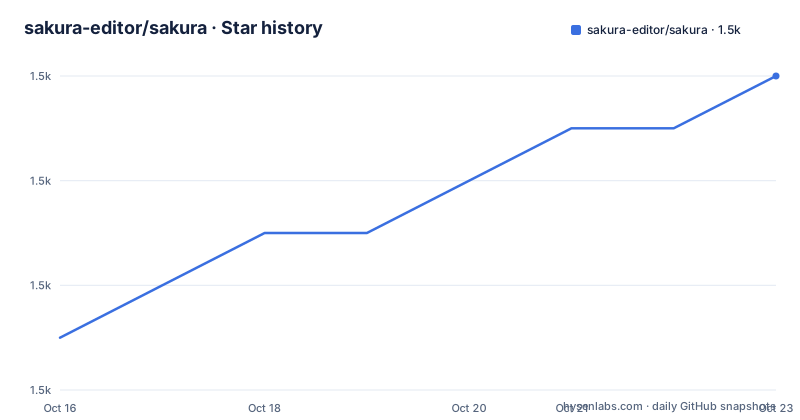
Star history
- sakura-editor/sakura1,506 ★ · +5
| Repository | 2026-10-16 | 2026-10-23 |
|---|---|---|
| sakura-editor/sakura | 1.5k | 1.5k |
5 Stars in the last 7 days, measured from the daily GitHub snapshot. Compare with other projects
Editorial analysis
What Sakura Editor Solves on Windows
Sakura Editor addresses the basic but persistent need to create and edit text files on Microsoft Windows. Its repository describes it as a free text editor, and its primary language is C++, which is consistent with a native desktop editor rather than a browser-only application. The intended audience includes Windows users who want a standalone editing tool, as well as developers who want to inspect or modify its implementation. The project also carries topics associated with grep, macros, and regular expressions, but the README does not describe the detailed behavior, configuration model, or limitations of those capabilities. Those topic labels can identify areas of interest, not prove a particular feature set.
The editor is not presented as a general development environment or as a cross-platform document suite. Its release channel is Windows-centered, and the repository includes an installer-oriented directory, a Visual Studio solution, Windows batch files, and desktop-specific project structure. This focus makes the adoption decision fairly direct. A user who needs a conventional Windows text editor can obtain a release from the official Sakura Editor Portal. A contributor needs a Windows-oriented C++ build environment and must follow the repository's build documentation rather than assuming that a generic C++ command is sufficient.
There is also a distinction between downloading and building. The README identifies the Sakura Editor Portal as the place for release versions. It separately points to the GitHub Actions build page for development versions. That separation is useful operationally, but it also means users must decide whether they want a published release or a development artifact. The README does not document rollback procedures, portable versus installed operation, autosave behavior, or compatibility with particular Windows versions, so those points should be checked before making a project-wide decision.
The C++ Repository and Build Structure
The repository is organized as a substantial C++ project rather than a small script collection. The top level contains sakura.sln, sakura_core, sakura_lang, src, externals, tools, help, and installer directories. The .gitmodules file indicates that external dependencies may be represented as submodules, while vcpkg.json and vcpkg-configuration.json indicate a package-management component for the build. Directory.Build.props, Directory.Build.targets, and CMakeLists.txt indicate that build behavior is represented through several configuration layers rather than one simple file.
The README's direct build instruction is to open sakura.sln and build it. It refers developers to tools/build.md for the detailed procedure. The repository also includes named Windows scripts such as build-sln.bat, build-gnu.bat, build-installer.bat, and build-all.bat. Their presence shows that contributors can build different outputs or variants through repository-specific automation. However, the README does not state the required command-line syntax for those scripts, so a tutorial should not invent flags or assume that every script is a complete installation recipe.
The source tree also reflects a native application with multiple language and support areas. The sakura_lang directory suggests that language-related resources or components are separated from the main source, while help and installer directories point to user documentation and packaged distribution. This layout is more informative than a bare “open source editor” label because it identifies concrete work for contributors: Visual Studio configuration, dependency resolution, C++ compilation, packaging, and release artifacts.
Static Analysis and Contributor Checks
Sakura Editor documents two static-analysis paths with different scopes. CodeFactor is used for C++ style checking, with lexical analysis performed by cpplint.py according to the repository's CodeFactor documentation. SonarQube is described as a multilingual static-analysis service, using a Build Wrapper and SonarScanner for code-quality analysis. The repository includes sonar-project.properties and related workflow configuration, so these checks are connected to project files rather than being only external recommendations.
This distinction matters when evaluating contribution friction. cpplint.py is associated with style and lexical checks, while SonarScanner can analyze multiple languages across the repository. The README does not say whether either service is mandatory for every pull request, whether the quality gate blocks merges, or how contributors run the services locally. It does show a quality gate status link and a GitHub Actions build workflow, but that is not enough to claim a complete enforcement policy. Contributors should therefore inspect CONTRIBUTING.md, .github/, sonar-project.properties, and the referenced tool documentation before assuming that a successful local build is sufficient.
The changelog is generated from pull requests through github-changelog-generator in the changelog-sakura repository, with AppVeyor participating in the automation. According to the README, CHANGELOG.md is therefore not manually assembled from an informal list of release notes. This gives releases a traceable change-history process. It also adds a dependency on external automation and a separate repository, which should be considered when investigating upgrade history or missing entries.
Downloading Sakura Editor and Building a Contributor Copy
For ordinary users, the documented route is the Sakura Editor Portal, not a package manager or a command-line installer. The README does not provide installation flags, environment variables, or a portable package command. It also does not document an automatic upgrade mechanism. A first-use tutorial therefore starts by downloading a release from the portal, installing or extracting it according to the instructions shown there, and launching the Windows application. Those instructions should be followed from the portal rather than reconstructed from repository files.
For contributors, the first concrete step is to obtain the repository and open sakura.sln in Visual Studio. The README points to tools/build.md for the complete procedure. The repository's.vsconfig file is relevant to reproducing the Visual Studio installation, and the presence of build-sln.bat provides a repository-specific batch entry point. Since the repository documentation does not give an exact invocation or expected output for that script, no command example is included here.
A successful build should produce the editor or the development artifact described by tools/build.md, while the GitHub Actions page can provide a separately identified development build. These are different outputs. A user who only needs to edit text should start with a portal release. A contributor who needs to inspect or change the C++ source should follow tools/build.md and review the resulting changes through the repository's build and analysis process.
Maintenance, Licensing, and Upgrade Boundaries
The repository is not archived. Its last push was on 2026-10-15, and release v2.4.3 is dated 2026-08-08. Those facts establish recent activity, but the README does not provide a support policy, compatibility matrix, migration guide, or release cadence. The large gap between v2.4.1 in 2020, v2.4.2 in 2022, and v2.4.3 in 2026 also means that users should not assume every earlier configuration remains compatible without checking the changelog and relevant documentation.
The project uses the Zlib license. The README links to the OSI license page, and the repository includes a LICENSE file. That is an important adoption fact for organizations reviewing redistribution conditions, but this article does not provide legal interpretation. Users who distribute a modified binary should review the actual license text and any third-party notices themselves.
Upgrades may involve more than replacing the executable. The repository contains installer files, language components, external dependencies, Visual Studio configuration, and generated changelog infrastructure. The README does not say whether settings migrate automatically, whether extensions or macros need separate handling, or whether an older Windows installation can upgrade in place. Those are concrete verification points for anyone moving from v2.4.2 or an earlier release.
Choosing Sakura Editor Against Other Editing Approaches
The clearest alternative is a modern cross-platform editor with packages for Windows, Linux, and macOS. Such an alternative can be attractive when a team needs one editor across several operating systems, a documented package manager workflow, or a familiar extension ecosystem. Sakura Editor's documented focus is narrower: a Windows text editor whose source is developed primarily as a C++ desktop project.
Another alternative is a browser-based editor. A web editor avoids installation on the user's machine and may be convenient for lightweight editing, but it depends on a browser environment and does not provide the same kind of native Windows application packaging described for Sakura Editor. These are different operating assumptions, not a claim that either product is universally better.
Sakura Editor is the wrong tool when the requirement is a documented Linux or macOS build, automated deployment across heterogeneous systems, or a supported command-line workflow for installing and updating the editor. The repository evidence does not establish those capabilities. It is more relevant when the target is Windows, the team needs source access to a C++ desktop editor, and the user values a portal-distributed release alongside a visible contributor workflow.
Editorial conclusion
Sakura Editor is a reasonable choice for Windows users evaluating a free text editor, and for contributors who can work with a C++ desktop application, Visual Studio solutions, and a repository centered on Windows-specific tooling. It is less suitable for teams that require documented Linux or macOS packaging, a documented command-line installation path, or evidence of a broad cross-platform development workflow. Before adoption, verify the current release in the Sakura Editor Portal, the required Visual Studio components in .vsconfig, and the behavior of the features relevant to your documents, especially grep, macros, and regular expressions.
Frequently asked questions
How do I download Sakura Editor?
The README says release versions are available from the Sakura Editor Portal. It does not document a package-manager installation command or a command-line upgrade process.
How do I build Sakura Editor from source?
The README instructs developers to open sakura.sln and build it, then refers them to tools/build.md for the detailed procedure. The repository also contains build-sln.bat and other Windows build scripts.
Does Sakura Editor support static analysis for C++?
The README documents CodeFactor with cpplint.py for C++ style checking and SonarQube with Build Wrapper and SonarScanner for multilingual analysis. It does not explain whether these checks are mandatory for every contribution.
What license does Sakura Editor use?
The repository and README identify the project as licensed under the Zlib license. Review the LICENSE file and relevant third-party notices before redistributing a modified build.
Official sources
Add this badge to your README
If you maintain this project, the badge below links readers to this analysis and shows its maintenance status from the daily GitHub snapshot. Paste the markdown into your README; add ?metric=license or ?metric=stars to the image URL for a different field.

[](https://hysenlabs.com/projects/sakura-editor-sakura)Star history chart for your README
[](https://hysenlabs.com/projects/sakura-editor-sakura)Was this useful?