exif-photo-blog: a Next.js photo template with a beta auth dependency and a placeholder test script
Photo blog, reporting 🤓 EXIF camera details (aperture, shutter speed, ISO) for each image.
At a glance
- What is it?
- sambecker/exif-photo-blog is a Vercel template that stores photos in blob storage and reads their camera metadata into the page. It is well documented for a template, and its details reward reading: two EXIF parsers, a blur data column in Postgres, static optimization that turns uploads into build time work, and a test script still carrying Jest's own example placeholder.
- Who is it for?
- exif-photo-blog is a good starting point if you want a photo site with camera data already wired into the markup and you are willing to deploy it to Vercel with Postgres and blob storage. Three things to decide before you fork it.
- Can I use it commercially?
- Not without permission. GitHub finds no licence file in the repository, and without a licence all rights are reserved by default: you may read the code but not reuse it. Check the README, or ask the authors, before using it.
- Is it still maintained?
- Yes. The repository received new commits within the last day.
- What is it written in?
- Mainly TypeScript, according to GitHub's language statistics.
Answers come from the project's GitHub data, last synced on October 21, 2026, and from our analysis. They are not legal advice.
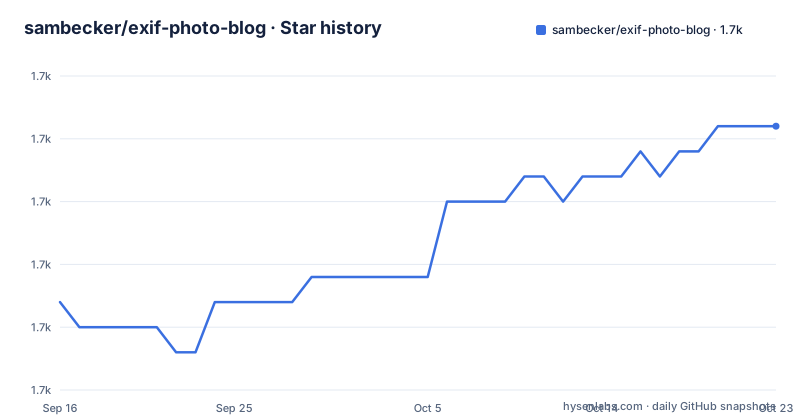
Star history
- sambecker/exif-photo-blog1,728 ★ · +7
| Repository | 2026-09-16 | 2026-10-21 |
|---|---|---|
| sambecker/exif-photo-blog | 1.7k | 1.7k |
7 Stars in the last 35 days, measured from the daily GitHub snapshot. Compare with other projects
Editorial analysis
The test script still contains Jest's documentation placeholder
The `test` script in `package.json` reads:
jest --watch --transformIgnorePatterns 'node_modules/(?!my-library-dir)/'`my-library-dir` is the placeholder Jest's own documentation uses to show how `transformIgnorePatterns` should look. It is not a package in this project. Somebody copied the pattern out of the docs, changed the surrounding command, and left the placeholder in the one script a new contributor is most likely to run.
Two smaller consequences sit in the same line. `--watch` is on by default, which is right for a laptop and wrong for a pipeline, so a CI job needs a flag the template does not supply. And the repository does carry real test scaffolding around it: `jest.config.ts`, `jest.setup.ts` and a `__tests__/` directory.
The rest of the scripts are unremarkable Next ones, `next dev`, `next build`, `next start`, `eslint .`, plus an `analyze` script that sets `ANALYZE=true` and builds with `--webpack` for the bundle analyzer. The package manager is pinned as `[email protected]`, and there is a `pnpm-workspace.yaml` even though the project is a single application.
Two EXIF readers and one EXIF writer in the dependency list
A project whose whole premise is camera metadata carries `exifr` for reading it and `ts-exif-parser` alongside it, plus `piexifjs`, which is a library for writing EXIF back into an image. Three libraries for one job, two of them reading. Neither of the readers is documented on the page, so which one handles a given file is something you would learn from the source.
Around them sit the packages that make the rest of the premise work. `sharp` does image processing, `culori` and `fast-average-color` handle colour, and `viewerjs` is the image viewer. There is also `extract-colors` and `date-fns-tz` for timezone handling on shot dates.
Whether your original file survives an upload is a configuration choice, and the page is explicit about the default. `NEXT_PUBLIC_PRESERVE_ORIGINAL_UPLOADS = 1` prevents photo uploads being compressed before storing, and `NEXT_PUBLIC_IMAGE_QUALITY` takes a value from 1 to 100 for large photos. Since the project's appeal is keeping original camera data, that flag is the one to check after your first upload rather than a month later.
Blur data is stored in Postgres, and there is a switch to stop it
`NEXT_PUBLIC_DISABLE_BLUR = 1` prevents image blur data being stored and displayed, and the page gives the reason as potentially useful for limiting Postgres usage. That single line tells you the architecture: the blurred placeholder for each image is a row in the database, not a file in blob storage.
It is a defensible design, since a tiny base64 blur string next to each photo record is a cheap way to avoid layout shift, and `fast-deep-equal` in the dependency list is the kind of helper that goes with comparing those records. It also means a photo blog is not just a bucket of images and a page; it is a table that grows one row per image, and database usage is a cost line that scales with the archive.
The same section shows how much of this configuration is really build-time content. `NEXT_PUBLIC_META_TITLE` and `NEXT_PUBLIC_META_DESCRIPTION` go into search results, `NEXT_PUBLIC_NAV_TITLE` and `NEXT_PUBLIC_NAV_CAPTION` into the top right navigation, `NEXT_PUBLIC_DOMAIN_SHARE` into the share modals. `NEXT_PUBLIC_SIDEBAR_TEXT` accepts inline formatting tags including `<b>`, `<strong>`, `<i>`, `<em>`, `<u>` and `<br>`, which is why `sanitize-html` is in the dependency list.
Every one of those carries the `NEXT_PUBLIC_` prefix, and the page's own answer to changing one is a rebuild.
Static optimization makes every upload a build time concern
Four flags decide how much of the site is rendered ahead of time: `NEXT_PUBLIC_STATICALLY_OPTIMIZE_PHOTOS` for the photo pages at `p/[photoId]`, `NEXT_PUBLIC_STATICALLY_OPTIMIZE_PHOTO_OG_IMAGES` for the social images, `NEXT_PUBLIC_STATICALLY_OPTIMIZE_PHOTO_CATEGORIES` for the category pages at `tag/[tag]` and `shot-on/[make]/[model]`, and `NEXT_PUBLIC_STATICALLY_OPTIMIZE_PHOTO_CATEGORY_OG_IMAGES` for that last group's social images.
The warning above them says enabling these may result in increased project usage, and it links to a FAQ entry titled why do production deployments fail when static optimization is enabled. That FAQ is the interesting part. It tells you that turning on build time rendering interacts badly with something in a production environment, and the page leaves the reason to the FAQ rather than explaining it here.
The tension with the product itself is easy to see. A photo blog with infinite scroll and a CMD-K search menu is built for content that appears after a deploy, and a page that is rendered at build time cannot contain a photo nobody had uploaded yet. Whether that is a bug or a deliberate trade depends on which of the four flags you set.
The same pattern shows up in the deploy steps. Changing an environment variable is not enough on its own: after adding the auth secret and the admin credentials, the instructions say to open the project's Deployments tab on Vercel, click the three dot button next to the most recent deployment and select Redeploy.
Local development runs through the Vercel CLI
The local development section is five steps, and three of them are about the deployment platform rather than the code. Clone the repository, run `pnpm i` to install dependencies, then install the Vercel CLI and authenticate with `vercel login`, link the local directory to your project with `vercel link`, and start the server with:
vercel devThe stated reason for that last command is that it starts the dev server with Vercel managed environment variables. In other words there is no offline path described: your local build reads its configuration from a Vercel project.
The page acknowledges the gap by linking to a FAQ entry titled can I work locally without access to an image storage provider. That question existing at all is the useful signal, since a template that reads and writes blobs and Postgres rows has a real dependency on both services being reachable, and the local dev route deliberately borrows the hosted ones.
For a project people fork to run their own photography site, that is a defensible choice and a clear one. It also means the two stores the template needs, Vercel Postgres and Vercel Blob, are part of the setup rather than an abstraction you can leave behind.
Storage is swappable, and the default blob store has to be public
The deploy button pre-selects two stores, a Postgres instance and a blob store, as part of template installation, and the page names Neon from the Vercel Marketplace as the preferred Postgres provider. One instruction is easy to miss and hard to recover from: when creating a new blob store, configure it as public.
That is the arrangement that lets a photo blog serve images from a CDN without a signed URL per request, and it is also the arrangement where the storage layer is publicly readable by anyone who has the object URL. The page does not discuss the consequences, and there is no setting on it for making the store private.
Swapping the storage layer is prepared for rather than merely hoped for. The contents list includes a section on alternate storage providers, and the dependency list carries `@aws-sdk/client-s3` and `@aws-sdk/s3-request-presigner` at a pinned 3.1145.0 alongside `@vercel/blob`. A presigner is only useful if something in the code asks for time limited URLs, which is the shape a private bucket needs.
The same pattern appears for the database. The contents list has a section titled alternate database providers, marked experimental, and `pg` is in the dependencies, so the Postgres connection is not Vercel specific even though the quick path is.
Auth runs on a beta major, with the admin account in the environment
The dependency is `next-auth` at `5.0.0-beta.32`. The whole admin surface of a photo site, the route that accepts uploads and holds the credentials to your storage, sits on a beta major version. Nothing on the page mentions it, so it is a line in the dependency list rather than a decision you are asked to make.
The setup itself is three environment variables and a redeploy. Generate a secret with a 32 character generator linked from the page and store it as `AUTH_SECRET`. Put the admin account in as `ADMIN_EMAIL` and `ADMIN_PASSWORD`. Then trigger a redeploy from the Vercel Deployments tab, because the application reads them at build time.
That design has one consequence worth stating plainly. The credentials to your photo site live in the deployment environment, and rotating them is a deploy operation rather than an admin screen operation. Uploading your first photo then happens at `/admin`, where you sign in, click Upload Photos, optionally add a title and click Create.
The README also routes readers who want updates to fork the repository, with a separate set of migration instructions for a project already deployed from the template. The fork ratio in the repository is consistent with that advice, and with the fact that the page lists six example sites built from it.
AI descriptions have two paths and one precedence rule
The optional AI layer can colour analyse photos and write text descriptions. Two paths are offered. The recommended one is Vercel AI Gateway, configured by setting `AI_GATEWAY_MODEL` to a supported model in `creator/model-name` form, with the example `openai/gpt-5.2`, and the model must support image input. Deployed on Vercel, no API key is needed at all, because authentication happens automatically over OIDC. Off Vercel, or locally without pulling the environment, you generate a key and put it in `AI_GATEWAY_API_KEY`.
The alternate is a direct OpenAI or OpenAI compatible endpoint. The precedence rule is one sentence: if both are configured, `OPENAI_SECRET_KEY` wins. So a project that once had a direct key keeps using it even after someone adds the gateway, which is a sensible default and a confusing one at the same time.
Step three of the gateway list is to add rate limiting, marked recommended. That is not advisory for an image analysis endpoint, and the dependencies show where it would run: `@upstash/ratelimit` and `@upstash/redis` are already present, so the limit is Redis backed rather than in process.
The fourth step, configuring which fields are auto generated, is where the page stops. It begins with a bullet that reads only Set w.
Editorial conclusion
exif-photo-blog is a good starting point if you want a photo site with camera data already wired into the markup and you are willing to deploy it to Vercel with Postgres and blob storage. Three things to decide before you fork it. Whether a beta major of the auth library is acceptable for the route that guards your uploads. Whether you accept a database row per image for blur data, which the project itself offers a switch to disable. And whether the template's licensing is acceptable to you, because there is no license file in the repository and no license recorded in the metadata, which is an unusual thing to discover after you have published a site.
Frequently asked questions
How do I run exif-photo-blog on my own machine?
Clone it, run pnpm i, install the Vercel CLI and authenticate with vercel login, run vercel link, then vercel dev to start the dev server with Vercel managed environment variables. The FAQ has an entry on working locally without access to an image storage provider.
Which environment variables does exif-photo-blog need before it will work?
NEXT_PUBLIC_DOMAIN for absolute URLs, AUTH_SECRET for the auth secret, and ADMIN_EMAIL plus ADMIN_PASSWORD for the admin account. The instructions then say to trigger a redeploy from the Vercel Deployments tab so the application picks them up.
Does exif-photo-blog keep the original photo files I upload?
Not by default. Setting NEXT_PUBLIC_PRESERVE_ORIGINAL_UPLOADS = 1 prevents uploads being compressed before storing, and NEXT_PUBLIC_IMAGE_QUALITY takes a value from 1 to 100 for large photos.
Can exif-photo-blog generate descriptions of my photos with AI?
Yes, through Vercel AI Gateway with AI_GATEWAY_MODEL set to a vision capable model in creator/model-name form, or through a direct OpenAI or compatible endpoint. If both are configured, OPENAI_SECRET_KEY takes precedence, and rate limiting through Upstash Redis is recommended.
How do I keep getting updates to exif-photo-blog after deploying it?
Fork the repository if you do not plan to change the code, or do not mind your updates being public. Projects already deployed from the template on Vercel are pointed at separate migration instructions.
What license does exif-photo-blog use?
None is stated. There is no license file in the repository and no license recorded in the repository metadata, so the terms for a forked copy are not specified anywhere in the tree.
Official sources
Add this badge to your README
If you maintain this project, the badge below links readers to this analysis and shows its maintenance status from the daily GitHub snapshot. Paste the markdown into your README; add ?metric=license or ?metric=stars to the image URL for a different field.

[](https://hysenlabs.com/projects/sambecker-exif-photo-blog)Star history chart for your README
[](https://hysenlabs.com/projects/sambecker-exif-photo-blog)