SAMtools for SAM, BAM and CRAM processing
Tools (written in C using htslib) for manipulating next-generation sequencing data
At a glance
- What is it?
- SAMtools is a C command-line suite for converting, sorting, indexing, inspecting and manipulating high-throughput sequencing alignments. It suits engineers who need direct control over alignment files or integration with HTSlib-based pipelines.
- Who is it for?
- SAMtools is appropriate for engineers who directly manipulate alignment files, need native integration through HTSlib, or require conversion, sorting and indexing outside a workflow manager. It is a poor fit for users seeking a graphical interface, a complete variant-calling environment, or a turnkey installation with no build dependency.
- Can I use it commercially?
- Check first. The repository uses a licence we do not classify automatically, so read its LICENSE file before any commercial use.
- Is it still maintained?
- Yes. The repository last received commits 1 day ago.
- What is it written in?
- Mainly C, according to GitHub's language statistics.
Answers come from the project's GitHub data, last synced on October 23, 2026, and from our analysis. They are not legal advice.
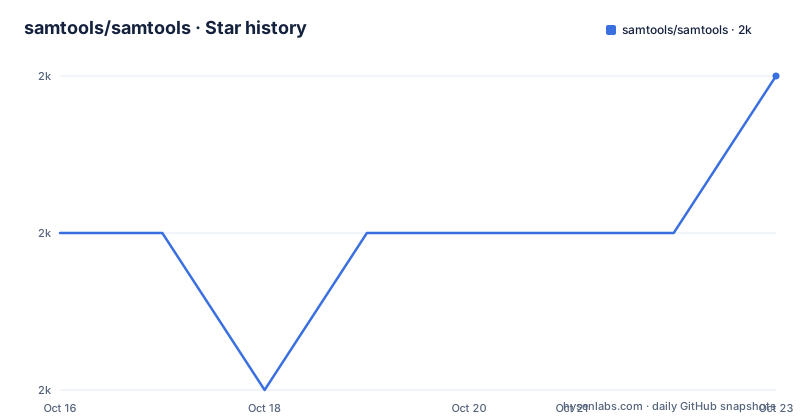
Star history
- samtools/samtools1,970 ★ · +1
| Repository | 2026-10-16 | 2026-10-23 |
|---|---|---|
| samtools/samtools | 2k | 2k |
1 Stars in the last 7 days, measured from the daily GitHub snapshot. Compare with other projects
Editorial analysis
Where SAMtools fits in an alignment workflow
SAMtools addresses the operational layer between receiving sequencing alignments and using them in later analysis. It is a suite of tools for handling SAM, BAM and CRAM files, with repository sources covering conversion, indexing, sorting, statistics, duplicate-related processing, consensus generation, depth calculation, target selection, color inspection and other alignment utilities. The intended users are engineers and bioinformatics practitioners who work directly with sequence alignment files, either from a shell pipeline or through software that depends on the wider HTS ecosystem.
The project is not intended to be the entire sequencing analysis stack. According to the README, the original package has been split into three coordinated projects. HTSlib is the C library for high-throughput sequencing data. SAMtools contains `mpileup` and tools for SAM, BAM and CRAM. BCFtools handles variant calling and other VCF and BCF operations. This division matters when selecting a tool: SAMtools can prepare and manipulate alignment data, but the repository does not present it as the replacement for a dedicated variant caller.
SAMtools is also written in C. That makes it suitable for environments where a native executable and the HTSlib data model fit an existing pipeline. It also means source builds have system and dependency requirements. The presence of terminal-oriented utilities such as `bam_tview` and `bam_tview_html` indicates both interactive and generated-output paths, although the README does not give commands for either one.
SAM, BAM and CRAM processing in C
The repository layout exposes a command suite implemented across many C source files rather than one monolithic program. `sam_view.c` corresponds to view and conversion behavior, `bam_sort.c` to sorting, `bam_index.c` to indexing, and `bam_fastq.c` to FASTQ conversion. Other files map to focused operations: `bam_stat.c`, `bam2depth.c`, `bam_markdup.c`, `bam_md.c`, `bam_consensus.c`, `bam_split.c`, `bam_cat.c` and `bam_addrprg.c`. This structure shows that the distribution combines many utilities under one coordinated command suite.
The underlying sequencing-data access is supplied by HTSlib rather than implemented as an isolated layer inside SAMtools. By default, the build looks for an HTSlib source tree in `../htslib`. A different source directory or an already installed HTSlib can be selected with `--with-htslib=DIR`. That dependency is central to the data flow: SAMtools' alignment utilities rely on HTSlib to handle high-throughput sequencing formats, while SAMtools supplies the command behavior around those operations.
A Git checkout also differs from a release tarball. The README says release tarballs include generated files that were not committed to the repository, so cloning the repository requires generation of build configuration before compilation. This distinction is easy to miss when following generic build instructions copied from a release package.
Building a SAMtools development checkout
The repository's documented source build requires Autoconf tools, configuration against HTSlib, compilation and installation. Run these commands from the SAMtools source directory in the order shown by the README:
autoheader
autoconf -Wno-syntax
./configure
make
make install
`autoheader` generates `config.h.in`. The README notes that it may produce a warning about `AC_CONFIG_SUBDIRS`, which it says can be ignored. `autoconf -Wno-syntax` then generates the `configure` script. The configuration step selects optional functionality and establishes how SAMtools locates HTSlib. `make` builds the project, and `make install` installs the result in the destination selected by the configuration environment.
By default, this sequence expects the HTSlib source tree at `../htslib`. If HTSlib is stored elsewhere or has already been installed, supply its directory during configuration:
./configure --with-htslib=DIRHere, `DIR` is the path accepted by the documented `--with-htslib` option. The README does not define a single universal value for it, so substituting a nonexistent or incompatible path would shift the failure into dependency discovery or compilation rather than resolving it. For deployment work, the complete details are delegated to the repository's `INSTALL` file rather than repeated in the README.
After installation, the source tree contains small data files under `examples/`, including `toy.sam`, `toy.fa`, `ex1.sam.gz` and `ex1.fa`. These are concrete files for a first file-level exercise, but the README does not include a command that invokes the installed executable against them. It therefore does not document a verified first-use command sequence or expected output.
Operational boundaries beyond format conversion
SAMtools covers considerably more than changing file extensions or file formats. Source names indicate capabilities for coordinate sorting, index generation, statistics, per-base depth, duplicate marking, reference-based consensus, amplicon clipping, region handling and sample operations. The presence of `bam_quickcheck.c`, `bam_checksum.c`, `bam_reheader.c` and `bam_color.c` also points to validation-oriented, structural and presentation tasks. These are separate implementation units, so a pipeline may need only a small portion of the suite even when it depends on several alignment operations.
The division of responsibility still imposes boundaries. The README assigns VCF and BCF processing to BCFtools. It also distinguishes SAMtools' `mpileup` from general sequencing I/O handled by HTSlib. Consequently, SAMtools is the wrong choice if the requested deliverable is primarily a VCF file, a variant-calling workflow, or application-level sequencing format access rather than alignment manipulation.
Input interpretation also matters. Operations involving depth, consensus, duplicate marking, amplicons or reference-related output depend on alignment and reference data that those commands expect. The README does not document the exact required reference formats, region syntax, validation rules or failure messages for each subcommand. Those details must be checked against the installed version's command documentation before a pipeline relies on them. Repository naming alone is not enough to infer compatible inputs or guarantee that a particular edge case is handled.
Release state, source builds and upgrade work
The repository is not archived, and its last push was on 2026-10-15. The listed recent releases include SAMtools 1.24 on 2026-07-09, 1.23.2 on 2026-07-10 and 1.22.3 on 2026-07-10. The `develop` branch is identified as the default branch. These facts show recent repository activity and parallel maintenance of multiple release lines, but they do not establish compatibility between every version and every HTSlib installation.
Upgrade cost depends heavily on the acquisition method. Release tarballs contain generated files absent from the Git repository. A source checkout therefore needs the Autoconf generation sequence, configuration and compilation. HTSlib must also be available in the expected source location or selected through `--with-htslib=DIR`. Reproducing a pinned deployment means preserving both the SAMtools version and the compatible HTSlib dependency, although the README does not state a version compatibility matrix.
The repository contains `NEWS.md` and `ChangeLog.old`, which are the relevant files to inspect for version-specific changes. The README directs bug reports and feature requests to the SAMtools GitHub issue tracker, while security-related reports are directed to `[email protected]`. Those reporting routes do not replace release review: workflows still need to determine whether changed behavior affects indexing, sorting or file handling.
License terms require direct file review
The repository is classified as using another license because its `LICENSE` file cannot be classified by GitHub. The README cites a paper whose abstract describes SAMtools and BCFtools as freely available under the permissive MIT license, and the repository's `Makefile` contains a permission notice. However, those secondary statements are not a substitute for reading the actual `LICENSE` file shipped with the checkout or release.
This distinction is relevant to organizations that copy source, redistribute binaries or embed parts of the code. The notice in the `Makefile` says the software is provided without warranty, but that does not answer every licensing question for a deployment. This article does not provide legal advice or reinterpret the custom classification. The concrete source of truth for terms is the repository's `LICENSE` file, accompanied by any notices applicable to copied portions.
Potential dependencies introduce a separate review area. The README requires or links HTSlib, but it does not reproduce its license terms. A team using the built executable should distinguish between the SAMtools license, notices included with copied code and the conditions that apply to separately distributed dependencies.
Choosing SAMtools against HTSlib and BCFtools
HTSlib and BCFtools are more precise alternatives when the required output falls outside SAMtools' role. HTSlib is a C library for handling high-throughput sequencing data. It suits software engineers embedding format access in a native application, whereas SAMtools packages command-line utilities for operations around SAM, BAM and CRAM files. Choosing HTSlib therefore means accepting integration work rather than relying on the existing command suite.
BCFtools is the relevant alternative for VCF, BCF and variant calling. SAMtools may generate or consume alignment data used in a broader workflow, but the README explicitly assigns VCF and BCF work to BCFtools. A project whose main requirement is producing variants should begin with BCFtools rather than infer that SAMtools' `mpileup` makes it a complete variant-calling package.
SAMtools remains the better fit when the task is a direct alignment-file operation and the shell command model is acceptable. The README is concise and sends builders to `INSTALL`, bug reporters to the issue tracker, and security reporters to the listed email address. It does not provide an exhaustive command catalog, compatibility matrix or operational runbook, so adoption decisions must also examine the documentation shipped with the selected release.
Editorial conclusion
SAMtools is appropriate for engineers who directly manipulate alignment files, need native integration through HTSlib, or require conversion, sorting and indexing outside a workflow manager. It is a poor fit for users seeking a graphical interface, a complete variant-calling environment, or a turnkey installation with no build dependency. Before adoption, check the `LICENSE` file for the exact terms, verify that the intended HTSlib source or installation works with `./configure`, and inspect the existing pipeline's required SAMtools version. The key boundary is that SAMtools handles SAM, BAM and CRAM operations, while variant work belongs primarily to BCFtools and low-level sequencing I/O belongs to HTSlib.
Frequently asked questions
How do I build SAMtools from its Git repository?
Run `autoheader`, `autoconf -Wno-syntax`, `./configure`, `make` and `make install` in sequence. The checkout requires generated files that are already present in release tarballs.
Which HTSlib location does SAMtools use by default?
By default, the build uses an HTSlib source tree in `../htslib`. A different source tree or a previously installed HTSlib can be selected with `./configure --with-htslib=DIR`.
Should I use SAMtools for VCF and BCF variant files?
The README assigns VCF, BCF and variant-calling work to BCFtools. SAMtools focuses on `mpileup` and tools for SAM, BAM and CRAM.
Official sources
Add this badge to your README
If you maintain this project, the badge below links readers to this analysis and shows its maintenance status from the daily GitHub snapshot. Paste the markdown into your README; add ?metric=license or ?metric=stars to the image URL for a different field.

[](https://hysenlabs.com/projects/samtools-samtools)Star history chart for your README
[](https://hysenlabs.com/projects/samtools-samtools)Was this useful?