SVPullToRefresh: pull-to-refresh with no delegate and no controller subclass
GitHub describes it as Give pull-to-refresh & infinite scrolling to any UIScrollView with 1 line of code.. The repository metadata lists Objective-C as its primary language. The metadata lists the MIT license. This article stays within the project description and details documented in the GitHub repository README.
At a glance
- What is it?
- SVPullToRefresh attaches three methods to UIScrollView through the Objective-C runtime and watches contentOffset with key-value observing. Adding the control is one line, and the state transitions inside your block stay with you.
- Who is it for?
- SVPullToRefresh still earns its line in a UIKit app that needs a refresh control without a delegate or a controller subclass, and the Objective-C source is small enough to fork. It is a poor fit if your screens are SwiftUI, since nothing in the README addresses that, and no release has appeared since the last push on 2023-12-08, so maintenance lands on you.
- Can I use it commercially?
- Yes. MIT is a permissive licence: you can use, modify and sell software built on it, as long as you keep its copyright and licence notices.
- Is it still maintained?
- Probably not. The repository last received commits 35 months ago, on December 8, 2023.
- What is it written in?
- Mainly Objective-C, according to GitHub's language statistics.
Answers come from the project's GitHub data, last synced on October 24, 2026, and from our analysis. They are not legal advice.
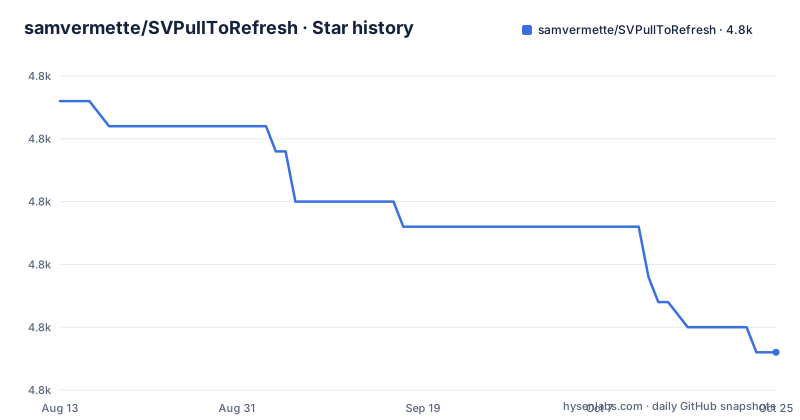
Star history
- samvermette/SVPullToRefresh4,769 ★ · -10
| Repository | 2026-08-13 | 2026-10-24 |
|---|---|---|
| samvermette/SVPullToRefresh | 4.8k | 4.8k |
-10 Stars in the last 72 days, measured from the daily GitHub snapshot. Compare with other projects
Editorial analysis
Three methods land on UIScrollView itself
The library ships as categories rather than a control you allocate and keep in a property. Using the Objective-C runtime, it adds three methods directly to UIScrollView, so the same call works on a UITableView, a UICollectionView or any other subclass, with no delegate protocol and no subclassing of UIViewController.
- (void)addPullToRefreshWithActionHandler:(void (^)(void))actionHandler;
- (void)addPullToRefreshWithActionHandler:(void (^)(void))actionHandler position:(SVPullToRefreshPosition)position;
- (void)addInfiniteScrollingWithActionHandler:(void (^)(void))actionHandler;
One method takes a position argument, so the same control can be pinned to either end of the scroll view. Underneath, the categories observe the scroll view's contentOffset with key-value observing, which is where the threshold logic lives. The runtime approach is what the project credits to a talk on demystifying the Objective-C runtime, and it is also the part with consequences: the methods exist because the runtime was asked to add them, not because a header you own declares them.
Your block owns the spinner, because stopAnimating is on you
The action handler receives nothing. No completion callback, no error, no scroll view reference. Inside it you prepend data, insert cells and then end the animation yourself, which the sample expresses as a comment rather than as something the library enforces.
[tableView addPullToRefreshWithActionHandler:^{
    // prepend data to dataSource, insert cells at top of table view
    // call [tableView.pullToRefreshView stopAnimating] when done
}];
Because the block takes no arguments, there is no channel for a failed request to report failure into the control. Nothing in the library ends the animation when your data never arrives, so a refresh whose network call errors and whose callback never fires leaves the indicator running until the view is rebuilt. If your refresh path can fail, put the stopAnimating call on the failure branch as well, not only on the success branch.
The bottom position sample still describes inserting cells at the top
Pulling from the bottom is a parameter rather than a separate API, and the sample for it reuses the top-of-table body unchanged. The comments about prepending data and inserting cells at the top of the table view are carried over verbatim into the bottom example.
[tableView addPullToRefreshWithActionHandler:^{
    // prepend data to dataSource, insert cells at top of table view
    // call [tableView.pullToRefreshView stopAnimating] when done
} position:SVPullToRefreshPositionBottom];
That is a documentation slip rather than a described behaviour, but it is easy to paste as is and then wonder why a footer refresh mutates the head of the list. A second gap sits next to it: nothing in the repository says what happens when both the bottom position and the infinite scrolling view are added to the same scroll view, or whether one displaces the other. Treat that combination as untested by the documentation and check it in your own build.
triggerPullToRefresh starts it from code, showsPullToRefresh hides it
Two trigger methods and two boolean properties cover the cases the gesture does not reach. A refresh can be fired from code, for instance in viewDidAppear:, and either control can be hidden for a stretch without being removed.
[tableView triggerPullToRefresh];tableView.showsPullToRefresh = NO;The infinite scrolling side mirrors this with triggerInfiniteScrolling and showsInfiniteScrolling. Hiding works by flag rather than by tearing down, so the handler you registered stays attached and runs again when the property returns to YES. Neither trigger accepts a reason or a completion, which means a refresh started from viewDidAppear: is indistinguishable to the control from one the user pulled for.
The refresh view takes colors and titles, infinite scrolling takes less
The two controls are not customizable in the same way. The pull to refresh view exposes colors, an activity indicator style, and per-state titles, subtitles and custom views.
@property (nonatomic, strong) UIColor *arrowColor;
@property (nonatomic, strong) UIColor *textColor;
@property (nonatomic, readwrite) UIActivityIndicatorViewStyle activityIndicatorViewStyle;

- (void)setTitle:(NSString *)title forState:(SVPullToRefreshState)state;
- (void)setSubtitle:(NSString *)subtitle forState:(SVPullToRefreshState)state;
- (void)setCustomView:(UIView *)view forState:(SVPullToRefreshState)state;
The infinite scrolling view lists two methods only: an indicator style setter and setCustomView:forState: taking an SVInfiniteScrollingState. No arrowColor or textColor is documented on that side, so making the two controls match means supplying a custom view of your own. Both controls hang off the scroll view as pullToRefreshView and infiniteScrollingView, which is how you reach these properties after registration.
CocoaPods takes one line, and the manual route has an ARC flag waiting
There are two installation routes, and the manual one carries a warning the CocoaPods route does not need. Adding the pod to a Podfile is the entire job:
pod 'SVPullToRefresh'
pod 'SVPullToRefresh', :head
The second line tracks the head of the repository rather than a published version, and this repository has no GitHub releases, so there is no tagged artifact sitting behind either form. The default branch is master.
Installing by hand means dragging the SVPullToRefresh/SVPullToRefresh folder into the project, adding the QuartzCore framework, and importing UIScrollView+SVPullToRefresh.h and/or UIScrollView+SVInfiniteScrolling.h. The line to read twice is the ARC note: in a project that does not use ARC you must add the -fobjc-arc compiler flag to UIScrollView+SVPullToRefresh.m and UIScrollView+SVInfiniteScrolling.m in Target Settings > Build Phases > Compile Sources. Those two files hold the handler blocks, and the flag is what compiles them with the memory management the code expects.
No releases, and the last push was on 2023-12-08
Maintenance state decides this one for a shipping app. The repository is not archived, but the last push was on 2023-12-08 and it has no GitHub releases at all, which leaves no changelog to check a fix against and no tag to pin a Podfile to. The MIT license keeps the code usable and forkable regardless.
What ships next to it is a demo rather than a test suite. The repository holds a Demo directory containing SVPullToRefreshDemo.xcodeproj, SVPullToRefreshDemo/ and a screenshot named [email protected], with SVPullToRefresh.podspec and LICENSE.txt at the root. That podspec is the only place a deployment target could be declared; the README states none, and it says nothing about SwiftUI or about which iOS releases the categories are safe on. Anyone needing a maintained version has to look for a fork, since the original gives them no release cadence to plan against.
Editorial conclusion
SVPullToRefresh still earns its line in a UIKit app that needs a refresh control without a delegate or a controller subclass, and the Objective-C source is small enough to fork. It is a poor fit if your screens are SwiftUI, since nothing in the README addresses that, and no release has appeared since the last push on 2023-12-08, so maintenance lands on you. Before adopting it, read the deployment target inside SVPullToRefresh.podspec and confirm your build handles the -fobjc-arc case if the project is not compiled with ARC.
Frequently asked questions
How do I add pull-to-refresh to a table view with SVPullToRefresh?
Call addPullToRefreshWithActionHandler: on the scroll view, prepend your data inside the block, then call [tableView.pullToRefreshView stopAnimating] when the work is done.
Does SVPullToRefresh need a delegate or a UIViewController subclass?
No. It uses the Objective-C runtime to add three methods to UIScrollView and tracks the scroll view's contentOffset with key-value observing, so neither a delegate nor a controller subclass is part of the setup.
How do I hide the refresh control or the infinite scrolling view?
Set tableView.showsPullToRefresh = NO for the refresh view and tableView.showsInfiniteScrolling = NO for the other one. The property hides the view, and the handler stays registered while it is hidden.
When was SVPullToRefresh last updated?
The last push was on 2023-12-08 and the repository has no GitHub releases, so there is no tagged version to pin and no release notes describing later changes.
Official sources
Add this badge to your README
If you maintain this project, the badge below links readers to this analysis and shows its maintenance status from the daily GitHub snapshot. Paste the markdown into your README; add ?metric=license or ?metric=stars to the image URL for a different field.

[](https://hysenlabs.com/projects/samvermette-svpulltorefresh)Star history chart for your README
[](https://hysenlabs.com/projects/samvermette-svpulltorefresh)Was this useful?