phpenv: a path shim that picks your PHP version from a file in the current directory
Simple PHP version management. Ever wondered why you can't run a PHP app on your own development machine?
At a glance
- What is it?
- A shell tool in the rbenv tradition that installs PHP versions into per-user directories, selects one by reading a version file as you move between projects, and needs its shims rebuilt by hand after every install. Its instructions append to a profile file that macOS login shells often ignore.
- Who is it for?
- phpenv is the tool you want if your problem is running a PHP application against several interpreter versions on one machine, especially when the versions have to be built from source with specific extensions. The model is the rbenv one, which means the behaviour is predictable: a file in the project directory decides the version, and moving between directories moves the interpreter.
- Can I use it commercially?
- Yes. MIT is a permissive licence: you can use, modify and sell software built on it, as long as you keep its copyright and licence notices.
- Is it still maintained?
- Yes. The repository last received commits 107 days ago.
- What is it written in?
- Mainly Shell, according to GitHub's language statistics.
Answers come from the project's GitHub data, last synced on November 14, 2026, and from our analysis. They are not legal advice.
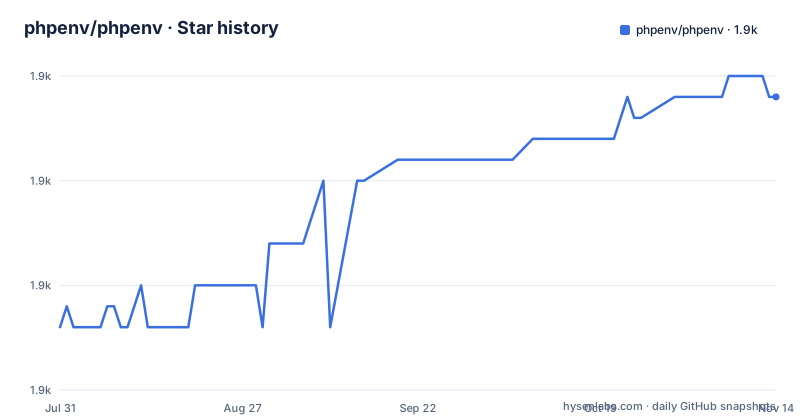
Star history
- phpenv/phpenv1,874 ★ · +11
| Repository | 2026-07-31 | 2026-11-14 |
|---|---|---|
| phpenv/phpenv | 1.9k | 1.9k |
11 Stars in the last 106 days, measured from the daily GitHub snapshot. Compare with other projects
Editorial analysis
The version comes from a file in whatever directory you are standing in
The mechanism is the rbenv mechanism, and it is worth stating plainly because everything else follows from it.
At install time phpenv puts itself into your search path. After that, any invocation of php, php-fpm or another PHP-related executable activates phpenv first. phpenv then looks in the current directory for a file named .php-version. If that file exists, its contents decide which interpreter runs in that directory, and phpenv resolves the name against the versions installed under a directory in your home folder.
Each installed version is a complete installation directory rather than a shared layout. The file spells out what that means: its own binaries, libraries, configuration files and manual pages, naming php, php-fpm, the extension installer, the archive installer and php.ini as the pieces each version carries. Once phpenv has decided, it calls the matching file.
The list also mentions Pyrus, a historical PEAR package manager for PHP. Its presence depends on the installed PHP distribution and tooling.
Nearly everything above the resolution step is extensible, and the extension mechanism is bash plugins rather than a configuration file.
Per-directory versions, and the switch happens when you change directory
Choosing a version writes a file. The example is four lines:
cd Projects/my-php-project
# choose PHP 8.3.13
phpenv local 8.3.13
That writes the chosen version into the version file in the current directory. Nothing global changes, and nothing about your shell configuration changes.
The consequence is the part that makes this design worth using. Two projects sitting in two directories can be pinned to two different interpreter versions at the same time, and when you change directory phpenv transitions between them by itself. You are not switching shells or setting variables; you are walking into a directory and the right interpreter answers.
The same idea applied to interpreter versions is why the project exists at all: the file opens with the observation that a developer needs the newest interpreter to run scripts and also wants to know how the same code behaves on the older releases their hosting runs. Per-directory pinning is what turns that into a workflow rather than a chore.
Everything above the resolution is customisable through plugins written in bash, which is the rbenv design again, and means a behaviour you want to change is probably a plugin rather than a patch.
Both install paths append to one profile file, and macOS may not read it
There are two documented installations and both end the same way.
The package manager route installs from a tap and then tells you to append the initialisation line to a profile file and restart your shell:
brew install phpenv/tap/phpenvecho 'eval "$(phpenv init -)"' >> ~/.profile
exec $SHELL -lThe manual route clones the repository into a directory in your home folder, adds its binary directory to the same search path variable in the same profile file, appends the same initialisation line for shims and completion, and restarts the shell again.
Here is the wrinkle. The manual steps say to check whether a bash profile file exists first and fall back to the general profile, so the documentation knows the name varies by shell. But the copy-and-paste lines all name one file, and on a Mac the default login shell reads a profile specific to that shell rather than the general one. So the most likely failure for a new user is that installation appears to succeed and no shim is ever created, and the symptom looks like phpenv being broken rather than the shell not having sourced the file.
If you want the automated route, there is a separate installer project, and if you cloned from source you upgrade by pulling in that directory.
Building an interpreter is another repository, and rehashing is on you
phpenv does not build PHP itself. A separate project does that, and you install it into the plugins directory of your phpenv installation:
git clone https://github.com/php-build/php-build $(phpenv root)/plugins/php-build
phpenv install <php-version>
After that comes the step people forget. The instructions for rebuilding the shim binaries say plainly that you should do this any time you install a new PHP binary, and the command is a single word. The project notes that automatic rehashing may also be available; if a new executable is missing from the shims, run the command manually.
Configuration of the build itself has three layers, and the third is the one worth knowing. The build tool has default compile options; each version's definition in that project carries its own; and environment variables override both. In practice you set two of them: one for compile options and one for extensions to build in. You can also add extensions after the fact rather than at build time, which is the practical route when a version is already installed and you only need one more module.
So the division of labour is: phpenv decides which interpreter runs, the build tool decides what is inside it, and the plugins decide everything about how phpenv behaves.
php-fpm runs as you, not as the web server
The recommended way to serve a project is through the process manager that ships with each installed version, and the documentation is direct about the permission model: php runs with the permissions of the invoking user, which is not necessarily the web server's.
That single sentence is the design decision. It means a development machine serves with your rights, which is convenient locally and is precisely what you should not do on a shared host without thinking about it.
There are four ways to start it, and the list repeats its own headings. It offers an init script shipped inside the version directory, a systemd unit shipped inside the version directory, and then says the same two things again about writing your own init script or your own unit. Add running it manually with arguments, and you have five options across four labelled lines.
Each version carries its own configuration file in its own directory, which on startup makes it listen on one port on the loopback interface. You can edit that file or point somewhere else with the config flag, which has a short form as well. Instructions for pointing a specific web server at it are external wiki articles rather than text in this file, which is a reasonable choice and one more reason to read the version-specific documentation rather than this page.
The alternative path is the old one: build the Apache module extension instead, and the web server finds it under the version's own library directory.
Two releases, two and a half years apart
The tag history is short. The first stable release was cut in March 2024, and the next one came on the thirtieth of July 2026, the same day as the most recent commit.
So this was a project that sat at version zero for a long time, cut a 1.0, and then went two and a half years without a patch line before cutting 1.1. That is a normal shape for a small tool maintained by one person, and the commit date on the release tells you the work for 1.1 landed the day it was tagged rather than being polished for weeks.
The repository itself is correspondingly small: a bin directory for the commands, a completions directory, a library directory that holds the plugins the installation steps clone into, and a test directory. There is no library directory of shared code beyond that, which is what you would expect from a shell project of this kind.
The repository is not archived, and the default branch is the conventional one. For upgrades, the file documents pulling in the clone directory, and says nothing about how to upgrade an installation that came from the package manager, which is the gap a new user is most likely to fall into.
The readme is written in the first person, with typos
The opening is unusual for a developer tool. It introduces itself by name in the first person, says it was designed for humans, and explains that it was inspired by two well-known Ruby projects with a set of additions specific to PHP. The description in the repository metadata asks a rhetorical question about whether you have ever wondered why you cannot run a PHP application on your own machine, and answers it by saying you just found out.
The prose has several errors. One word is misspelled, one sentence about seeing how code behaves on older interpreters has its words out of order, and the phrase about building extensions into an interpreter reads as though the build were a noun rather than a verb. None of that affects the tool.
It matters for one reason: this is the whole documentation. There is no separate manual in the repository, no wiki of its own and no extended guide, so a typo is not a cosmetic issue in a page nobody reads carefully. It is the only place the answer to your question is written down.
Read it twice, and read the external build tool's manual page as well, because that is where the compile options are actually specified.
Editorial conclusion
phpenv is the tool you want if your problem is running a PHP application against several interpreter versions on one machine, especially when the versions have to be built from source with specific extensions. The model is the rbenv one, which means the behaviour is predictable: a file in the project directory decides the version, and moving between directories moves the interpreter.
Three things to know before you install it. The documented shell setup appends to one profile file while the manual steps themselves suggest checking another first, so on a machine whose login shell reads a different file, the shims will not be active and you will be debugging a path problem rather than a version problem. The documentation recommends rehashing after installing a PHP binary; automatic rehashing may also be available, depending on the setup. And the web server story assumes you will run php-fpm as yourself rather than as the web server user, which is a deliberate choice with real permission consequences.
If you came from another tool, the migration is a directory copy and a version file. Read the plugin directory before you rely on customisation, because nearly every part of the mechanism is meant to be changed from bash rather than configured.
Frequently asked questions
How does phpenv choose which PHP version to run?
It injects itself into the search path at install time, then scans the current directory for a version file. If that file exists, its contents select the interpreter from the versions installed under your home directory, so moving between project directories switches versions automatically.
What do I have to do after installing a new PHP version with phpenv?
Rebuild the shim binaries with the rehash command. The documentation says to do this any time a new PHP binary is installed, and nothing does it for you.
Which shell file should I add phpenv to?
The documented commands append to the general profile file, while the manual steps suggest checking a shell-specific profile first. On a machine whose login shell reads the shell-specific file, the documented line may never be sourced.
Does phpenv build PHP versions itself?
No. A separate build project is cloned into the plugins directory, and the install command invokes it. Compile options come from three layers, with environment variables overriding the build tool's defaults and each version's own definition.
Official sources
Add this badge to your README
If you maintain this project, the badge below links readers to this analysis and shows its maintenance status from the daily GitHub snapshot. Paste the markdown into your README; add ?metric=license or ?metric=stars to the image URL for a different field.

[](https://hysenlabs.com/projects/phpenv-phpenv)Star history chart for your README
[](https://hysenlabs.com/projects/phpenv-phpenv)Was this useful?