SandBase Harness: a self-hosted agent runtime you build from a tagged GitHub source, not from npm
Local-first, self-hosted AI agent runtime and MCP bridge with sandboxed sessions, memory, credentials, audit/replay, and a local Console.
At a glance
- What is it?
- sandbaseai/sandbase-harness runs AI agents locally with sessions, sandboxed tools, memory, credentials, audit and replay, plus a Claude Managed Agents-style /v1 API. It is pre-1.0 at v0.3.8, and the safe way in is a pinned git clone.
- Who is it for?
- SandBase Harness suits developers who want to self-host an agent runtime with audit and replay, and who can live with a 0.3.x version number and a source build. It does not suit anyone who wants a visual workflow builder, a one-line npm install, or a runtime that mounts every route of the official Managed Agents surface.
- Can I use it commercially?
- Yes. Apache-2.0 is a permissive licence: you can use, modify and sell software built on it, as long as you keep its copyright and licence notices.
- Is it still maintained?
- Yes. The repository received new commits within the last day.
- What is it written in?
- Mainly TypeScript, according to GitHub's language statistics.
Answers come from the project's GitHub data, last synced on November 15, 2026, and from our analysis. They are not legal advice.
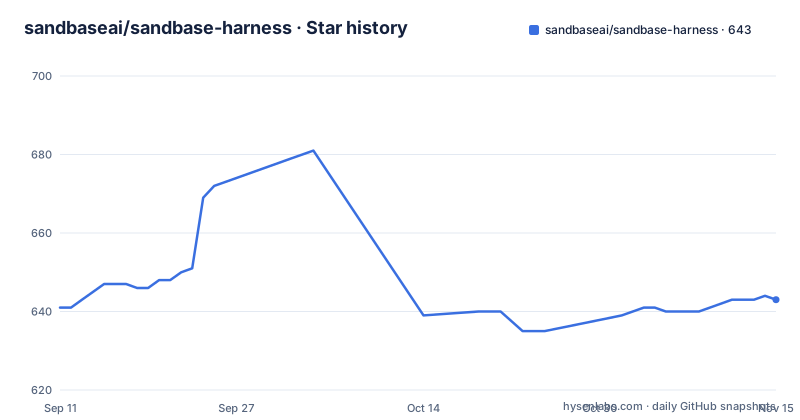
Star history
- sandbaseai/sandbase-harness643 ★ · +2
| Repository | 2026-09-11 | 2026-11-15 |
|---|---|---|
| sandbaseai/sandbase-harness | 641 | 643 |
2 Stars in the last 65 days, measured from the daily GitHub snapshot. Compare with other projects
Editorial analysis
The npm name managed-agents belongs to someone else, so you build from a pinned tag
The package.json of this repository is named managed-agents, which makes the most dangerous mistake an easy one. The README warns that the unscoped managed-agents name on npm is not this project. Until an official scoped package is announced in the repository, you install only from the tagged GitHub source release, and you must not run npx managed-agents or npm install managed-agents. The package.json itself is marked private, so there is no published package to fall back on. The quick start therefore clones a specific tag with a shallow depth, installs with npm ci, builds, and runs the built file with Node. It needs Node.js 22 or newer and npm 10 or newer, and Docker only if you want Docker-backed sandboxes.
git clone --branch v0.3.8 --depth 1 https://github.com/sandbaseai/sandbase-harness.git
cd sandbase-harness
npm ci
npm run build
mkdir ../my-agents && cd ../my-agents
node ../sandbase-harness/dist/index.js init
node ../sandbase-harness/dist/index.js start
A saved provider key does nothing until you restart the runtime
After init, the workspace you ran it in holds an agent, a skills folder and a config.yaml whose provider reference is the ${OPENAI_API_KEY} environment variable. The start command serves the API and the Console on http://127.0.0.1:3000. Setup is finished in the browser under Settings > Setup. You paste your API key into the provider form and save, and the page then reports that the saved configuration is not active yet. A saved setting only takes effect at startup, so you stop the runtime with Ctrl+C and run start again, or press the restart button. If your provider is not in the list, you choose the OpenAI-compatible vendor and set its base URL. A user who saves the key and starts chatting without restarting will keep hitting the old configuration.
The default model ID gpt-4o fails with model_not_found on other providers
The second setup step is the model. In the Agent models panel you set the model ID your provider actually serves, with deepseek-chat given as the DeepSeek example. An agent carries its own model ID, and the gpt-4o that init writes is not valid for every provider. A wrong ID fails the turn with model_not_found. The practical lesson is that switching provider in Settings is only half the change, because the agent still names the old model. The feature list also states that the runtime has one active model provider boundary, configured through Settings V2, so you cannot run an OpenAI agent and an Anthropic agent side by side from the same runtime instance and must switch the active provider instead.
Tool calls park for approval unless you pass the allow flag
Once the runtime is up, you can send the first message from the Console by opening Sessions, creating a session for the agent and typing into the composer. From a terminal there is one command. The chat command sends one message and exits once the turn settles. Without the message option it keeps the session open and streams until you interrupt it. The tool approval option set to allow preauthorizes the tool calls the agent may make. The init template otherwise parks those calls for approval and waits for a person to answer, so a scripted run without the flag will appear to hang. Allowing everything is convenient for a first test and a poor default for an agent that holds credentials.
node ../sandbase-harness/dist/index.js chat agent_assistant --message "hello" --tool-approval allowFour sandbox backends exist, and the one you pick decides how contained generated code is
The table of what Harness provides says generated code can run in local, Docker, Kubernetes and self-hosted worker sandboxes. The feature list gives the mechanics: a local process, Docker with per-session containers, Kubernetes through kubectl exec and cp, and a self-hosted worker queue. Docker is optional and only needed for the Docker-backed option. These backends are not equivalent in how much they separate the agent from your machine, since a local process shares your host. If an agent may run code written by a model, choose the backend with that in mind and read the project's docs for what each backend isolates, instead of assuming the word sandbox means the same thing everywhere.
State lives in SQLite and the workspace folder, and the npm file list excludes it
By default, metadata for agents, sessions, environments, credential vaults, memory stores, files, skills and API keys goes into SQLite, while local file and skill bytes sit in the workspace state directory. The project advertises local-first storage with no required hosted control plane. The package.json files list excludes the .managed-agents logs, the data.db files, the files folder and the cache, which keeps runtime data out of anything packed from the repository. For you it means backup is a file-level task: copy the SQLite database and the workspace state directory together, because the database alone does not hold file and skill bytes. Sessions come with resumable Server-Sent Events, which is what makes replay and debugging of a long-running agent possible.
Twenty routes of the official Managed Agents surface are refused by name
The project mimics the Claude Managed Agents contract, and it publishes how closely. Against the official SDK's route surface of 110 method and path pairs, as of SDK version 0.131.0, 90 routes are mounted and 20 refuse by name, with none deferred. The declaration lives in src/core/capabilities/matrix.ts, and Partial and Unsupported entries always name their reason. The compatibility table in the README is generated by npm run docs:compat, and a contract-honesty test fails when it drifts from the matrix. One partial entry applies version, beta and mutual-exclusion rules only to requests that carry a compatibility header. For a client that touches one of the 20 refused routes, the failure is explicit and not silent, but it still means a program written for the hosted service may need changes.
Binding to 0.0.0.0 in Codespaces exposes the Console, and the version is still 0.3.x
The Console listens on 127.0.0.1 by default. The Codespaces route starts the server with the host option set to 0.0.0.0 so the forwarded port can reach it, and the README adds that Codespaces usage may be billed by GitHub while the local quick start remains free and keeps all runtime data on your machine. The same flag in any other environment would make the Console reachable by other machines, so apply it only where the port is private. On maintenance, the repository is not archived, the last push was on 2 November 2026, and the newest releases are v0.3.8 on 30 August 2026, then v0.3.7 and v0.3.6 on 20 August 2026. Three releases in ten days at a 0.3 version number says the interfaces are still moving.
node dist/index.js start --host 0.0.0.0Editorial conclusion
SandBase Harness suits developers who want to self-host an agent runtime with audit and replay, and who can live with a 0.3.x version number and a source build. It does not suit anyone who wants a visual workflow builder, a one-line npm install, or a runtime that mounts every route of the official Managed Agents surface. Before relying on it, read the compatibility matrix for the routes you need and confirm which sandbox backend your untrusted code will run in.
Frequently asked questions
What is SandBase Harness?
It is a local-first, self-hosted AI agent runtime and MCP bridge with sandboxed sessions, memory, credentials, audit and replay, and a local Console. It exposes a Claude Managed Agents-style /v1 API.
Can I install SandBase Harness with npm install managed-agents?
No. The unscoped managed-agents name on npm is not this project, so install only from the tagged GitHub source release, for example by cloning the v0.3.8 tag and running npm ci and npm run build.
Which model providers does SandBase Harness support?
OpenAI, Anthropic, MiniMax and OpenAI-compatible providers, including DeepSeek V4, with one active provider at a time. A provider you do not see in the list can be added through the OpenAI-compatible vendor with its base URL.
Official sources
Add this badge to your README
If you maintain this project, the badge below links readers to this analysis and shows its maintenance status from the daily GitHub snapshot. Paste the markdown into your README; add ?metric=license or ?metric=stars to the image URL for a different field.

[](https://hysenlabs.com/projects/sandbaseai-sandbase-harness)Star history chart for your README
[](https://hysenlabs.com/projects/sandbaseai-sandbase-harness)Was this useful?